Mantine 9.6.0 covers core controls, hooks, forms, and add-ons
Version 9.6.0 organizes the library as a set of packages rather than one indivisible kit. @mantine/core contains more than 100 components, while @mantine/hooks lists more than 80 hooks. Forms, dates, charts, notifications, modals, rich text, carousels, dropzones, code highlighting, schedules, and other features live in separate packages. That arrangement lets an application install only the groups it needs, while the shared provider and CSS variables keep their appearance connected.
The source repository is much larger than a consumer installation suggests. We measured 6,585 files, roughly 425,724 lines of source, and 24.5 MB before dependencies. It is a Yarn workspace containing the published packages, two documentation applications, demonstrations, build scripts, and release tooling. Consumers can ignore most of that structure. Contributors changing a component may also touch tests, demos, styles, generated docs, or package exports inside the same change.
Mantine 9.6.0 requires React 19.2 and explicit CSS setup
The current @mantine/core package declares React and React DOM 19.2 as peer dependencies. A basic application imports the core stylesheet and wraps its tree in MantineProvider. Dates, charts, dropzones, code highlighting, and other add-ons require their corresponding packages and style files. With server rendering, the setup guide adds ColorSchemeScript and Mantine HTML properties to avoid a hydration warning. Existing React 18 applications face a framework migration alongside Mantine 9 adoption.
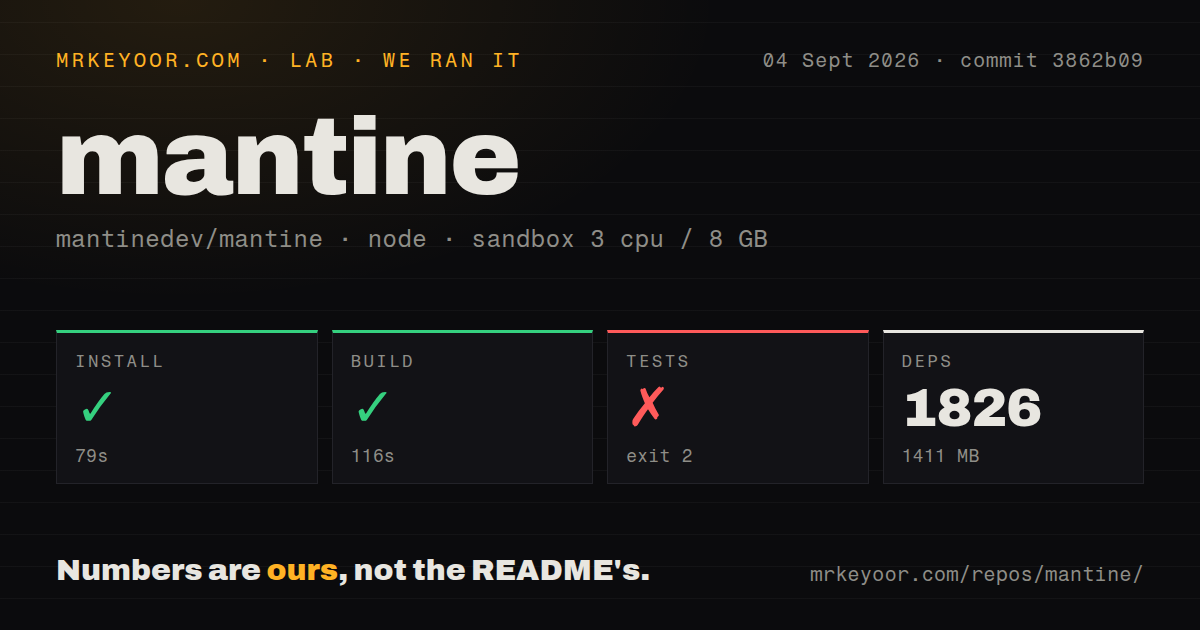
Repository setup is considerably heavier. Yarn installed 1,826 packages in 79 seconds and left 1,411 MB on disk in our container. The root package requires Node 22 and records Yarn 4.18 as its package manager. Its workspaces include all packages and both docs applications, so one install pulls the tooling for formatting, linting, Jest, Storybook, TypeScript, publishing, documentation generation, and website builds. That cost matters for contributor laptops and disposable CI runners even if a production app imports only @mantine/core.
What happened when we ran it
Our measurement setup used commit 3862b09 in our fresh unprivileged Debian sandbox with 3 CPUs and 8 GB of RAM. Installation succeeded in 79 seconds, adding 1,826 packages and consuming 1,411 MB. The build then succeeded in 116 seconds. The checkout was a monorepo with 2 CI workflow files, no Dockerfile, and no top-level tests directory. Those structural signals do not say whether package-local tests exist.
The root test step failed with exit code 2 after 40 seconds. Its TypeScript chain checked the repository, entered apps/mantine.dev, and stopped in HomePageSponsors.tsx. The compiler reported that the item parameter on line 7 implicitly had an any type. Npm then identified the failed typecheck lifecycle in the docs workspace. The supplied log ended there, so it does not establish whether later lint or Jest stages would pass.
Mantine 9.6.0 components always enter the client boundary
The 9.6.0 help guide says every Mantine component is a client component and already carries the client directive. Next.js can still render those components on the server, but their code is included in the client bundle. Hooks, compound component syntax, render callbacks, and client logic impose further boundary rules. Teams trying to keep most of a page as React Server Components can isolate Mantine behind small client wrappers, though a UI built mostly from the library will move much of that tree into the client graph.
The 6,585-file monorepo reflects how many layers support that consumer API. It has generated docs, examples, styles, package exports, and separate sites in addition to the components. Our 116-second build passed, but the 40-second root check failed before reaching the rest of the scripted sequence. A contributor should run the package tests and the documentation typecheck for any touched surface, then confirm that the public ESM and CommonJS exports behave in a clean consumer project.
Browser support begins at Chromium 108, Firefox 101, and Safari 15.4
The tested minimums are Chromium 108, Firefox 101, and Safari 15.4 across desktop and mobile targets. Internet Explorer is unsupported. The styles use :where, CSS layers, flex gaps, dynamic viewport units, aspect ratio, and sometimes :has or container queries. Polyfills are left to the application. That is a reasonable floor for a current SaaS interface, but a public service with an older managed-device population needs its own browser matrix.
Styling offers component props, style props, CSS variables, a Styles API, and CSS modules. The docs recommend CSS modules for most custom work and warn against filling each component with many inline style props. This flexibility still asks teams to make a choice and enforce it. A 1,411 MB contributor install also provides no official Figma or Sketch library; Mantine points designers to community files whose freshness it does not guarantee. Design teams that require code and design assets to version together must build that bridge themselves.
The August 9.6.0 release is active, with a new ESM defect reported
Release 9.6.0 arrived on August 31, 2026, adding a lightbox package, an action bar, more chart types, richer editor controls, and schedule changes. Two days later, issue 9166 reported that importing @mantine/lightbox in a published ESM environment throws before rendering because of a circular dependency. The report includes a direct Node import reproduction and was updated on September 4. That is one package in a broad release, but teams using the new lightbox should test the exact bundler path or wait for a fix.
GitHub recorded the last push on September 1, 2026, with 31,667 stars and 56 combined issues and pull requests. Open issue activity continued into September, while other recent reports were marked for a patch. That health picture is current and busy. It does not cancel our source result: after a 79-second install and 116-second build, the 40-second check still failed on a docs type error. Mantine is easier to adopt as a package than to validate as a whole monorepo.