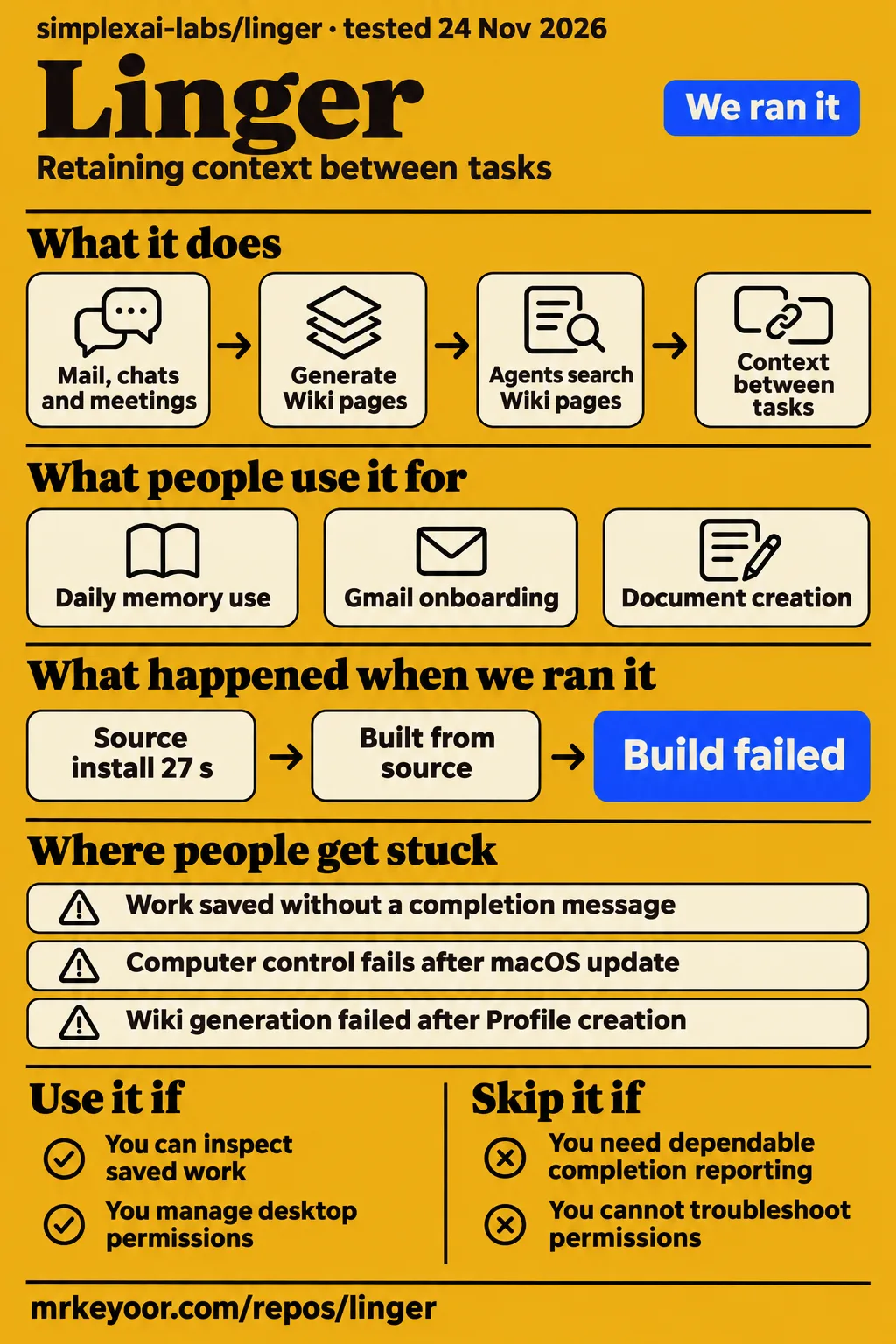
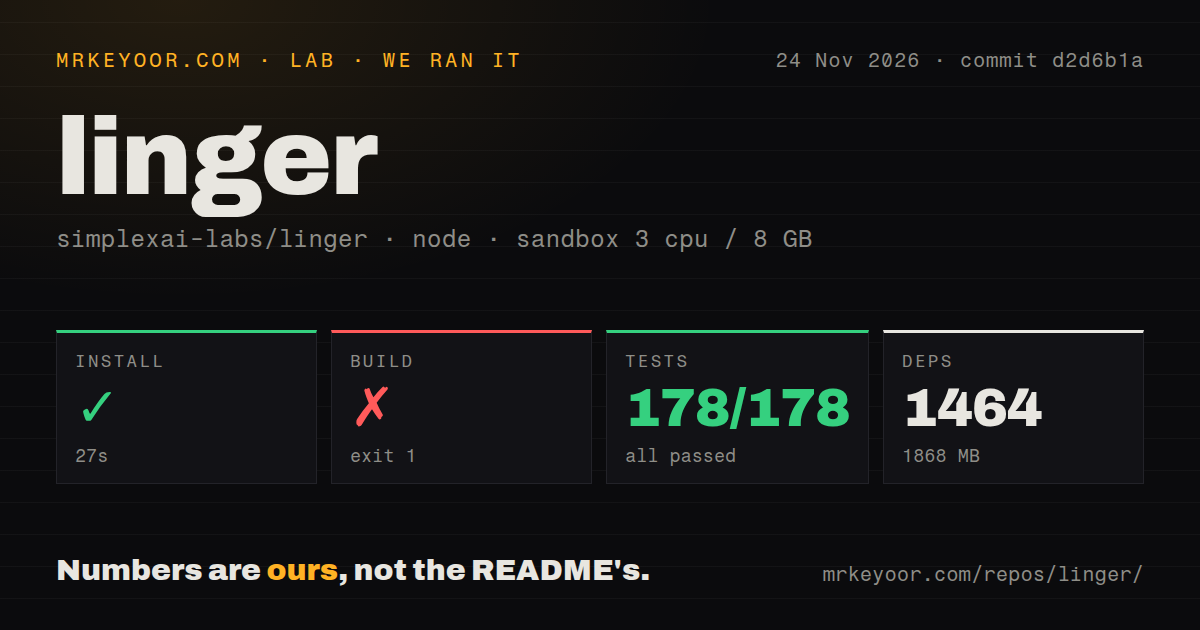
Linger is Simplex AI Labs' personal agent for shared memory and computer tasks. In our November 24, 2026 source run, dependency installation succeeded in 27 seconds, but the build and test commands failed. Technical users can use this review to plan a memory-workflow evaluation; users who require dependable completion reporting should avoid it because issue #352 documents work and status diverging. The source checkout was commit d2d6b1a.
What people use Linger for
Issue reporters describe daily memory use, Gmail onboarding, document creation and conversations spanning multiple Rooms, Linger's conversation spaces. These are specific user reports, with different outcomes: a populated Profile, saved document work and interrupted conversations are separate results. The Linger README describes mail, chats and meetings becoming Wiki pages that agents can search, giving these reports a common purpose: retaining context between tasks.
| Who used it | What they did | What happened |
|---|---|---|
| Arch Linux reporter, Desktop 0.1.6 | Used memory and Wiki daily | They liked the features, but cloud-backed consolidation usually failed after network access ended at 23:30. |
| Reporter of issue #157 | Connected Gmail during onboarding | Their Personal Profile populated while Wiki sections stayed empty with a count of 0. |
| coolsocket, Windows 11, local Pi runtime | Requested a native document from synthetic meeting facts | The edit persisted, but no completion reply reached the Room. |
| Reporter of issue #257 | Used one Codex Agent across two Rooms | The first context worked for about 25 minutes, then memory pruning broke subsequent runs. |
| wangdada8208, Linux | Ran Antigravity through the Computer Daemon | Session creation and partial progress preceded a canceled turn after roughly 90 to 100 seconds. |
| Reporter of issue #344, Apple silicon and Pi | Used computer-control tools across an update from 0.1.3 to 0.1.4 | Renewing permissions and restarting restored computer use. |
The document example explains why status deserves separate attention. coolsocket requested a meeting summary, a task table and unresolved items from invented meeting facts. The local Pi agent saved the edit, then the run failed because the conversation received no completion message. Inspecting both the document and the Room before repeating an editing request follows directly from that sequence: the saved work can already exist when the status reports failure.
What happened when we ran it
Our source run installed dependencies in 27 seconds, then failed its build and test commands; our separate Compose attempt stopped at a safety check. The hands-on header describes a November 24 lab-server Compose setup with ports bound to 127.0.0.1. The subsequent step records the operational outcome: our harness refused variable-based environment-file paths before recording a usable application task.
| Recorded source step | Result | What the output supports |
|---|---|---|
| Dependency installation | Succeeded in 27 seconds | 1,464 dependencies recorded; 1,868 MB on disk. |
| Build | Failed, exit 1, in 12 seconds | A bundled native PostgreSQL archive requirement stopped the desktop build. |
| Tests | Failed, exit 2, in 18 seconds | One summary recorded 178 passes; another recorded 4 failures, 96 passes and 1 skip. |
The Compose safety step named services.teamhub-migrate.env_file and services.node-services.env_file, both using ${LOCAL_ENV_FILE:-.env}, and also named services.teamhub.env_file. Our harness requires literal paths. This result was a harness policy rejection, distinct from an application error. The teardown record reports successful cleanup, completing the recorded attempt without an application workload result.
The source sandbox configuration was 3 CPUs, 8 GB RAM and image lab-node:22. The build tail identifies Node.js v24.19.0 for that process. At apps/desktop/build.mjs:207, it names distribution/linux-x64.json and postgres-17.10-pgvector-0.8.6-linux-x64-5e6062ecf6be0260ace0d10671db48a81405687d50a853c7459888f405bbfdd5.tar.gz. The captured instruction ends at put it in LINGER_NATIVE_. That is the recorded error text, rather than a complete configuration command.
The overall test command exited with 2 despite the parser's 178-pass summary. The tail also names four failures in scripts/dev-local-computer.test.ts, one skipped test in scripts/install.test.ts, and make: *** [Makefile:184: check-scripts] Error 2. These summaries cover different parts of the command and stay separate here. The checkout scan recorded 5,964 files, approximately 1,195,598 source lines, 163.5 MB, five CI workflows, workspaces and Compose. It detected no Dockerfile or tests directory; the named .test.ts files show tests outside that directory convention.
Where people get stuck: completion status and saved work differ
Issue #352 describes both a reply already visible in the Room and successful work with a genuinely missing completion message. DASHAN-0079 reported the visible-reply case on Windows with Codex. A maintainer attributes false reply_not_sent and reply_undelivered failures to Computer-side command classification corrected in #381. coolsocket's Pi document case required a different response because the completion message was actually absent.
| Symptom and reporter | What the thread found | Response described there |
|---|---|---|
| PostgreSQL initialization, issue #329 | Chinese characters in a Windows profile path were read as ?? on 0.1.5 |
A contributor reports patched Setup initialization and SQL queries under two profile paths; the synthesis identifies merged #341. |
| Rejected drive location, issue #329 | Other users could modify the drive root | The maintainer recommends the default location in a newer build rather than changing drive permissions. |
COMMAND_TIMEOUT, issue #348 |
A PowerShell private-path helper stalled with -EncodedCommand |
Peachck reports a local change to -Command, retaining paths on standard input. |
| Conversations fail after memory updates, issue #257 | Pruning deleted a generation referenced by a live activation | Commenters identify 27adbd6 and inline Context View memory content. |
| Computer control fails after macOS update, issue #344 | The stored permission grant belonged to the previous build signature | The reporter renewed Screen Recording and Accessibility grants, then restarted. |
The #352 discussion describes a bounded follow-up asking an agent to send its completion reply. Changing models had not resolved the original reporter's warning. Windows initialization, drive permissions, shell-helper execution and reply classification each identify a different stage of work. The table therefore preserves the error and its reported response together, rather than presenting reinstalling or switching models as a common remedy for all five cases.
Cloud-backed memory jobs need connectivity and an available model
The cloud-backed user in issue #436 lost network access at 23:30, before midnight consolidation, and reported that the nightly job usually failed. That configuration explains the network requirement in this case. Separately, issue #157 records successful Gmail Profile creation with empty Wiki sections, showing that onboarding and Wiki generation have distinct outcomes even before considering the selected model account.
quantissimo later reported that an update removed Unknown feature flag: sleep_tool, then Wiki processing encountered model_not_found. Linger inherited gpt-6.1-sol from a shared Codex configuration, and the account Linger used rejected it. The commenter changed the default to gpt-5.6-sol, saved initial memory revisions and advanced Wiki processing. Those exact model names describe that account-specific report, rather than a general model recommendation.
XiaoBinGan reports implementation of MEMORY_DAILY_HOUR in #467, accepting local hours 0 through 23 with midnight as the default. The comment says the scheduler already replays missed calendar hours from its checkpoint after sleep. Changing which hour closes the day and replaying missed hours perform different jobs. Neither changes the runtime selected for model calls, so the cloud-backed reporter's connectivity requirement belongs to that configuration.
Local storage and model processing are separate choices
The Compose guide says agents run on a connected computer through Claude Code, Codex or Pi, while the containers run the server. A runtime executes the agent and its model calls. The guide routes memory background work through Codex or Claude Code on that computer, and describes Grok Live as a direct server-to-xAI connection when XAI_API_KEY is set. Voice also requires a Soniox key.
The network setup instructions default to localhost and identify public development values in .env.example. Before serving other computers, operators must generate private LINGER_SECRET_SEED and TEAMHUB_SECRET_ENCRYPTION_KEY values and put HTTPS in front of port 3000. The guide also explains account-command password resets rather than email resets. These are concrete operating responsibilities alongside choosing the model runtime and connecting a computer.
Linger vs llama.cpp, Perplexity Personal Computer and Codex CLI
Linger's shared memory and computer workflows occupy a different layer from llama.cpp inference and a coding agent used directly. The llama.cpp README describes inference locally and in the cloud. The Codex README describes a coding agent running on your computer. Those descriptions support choosing by task; they do not make either project a measured substitute for Linger's complete personal-memory workflow.
| Alternative | Evidence-backed distinction | Choose it when |
|---|---|---|
| llama.cpp | Its README describes LLM inference across local and cloud hardware. | Running or serving a model is the task. |
| Codex CLI | Its README describes a coding agent running locally on your computer; Linger documents Codex as a runtime. | Repository work is the task and a shared personal Wiki adds no required function. |
| Perplexity Personal Computer | i10X positions Linger as a device-local alternative. | Your shortlist concerns personal-assistant products. |
kyzoroX's X post labels the quoted speeds vendor lab numbers and asks for 64K-context prefill timing on an RTX 3060 with 64 GB RAM. Prefill processes the prompt before output generation; decoding generates the output tokens. The distinction gives readers a concrete comparison question: how long does the selected configuration take to process remembered context before it starts answering? The post's request concerns that delay rather than another output-speed figure.
Outdated claims, corrected
GithubProjects' promotion says Linger runs entirely on a Mac or PC with no cloud, while the Compose guide explicitly describes runtime-based processing and direct xAI voice calls. The promotion's blanket wording therefore omits configuration choices that change external processing. Linger's local-inference path, cloud-backed runtime configuration and voice-provider connections need separate descriptions to explain where a particular installation sends its work.
The i10X article describes an unsigned macOS package that users can allow at first launch. Ryanpwq's Desktop 0.1.6 report in issue #510 describes following the official quarantine workaround and still receiving a malware alert followed by removal to Trash. The maintainer tried the same ARM64 release on macOS 27.2.1 (26B131), could not reproduce the behavior and requested logs. The reported XProtect versions were 5287 and 5377.
FAQ
The desktop app serves one person on one computer; Compose supports a server shared by connected computers, according to the README. These answers address installation, processing and failure questions raised in searches and issue discussions. They keep the reported response beside each error so a reader can distinguish a runtime-account problem from a connection problem, a saved edit from a completion message, and an implementation change from a desktop download.
How do I use Linger?
The Compose guide connects a signed-in runtime through linger-computer login, which authorizes the computer in a browser and starts its daemon. It then uses linger-computer daemon status for the connection and linger-computer runtime check when agents do not answer. The desktop option is for one person on one computer; the Compose route also supports serving several computers from one server.
Does Linger keep records locally while background processing still uses the cloud?
Yes, issue #436 describes cloud-dependent consolidation, and the Compose guide routes background work through a connected runtime. Storage location and runtime selection answer different questions. The same guide identifies direct xAI calls for Grok Live and a Soniox key for voice. A configuration description should name those connections alongside the model used for chat and the runtime used for memory jobs.
Can Linger really run a 125B model with 12 GB of GPU memory?
The README describes the 125B Qwen3.8-Flash-Next configuration as a 12 GB card with 64 GB of RAM. Its PolyStrata explanation keeps frequently used experts on the GPU and other experts in RAM or on SSD. The stated configuration includes system memory and storage placement, so the 12 GB GPU figure alone is an incomplete account of the vendor's hardware claim.
Why does Codex say it finished without sending a reply, even after changing models?
Issue #352 identifies both false classification of a delivered reply and an agent that genuinely omitted its completion message. The thread's Windows Codex report says the reply was already visible in the Room, while the Pi document example saved work without sending that message. Inspecting the Room and the edited artifact answers different parts of the failure before a task is repeated.
Can I configure the nightly memory consolidation hour?
XiaoBinGan's comment in issue #436 reports MEMORY_DAILY_HOUR implementation in #467, with values from 0 through 23 and midnight as the default. The comment separately explains existing checkpoint replay for a computer asleep at the scheduled hour. The setting moves the local hour that closes the day; checkpoint replay evaluates work for missed calendar hours when the scheduler resumes.
Which Linger this review covers
This review covers Simplex AI Labs' simplexai-labs/linger, the personal-agent repository linked throughout this page. The Linger app at withlinger.com documents collecting visual references on a Mac, while Durenlab's LINGER is a gene-regulation model. Including the repository owner when finding downloads and issue discussions separates those software projects without treating unrelated name matches as evidence about this agent.
What we have not tested yet
Supported desktop installation remains unverified in our work: the dependency step was a source-checkout operation, and the Compose attempt stopped at our harness safety check. It produced no usable application workload, generated Wiki, answer-quality result, application task timing, application memory measurement or screenshot. The image label establishes neither the operating-system version nor the actual runtime; Node.js v24.19.0 comes from the build log. The truncated archive instruction cannot support a complete corrective command.
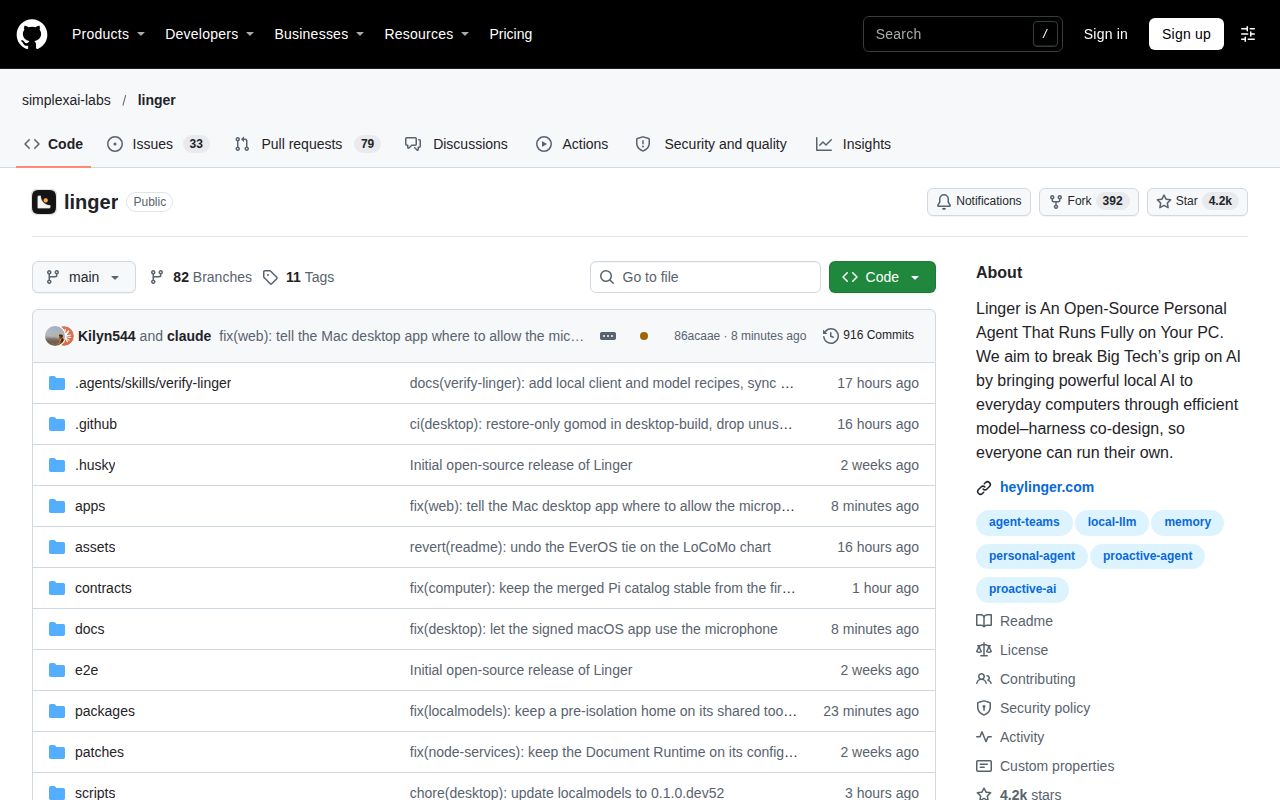
Independent GPU-speed reproduction, 64K prefill timing, long-task comparisons with cloud models and inference on the stated 125B configuration are outside our results. The alternatives table supplies a task-selection aid rather than a head-to-head benchmark. Dated repository metadata does exist: the November 24, 2026 snapshot records 4,233 stars and a last push at 06:09:53Z, while desktop-v0.1.6 is dated November 20, 2026 at 17:57:59Z. These facts do not measure adoption or reliability.
Release inclusion needs separate evidence for #341, 27adbd6 and the consolidation-hour setting. The #352 investigation places its relevant fixes on main but outside released builds, including Desktop 0.1.6, and calls for release plus retesting. The #329 contributor tested the patched Setup executable, not the portable ZIP. The #348 workaround was local: its nine focused Windows path-validation tests passed, but a full desktop installation was not tested. The #157 follow-up stops before final Wiki publication.
Antigravity's full capability matrix and the cancellation reported in issue #380 are unresolved here. The run used agy 1.5.13 and daemon 0.55.0, reached partial progress and ended with Antigravity session/prompt failed: context canceled. Documentation work in #468 addresses documentation rather than demonstrating complete background Memory/Wiki and usage-reporting support. Those partial results do not supply a successful end-to-end Antigravity workflow.
The Memory-server report in issue #93 concerns a module-level reproduction at baseline 860dbfc: after closing a shared-host server, a route returned 401 instead of 404 and replacement mounting failed with HTTP route prefix already mounted: /internal/v1/. Its reported #95 correction and 13 passing Memory-server tests describe that scope, rather than a deployed production incident or a clean full-suite result. They do not constitute a security audit.
Network traffic, prompt injection through connected content and permission isolation across users were not assessed. The macOS malware-alert cause remains unresolved; the report alone proves neither malware nor a safe explanation for the alert. Maintainers also say update-related permission failures can recur until Apple-issued signing becomes available, without a date. For an initial evaluation, synthetic documents provide a bounded task whose saved result and completion message can be inspected separately.