Decide by integration needs, then verify the runtime
llama.cpp gives developers a C-style library interface, command-line tools, and a server. Choose it when your application needs direct control over model files and execution settings. Our recorded sandbox run leaves native installation and inference behavior unverified, so it cannot settle whether llama.cpp works well on your hardware.
The build guide identifies the library as the main product and documents separate CPU and accelerated build paths. Those paths have different requirements. For example, CUDA needs the CUDA toolkit, while Metal is enabled by default on macOS. A result from one setup cannot certify the others.
What our recorded run establishes
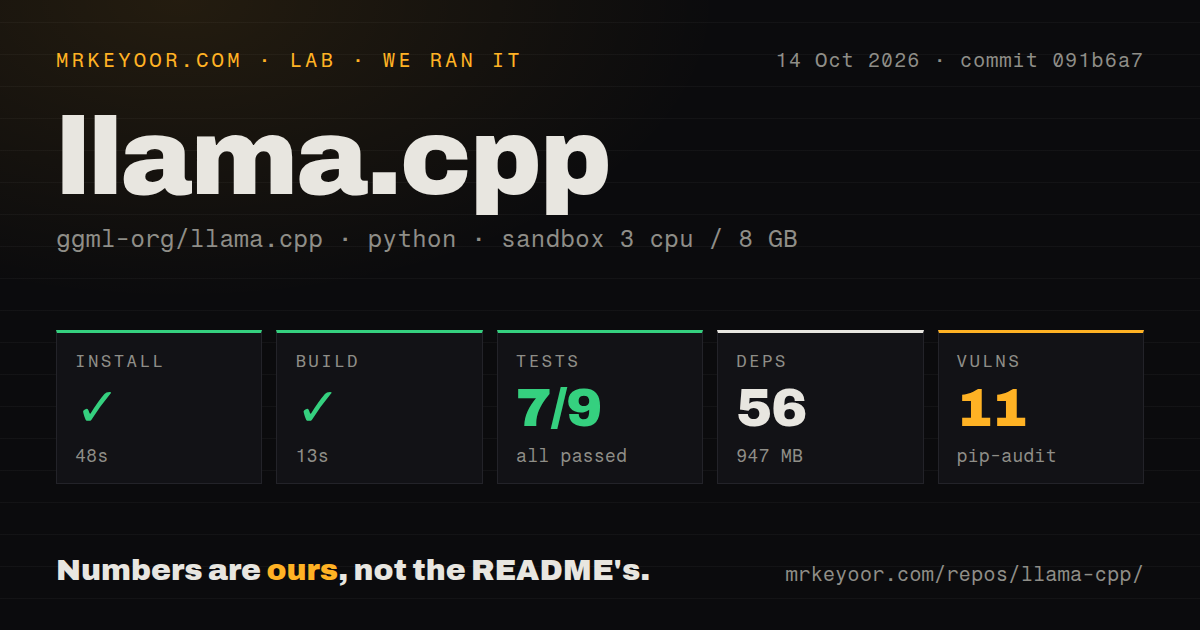
The run took place on October 14, 2026, at commit 091b6a7fc561b78da90a0ed2d524ec995458c657. Its recorded configuration was 3 CPUs, an 8 GB memory limit, and the ghcr.io/astral-sh/uv:python3.12-bookworm image. The harness selected Python as the primary ecosystem; detection also found C++ and CMake. This was a Python-oriented repository check, with no supplied inference workload.
The install step returned exit 0 after 48 seconds, but its retained output begins with a dependency-resolution error. It says the available requests==2.28.1 did not satisfy requests>=2.32.3,<2.33.dev0 and describes uv's index-selection behavior. The record does not explain how that error and the success flag arose together. We therefore cannot call dependency setup complete. The reported 56 dependencies and 947 MB describe the recorded environment, without proving that a llama CLI was installed.
The build step returned exit 0 after 13 seconds. Its output tail is empty, and the supplied record omits the command. It provides no evidence of which native targets, if any, were compiled. There is no installed-binary check or model-download result to connect that step to a working inference runtime.
The pytest step exited 1 after roughly 7 seconds. Its retained output reports "7 passed, 2 errors in 1.28s"; that pytest summary duration differs from the harness's elapsed step time. Collection failed in scripts/snapdragon/qdc/tests because appium was missing and in tools/server/tests because wget was missing. The parser reports 0 failed and a total of 9. These are recorded summary values, not reconciled exhaustive counts of unique tests. The command did not finish cleanly, but the collection errors do not prove that native inference is broken.
Pip-audit recorded 11 advisories across 2 packages. The supplied evidence does not identify those packages, their severity, or how much of the environment was audited. Dependency count is not audit coverage. These findings cannot establish whether a native server deployment exposes an affected dependency.
The repository scan recorded 3,758 files, approximately 879,865 source lines, 171 MB, 58 CI workflows, and a tests directory. Those inventory measurements describe the checkout, not passing coverage or runtime reliability.
GGUF and backend choice define your evaluation
The model guide requires GGUF files and points to conversion scripts for other formats. Start with a model explicitly compatible with llama.cpp. Our sandbox's 8 GB limit is not a model-size recommendation, and the run contains no measurement of model memory use, latency, output quality, or GPU execution.
For a useful acceptance check, record the runtime commit, model file and quantization, hardware backend, and context settings. Verify the binary, load the model, and exercise representative prompts or API requests. Keep dependency setup, compilation, model download, and inference results separate so a successful preliminary step cannot stand in for the workload you need.
Server features require their own checks
The server documentation describes a web interface and OpenAI-compatible chat completions, Responses, and embeddings routes. It also documents Anthropic-compatible messages, optional API-key authentication, and experimental agent tools. These are documented capabilities, not features exercised in our run.
The documented file and shell tools carry an explicit warning against enabling them in untrusted environments. Evaluate those permissions separately from chat access. API compatibility also needs request-level checks with your chosen model and template; our Python collection errors say nothing about endpoint behavior.
Budget for integration changes
The v0.6.0 release notes describe the llama_batch_ext API and llama_process(), with session formats bumped to LLAMA_SESSION_VERSION 11 and LLAMA_STATE_SEQ_VERSION 4. If you embed the library or preserve session state, review those changes before upgrading. Neither the recorded build flag nor the pytest summary verifies migration compatibility.
When to evaluate Ollama or vLLM
Ollama documents named-model chat commands and a REST API for running and managing models. It is relevant when that operating interface suits your application better than direct library integration. This evidence does not establish that its setup is faster or that it performs better.
vLLM documents continuous batching of incoming requests and parallelism for distributed inference. Evaluate it when those serving requirements drive the choice. No comparative benchmark was run.
How to read the scores
These are editorial evidence ratings, not benchmark results. The scale is 1 for substantial documented obstacles, 2 for limited evidence or unresolved setup, 3 for a documented path with material validation gaps, 4 for detailed evidence across the relevant paths, and 5 for strong evidence plus representative validation. Unknown adoption, support responsiveness, and compatibility do not earn a high score. Setup reflects the conflicting run record; documentation reflects the supplied guides; community reflects the limited evidence of participation; maturity reflects documented integration capabilities and changes. None measures production reliability.