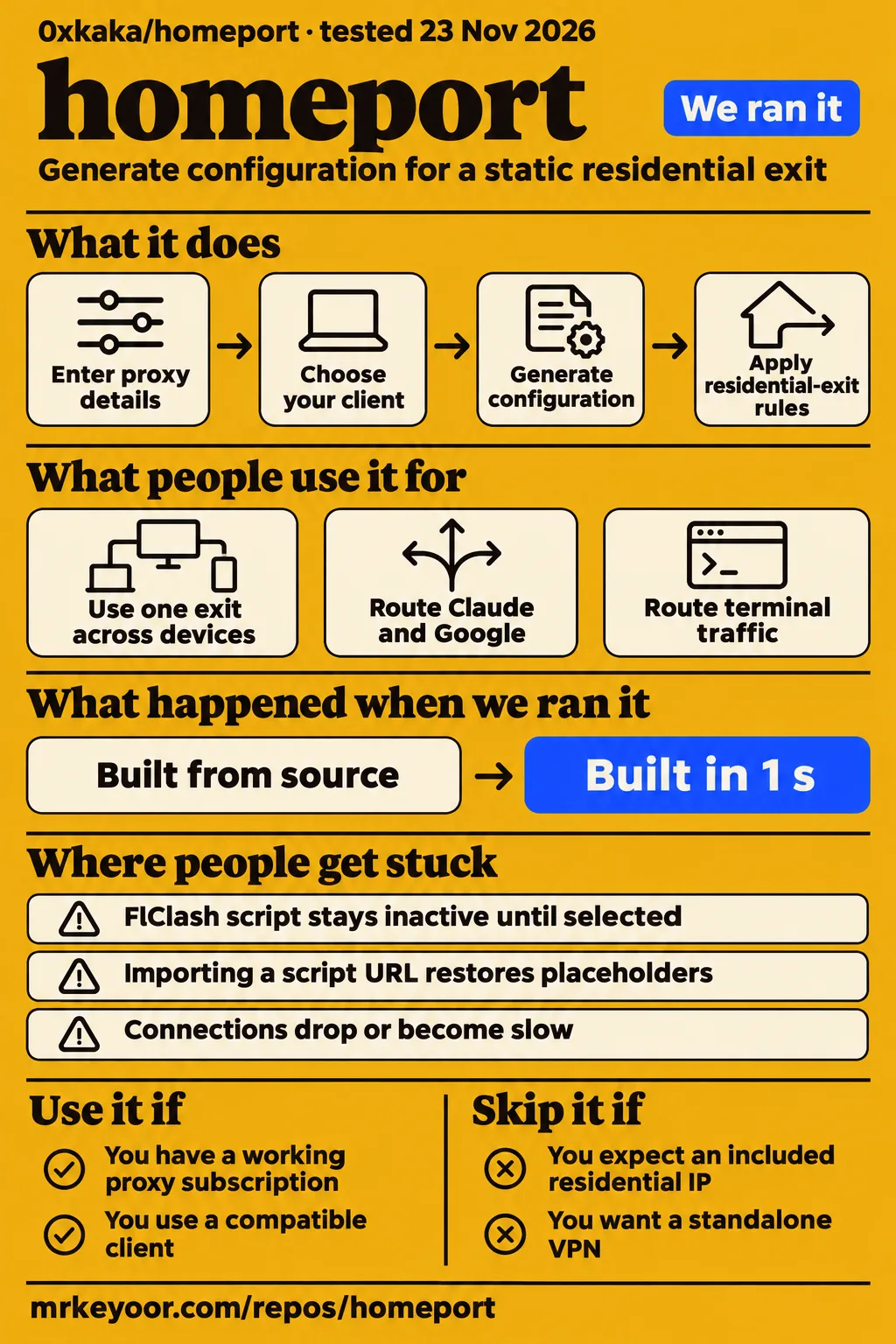
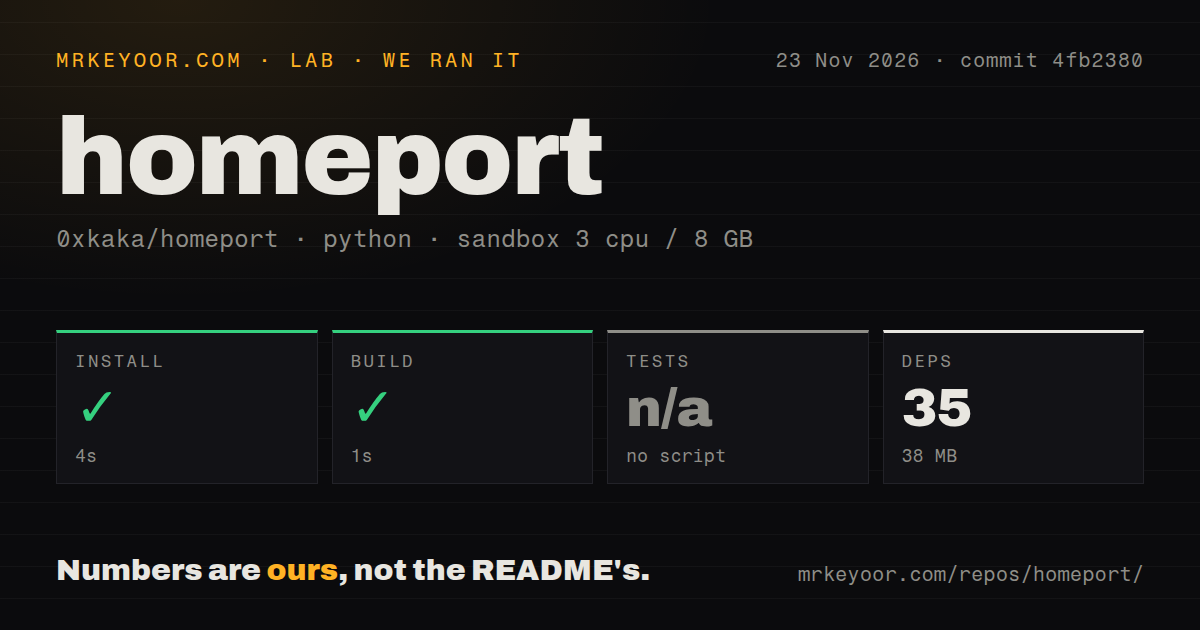
homeport is for people who already have a working proxy subscription and want to add a static residential exit for selected websites. Our sandbox installed the source in 4 seconds and built it in 1 second at commit 4fb2380. The later deployment attempt stopped at the harness's Compose-file prerequisite. Choose this configuration helper for its documented client workflow; skip it if you expect an included residential IP or a standalone VPN.
What you can do with homeport
The homeport README documents routing selected websites through a fixed residential proxy while other websites use your existing proxy subscription. You bring the residential service and its connection details. The README describes a residential or ISP proxy with a static address, using HTTP or SOCKS5 authentication. Homeport's role is to help write the configuration that connects those services through your client.
The documented route sends selected traffic through your chosen subscription node, then the residential proxy, then the destination website. The subscription node acts as the relay. Claude, Google and Stripe are the README's headline examples, and its rules also cover authentication, payment and monitoring domains. This arrangement gives the client two separate jobs: choose the relay and apply the residential-exit rules to the matching destinations.
The browser generator asks for the proxy host, port, username and password, followed by your device and client. The manual route uses a JavaScript override for the Clash clients or a node and module in Shadowrocket. The README also describes adding an iPhone node by QR code. These are configuration entry methods for software you already use, rather than separate proxy services bundled with homeport.
What people use homeport for
Configuring selected domains to use a static residential exit through an existing proxy subscription is homeport's documented workflow. The README's setup instructions begin with a subscription that already works, then add a residential proxy and client-specific rules. That sequence answers the practical starting question: use homeport after your basic client connection works, rather than starting with an empty client and expecting it to supply connectivity.
One documented use is applying the same residential endpoint across a phone and computer. Another is sending Claude, Google and payment-related domains through the residential route while retaining the existing subscription for other destinations. A third is configuring terminal programs alongside browser traffic through TUN or explicit proxy settings. Each appears in the README's device, routing and terminal instructions, so the useful choice is which client workflow matches your devices.
The README gives different activation steps for each client. Clash Party attaches an override to a subscription and restarts the core; Clash Verge Rev reloads the subscription after saving its extension script; FlClash selects the imported script in the subscription's override settings. Shadowrocket instead separates the residential node from its routing module. Those client-specific instructions make the repository useful as a configuration recipe: copying the connection values is only one part of applying it.
What happened when we ran it
Our November 24 deployment attempt failed at the safety step because the harness required a Compose file. The failure names all four filenames it checked: "unsafe repo: none of compose.yaml, compose.yml, docker-compose.yaml, docker-compose.yml exists (rule: a compose file is required)". This is the recorded stopping point, before the attempt exercised the README's browser-and-client sequence.
The run header says "deployed with its own docker compose" and describes ports bound to 127.0.0.1. The failed prerequisite contradicts that deployment label. The final cleanup entry reports "teardown: ok", which records successful teardown after the stop. Reading these entries together preserves the failure rather than turning the header into a successful deployment result.
Our earlier source run completed its install and build steps at commit 4fb2380 on November 23, 2026. We measured 35 dependencies and 38 MB on disk in that sandbox. The table keeps the source checks separate from the later deployment attempt and identifies what each recorded outcome answers. The November 23 measurements are the basis for the timings and checkout figures below.
| Check or question | Our recorded answer | Verdict | Why |
|---|---|---|---|
| Did installation finish? | Succeeded in 4 seconds | Passed recorded step | The sandbox's dependency setup completed |
| What was the dependency footprint? | 35 dependencies, 38 MB on disk | Recorded | These figures describe the source environment |
| Did the build finish? | Succeeded in 1 second | Passed recorded step | The harness recorded a successful build |
| Did tests run? | No tests script or target; skipped | Skipped | The run contains no passing-suite result |
| What did the repository scan count? | 6 files, about 221 source lines, 0.1 MB checked out | Recorded | These figures describe the scanned checkout |
| What supporting files did the scan find? | 1 CI workflow, no Dockerfile, no tests directory | Recorded | These are file observations |
| Did the November 24 deployment pass its prerequisite? | No Compose file found | Failed | The safety step required one of four Compose filenames |
| How should the deployment header be read? | It says deployed despite the failed safety step | Contradictory | The failed prerequisite is the recorded stopping point |
| Did teardown complete? | teardown: ok | Passed cleanup | The final entry reports successful teardown |
The sandbox configuration specified 3 CPUs, 8 GB RAM and image label ghcr.io/astral-sh/uv:python3.12-bookworm; the harness recorded 7 seconds total. Its ecosystem field says Python. The README, however, directs users to a browser page, JavaScript override and Shadowrocket module. It also documents python3 scripts/check.py for maintainer checks using sample subscriptions and matching rules, a different activity from importing configuration into a proxy client.
Where people get stuck: importing a script does not activate it
The README says a FlClash script stays inactive until you select it in the subscription's override settings. Its instructions then reconnect or restart the client. Clash Party likewise requires attaching the override to the subscription, saving and restarting the core. The important handoff is between storing a script and making the active subscription use it, which the client instructions spell out separately.
| Symptom described in the README | What the README tells you to check |
|---|---|
| Claude or Google will not open | Proxy host, port, credentials, placeholder values, service expiry and the Shadowrocket node name |
| Configuration will not load | Missing quotes or commas, and the correct script entry function for the client |
| Phone and computer show different IPs | Same residential endpoint, routing mode, system proxy and Chrome QUIC setting |
| Connections drop or become slow | Change the relay node; Shadowrocket has a separate proxy-through selection |
| Imported script has no effect | Select it under the subscription override, then reconnect |
The README distinguishes the proxy connection address from the assigned exit IP. When a provider shows both, enter the proxy address as the host; use the assigned exit IP when comparing the result at the address-check page. Its example uses p.webshare.io as the connection host. Confusing these fields changes the connection details before client rules enter the picture.
The README lists default mixed ports of 7890 for Clash Party and 7897 for Clash Verge Rev, with the client's displayed setting taking precedence after changes. Its Windows address-check command uses curl.exe. These details belong together: the command must address the port of the client actually running, and the executable name must match the documented PowerShell instruction.
Credentials live in the configuration you generate
The README says account credentials are processed in the browser without uploading them. Its manual FlClash instructions place the host, port, username and password in the script's HOME object. Shadowrocket uses a different split: credentials live in the node, and routing rules live in the module. Those storage locations explain why the README gives different update instructions for the two workflows.
For FlClash, the README warns that importing the script again from its URL restores placeholders. Its update instructions tell users to retain the four connection values and enter them again after an update, or regenerate the configuration through the browser page. Shadowrocket's module can be updated separately because its account details reside in the node. The relevant distinction is which file or client entry an update replaces.
Shadowrocket's node remark must be exactly 🏠住宅出口-勿选, because the rules refer to that name. The README says to install the module before adding the node and to keep the ordinary subscription node selected on the home screen. Selecting the residential node there sends all traffic through it; the README warns that this can prevent downloading the module from GitHub.
The instructions are in Chinese
The README's setup instructions are in Chinese and distinguish client-specific labels, entry functions and routing modes. Clash Party and Clash Verge Rev use function main(config, profileName) { where the manual FlClash script uses const main = (config) => {. The README also specifies changing the corresponding closing line. These are edits to the complete upstream script, rather than interchangeable snippets to paste into any client.
Shadowrocket follows its own sequence: install the module, add the residential node, select a relay under proxy-through, then use configuration routing mode. The Clash instructions instead refer to rule mode, system proxy and optional TUN settings. Translating the instructions therefore means following the labels for the selected client while preserving exact configuration values such as the residential node's remark.
homeport vs Clash Verge Rev, FlClash and similarly named services
Clash Verge Rev and FlClash are proxy clients, while homeport documents configuration for clients including both. The Clash Verge Rev README calls it a Clash Meta GUI based on Tauri. The FlClash README calls it a multi-platform proxy client based on ClashMeta. Choosing either client's own configuration tools is an alternative to using homeport's generated recipe.
| Choice | What its documentation describes | Choose this route when |
|---|---|---|
| homeport | Generator and manual recipes for a fixed residential exit through an existing subscription | You want this particular routing recipe |
| Clash Verge Rev directly | A Clash Meta GUI based on Tauri, with configuration management and rule editing | You want to manage routing in the desktop client's interface |
| FlClash directly | A multi-platform proxy client with profiles, an editor and override scripts | You want to maintain profiles and rules in the client |
| homeport.sh | Deployment of repositories or files to a running app with an HTTPS address | Your task is hosting an application |
| Homeport AI tender monitor | Searching procurement portals and checking notices and documents | Your task is finding business tenders |
The similarly named homeport.sh deployment service describes hosting applications, and the Homeport AI tender monitor describes finding procurement opportunities. This review concerns 0xkaka/homeport. Its relevant comparison is with maintaining configuration through Clash Verge Rev or FlClash directly: both clients have configuration tools of their own, and homeport's README describes how to load its residential-exit recipe into them.
GitHub activity and the maintainer workflow
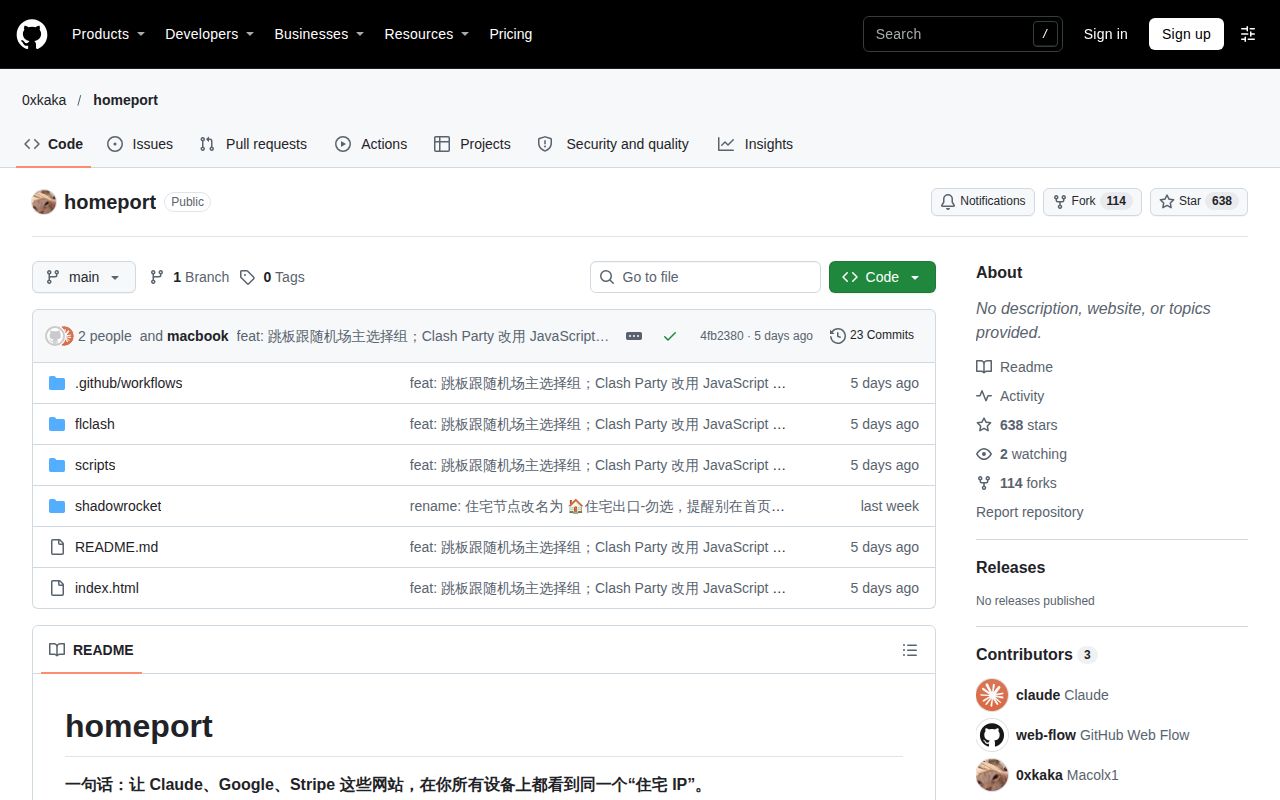
GitHub metadata recorded 638 stars, 114 forks and a November 19, 2026 last push when observed on November 24. The repository metadata reports zero open issues and pull requests in its combined count. These are dated activity figures. The practical maintenance instructions are in the README, which identifies the rule files and explains how changes should stay synchronized.
The README tells maintainers to update flclash/homeport.js and shadowrocket/homeport.module, plus the generator's GROUPS in index.html. It describes adding suffix rules, running python3 scripts/check.py, and an Actions check after pushing to GitHub. This makes the rule-update path more specific than simply editing the generated output: changes need to reach the client scripts and browser generator together.
FAQ
The homeport tutorial is in 0xkaka/homeport's README and linked configuration page. The generator collects the residential proxy's host, port, username and password, then asks for the device and software. The manual instructions cover the same configuration through client-specific scripts or a Shadowrocket module. The questions below distinguish where to find those instructions, how the routing sequence works and which Homeport this review covers.
Where can I find the tutorial for combining a proxy service with a residential IP using homeport?
The README links the configuration generator and provides manual instructions for Clash Party, Clash Verge Rev, FlClash and Shadowrocket. Its client table specifies FlClash version ≥ 0.8.85 for Android. After the client-specific setup, its address-check instructions use ipv4.webshare.io and compare the displayed address with the residential provider's assigned IP. The generator offers copying configuration and, for iPhone node entry, a QR-code option.
Can someone summarize the homeport residential proxy tutorial?
The documented sequence uses the existing subscription as the relay, adds a static residential proxy, and applies rules for selected destinations. The README's client instructions then explain activation: select the override for the subscription where required, reload or restart the client, and choose its documented routing mode. Shadowrocket keeps credentials in the node and rules in the module; the Clash workflows use the JavaScript script.
What does homeport mean, and which project or service does the name refer to?
This review concerns 0xkaka/homeport, the repository whose README describes residential-proxy configuration. The comparison table distinguishes that task from application hosting at homeport.sh and procurement monitoring at Homeport AI. For this repository, the client choice determines which instructions apply: a JavaScript override for the documented Clash clients, or the node-and-module sequence for Shadowrocket. The project name alone does not identify which of these services a search result describes.
What we have not tested yet
Our runs contain no completed client-routing session in Clash Party, Clash Verge Rev, FlClash or Shadowrocket. The November 23 timings measure source setup at commit 4fb2380; the current README instructions are documentation, not an execution record for that checkout. Actual runtime and operating-system versions require toolchain logs. The image label alone identifies configured sandbox metadata, and the dependency footprint is neither client idle memory nor a security audit.
Browsing speed, consistent exits across devices, QUIC handling, DNS behavior, IPv6 blocking and relay-failure behavior remain outside the recorded results. The README's claims about other traffic retaining its speed and credentials staying in the browser also need direct checks. We have no generator network capture, credential-handling audit, residential-provider assessment or execution result for the documented maintainer self-check. The troubleshooting table reports README guidance rather than reproduced client failures.
An English setup guide was not assessed, and no complete repository file inventory supports a claim that one does not exist. The release lookup does not establish a latest release; its null value can reflect lookup failure. GitHub's null license field does not identify reuse terms. The X search excerpt includes a 0xjackkk link post, but no visible tutorial-summary exchange. It therefore supports neither attribution of that exchange nor a setup-time claim. The Reddit and video results do not document this repository's adoption or support responsiveness.
Account-verification frequency, successful payments and protection from suspension have no measured outcome here. A next client run should record the client version, configuration with secrets removed, expected exit address, browser and terminal results, and behavior after changing the relay. That would test the workflow homeport actually documents. The present evidence supports successful source setup and a later deployment attempt that stopped at a Compose prerequisite.