Short answer
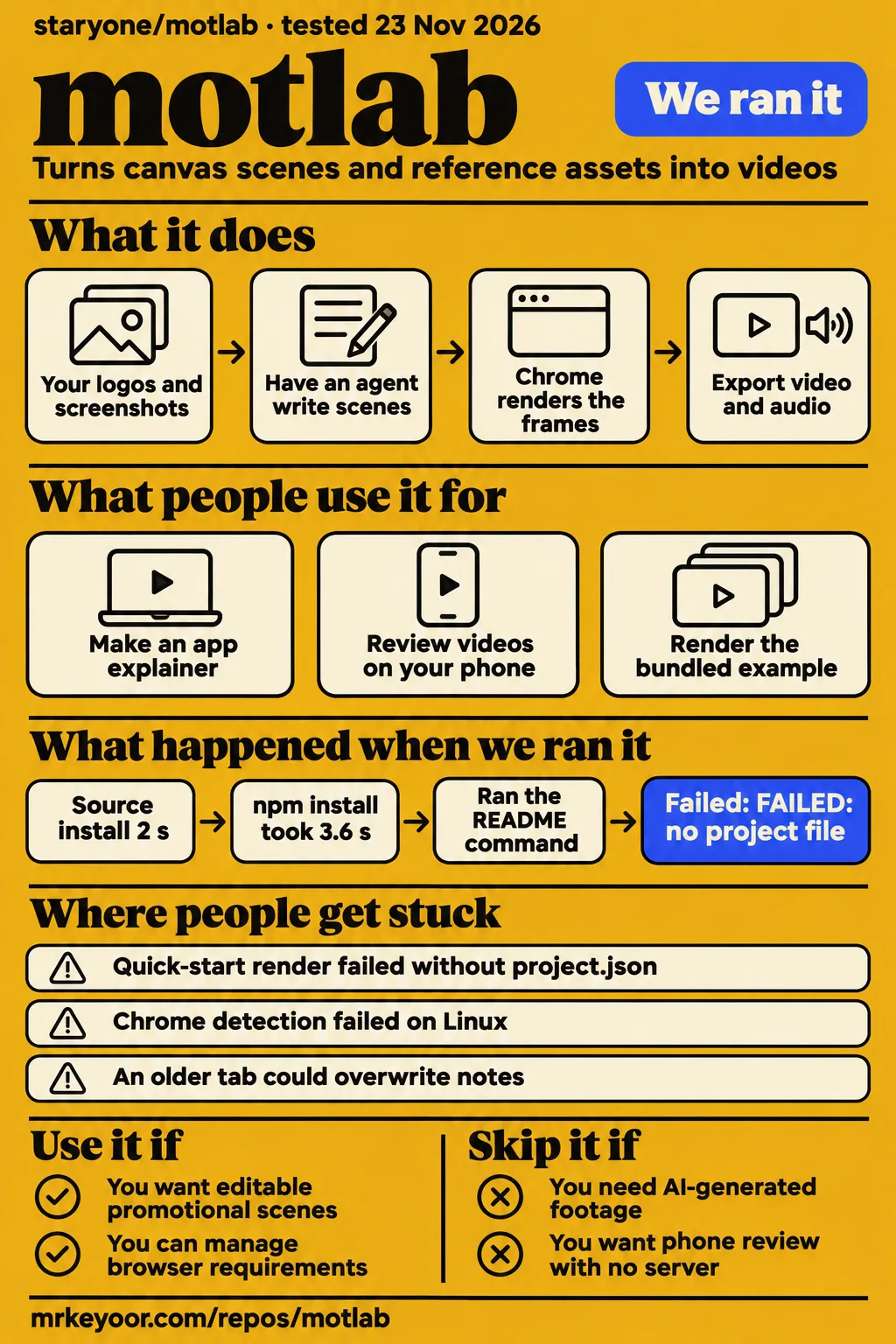
Our quick-start render stopped with FAILED: no project file at /work/qs/example/project.json, before producing a video. That was our November 23 attempt, alongside a separate source test run that exited 1 after 64 seconds. Use motlab if you want a coding agent to make editable promotional scenes from your own assets and you're comfortable managing a browser-based renderer. Skip it if you need AI-generated footage: the engine draws coded scenes and uses the references you bring, according to the project README.
The reason to consider it is the feedback loop. You can put a note on the actual frame, point to the part that needs changing, and let the agent read that instruction from a file. That is a concrete benefit when a product logo, caption or screenshot needs a precise revision. The contributor's Linux export report also checks the finished file and its scene order, giving readers an example of checking the assembled result rather than relying on a render command alone.
What people use motlab for
Urdemonlord reports making a 42.1-second vertical IRIS promo on Ubuntu without a GPU, with the render command taking about 82 seconds in issue #8. IRIS is a self-hosted webmail project. The video used six canvas scenes and narration, including animated text and diagrams of mail-service failover. This is a useful reference if your own brief is an app explainer rather than synthetic live-action footage.
| Who used it | What they made or opened | Reported outcome |
|---|---|---|
| GitHub contributor Urdemonlord | IRIS promotional video with six 2D scenes | A 1080x1920 H.264/AAC export, with stills and scene order checked in issue #8. |
| Project author staryone | motlab's own advertisement | A 19-second, seven-scene video reviewed in the viewer and exported at 4K, according to the README. |
| GitHub contributor rayw-lab | Bundled example on an Apple M5 | The release credits the Mac render; the installation guide records 270 frames at 1920x1080, nine-second video and audio streams, and an error-free FFmpeg decode. |
| X user Cydr4l | Bundled example in a container without a GPU | Reported a nine-second 1080p MP4 on the first attempt in their X post. |
| Tester unnamed in the project docs | Viewer hosted on a Linux VPS | Opened it from a laptop and phone through Tailscale Serve, according to the phone-access FAQ. |
Urdemonlord's report is the most useful of these for judging an actual deliverable. The contributor checked extracted stills, a tile of the finished MP4, and frames at selected times before calling the project done. That gives you something to imitate when checking an export: look at the assembled video as well as the individual scene previews. A successful encoder exit alone would miss a scene in the wrong position.
What happened when we ran it
Our November 23 quick-start attempt reached the rendering command, then failed because /work/qs/example/project.json was absent, as the usage step records. The task was the README command motlab render example --scale 1. It ran at commit fd2bfdaf2bdf in a fresh unprivileged container configured with 2 CPUs and 4 GB RAM, no published ports and no secrets, according to the run record.
The clone step took 2 seconds, and the package step installed @motlab/cli 0.4.1, recording 14.0 MB installed in 3.6 seconds. Then motlab --version returned 0.4.1 in 0.1 seconds, and motlab --help exited 0 in 0.1 seconds and listed rendering commands. The render step exited 1 in 0.1 seconds when it looked for the missing project. The teardown step completed successfully.
The current README explains the missing prerequisite: after an npm installation, copy example/ from the engine folder printed by motlab --help, then run the command in a folder containing that project. Those are the documented quick-start steps. The command takes a project directory as its input; the installed engine and a local copy of its example project are separate parts of that workflow.
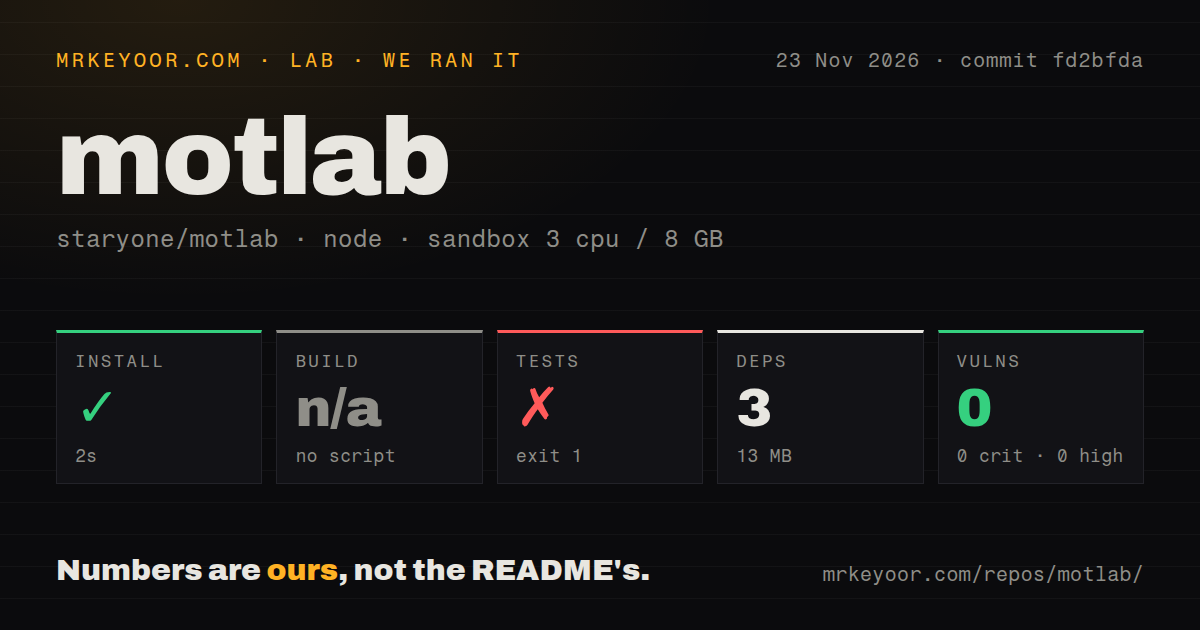
A separate source check used commit fd2bfda on November 23, with 3 CPUs, 8 GB RAM and image label lab-node:22. In our source run, dependency installation succeeded in 2 seconds, recording 3 dependencies and 13 MB on disk. The source check and the quick-start container are different runs, so their resource settings belong beside their own results.
| Source check | Our recorded result |
|---|---|
| Checkout | 155 files, about 6,817 source lines, 4.2 MB |
| Dependency installation | Succeeded in 2 seconds; 3 dependencies recorded; 13 MB on disk |
| Build | Skipped because there was no build script or target |
| Tests | Failed, exit 1, after 64 seconds |
| npm audit | 0 known vulnerabilities: 0 critical, high, moderate or low |
| Repository signals | One CI workflow file, a tests directory, no Dockerfile detected |
The test log names a failing case: project: parts render several at a time in order, and a failing part is tried again one at a time. Its tail points to test/render.test.js:325 and an assertion expecting a rejection matching b.html is 180x320 but a.html is 320x180. In plain words, the failing check concerns parallel project rendering and retry behavior, and the assertion expected a size-mismatch error. The recorded test command exited 1 after 64 seconds.
Where people get stuck: browser discovery and filenames
Version 0.4.0 added automatic discovery of Playwright's Chromium when no system Chrome is found, according to the release notes. That addresses the friction Urdemonlord documented in issue #8: motlab doctor reported Chrome missing even though a working browser was in Playwright's cache. The report records doctor passing with CHROME set to that browser path. The reporter's workaround and the later automatic fallback are separate events.
If the command itself is missing, start with PATH, the list of folders your shell searches for executable commands. The installation guide describes nvm for Windows 2.0 placing npm's global commands outside the searched folders. Setup can write a launcher to ~/.local/bin and print the PATH instruction. Repeatedly reinstalling the package won't address a shell that is looking in the wrong directory.
The project's release history supplies a practical fix map: version 0.4.1 lists viewer, export and CLI fixes, including filenames, notes edited in multiple tabs, case-sensitive project folders and domain restarts. These entries help distinguish an older-version symptom from a project-file problem such as the one in our quick-start attempt. Each row below describes the symptom the release says it fixed.
| Symptom | Documented resolution |
|---|---|
| Viewer goes blank with an apostrophe in a version name | Listed as fixed in 0.4.1. |
An audio filename containing # prevents opening a project |
Listed as fixed in 0.4.1. |
| An older tab overwrites notes edited elsewhere | Listed as fixed in 0.4.1. |
| Linux folders differing only by letter case appear together | Listed as fixed in 0.4.1. |
Scene paths with # or ? fail beside a transition |
Listed as fixed in 0.4.1. |
| Cancelling while a scene loads stalls the next export | Listed as fixed in 0.4.1. |
Version-file editing opens project.json, or restarting a domain viewer leaves it stopped |
Both listed as fixed in 0.4.1. |
The stale-tab fix concerns saved feedback: an older tab could write old notes over another tab's edit. That matters when several cuts stay open while an agent changes files. The 0.4.1 notes also say setup recognizes npm command directories reached through symlinks on macOS and Linux, avoiding an unnecessary second launcher. The installation guide records a separate-prefix dry run for that launcher check.
Several scenes render together, and still batches have had failures
The renderer processes up to three scenes and transitions at once by default, reducing that number on smaller machines, according to the README. The export menu exposes a choice of one to four, and --parallel controls the command-line path. For a machine shared with other work, this is a setting you can choose deliberately rather than treating the default as a hardware recommendation.
The 0.4.0 release reports that a 4K still-export batch previously stopped with Failed to fetch after about 109 images, and that all 200 completed after the fix. Version 0.4.1 separately lists a fix for stills overwriting one another when timestamps rounded to the same value. Those are different failure modes: completing a batch and preserving each intended output both matter when you use stills to inspect a video.
A scene script error also has a documented containment change. The 0.4.0 notes say it becomes a blank two-second scene with an error in the preview instead of stopping the whole viewer. Earlier, 0.3.0 reported fixes for rendering as root and WebM footage arriving one frame late; the author's X announcement also names MKV footage. These fixes concern different inputs and execution paths, so a working canvas preview answers a different question from a finished export containing footage.
Remote review needs a server and access controls
The README documents a domain-hosted viewer behind a reverse proxy such as Caddy, with a password you set, and a private Tailscale Serve route for your own devices. The documented Tailscale setup opened a Linux VPS viewer on a laptop and phone. This is useful if the rendering machine lives elsewhere and you want to leave feedback from a smaller screen.
Remote access adds a deployment job to making the video. The same FAQ says there is no ready-made same-Wi-Fi option without a server. The described routes require either your own domain and reverse proxy or Tailscale. The 0.4.0 release also lists phone timeline dragging and a bottom-edge control for restoring the hidden fullscreen player bar, two interface details relevant to reviewing on a small screen.
The scene model runs HTML pages in browser frames. Treat agent-written scenes as code you are allowing to execute, and review unfamiliar scripts and assets accordingly. A password on a viewer controls access to that viewer; inspecting scene code addresses what the project executes. The source check's npm audit result was 0 known dependency vulnerabilities, with 0 critical, high, moderate or low advisories.
motlab vs Remotion and HyperFrames
HyperFrames beat motlab in the author's software-rendered 4K comparison, even though motlab led at 1080p in the same README benchmark. That reversal is the most useful detail in the speed section: changing resolution changed the winner. The reported figures give a concrete comparison for those settings, while the workflow decision also includes how you write scenes, review revisions and assemble the final video.
| Alternative | What the comparison actually says | When to consider it |
|---|---|---|
| Remotion | The author reports 30.7 seconds against motlab's 9.5 or 12.6 seconds for the 1080p benchmark scene on one Windows laptop. Benchmark details. | Keep it in your evaluation when choosing a video-code workflow. |
| HyperFrames | With Chrome drawing in software at 4K, it took 43.4 seconds against motlab's 60.7 seconds. Benchmark details. | Include it when your intended renderer will use software graphics at 4K. |
| AI image or video models | motlab's README says its pictures come from references and code, with no image or video model involved. How it draws scenes. | Choose a model-based tool when generating new footage is the task; choose this workflow when arranging your assets and coded graphics is the task. |
The author's comparison uses a moving gradient, 160 animated cards and text, rendered with the same Chrome on a Ryzen 7 5800H laptop running Windows 11. It reports the median whole-command time across three runs. The 1080p scene contains 300 frames; the comparison names HyperFrames 0.9.52 and Remotion 4.0.543. Those details identify the workload behind the seconds in the table.
For an app promotion, the review workflow may decide the choice before encoding speed does. motlab's notes live in selection.json, and versions sit beside one another in the viewer. If your bottleneck is explaining which caption covers which screenshot, that file-based feedback path is a more relevant feature than the time for a benchmark card animation. The agent reads the notes by number and revises the scene code.
Outdated claims, corrected
The installation guide documents an Apple M5 example render with @motlab/cli 0.4.0, superseding AIchanyi's X summary that macOS had not run motlab yet. The guide records both video and audio output, while AIchanyi's post preserves the older statement. The output contained 270 frames at 1920x1080 and 30 fps; both streams lasted 9.000 seconds, and FFmpeg decoded the whole file without an error.
The README also contradicts itself about GPU-free machines. Its GPU FAQ says a machine with no GPU has not been tested, while its platform FAQ acknowledges the Ubuntu video from Urdemonlord's issue #8. Both statements appear in the README. The detailed Linux report describes a completed 42.1-second promotional video using software rendering throughout, so the blanket statement about no GPU-free test is stale.
RRweb3's November 18 X overview describes version 0.2.2 and MIT licensing. The version statement is historical: the release feed includes 0.4.1. MIT remains a valid choice. In issue #44, rayw-lab, Urdemonlord and Rifkiend each consented to licensing their contributions under MIT OR Apache-2.0, and staryone then reported completion in #45. Users can choose either license.
FAQ
The author reports making motlab's own 19-second, seven-scene advertisement with the engine and agent skill, reviewing it in the viewer and exporting it at 4K in the README. That example answers the practical question behind the agent workflow: the author used it to make an advertisement from scenes, then reviewed and exported the result. The questions below cover authoring, requirements and delivery.
Can a coding agent turn a folder of logos and screenshots into a 4K promo video?
Yes: the README describes an agent building scenes from a reference folder and exporting up to 4K. You give it logos, screenshots, footage, fonts, music or voice and a direction, then leave corrections on frames in the viewer. The author's advertisement is the documented example. Notes can mark a point, a box or a time range, giving the agent a specific location to revise.
Can you make a video with code instead of a video generation model?
Yes: motlab scenes are canvas pages whose renderAt(t) function draws a frame at a specified time. Headless Chrome, a browser running without its normal window, renders the frames for export. The README describes that page contract, including the canvas, total duration and ready state. You can write scenes by hand or have an agent write them from a brief and reference assets.
Does motlab use AI image or video models?
No: the engine draws scenes from code and your reference materials, according to the project's explanation. A coding agent can write the code, but that doesn't make the renderer an image-generation or video-generation model. Bring the pictures, footage, fonts and audio that your brief calls for; the documented authoring workflow uses those references to construct the scene pages.
Which coding agents does the motlab skill work with?
Setup targets Claude Code by default. --skill agents covers Codex, Cursor, OpenCode, GitHub Copilot, Gemini CLI, Amp, Windsurf and Muse Code; separate options cover Antigravity and Hermes Agent. The README also documents a custom skill-folder option. Running setup again for another agent adds the skills there too, and the README instructs users to start a new agent session afterwards so it loads them.
Do I need a GPU to render videos with motlab?
No GPU was needed for Urdemonlord's reported Ubuntu IRIS video. Issue #8 identifies software rendering and H.264 encoding, with six canvas 2D scenes and narration from six MP3 files. The resulting vertical video was 1080x1920 at 30 fps, and the render command took about 82 seconds. The contributor also checked stills and selected frames from the finished MP4.
Does motlab run on macOS and Linux?
Yes, there are documented exports on both: the Apple M5 example using @motlab/cli 0.4.0 in the installation guide and the Ubuntu promotional video in issue #8. The Mac example produced 270 frames at 1920x1080 and 30 fps. The Linux project produced a 42.1-second vertical H.264/AAC video using software rendering, with its scene order checked after export.
Can I review motlab videos on my phone?
Yes, through a remotely hosted viewer. The README reports phone access through Tailscale Serve and describes a domain-and-password route through a reverse proxy. A Linux VPS viewer was opened from both a laptop and a phone through Tailscale. The 0.4.0 release also lists phone timeline and fullscreen-control changes; the hosting route supplies access to the project viewer.
How can I make motlab's exported files smaller?
Set "qp": 22 in project.json, the README's documented starting point for reducing file size. The author reports a busy 4K export that was 30% smaller, with SSIM changing from 0.9964 to 0.9960. Compare the resulting file with your delivery requirements and inspect text edges and moving graphics before selecting the final export settings for your own video.
Can I use motlab without an agent?
Yes: you can hand-write the HTML scene pages, open them through motlab edit, and export through motlab render, according to the README FAQ. The agent skill is a way to author and revise the project. A project file lists the scene pages and audio files, while each scene draws its visible content as a function of time.
Do contributors consent to relicensing their motlab contributions under MIT OR Apache-2.0?
The three contributors named in issue #44 each replied with consent, and the maintainer reported that the change was complete. Their replies are visible in the closed issue: rayw-lab, Urdemonlord and Rifkiend agreed to MIT OR Apache-2.0, and staryone reported completion in #45. This concerns the engine's code licensing; assets you supply need their own licensing checks.
What we have not tested yet
Our quick-start attempt produced no finished video, and the source suite failed. We have not rerun the example after copying its project folder, inspected the complete failing-test log, or recorded the actual runtime versions behind the sandbox image label. The README requires Node 24 or newer, Chrome or Chromium, and FFmpeg with ffprobe; lab-node:22 alone cannot establish whether that requirement was met. The failure message identifies a missing project file, not a runtime incompatibility.
There is no independent cross-platform speed benchmark here. The author's comparison covers one scene on one Windows laptop. The detailed GPU-free Linux project used no footage, 3D or scene transitions. The Mac check covers @motlab/cli 0.4.0's bundled example; the installation guide leaves full global setup, update and uninstall untested on macOS, and the 0.4.1 release also leaves the viewer untested there. The installation guide records the Mac check's boundaries.
The remote-viewer report demonstrates Tailscale access, while the README leaves a real VPS behind Caddy untested. The 0.4.0 mobile checks used phone emulation and explicitly excluded physical finger and pen testing. We also have no measured long-project memory use, sustained render throughput, or independent remote-viewer security evaluation. The release's testing notes distinguish the emulated phone layout from real touch hardware; the npm audit result covers known dependency advisories in the source run.
Package identity matters for the next attempt: the unscoped npm package motlab is an older MATLAB replica on Libraries.io, while this video engine is @motlab/cli. Use the scoped package and the README's copied example project as the starting point. The remaining practical question is whether that project exports successfully in your environment, followed by inspection of the finished video and its audio.