Short answer: try the launcher before changing startup
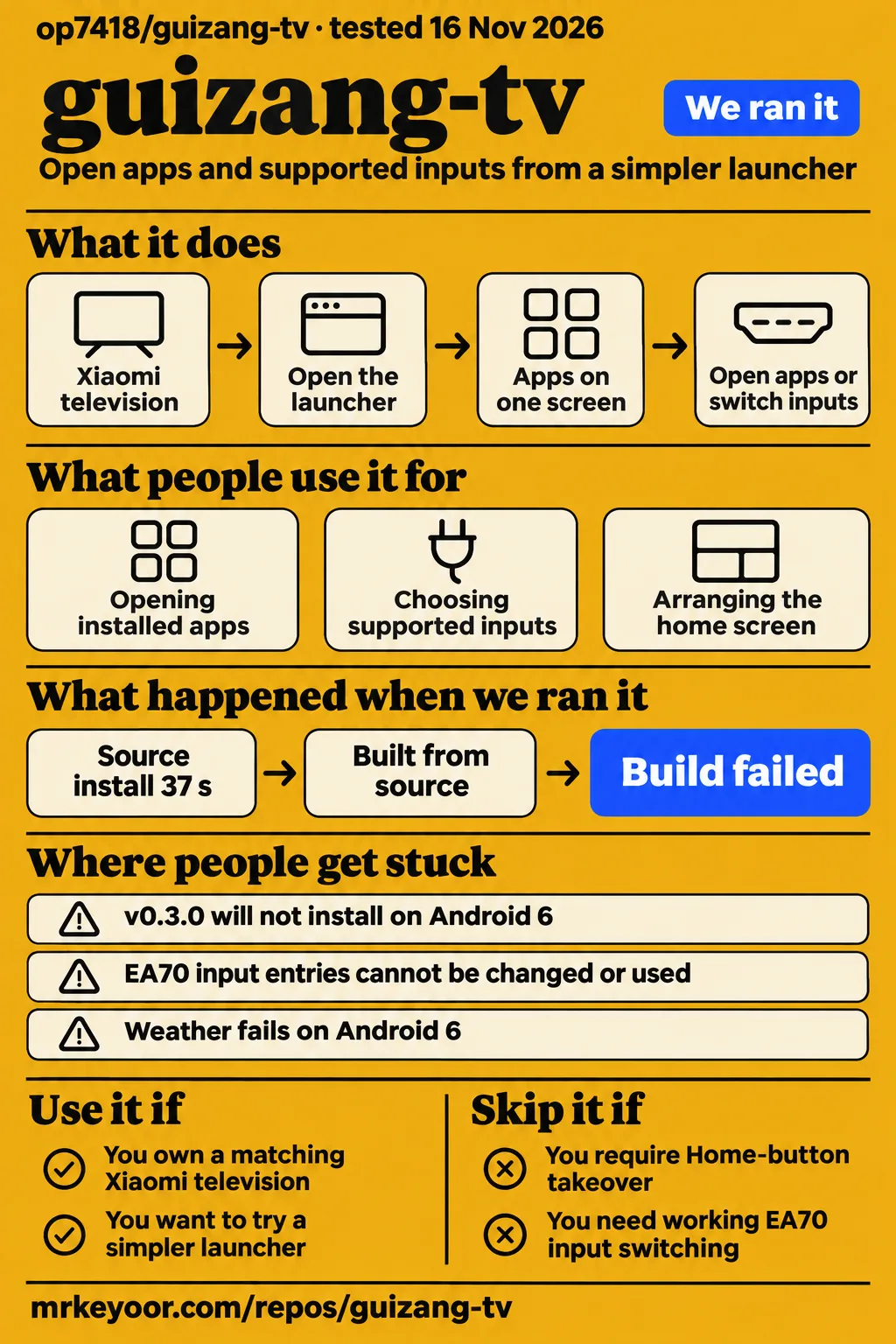
GuiZang TV leaves Home under Xiaomi's control and focuses on MiTV-MTSU0, so it suits owners who want a simpler screen they can open from the existing app list. Choose it for that ordinary-app trial before changing startup settings. Skip it if your requirement is Home-button takeover, an official Android 6 package or working EA70 input switching. Those requirements conflict with the documented behavior or the supplied installation and input reports. GuiZang TV README, Android 6 report, EA70 report.
The version distinction matters as much as the television model. The official download is v0.3.0, while the README also describes main-branch weather and Codex experiments. SinHom's Android 6 compatibility work and vegure's S75 startup changes belong to contributor builds. Read those as separate choices with separate setup responsibilities. The practical next step is to identify your television's model and Android level, then decide whether the official package or source adaptation matches the job you want to do.
What people use guizang-tv for
The author describes using GuiZang TV for PS5 and Apple TV connections, Bilibili and casting, with frequently used destinations collected on one screen. The README documents a large list, an optional horizontal Dock and packaged wallpapers. These are concrete launcher uses: opening installed applications, choosing supported inputs and arranging the home screen. The project also retains entries for all apps, other inputs, Settings and Xiaomi's original launcher. Author's X post, documented launcher features.
| Who used it | What they wanted | Reported result |
|---|---|---|
| Author op7418 | Keep frequently used apps, console and Apple TV connections together | Described a personal launcher with Bilibili, casting and rotating wallpapers. Author's X post |
| Contributor SinHom | Run it on an older MiTV4-ANSM0 | Reported a compatibility build that installed and opened, with settings, apps, wallpapers and the stock-launcher entry working. Issue #1 |
| Contributor vegure | Open it automatically on an S75 whose configured startup route failed | Reported an accessibility workaround and restart persistence after disabling a Xiaomi configuration service. Issue #6 |
GuiZang TV's public build excludes the upstream cleanup scripts and system-app disabling workflow. That distinction separates changing the screen you open from changing the television's installed system packages. Owners looking for a smaller app list can assess the launcher on that basis; owners looking for package cleanup are considering a broader job. The supplied author post supports the personal launcher use, while the README supplies the public package's scope. Public-build contents and lineage.
What happened when we ran it
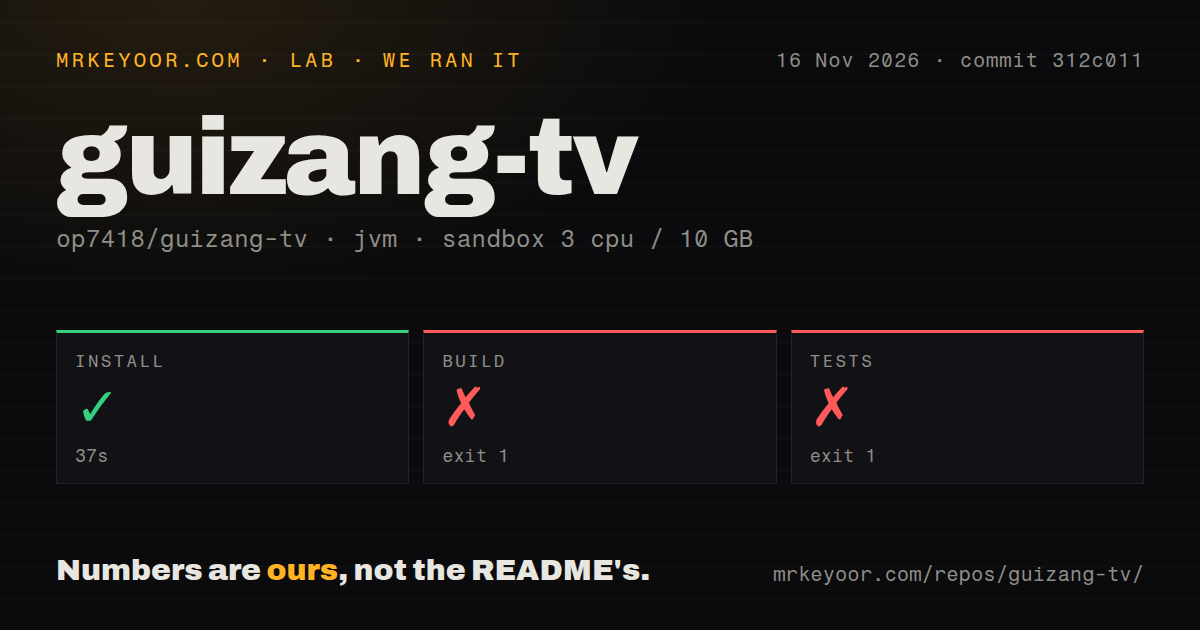
Our run at commit 312c011 recorded a successful 37-second install step, a failed 13-second build and a failed 14-second test command on November 16, 2026. The sandbox configuration recorded 3 CPUs, 10 GB RAM and image label lab-jvm:21. The build and test logs both stopped during task dependency resolution because the Android SDK location was missing. These timings describe the recorded commands, with the environment failure preserved as their outcome.
| Sandbox step | Recorded result | What it tells you |
|---|---|---|
| Install | Succeeded in 37 seconds | The harness installation step completed. |
| Build | Exit 1 in 13 seconds | Gradle stopped while resolving dependencies for :app:compileDebugJavaWithJavac because the SDK location was missing. |
| Tests | Exit 1 in 14 seconds | Gradle stopped while resolving dependencies for :app:testDebugUnitTest because the SDK location was missing. |
Both failing logs say SDK location not found. They request an ANDROID_HOME environment variable or an sdk.dir path in local.properties. The README requests JDK 17, Gradle 8.9, Android SDK Platform 34 and Build Tools 34.0.0. The supplied build log links to Gradle 8.10.2 documentation. The missing SDK location is the recorded stopping condition; the version difference is a separate detail in the evidence. README build requirements.
The repository scan recorded 125 files, approximately 2468 lines of source and a 2.2 MB checkout. It found one CI workflow file, no Dockerfile and no directory named tests. The README says CI builds a Debug APK and runs tests and lint. Those are different observations: the scan describes repository structure, while the README describes the project's workflow. A directory-name scan supplies no count of test cases. Documented CI workflow.
The separate hands-on safety step failed because none of compose.yaml, compose.yml, docker-compose.yaml or docker-compose.yml existed. Its run summary nevertheless claimed deployment through the repository's Docker Compose configuration with every port bound to 127.0.0.1. The failed prerequisite conflicts with that deployment wording, so the safety failure is the usable outcome. Teardown reported ok.
Where people get stuck: installation, HDMI and boot entry
Issue #1 reports that the official v0.3.0 APK requires API 26, while the reported MiTV4-ANSM0 runs Android 6.0.1/API 23. SinHom describes an installation confirmation followed by an unsuccessful install, then identifies the manifest's minimum SDK. That makes Android level an early package-selection check. The same thread later reports success with a compatibility build after lowering minSdk and replacing Java interfaces unavailable on API 23. SinHom's installation and compatibility report.
| Symptom | Evidence | Practical response and status |
|---|---|---|
| v0.3.0 will not install on Android 6 | Issue #1 identifies API 26 in the package and API 23 on the television. | Match the package to the Android level; SinHom reports a compatibility branch. |
| EA70 input entries cannot be changed or used | Issue #3 reports both failures and has zero comments. | Use the model-specific HDMI adaptation guidance when investigating the report. |
| S75 stays on Xiaomi's home screen after restarting | Issue #6 reports the configured system target and enabled app switch on OS3.0.106.0.UFTMATV. | The contributor investigates startup timing and reports a fork-based workaround. |
| Weather fails on Android 6 | SinHom reports HTTPS TLS or certificate-chain failures. | The reported HTTP experiment was excluded from the PR. |
The README says PS5 and Apple TV are entry names, rather than automatically detected devices. On adapted models, its documented defaults lead to HDMI 2 and HDMI 1 respectively; ports should match the actual wiring. Xiaomi-specific calls are concentrated in XiaomiControls.java, and the README explicitly says adding a model name alone does not complete adaptation. The EA70 report therefore belongs beside the shortcut description when deciding whether this launcher meets an input-switching requirement. EA70 issue #3, HDMI adaptation guidance.
Startup workarounds belong to their exact firmware
Vegure reports that an S75 running OS3.0.106.0.UFTMATV stayed on Xiaomi's launcher after full restarts despite the configured startup target and enabled in-app switch. The issue describes a startup call before user unlock, a null launch intent and configuration clearing associated with compliance checks. It also reports that a boot receiver failed to receive its broadcast while the package carried a stopped flag. These are the contributor's findings from that television. S75 startup investigation.
The contributor's fork used an accessibility route, then added a boot-receiver route after identifying configuration restoration by com.mitv.cloudcontrol. A later comment reports restart persistence after disabling that service. Home continued to return to Xiaomi's launcher. The distinction between opening after restart and owning Home is useful here: an automatic entry can work while the remote still takes the household back to the stock screen. The README likewise treats experimental boot entry and default-launcher selection as separate settings. Fork updates, documented Home behavior.
SinHom's Android 6 thread records a different startup problem: an elapsed-time boot token could repeat and cause the gate to skip launching. The contributor reports changing that token to /proc/stat btime and updating the PR #2 branch. The same discussion describes an additional private reassert mechanism separately from the submitted changes. Those distinctions help a developer locate the relevant implementation instead of combining every successful comment into one assumed package. Android 6 startup updates.
Bundled wallpapers can change on TV; importing yours takes a build
GuiZang TV lets owners select packaged wallpapers on the television, while adding new image files uses the source-build workflow. The README accepts 1 to 15 JPEG, PNG or WebP images and documents a Pillow preparation script. It says the script preserves originals, produces copies with a longest edge of 1920 pixels and removes EXIF. Generated local assets take priority after rebuilding, while the bundled photographs remain in the APK. Wallpaper preparation workflow.
Home-item editing happens on the television: the README documents adding, hiding, sorting and undoing edits, with up to nine entries. Settings also contains layout, font, focus and background choices. Wallpaper rotation defaults to five minutes and offers one-, five-, fifteen- and thirty-minute intervals. These controls answer different needs from importing a new family photograph. An owner rearranging existing entries can work in Settings; a developer adding image files follows the preparation and build steps. Home editing and wallpaper controls.
The official APK is offline; main adds optional network features
The README says v0.3.0 remains offline and the basic launcher needs no account or accessibility service. Main-branch weather and Codex experiments are disabled by default; the Codex experiment connects through a computer on the same local network and uses that computer's Codex login and quota. The README explicitly excludes the Codex feature from the official v0.3.0 APK and describes weather as awaiting a released APK. Release and experiment descriptions.
SinHom reports HTTPS weather failures on Android 6 and successful weather display after changing endpoints to HTTP during a private experiment. The comment explicitly excludes that fallback from the PR. For ordinary installation, the README instead directs owners to a local APK route or authorized ADB, followed by opening 归藏电视 from Xiaomi's application list. It says debugging can be disabled afterward. Owners who configured automatic entry should follow the linked disable-and-restore procedure before removal or downgrade. Weather experiment, installation and removal guidance.
Chinese documentation sets the support path
GuiZang TV's supplied README and sampled compatibility discussions are in Chinese, and the README contains no English documentation link. English-reading owners will need those model names, firmware strings and Chinese setting names when following installation or discussing a failure. The public package name is io.github.op7418.guizangtv; the application appears as 归藏电视. The README says this package does not overwrite upstream CleanYourTV or the author's private trial package, and settings do not migrate automatically. README installation and package details.
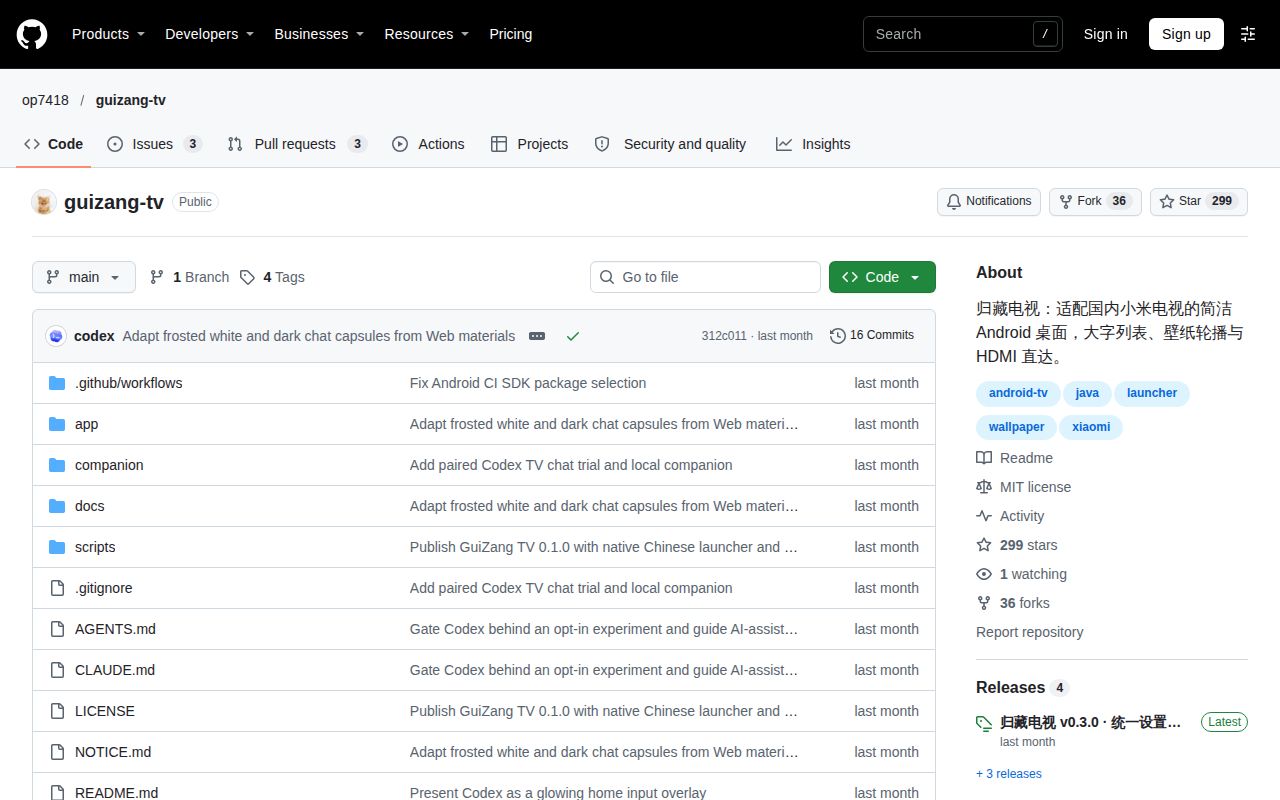
The supplied repository metadata records an October 22, 2026 last push, and the release record identifies v0.3.0. The sampled discussions include detailed compatibility work alongside the unanswered EA70 report. For a useful issue report, the README asks for television model, Android and firmware versions, and reproduction steps, with private identifiers removed. That is also a useful checklist for reading existing reports: match the device and package before treating another owner's result as relevant to your setup. Repository metadata, reporting guidance.
GuiZang TV vs CleanYourTV and CleanFrame
GuiZang TV implements a Xiaomi-focused Android launcher; CleanYourTV documents an Android cleanup workflow, and CleanFrame was built for Samsung The Frame running Tizen. The GuiZang TV README identifies CleanYourTV as its starting lineage and CleanFrame as visual inspiration. Those relationships explain the shared ideas while leaving the platform and installation responsibilities distinct. Choose by the television and the changes you intend to make before comparing the appearance of their home screens. GuiZang TV acknowledgments.
| Project | Documented distinction | Pick it when |
|---|---|---|
| GuiZang TV | Native Java Xiaomi launcher; the public build excludes upstream cleanup scripts and system-app disabling. | You want to try the launcher on a matching Xiaomi television. |
| CleanYourTV | CleanYourTV documents backing up installed packages and settings, disabling selected packages and installing a native launcher. | Package cleanup is part of the job. |
| CleanFrame | CleanFrame's author built it for a Samsung The Frame running Tizen. | You want a starting point for adapting a Samsung Tizen home screen. |
CleanYourTV describes standard Android debugging, package backups and pm disable-user, with restoration based on recorded state. CleanFrame describes a browser preview followed by a Samsung-specific installation process using the owner's identity and certificates. GuiZang TV's README says its Android interface uses native Java and does not transplant Tizen runtime code or CleanFrame's photographs. These primary-source distinctions support a platform-and-workflow comparison. CleanYourTV README, CleanFrame README, GuiZang TV implementation.
What the other reviews get wrong
HotRepo groups people who want to manage wallpapers, apps and accounts on the television into its bad-fit description. GuiZang TV's README makes a more useful distinction: owners can edit home entries and select packaged wallpapers on the television, while importing new wallpaper files requires rebuilding. It also says the project supplies no application account-login functionality. Those are separate capabilities, so a recommendation should address each task rather than treating all on-TV management as one requirement. HotRepo review, documented editing and account behavior.
The supplied overview gaps also make package and model names important. Android 6 advice needs the official package's API 26 floor beside SinHom's compatibility branch. HDMI advice needs the EA70 failure beside the README's model-specific adaptation instructions. Both details change the download decision: a familiar brand name and a visible input label are insufficient grounds for selecting a package. The installation and input reports provide more useful distinctions than a general claim that the launcher supports Xiaomi televisions. Android 6 issue #1, EA70 issue #3.
FAQ
Issue #1 identifies API 26 as the official v0.3.0 APK's minimum, above the reported Android 6 television's API 23. The supplied questions also concern contributor compatibility builds, S75 startup behavior and EA70 inputs. Those questions refer to different packages and firmware paths. The answers below keep the named device or branch attached to its result, so an installation answer does not silently become a claim about startup or HDMI support. Compatibility discussion.
Why won't guizang-tv v0.3.0 install on my Android 6 Xiaomi TV?
The MiTV4-ANSM0 in issue #1 runs Android 6.0.1/API 23, below the official APK's reported API 26 minimum. SinHom describes the unsuccessful installation and identifies the manifest mismatch. The same thread recommends documenting Android 8.0/API 26 as the package requirement. For that reported television, selecting the official v0.3.0 APK leads directly to the version mismatch described in the issue. Issue #1 installation details.
Is there a working Android 6 compatibility build?
SinHom reports a working compatibility build on MiTV4-ANSM0 after lowering minSdk to 23 and replacing unavailable Java interfaces. The reported working functions include installation, launch, Settings, the app list, wallpapers and the stock-launcher entry. Later comments describe a boot-token correction in the PR #2 branch and distinguish additional private startup changes. The thread is the source for those contributor-build results. SinHom's compatibility updates.
Why doesn't guizang-tv open after reboot even though start_3rd_app and the in-app switch are configured?
Vegure reports that exact failure on an S75 running OS3.0.106.0.UFTMATV, with both settings configured. The investigation describes execution before unlock and subsequent clearing of the configured target. The contributor then reports a fork using accessibility and boot-receiver routes, followed by identifying the service that restored configuration. On that device, the two documented settings alone did not produce the requested restart behavior. S75 issue #6.
Does successful boot entry on OS3.0.119 depend on startup advertising delaying the launch until after unlock?
The advertising-delay explanation appears as a question from the issue #6 author about OS3.0.119. The contributor asks how the maintainer's launch timing relates to user unlock and whether advertising supplies a delay. The concrete evidence in the report concerns the S75 firmware named above, where the contributor describes the startup path running before unlock. Timing question and device investigation.
Does Xiaomi firmware clear the configured boot app through its app-compliance checks?
The issue #6 author reports compliance-related clearing on the S75 firmware and asks whether it also happens on the maintainer's firmware. That question follows the contributor's analysis of why the configured startup target failed on the reported television. The same discussion separates this target-clearing problem from the stopped-package problem affecting boot broadcasts. Compliance and startup investigation.
Can the official project offer an optional accessibility fallback for boot entry?
A contributor offers to submit an optional accessibility route in issue #6 after reporting success in a fork. The comment describes using the appearance of Xiaomi's launcher window as a launch trigger and retaining the project's existing startup switch and bookkeeping. The public README describes the basic launcher as requiring no accessibility service. These are the proposal and documented public requirements in the supplied evidence. Contributor proposal, README requirements.
How can I change the PS5 and Apple TV input shortcuts or get input switching working on a Xiaomi EA70?
Issue #3 reports that an EA70 owner could neither change the entries nor switch inputs, and the supplied thread has zero comments. The README says PS5 and Apple TV are labels, ports must match the wiring, and Xiaomi-specific implementation lives in XiaomiControls.java. Its adaptation guidance explicitly requires more than adding a model name. EA70 report, input adaptation guidance.
What we have not tested yet
Our build and test commands stopped during dependency resolution, before Android application validation; the separate Compose attempt failed its prerequisite. The successful harness install step is not evidence of APK installation on a television. We have not tested remote navigation, HDMI switching, Home behavior, wallpaper rendering, voice, casting, live playback, standby wake or power-loss recovery. The sandbox image label supplies no proof of the actual Java runtime or operating-system version, and the supplied raw toolchain evidence does not resolve those versions.
The contributor results remain attributed observations rather than reproduced results from our lab. The supplied evidence does not establish an official release containing the Android 6 branch or accessibility proposal, an EA70 fix, or a confirmed advertising-delay dependency on OS3.0.119. Vegure's latest supplied update still identifies standby wake and power-loss cold starts as unresolved. The README's complete television-and-Mac test combination also leaves other computer and television combinations outside that demonstrated setup. These records supply no comparative performance, long-term household reliability or security assessment.
The useful next step is the README's ordinary-app trial: match the official package to the television's Android level, install through a supported route and open 归藏电视 from Xiaomi's app list. Exercise the applications and inputs your household uses before configuring automatic entry. Owners who already configured startup should read the linked disable-and-restore instructions before uninstalling or downgrading, because the README directs them to clear and check that configuration first. Trial and recovery guidance.