The inspection commands make generated video reviewable
A coding agent cannot sit through a clip and decide whether the pacing feels wrong. fframes works around that blind spot with outputs the agent can parse. inspect samples the video and reports missing fonts, clipped text, bad SVG, or panics with a time and scene. strip makes a contact sheet, onion blends a movement into one image, and audio analyze reports loudness, peak, clipping, and silence. That is the project's clearest reason to exist.
Humans still get a GPU preview window and a browser editor with a timeline. The final video comes from render, while snapshot comparisons mark changed pixels against approved PNG files. A scene can be addressed by frame, seconds, percentage, or a named scene offset. Add --json and the diagnostic output becomes suitable for an automated loop. This is a thoughtful toolset for reviewing code-generated motion without claiming a model can literally watch or listen.
Rust and SVG replace the familiar React composition model
Each frame is an SVG tree returned by a Rust function. The svgr! macro mixes markup with expressions, and timeline helpers map frame positions to transforms and easing. Static markup is cached, Skia draws through Metal on macOS or Vulkan on Linux and Windows, and FFmpeg's libraries handle encoding. Shader layers accept SkSL or Shadertoy-style GLSL when SVG cannot produce the desired image.
That stack gives you explicit source and native rendering, but it asks for Rust fluency. The simplest manual start installs cargo-fframes, creates a project, and opens a release-mode preview. Templates cover single or multiple scenes, horizontal, portrait, square, and UHD output. Existing examples include product motion, podcast visualizers, vertical clips, shaders, and conference splash screens. They are useful starting points, though none replaces learning ownership and lifetimes when the generated code stops compiling.
The bundled coding-agent skill is the bridge. Its Markdown guides cover the workflow, API, visual design, and sound, then steer the agent from an empty folder to an MP4. The framework's verbose API is easier for a code generator than for someone expecting a direct manipulation editor. You should still watch the preview. The diagnostics can catch clipped text and silence, but they cannot judge whether a joke lands or a transition feels cheap.
What happened when we ran it
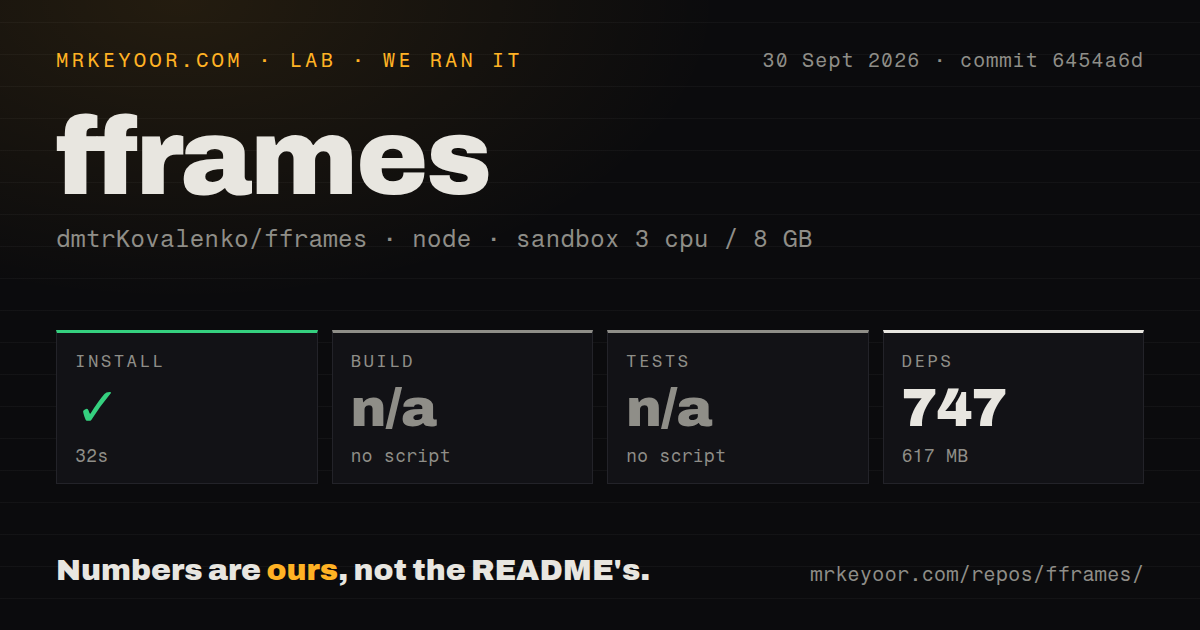
Our sandbox installed the pnpm dependencies for commit 6454a6d in 32 seconds. It added 747 packages and occupied 617 MB on disk. The container had 3 CPUs, 8 GB of RAM, Node 22, no secrets, and no elevated privileges. The install passed without an error. The checkout itself was 632.2 MB, with 2,082 files and about 62,424 lines of source.
No root build script or target was available to our harness, so the build step was skipped. The same was true for tests: there was no root test script or target to run. Our scan found one CI workflow, no Dockerfile, no tests directory, and pnpm workspaces. These facts do not say the Rust crates cannot build. They say this measured Node workspace did not provide the standard gates our runner looks for.
We therefore did not render a frame, compile the Rust workspace, or test the GPU paths in this run. The distinction matters because most of fframes lives beyond pnpm install. A successful 32-second dependency installation is evidence that the JavaScript workspace resolves at that commit. It is not evidence about FFmpeg linking, Skia, codec output, browser playback, or video correctness. Plan a platform-specific render check before adopting it.
Native media dependencies are the real setup cost
Rust is required, and editor contributors also need Node.js plus pnpm, just, cargo-watch, wasm-bindgen-cli, and wasm-pack. Debian users are told to install FFmpeg, x264, x265, Opus, VPX, Clang, libclang, NASM, Yasm, Ninja, and ALSA development packages. macOS has its own Homebrew list. Common macOS and Linux architectures can download prebuilt Skia and FFmpeg artifacts, while other combinations may compile them.
Windows follows a different route. The README specifies an FFmpeg 9.0 shared build and LLVM, with FFMPEG_DIR, LIBCLANG_PATH, and PATH pointing to the right files. Codec features that request a source FFmpeg build are unsupported there. CPU mode avoids Skia, but it also removes the preview window and renders more slowly according to the project. These are normal native-media complications, and they make a container-free setup guide especially valuable.
Cached native builds can also fail on a different processor if they were compiled with machine-specific flags. fframes provides a build-portable feature for artifacts that move across machines. That detail belongs in CI from day one. A cache that saves time on one runner and crashes with SIGILL on another is worse than rebuilding, particularly for a renderer used in unattended batch work.
Two open reports touch the last frame and color output
Issue 156 reproduces an H.264 B-frame input losing its final frames at end of file. An open pull request was working on draining delayed frames when we checked. Issue 157 reports BT.709 input being converted into native PNG frames with colors resembling BT.601. Neither report came from our sandbox, but both concern output correctness rather than cosmetic inconvenience. Test your real codecs and color path before producing a large batch.
The project was pushed on October 1, 2026, and v1.1.0 shipped on September 30 with a fix limiting codec threads during parallel segment rendering. GitHub listed 1,582 stars and four combined open issues and pull requests. That is active maintenance around a very young 1.x release. fframes is a serious experiment with a useful inspection model. Its best buyer is ready to own a native Rust video stack and treats the one-line skill install as the start of the work.