A scene file makes the lesson repeatable
Change the transformation in a Python scene, then render the explanation again. Manim Community makes sense when that is how you want to revise a lesson. Its README example creates a square, transforms it into a circle, and fades it out through explicit scene instructions. You can inspect the sequence in a text file. For an explanation whose geometry carries the argument, that control is a good reason to learn the library.
The cost is that you author the animation in Python. The example asks you to define a Scene and its construct method before running a command. I would choose this approach for teaching material that needs repeated revisions or related scenes with shared logic. For a presenter who wants to arrange every movement visually, the code is extra work before the explanation gets any better.
What happened when we ran it
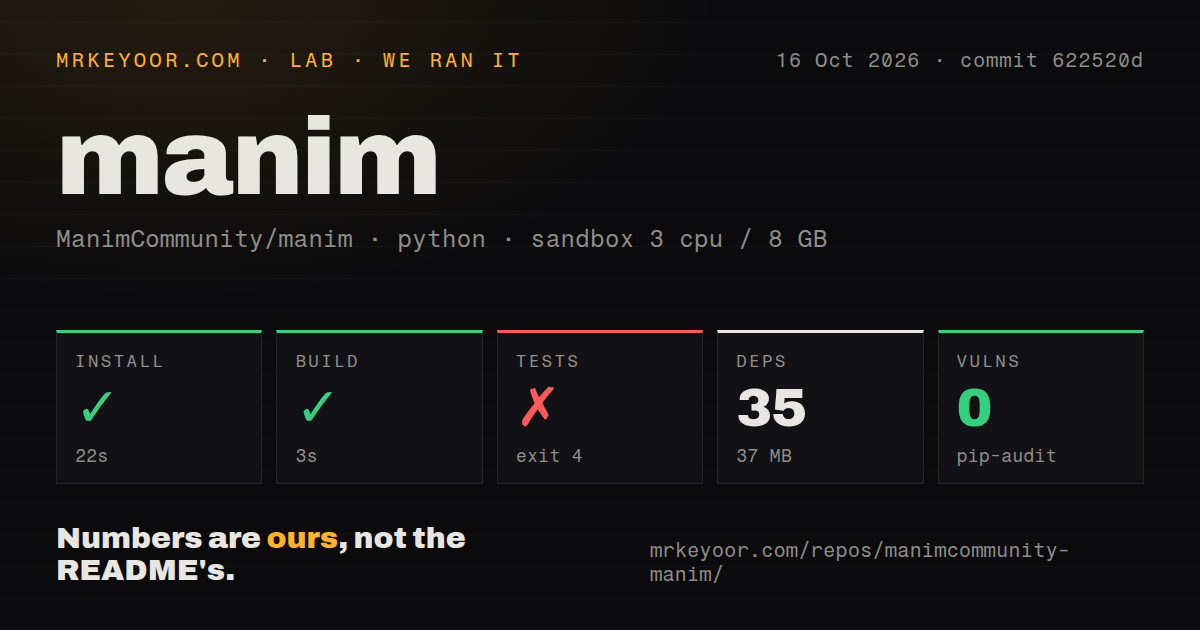
Our sandbox installed Manim Community commit 622520d in 22 seconds and built it in 3 seconds, but the test step failed after 6 seconds with exit code 4. The run took place on October 16, 2026, with 3 CPUs and 8 GB of RAM. The recorded image was ghcr.io/astral-sh/uv:python3.12-bookworm. That label does not establish the actual interpreter or operating-system version, which would require the raw toolchain logs.
The failure occurred while loading tests/conftest.py. Its import cairo statement raised ModuleNotFoundError: No module named 'cairo'. That is the extent of the diagnosis: the test process could not import that module. The supplied log does not explain why it was unavailable, and it gives no passing-test count. A successful build therefore leaves the test setup unresolved. It does not establish a rendering defect.
Installation recorded 35 dependencies and 37 MB on disk. Pip-audit reported 0 known vulnerabilities in this run, which is an audit result rather than a security guarantee. The checkout itself contained 1,398 files, about 101,592 source lines, and occupied 17 MB. These measurements describe the repository workflow we ran. They provide no rendering-speed benchmark or visual-quality result, so I would still require an exported lesson before adopting it for a deadline.
Local use needs a prepared Python environment
The official local guide recommends an isolated project managed with uv. On Linux it lists a C compiler, Python development headers, pkg-config, and the Pango and Cairo development libraries. Its macOS path calls for Cairo and pkg-config through Homebrew. Those documented requirements deserve attention before you treat a package command as the whole setup. They do not, by themselves, explain the missing import in our sandbox.
Formula rendering adds another choice. The guide describes LaTeX as optional if plain text is sufficient, and gives operating-system-specific distribution advice for people who need it. It also documents an optional Typst dependency. The basic local workflow needs a scene file and a working local environment, without a hosted rendering account or API credential. For an initial look, the README links an online Jupyter environment and a maintained Docker image.
Community scenes and ManimGL instructions must stay separate
The Community README explicitly warns that mixing its installation instructions with those for 3b1b/manim causes problems. Both projects carry the Manim name and share an origin, which makes an old tutorial an easy source of confusion. Check the repository behind an example before copying its commands. A recognizable square-to-circle animation does not tell you which edition produced it.
ManimGL is the alternative to consider when studying Grant Sanderson's own video workflow. Its README identifies the package as manimgl and warns that older video code may be incompatible with the current version. Motion Canvas instead combines a TypeScript animation library with an editor preview and targets informative vector animation synchronized with voice-overs. Choose between these authoring models using a scene you actually need to explain, rather than the reputation of a demonstration video.
Version 0.22.0 requires some script changes
The October 8, 2026 release notes replace overlapping output switches with a single format setting. They also separate opening a finished file from live OpenGL preview. Ordinary scenes using default settings need no changes, according to the release, while scripts and configuration relying on removed options need updates. A team with automated exports should read that migration section before changing its pinned version.
Maintenance is current, although contribution expectations are restrictive. GitHub records a push on October 20, and the issue feed contains discussion updated on October 23. The README says a major refactor is underway and that new-feature contributions generally will not be accepted during it. If adopting Manim depends on getting your own feature merged soon, that is a concrete reason to wait or keep the change in your own fork.
I rate documentation 4/5 for its runnable scene example, platform-specific local guide, and explicit release migration notes. That is a judgment of documented coverage, with 5 reserved for coverage verified through the relevant workflows. Setup ease and runtime maturity remain unassessed because our tests stopped at the import, and community support quality remains unassessed because an active feed cannot establish response quality. Before moving a course onto Manim Community, export one representative scene with your own formulas and keep its working environment pinned alongside it.