Cline puts approval beside code and shell access
Cline can edit project files, execute terminal commands, and connect external tools through MCP. The consequential choice is how much of that work you approve yourself. Its README describes a Plan mode for discussing an approach and an Act mode for carrying it out, with approval for edits and commands unless you enable auto-approve. I'd start with a contained change where you already know what a correct diff should look like.
The engine reaches you through a CLI, VS Code extension, desktop app, and SDK. Rules in .clinerules carry project conventions into supported clients, while checkpoints let you undo agent edits. Those are useful controls when a model changes several related files. They don't establish that the resulting application behaves correctly. The 2 failed daemon shutdown cases in our run are a reminder to keep verification separate from an agent's account of its work.
What happened when we ran it
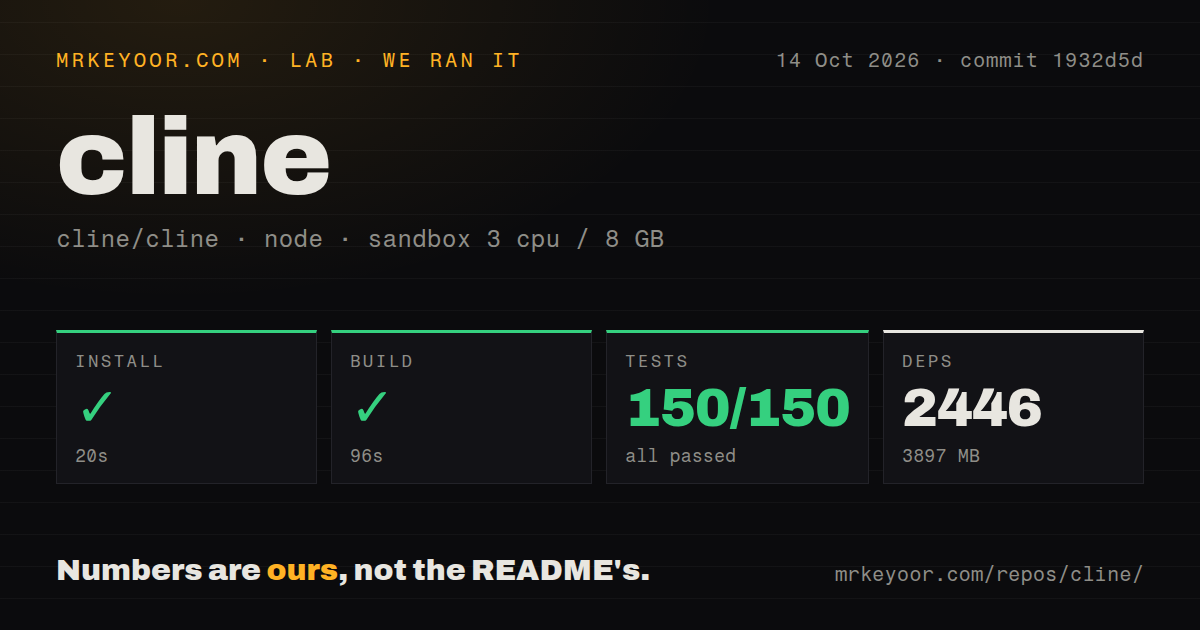
Our Cline install pulled 2,446 packages in 20 seconds and occupied 3,897 MB; the build succeeded in 96 seconds. We ran commit 1932d5d on October 14, 2026, in an unprivileged Debian container with 3 CPUs, 8 GB of RAM, and no secrets. The checkout itself occupied 72.5 MB across 4,383 files. Contributing to this monorepo requires considerably more disk space than its initial download suggests.
The complete test command exited with code 1 after 325 seconds. A headline Vitest summary recorded 150 passed and 0 failed, but the log contains several separate suites. The CLI summary reports 1,268 passing tests, and the core unit summary reports 3,045 passing with 107 skipped. These are separate summaries, so treating the headline as the total would conceal the failure that ended the command.
The later src/hub/daemon/shutdown.e2e.test.ts suite reported 2 failures. Its surrounding summary shows 5 passed and 2 failed. The supplied tail doesn't include the assertions or an underlying exception, so we can't identify the cause. Our scan also found 18 CI workflow files and no Dockerfile. A directory literally named tests was absent, yet the log plainly shows tests beside source files. Directory naming alone would have given the wrong impression.
Provider choice comes with configuration work
Cline supports hosted providers and local endpoints such as Ollama and LM Studio. Hosted use needs the relevant account or credentials, while a local endpoint needs a working model service on your machine. The 96-second source build says nothing about whether your chosen model can follow tool instructions or handle your repository. Our sandbox held no secrets and supplied no evidence about model quality, request costs, or successful agent tasks.
The project README also describes headless CLI use, scheduled agents, and messaging connectors. Those make sense for recurring jobs with explicit access boundaries. A Slack connector needs its own tokens and secrets, and a scheduled agent continues independently of your terminal. If you only want help inside an editor, leaving those features unused keeps the operational burden closer to the original task.
The latest SDK excludes a remote plugin path
Release sdk/sdk/v0.0.94, published October 16, 2026, removes in-process plugin execution and its silent fallback. Plugins must use worker threads or the subprocess sandbox. Its release notes say hosts missing the plugin bootstrap fail plugin loading explicitly. They also say the SSH remote hub ships without that bootstrap and reports plugin tools as missing. That's a concrete blocker for a remote workflow built around plugins.
The monorepo's 4,383 files cover products with different packaging boundaries. The README's product index says the JetBrains plugins aren't currently open sourced, even though the main repository uses Apache-2.0. Anyone requiring source access to every installed editor component should stop at that distinction. A shared engine doesn't make every client equally inspectable, and the latest SDK tag should not be read as a release number for the entire product family.
Active development still leaves client-specific reports
GitHub recorded a push on October 16, 2026, with 70,383 stars and 1,667 open issues and PRs combined. Recent activity includes an open VS Code tool-call report where the model requests an unavailable write_file tool. An open CLI report describes working-directory state staying tied to startup after a session directory change. These concern different clients and aren't explanations for our daemon test failures.
Aider is worth considering if you want a terminal workflow centered on changes in a Git repository. Continue is a useful comparison for teams choosing an editor assistant. Neither alternative erases the need to review generated code. Cline earns a trial when provider choice, visible approvals, and reusable agent tooling are requirements you actually have. For source contributors, budget the measured 3,897 MB environment and inspect the shutdown failures before making a green full suite a release prerequisite.