Figma Console MCP can change a design file through its Desktop Bridge plugin. For a design-system team, the adoption question is whether it can complete the particular token or component change the team needs. The supplied sandbox run establishes a successful source build, failed tests and an unresolved dependency audit. It does not establish a working live connection to Figma.
The README documents design-data extraction, variable management, token exchange and design-code checks. These are upstream capabilities, separate from the install, build and test results measured here.
What happened when we ran it
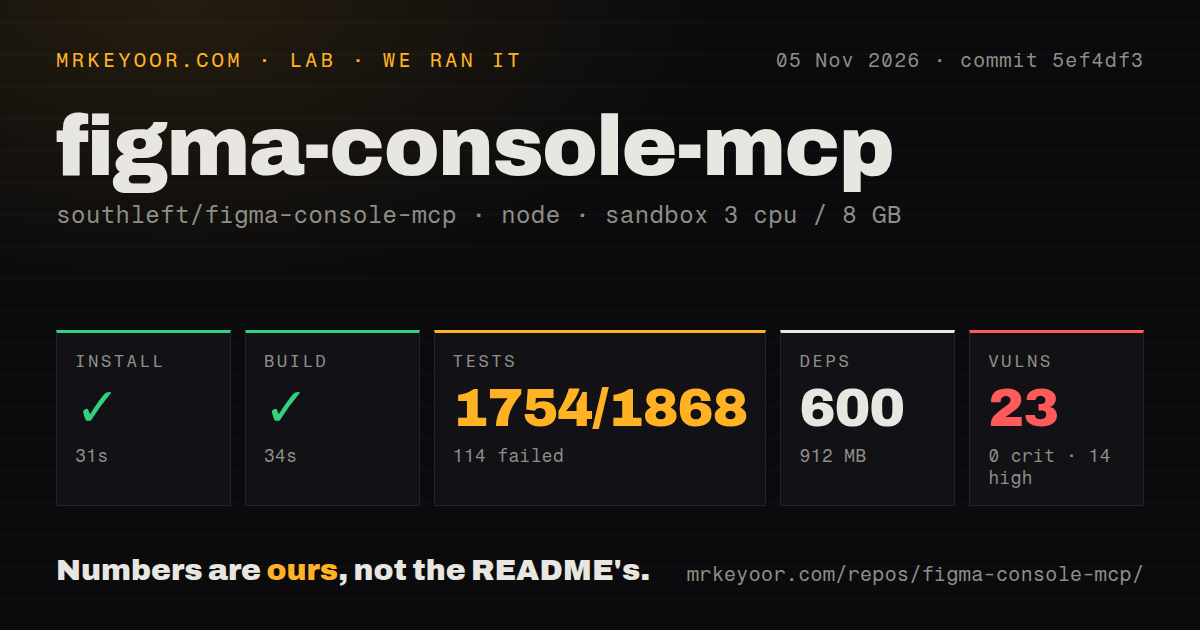
Figma Console MCP built in 34 seconds in our sandbox, but 114 of 1,868 tests failed and npm audit reported 23 known vulnerabilities. Dependency installation succeeded in 31 seconds, recording 600 dependencies and 912 MB on disk. The run used commit 5ef4df3 on November 5, 2026.
The test command exited 1 after 29 seconds. Jest reported 1,754 passing tests and 114 failures. Six suites failed and 74 passed, out of 80. The failing suite names cover cloud relay, accessibility tools, port discovery, HTTP transport, accessibility scanning without script execution and the WebSocket bridge.
Those names identify where to investigate. The supplied log tail contains no assertion failures or underlying exceptions, so it cannot establish a missing service, a sandbox restriction or a product defect as the cause. A successful build also does not establish that the bridge can reconnect or complete an edit.
The recorded configuration was 3 CPUs, 8 GB RAM and image label lab-node:22. Actual runtime and operating-system versions require the raw toolchain logs. The checkout scan found a tests directory and one CI workflow file, with no Dockerfile detected. No live Figma edit or token round trip was measured.
Investigate the audit before adoption
The npm audit result listed 14 high, 1 moderate and 8 low vulnerabilities, with none critical. The supplied record does not identify affected packages, dependency paths or deployed reachability. It supports further investigation without establishing that the hosted relay or a Figma file is exploitable.
Obtain the package-level report for the exact revision you intend to use. A later dependency update would need its own verification; the supplied record contains no later audit result.
Cloud writes still require Figma Desktop
The README requires Figma Desktop and the Desktop Bridge plugin for Cloud Mode. Commands travel through a hosted relay to the plugin running in your file. Cloud Mode removes local Node installation from that setup, but browser-only Figma users still need the desktop application for this write path.
The local route documents Node.js 18+, an MCP client and a Figma personal access token. Import the plugin manifest and run the plugin in the intended file. Unpaired Remote SSE is read-only. Local Mode is required for codebase extraction because those tools read and write local files.
The Cloud Mode authentication instructions need care. The detailed setup requests a Figma personal access token as a bearer token, while the installation comparison table labels Cloud Mode authentication automatic OAuth. The supplied documentation does not resolve that inconsistency. Confirm the requirements for the endpoint you choose. Neither authentication flow was reproduced in the measured run.
Use a copied file to check the token workflow
The README documents bidirectional token sync, including creates, renames, alias retargeting and replace-gated deletes. It also describes a dry-run strategy for previews. These documented controls give a design-system maintainer specific behavior to check before connecting a shared library.
Start with a copied file and a small token collection whose expected values you know. Request a preview, inspect the proposed changes, apply a small edit and compare the resulting variables with the expected values. Include an alias if your system uses aliases. This is a proposed acceptance exercise, not a token round trip completed by the lab.
Plugin updates also need attention. The README says Figma caches plugin files and that some releases require re-importing the manifest. Updating the server alone may leave an older plugin running. Check the selected release's re-import instructions when investigating a missing method.
Compare the workflow you need
Framelink simplifies Figma API responses to relevant layout and styling information for coding agents. Its README describes giving an agent a file, frame or group link to implement a design. Consider it when supplying design context is the task. The supplied MrKeyoor Framelink review addresses that use case; this review focuses on Console MCP's write requirements and measured source-run results. No comparative output-quality test was supplied.
Figma's first-party MCP server supports native canvas writes as well as design context. Its documentation describes a remote connection without Figma Desktop. Canvas writing requires the remote Figma MCP server and a Full seat to write outside your drafts. Console MCP's write support alone is therefore insufficient reason to choose it over the first-party service.
Documentation earns 4/5 on a coverage rubric: 1 means no usable setup route, 2 means a route is described but prerequisites are unclear, 3 means material setup gaps remain, 4 means distinct routes and configuration boundaries are explained, and 5 requires verification across those routes. The README explains local, cloud and read-only routes, plugin maintenance and token-sync boundaries. Its authentication inconsistency remains a caveat, and the routes were not verified live.
Setup ease and maturity remain unassessed because no live bridge operation was measured. Issue activity and maintainer response quality were not assessed. Before granting access to a shared library, complete the copied-file token exercise on the revision you intend to use.