webpack review
webpack 5.109.2 starts from one or more module entries, builds a dependency graph, and emits browser, Node, or other target assets. Loaders translate matched modules; plugins join compiler phases for HTML, CSS extraction, caching, analysis, federation, and output work. The current patch fixes aliases aimed at package directories ending in .js, CSS source-map names, expired filesystem-cache cleanup, and dead CommonJS property access. Our browser-targeted esbuild check failed because webpack itself is Node build infrastructure, not code meant to ship in a page.
webpack 5.109.2 took 4.3 seconds, ran a native or compile step, and left 70 packages using 31 MB in our sandbox, with 0 audit findings. Keep it where loaders, plugins, Module Federation, or exact chunk control justify that machinery; start simpler for a new ordinary app or library.
We installed it
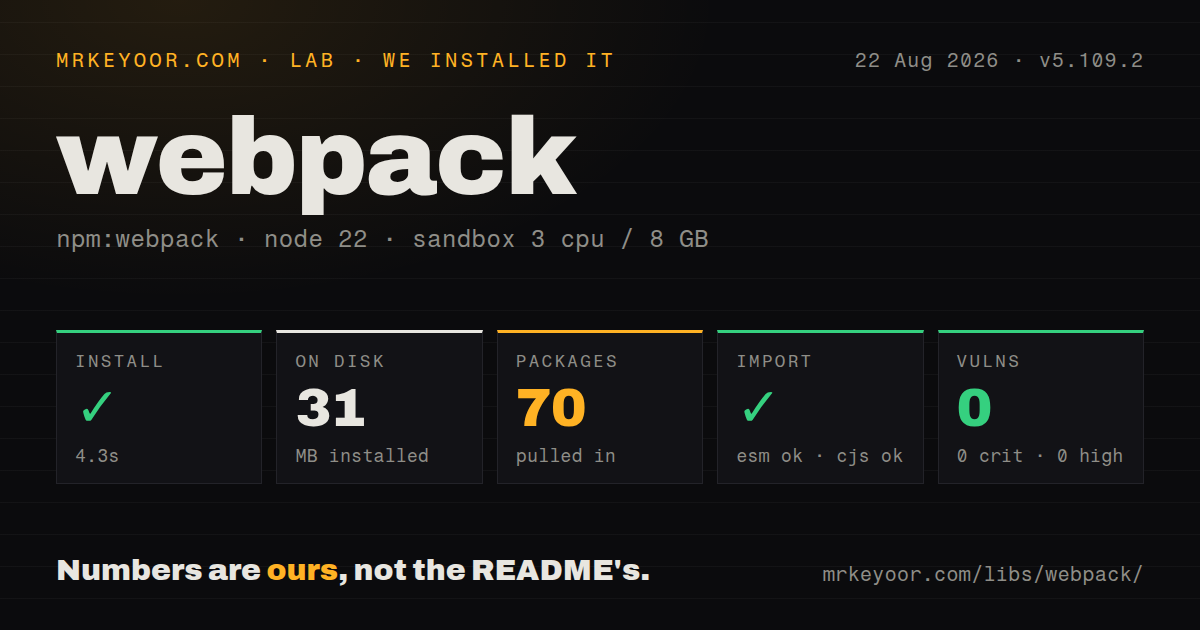
| Install | ✓ · 4.3s | 70 packages on disk · 31 MB · native build step |
| Import | ✓ | ESM import works · require() works · CommonJS package |
| Browser | n/a | could not be bundled for the browser (Node-only code, most likely) |
| Types | ✓ | TypeScript types bundled |
| Known vulns | 0 | 0 critical · 0 high · 0 moderate · 0 low (npm audit) |
Answers from our run
Does webpack install cleanly?
Yes. In a fresh container with an empty cache, npm install webpack finished in 4 seconds, leaving 70 packages and 31 MB on disk, after a native build step. npm audit reported no known vulnerabilities.
Can webpack run in a browser?
Not directly: esbuild could not bundle it for the browser in our run, which normally means it depends on Node built-ins. Use it on the server, or find a browser-targeted alternative.
Does webpack work with both ESM and CommonJS?
Yes. Both import 'webpack' and require('webpack') worked in Node 22 in our run. The package is published as CommonJS.
Does webpack include TypeScript types?
Yes, type declarations ship inside the package, so no @types install is needed.
webpack or vite: which should you use?
vite: Choose it for a new web application that benefits from opinionated development serving and defaults. webpack 5.109.2 took 4.3 seconds, ran a native or compile step, and left 70 packages using 31 MB in our sandbox, with 0 audit findings.
When should you not use webpack?
A new conventional web app values quick startup and small configuration. Vite usually reaches that baseline with fewer decisions.
Discussed on
- hnTurbopack, the successor to Webpack626 points
- hnIntroducing Webpack Dashboard441 points
- hnOur long term plan to make GitLab as fast as possible with Vue and Webpack374 points
- hnWhy we switched from Webpack to Vite355 points
- hnWebpack 5250 points
Use it if
- An existing application depends on webpack loaders, plugins, framework adapters, or Module Federation.
- One compiler must coordinate JavaScript, CSS, assets, WebAssembly, code splitting, and custom build hooks.
- A platform team needs precise control over chunks, runtime code, externals, targets, resolution, and emitted filenames.
- Large repeat builds justify a persistent filesystem cache whose invalidation inputs the team can maintain.
- A new conventional web app values quick startup and small configuration. Vite usually reaches that baseline with fewer decisions.
- The job is bundling a small ESM library. Rollup or esbuild exposes a narrower model without webpack's compiler surface.
- Code intends to import webpack in the browser. Our browser bundle attempt failed because core relies on Node build behavior.
- The project cannot own loader and plugin compatibility. Core alone does not compile TypeScript, Sass, Vue, or other source formats.
- Nobody owns the config. Overlapping rules, resolver aliases, plugin hooks, and implicit framework changes make output regressions hard to trace.
Setup reality
We installed webpack 5.109.2 in a fresh Node 22 Bookworm sandbox. npm took 4.3 seconds, ran a native or compile step, and left 70 packages occupying 31 MB. webpack itself was 9,988 KB unpacked with 20 direct dependencies and no peers. npm audit reported 0 known vulnerabilities. The package declares Node >=10.13.0, ships as CommonJS without an exports map, bundles declarations, and loaded through require() and ESM import.
The command-line executable lives in webpack-cli, a separate package that webpack does not list as a peer. Most direct setups add webpack.config.js and specify mode, entry, output, target, rules, plugins, and resolution. Loader order is operational: use arrays execute from the final loader toward the first. Framework CLIs may generate or merge this configuration, so check their supported override path before adding a standalone file.
DefinePlugin performs source replacement at build time. Any credential placed there becomes readable in emitted JavaScript, so restrict it to public constants. Filesystem cache keys need the lockfile, Node version, webpack stack, config, and any local generators that affect output. Version 5.109.2 now removes unreferenced and expired cache packs more consistently, but CI still has to restore a compatible cache directory.
Dynamic import creates asynchronous chunks. Tree shaking works best with ESM, production optimization, and accurate sideEffects metadata; one CommonJS boundary or incorrect package metadata can retain code. Generate stats when output is surprising. Our attempt to bundle webpack itself for browsers failed, matching its Node-only compiler role. Keep webpack, its CLI, loaders, and plugins in development dependencies unless a production server invokes compilation at runtime, which also expands deployment weight and attack surface.
Patterns
Build one browser entry bundle-browser-entry
// webpack.config.js
const path = require('node:path');
module.exports = {
  mode: 'production',
  entry: './src/index.js',
  output: { path: path.resolve(__dirname, 'dist'), filename: 'app.js', clean: true },
};
output.clean removes stale assets inside the configured output directory before emitting the next build.
Run development and production builds add-cli-scripts
{
  "scripts": {
    "build": "webpack --mode production",
    "watch": "webpack --mode development --watch"
  }
}
Install webpack-cli separately because the core package has no CLI peer dependency.
Load CSS imports process-imported-css
module.exports = {
  module: { rules: [{ test: /\.css$/i, use: ['style-loader', 'css-loader'] }] },
};
Loaders execute right to left, so css-loader resolves CSS first and style-loader handles its result.
Copy imported files emit-static-assets
module.exports = {
  module: { rules: [{ test: /\.(png|svg|woff2)$/i, type: 'asset/resource' }] },
};
asset/resource emits a file and exports its final URL without the old file-loader package.
Create an asynchronous chunk lazy-load-feature
button.addEventListener('click', async () => {
  const { openEditor } = await import(
    /* webpackChunkName: "editor" */ './editor.js'
  );
  openEditor();
});
Older browser targets need Promise support for webpack's dynamic import runtime.
Replace a build-time value define-public-constant
const webpack = require('webpack');
module.exports = {
  plugins: [
    new webpack.DefinePlugin({ __API_ORIGIN__: JSON.stringify(process.env.PUBLIC_API_ORIGIN) }),
  ],
};
DefinePlugin writes the replacement into emitted code. A server credential placed here becomes public.
Enable filesystem caching persist-build-cache
module.exports = {
  cache: {
    type: 'filesystem',
    buildDependencies: { config: [__filename] },
  },
};
List local config and generator files whose changes must invalidate cached modules, and key CI caches on the lockfile and Node version.
Create production source maps emit-source-maps
module.exports = { mode: 'production', devtool: 'source-map' };Public .map files can expose source. Upload them privately when only an error tracker should read them.
Leave a server package unbundled externalize-node-package
module.exports = {
  target: 'node',
  externals: { pg: 'commonjs pg' },
};
The deployment must provide pg at runtime because the output retains a require call.
Generate analyzer input export-build-stats
npx webpack --profile --json > stats.jsonStats reveal duplicated modules and unexpected chunks, but the file can expose source paths and module names.
Emit separate page bundles build-multiple-entries
module.exports = {
  entry: { admin: './src/admin.js', shop: './src/shop.js' },
  output: { filename: '[name].[contenthash].js' },
};
contenthash supports long cache lifetimes, and HTML generation must reference each newly emitted filename.
Read targets from Browserslist target-browser-policy
// webpack.config.js
module.exports = { target: 'browserslist' };

// package.json
// "browserslist": [">0.5%", "not dead"]
Webpack target controls its runtime assumptions. Transpiling application syntax can still require Babel or another loader.
Alternatives
| Package | Registry | Pick it when |
|---|---|---|
| vite | npm | Choose it for a new web application that benefits from opinionated development serving and defaults. |
| rollup | npm | Choose it for libraries and builds whose output model centers on ESM. |
| esbuild | npm | Choose it when compilation speed and compact configuration matter more than webpack plugin compatibility. |
| rspack | npm | Choose it when an existing webpack-shaped stack needs a faster Rust-based compiler and its plugins are compatible. |
More cli & tooling guides
commander · chalk · typescript · esbuild · yargs · click · the whole shelf →
Related reading
How this guide is made: grounded in the library's documentation, release notes, changelog, and issue history, on a fixed rubric — not a hands-on install of every release. The 50 most-downloaded entries are additionally install-verified in clean containers. Corrections: contact the desk.