rollup review
Rollup 4.63.0 follows ES module imports and exports to create optimized JavaScript bundles, shared chunks, preserved module trees, or several output formats from one graph. It can emit ESM, CommonJS, UMD, and IIFE code; plugins handle package resolution, CommonJS input, source-language transforms, assets, and minification. Version 4.63.0 improves static tracking of function return values, allowing tree-shaking to reason about more calls. Rollup core remains a bundler, not a dev server, declaration generator, or CSS policy.
Rollup 4.62.5 installed in 2.7 seconds with 4 packages and 7 MB, loaded through require and import, and returned 0 audit findings in our sandbox; current 4.63.0 is a strong fit when library output structure is part of the contract. Choose a higher-level tool when dev serving or declaration generation matters more than hook-level control.
We installed it
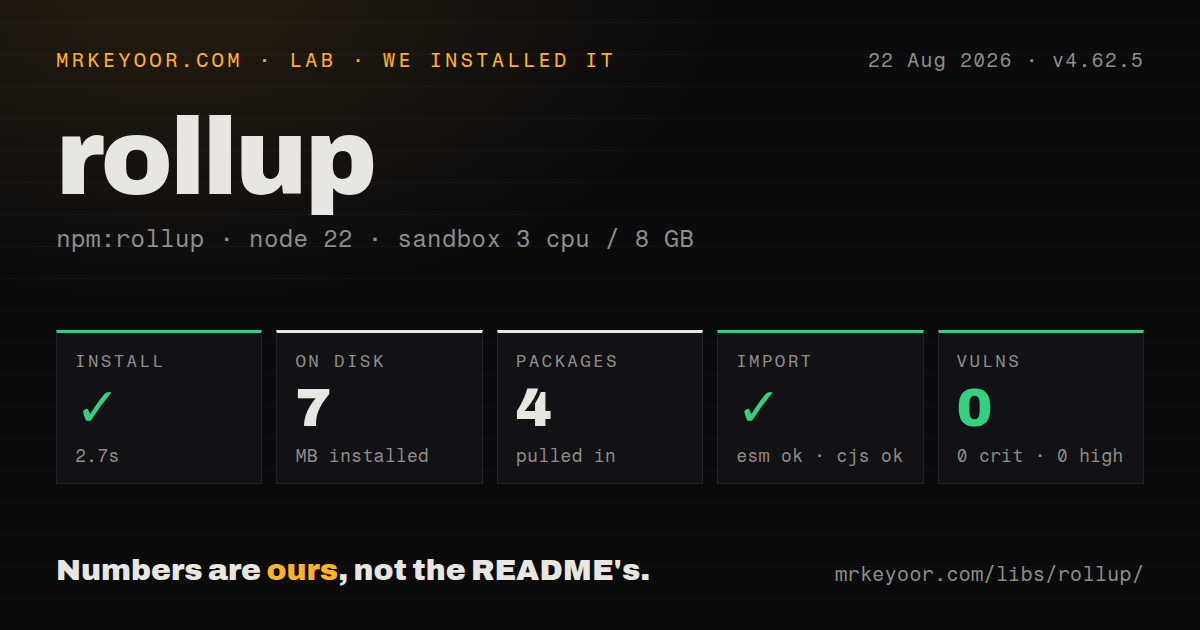
| Install | ✓ · 2.7s | 4 packages on disk · 7 MB |
| Import | ✓ | ESM import works · require() works · CommonJS package with exports map |
| Browser | n/a | could not be bundled for the browser (Node-only code, most likely) |
| Types | ✓ | TypeScript types bundled |
| Known vulns | 0 | 0 critical · 0 high · 0 moderate · 0 low (npm audit) |
Answers from our run
Does rollup install cleanly?
Yes. In a fresh container with an empty cache, npm install rollup finished in 3 seconds, leaving 4 packages and 7 MB on disk. npm audit reported no known vulnerabilities.
Can rollup run in a browser?
Not directly: esbuild could not bundle it for the browser in our run, which normally means it depends on Node built-ins. Use it on the server, or find a browser-targeted alternative.
Does rollup work with both ESM and CommonJS?
Yes. Both import 'rollup' and require('rollup') worked in Node 22 in our run. The package is published as CommonJS with an exports map.
Does rollup include TypeScript types?
Yes, type declarations ship inside the package, so no @types install is needed.
rollup or vite: which should you use?
vite: Choose it for browser applications that need an HTML-aware dev server and production build in one tool. Rollup 4.62.5 installed in 2.7 seconds with 4 packages and 7 MB, loaded through require and import, and returned 0 audit findings in our sandbox; current 4.63.0 is a strong fit when library output structure is part of the contract.
When should you not use rollup?
The main job is a browser application with HTML handling, a development server, and hot updates; Vite packages those concerns around a production bundler.
Discussed on
Use it if
- A published library needs deliberate external dependencies, ESM and CommonJS entry files, source maps, and predictable chunk names.
- A build requires custom resolve, load, transform, or output hooks that fit Rollup's plugin lifecycle.
- Several entry points should share chunks or preserve source modules while respecting an explicit package exports map.
- Vite's production output needs lower-level Rollup options and the team understands which settings Vite exposes.
- The main job is a browser application with HTML handling, a development server, and hot updates; Vite packages those concerns around a production bundler.
- Build latency matters more than detailed plugin hooks and chunk control; esbuild is a better narrow compiler comparison.
- A conventional TypeScript library mainly wants declarations and two output formats; a wrapper such as tsup owns more of that routine setup.
- The team expects TypeScript, CommonJS, JSON, CSS, package resolution, and minification to work from Rollup core. Each concern needs its plugin or a separate compiler.
- Native optional packages cannot be installed for the deployment platform. Rollup 4 selects parser binaries by operating system, CPU, and libc.
Setup reality
Our lab installed Rollup 4.62.5, one patch line behind today's 4.63.0, in a clean Node 22 Bookworm container. That install took 2.7 seconds, left 4 packages using 7 MB, and npm audit found 0 known vulnerabilities. Version 4.62.5 declared 1 direct dependency and 0 peers, measured 2,884 KB unpacked, and bundled TypeScript declarations. Both require and ESM import worked through its CommonJS package and exports map.
Rollup 4 needs Node 18 or newer and npm 8 or newer. Platform-specific parser code arrives through optional packages. Do not copy node_modules or a lockfile installation blindly between macOS, Windows, glibc Linux, and musl Linux; install for the target so npm selects the matching binary. No credential is needed unless a plugin fetches private modules or remote assets.
A typical config is rollup.config.mjs. Bare package resolution and CommonJS translation require the relevant plugins, and their ordering affects which files later transforms see. Rollup does not emit TypeScript declarations. Many library builds let it create JavaScript while tsc --emitDeclarationOnly produces types. Version 4.63.0's new return-value analysis may change which unused code disappears, so compare package output and run consumer tests after upgrading.
Our attempt to bundle Rollup itself for a browser with esbuild failed, matching its role as Node-side build tooling. Multiple inputs and dynamic imports can emit several chunks and therefore need output.dir. Programmatic callers should close bundles and watchers so plugins release workers and file handles. Aggressive moduleSideEffects settings can erase registrations, polyfills, or imported CSS even when the build succeeds.
Patterns
Emit one ES module build-esm
// rollup.config.mjs
export default {
  input: 'src/index.js',
  output: {
    file: 'dist/index.js',
    format: 'es',
    sourcemap: true,
  },
};
Use an ESM config file. The `es` format preserves an ES module entry for modern consumers.
Write ESM and CommonJS outputs emit-dual-package
export default {
  input: 'src/index.js',
  output: [
    { file: 'dist/index.js', format: 'es' },
    { file: 'dist/index.cjs', format: 'cjs', exports: 'named' },
  ],
};
Map both files in package.json exports, then test import and require against the packed tarball.
Leave package dependencies unbundled externalize-packages
const external = (id) =>
  id === 'react' || id.startsWith('react/');

export default {
  input: 'src/index.js',
  external,
  output: { dir: 'dist', format: 'es' },
};
A predicate handles package subpaths. Library builds should define externals from their public dependency contract.
Resolve npm and CommonJS modules load-commonjs
import commonjs from '@rollup/plugin-commonjs';
import { nodeResolve } from '@rollup/plugin-node-resolve';

export default {
  input: 'src/app.js',
  plugins: [nodeResolve({ browser: true }), commonjs()],
  output: { file: 'dist/app.js', format: 'es' },
};
Resolution runs before CommonJS conversion so the transform can inspect the selected package files.
Name entry and shared chunks build-multiple-entries
export default {
  input: { main: 'src/main.js', worker: 'src/worker.js' },
  output: {
    dir: 'dist',
    format: 'es',
    entryFileNames: '[name].js',
    chunkFileNames: 'chunks/[name]-[hash].js',
  },
};
Use output.dir because two entries and their shared graph can generate more than one file.
Write and close a bundle run-javascript-api
import { rollup } from 'rollup';

const bundle = await rollup({ input: 'src/index.js' });
try {
  await bundle.write({ file: 'dist/index.js', format: 'es' });
} finally {
  await bundle.close();
}
Close in finally so plugin workers and handles are released after either success or a failed write.
Provide generated build data create-virtual-module
const publicId = 'virtual:build-info';
const resolvedId = `\0${publicId}`;

export default {
  name: 'build-info',
  resolveId(id) { return id === publicId ? resolvedId : null; },
  load(id) {
    if (id === resolvedId) return `export const sha = ${JSON.stringify(process.env.GIT_SHA)};`;
  },
};
The zero-byte prefix marks an internal virtual ID so other resolvers do not treat it as a filesystem path.
Keep the source module layout preserve-modules
export default {
  input: ['src/index.js', 'src/testing.js'],
  output: {
    dir: 'dist',
    format: 'es',
    preserveModules: true,
    preserveModulesRoot: 'src',
  },
};
Preserved files may expose internals. Limit supported imports with a package exports map.
Alternatives
| Package | Registry | Pick it when |
|---|---|---|
| vite | npm | Choose it for browser applications that need an HTML-aware dev server and production build in one tool. |
| esbuild | npm | Choose it for very fast transforms and standard bundles with less output-level control. |
| webpack | npm | Choose it for an established loader stack or webpack-specific features such as Module Federation. |
More cli & tooling guides
commander · chalk · typescript · esbuild · yargs · click · the whole shelf →
How this guide is made: grounded in the library's documentation, release notes, changelog, and issue history, on a fixed rubric — not a hands-on install of every release. The 50 most-downloaded entries are additionally install-verified in clean containers. Corrections: contact the desk.