typescript-eslint review
typescript-eslint 8.68.0 is the umbrella package that lets ESLint parse TypeScript and run the project's TypeScript-specific rules. It re-exports the parser, plugin, shared flat configs, typed AST utilities, file-extension arrays, and standard JavaScript or TypeScript globs. Syntax presets work from the parsed tree; typed presets start TypeScript's project service so rules can reason about promises, unsafe values, unnecessary assertions, callback return types, and other facts the syntax alone cannot prove. Version 8.68 adds fix suggestions to `strict-void-return`, supports ESLint rule `meta.languages`, and fixes several false negatives, invalid suggestions, an autofix that could break arrow functions, and a recursive-type stack overflow.
Our typescript-eslint 8.67.0 install took 6.7 seconds, left 86 packages and 44 MB, produced 0 audit findings, and failed its browser bundle; the current npm release is 8.68.0. Install it when ESLint needs TypeScript syntax or type facts, and enable typed presets only for files whose TSConfig and added lint cost you will maintain.
We installed it
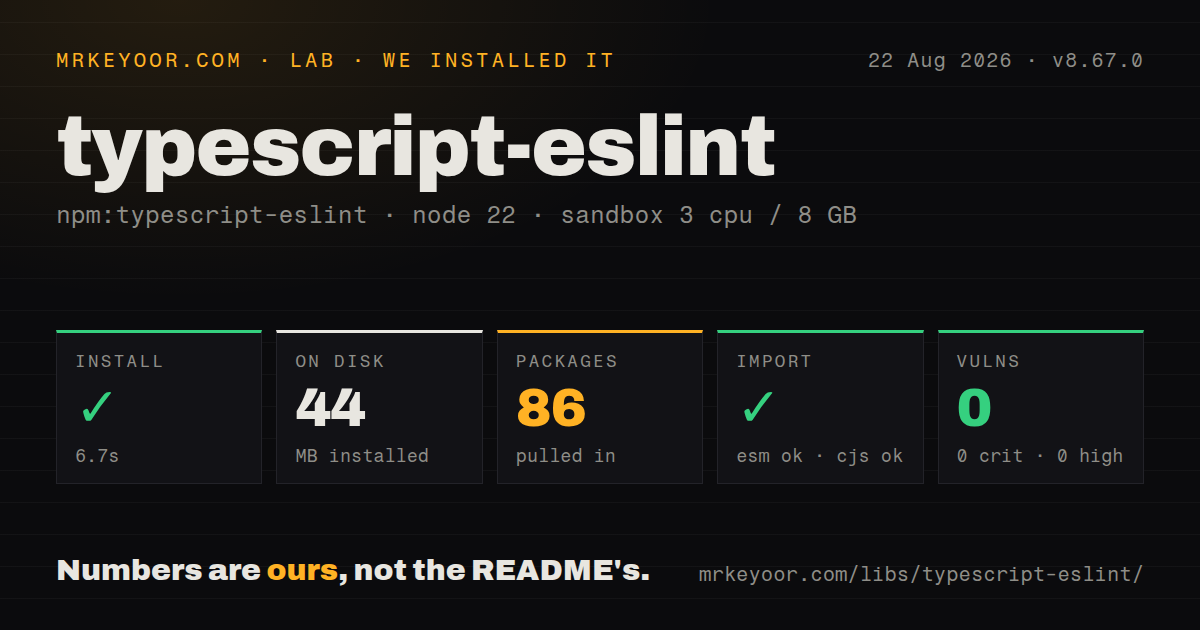
| Install | ✓ · 6.7s | 86 packages on disk · 44 MB |
| Import | ✓ | ESM import works · require() works · CommonJS package with exports map |
| Browser | n/a | could not be bundled for the browser (Node-only code, most likely) |
| Types | ✓ | TypeScript types bundled |
| Known vulns | 0 | 0 critical · 0 high · 0 moderate · 0 low (npm audit) |
Answers from our run
Does typescript-eslint install cleanly?
Yes. In a fresh container with an empty cache, npm install typescript-eslint finished in 7 seconds, leaving 86 packages and 44 MB on disk. npm audit reported no known vulnerabilities.
Can typescript-eslint run in a browser?
Not directly: esbuild could not bundle it for the browser in our run, which normally means it depends on Node built-ins. Use it on the server, or find a browser-targeted alternative.
Does typescript-eslint work with both ESM and CommonJS?
Yes. Both import 'typescript-eslint' and require('typescript-eslint') worked in Node 22 in our run. The package is published as CommonJS with an exports map.
Does typescript-eslint include TypeScript types?
Yes, type declarations ship inside the package, so no @types install is needed.
typescript-eslint or eslint: which should you use?
eslint: Choose core ESLint alone when the repository has JavaScript and needs no TypeScript parser or typed rules. Our typescript-eslint 8.67.0 install took 6.7 seconds, left 86 packages and 44 MB, produced 0 audit findings, and failed its browser bundle; the current npm release is 8.68.0.
When should you not use typescript-eslint?
The codebase contains only JavaScript. Core ESLint can parse it without loading TypeScript, this parser, or the TypeScript rule plugin.
Discussed on
Use it if
- ESLint must parse `.ts`, `.tsx`, `.mts`, or `.cts` sources and report rules designed for TypeScript semantics.
- CI needs typed checks such as floating promises, misused async callbacks, unsafe assignments, or unnecessary assertions.
- A flat config should compose recommended, strict, stylistic, or type-checked presets with file-specific overrides.
- Custom ESLint rules need the same project's parser services, typed ESTree nodes, plugin helpers, and utility types.
- The codebase contains only JavaScript. Core ESLint can parse it without loading TypeScript, this parser, or the TypeScript rule plugin.
- Fast syntax linting and formatting are the whole requirement. Biome covers both with less configuration and without TypeScript project loading.
- Nobody will maintain TSConfig coverage for files receiving typed rules. Project service reports files outside a configured project unless you ignore, exempt, or narrowly allow them.
- Installed peers fall outside ESLint `^8.57 || ^9 || ^10` or TypeScript `>=4.8.4 <6.1`. Those are the support ranges published with 8.68.0.
- This code must execute in a browser. Our 8.67.0 esbuild browser attempt failed, matching a Node lint tool that opens ESLint and TypeScript project data.
Setup reality
We installed typescript-eslint 8.67.0 in a fresh Node 22 Bookworm sandbox in 6.7 seconds. That run left 86 packages and 44 MB on disk, and npm audit reported 0 known vulnerabilities. The measured umbrella package had 4 direct dependencies, 2 peers, and 84 KB unpacked. It was CommonJS behind an exports map, included TypeScript declarations, and worked with both require() and ESM import. These figures describe 8.67.0; npm now publishes 8.68.0.
Install supported eslint and typescript peers in the workspace that runs lint. Version 8.68.0 accepts ESLint 8.57, 9, or 10 and TypeScript from 4.8.4 up to, but excluding, 6.1. Keep the umbrella package and any separately installed @typescript-eslint/* packages on one version. Mixed copies can load more than 1 parser instance or pair rule metadata with a different utility build. The current Node range starts at 18.18, 20.9, or 21.1 on its respective branches.
Begin with a syntax preset when types add no decision value. Typed presets need parserOptions.projectService: true, which asks TypeScript to find a project for every linted file. Config scripts, generated code, and tests outside a TSConfig need an explicit choice: ignore them, apply disableTypeChecked, or put a very narrow pattern in allowDefaultProject. Broad fallback globs create extra project-service work. In a monorepo, verify which TSConfig each package file receives.
Our 8.67.0 browser bundle failed, so keep this dependency in development tooling. Typed rules create a TypeScript program and can add noticeable time and memory on a large workspace. Ignore build output, scope files with the package's globs exports, and use ESLint caching where it is safe. For current flat configs, use ESLint's defineConfig; the umbrella package's older config() helper is deprecated. Run each minor update against the existing lint baseline because preset contents and autofixes can change.
Patterns
Lint JavaScript and TypeScript without types configure-syntax-rules
// eslint.config.mjs
import js from '@eslint/js';
import { defineConfig } from 'eslint/config';
import tseslint from 'typescript-eslint';

export default defineConfig({
  files: [tseslint.globs.jsts],
  extends: [js.configs.recommended, tseslint.configs.recommended],
});
The recommended syntax preset does not start TypeScript's type checker; `globs.jsts` includes standard JavaScript and TypeScript extensions.
Ask project service for type information enable-typed-rules
export default defineConfig({
  files: [tseslint.globs.ts],
  extends: [
    js.configs.recommended,
    tseslint.configs.recommendedTypeChecked,
  ],
  languageOptions: {
    parserOptions: { projectService: true },
  },
});
recommendedTypeChecked replaces the syntax-only TypeScript preset and asks project service to locate a TSConfig for every matching file.
Exempt JavaScript from type-aware checks disable-typed-js-rules
export default defineConfig(
  typedConfig,
  {
    files: [tseslint.globs.js],
    extends: [tseslint.configs.disableTypeChecked],
  },
);
disableTypeChecked leaves syntax linting available while preventing JavaScript files from requiring TypeScript project information.
Type-check one file outside TSConfig allow-config-project
export default defineConfig({
  languageOptions: {
    parserOptions: {
      projectService: {
        allowDefaultProject: ['eslint.config.mjs'],
      },
    },
  },
});
Keep allowDefaultProject limited to a few explicit config files; broad patterns add separate project-service work and are rejected by some safeguards.
Exclude build output globally ignore-generated-files
export default defineConfig(
  { ignores: ['**/dist/**', '**/coverage/**', '**/*.generated.ts'] },
  projectConfig,
);
A flat config object containing only `ignores` applies globally and prevents generated files from entering parser or type-checker work.
Require an explicit promise decision catch-floating-promise
async function saveRecord() {}

saveRecord();       // reported
await saveRecord(); // awaited
void saveRecord();  // explicitly ignored
`no-floating-promises` needs type information. The `void` form suppresses the report and still does not handle a runtime rejection.
Handle rejection inside a void callback guard-void-callback
button.addEventListener('click', () => {
  void saveRecord().catch(reportError);
});
`no-misused-promises` can report an async function where the host expects a void callback; this wrapper handles the returned promise explicitly.
Allow prefixed names for unused values configure-unused-variables
export default defineConfig({
  rules: {
    'no-unused-vars': 'off',
    '@typescript-eslint/no-unused-vars': ['error', {
      argsIgnorePattern: '^_',
      caughtErrorsIgnorePattern: '^_',
    }],
  },
});
Disable core no-unused-vars before enabling its TypeScript extension, or the same declaration can receive 2 reports.
Keep type imports explicit enforce-type-imports
export default defineConfig({
  rules: {
    '@typescript-eslint/consistent-type-imports': ['error', {
      prefer: 'type-imports',
      fixStyle: 'inline-type-imports',
    }],
  },
});
The fixer rewrites import syntax, so confirm the repository's module compiler preserves or erases type-only imports as expected.
Override rules for declarations scope-declaration-files
export default defineConfig({
  files: [tseslint.globs.tsDeclaration],
  rules: {
    'no-var': 'off',
  },
});
`globs.tsDeclaration` includes `.d.ts` and compound forms such as `.d.css.ts`; the export first appeared in 8.67.0.
Fail CI on an unsupported compiler reject-unsupported-typescript
export default defineConfig({
  languageOptions: {
    parserOptions: {
      onUnsupportedTypeScriptVersion: 'error',
    },
  },
});
Version 8.68.0 supports TypeScript from 4.8.4 up to, but excluding, 6.1; this option turns the normal warning into an error.
Wire one rule without a preset register-parser-plugin
export default defineConfig({
  files: [tseslint.globs.ts],
  plugins: { '@typescript-eslint': tseslint.plugin },
  languageOptions: {
    parser: tseslint.parser,
    parserOptions: { projectService: true },
  },
  rules: { '@typescript-eslint/no-floating-promises': 'error' },
});
Keep the documented `@typescript-eslint` namespace; registering the same plugin under extra names can duplicate rule configuration and reports.
Alternatives
| Package | Registry | Pick it when |
|---|---|---|
| eslint | npm | Choose core ESLint alone when the repository has JavaScript and needs no TypeScript parser or typed rules. |
| @biomejs/biome | npm | Choose it for fast TypeScript syntax checks and formatting when ESLint plugins and type-aware rules are unnecessary. |
| oxlint | npm | Choose it for a fast first lint pass or a project whose required rules fit its supported set. |
More cli & tooling guides
commander · chalk · typescript · esbuild · yargs · click · the whole shelf →
How this guide is made: grounded in the library's documentation, release notes, changelog, and issue history, on a fixed rubric — not a hands-on install of every release. The 50 most-downloaded entries are additionally install-verified in clean containers. Corrections: contact the desk.