eslint review
ESLint 10 is a Node-based JavaScript linter built around an ordered flat-config array and rules that inspect parsed syntax. Core catches such things as unreachable code, unsafe comparisons, and unused bindings; parsers and plugins add TypeScript or framework knowledge. The 10.9.1 patch fixes a no-loss-of-precision false positive on numeric literals with a trailing decimal point. We installed 10.9.0, where that rule had just gained numeric-underflow checks and no-unmodified-loop-condition gained an option for conditional expressions. Both require() and ESM import worked in our sandbox, while a browser bundle did not build.
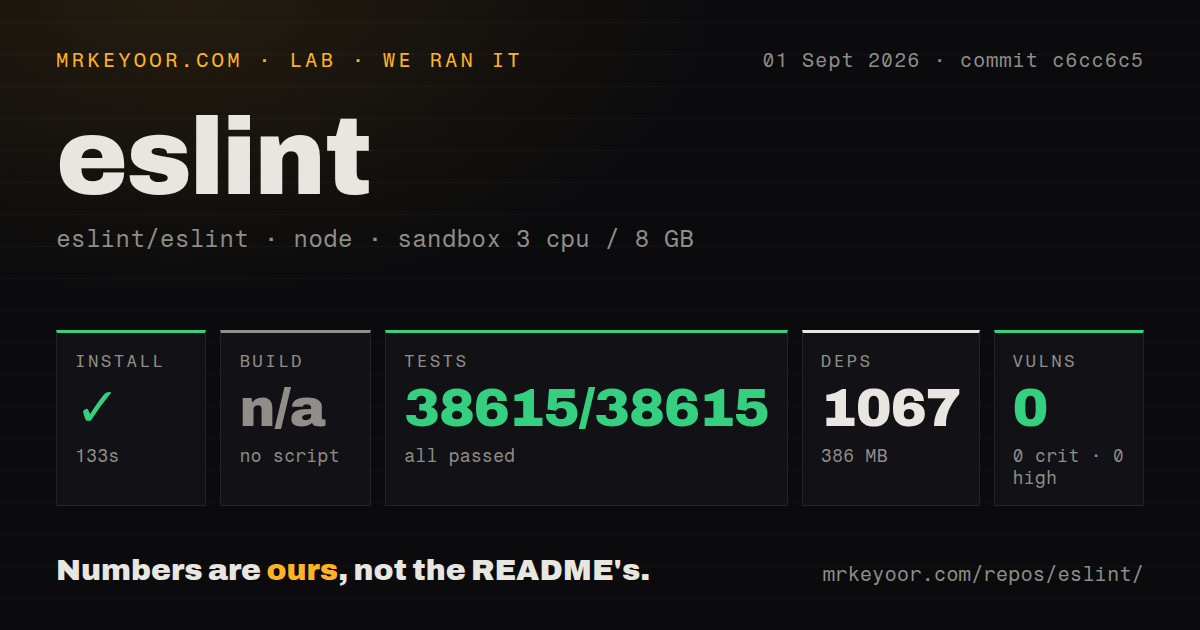
Our ESLint 10.9.0 install took 2.7 seconds, occupied 13 MB across 69 packages, and produced 0 audit findings, so its local cost is reasonable for teams that need its plugin system. Skip it for browser-side analysis or when a compiled linter already covers every rule you enforce.
We installed it
| Install | ✓ · 2.7s | 69 packages on disk · 13 MB |
| Import | ✓ | ESM import works · require() works · CommonJS package with exports map |
| Browser | n/a | could not be bundled for the browser (Node-only code, most likely) |
| Types | ✓ | TypeScript types bundled |
| Known vulns | 0 | 0 critical · 0 high · 0 moderate · 0 low (npm audit) |
Answers from our run
Does eslint install cleanly?
Yes. In a fresh container with an empty cache, npm install eslint finished in 3 seconds, leaving 69 packages and 13 MB on disk. npm audit reported no known vulnerabilities.
Can eslint run in a browser?
Not directly: esbuild could not bundle it for the browser in our run, which normally means it depends on Node built-ins. Use it on the server, or find a browser-targeted alternative.
Does eslint work with both ESM and CommonJS?
Yes. Both import 'eslint' and require('eslint') worked in Node 22 in our run. The package is published as CommonJS with an exports map.
Does eslint include TypeScript types?
Yes, type declarations ship inside the package, so no @types install is needed.
eslint or @biomejs/biome: which should you use?
@biomejs/biome: Choose it when one compiled tool should format code and enforce its supported lint rules. Our ESLint 10.9.0 install took 2.7 seconds, occupied 13 MB across 69 packages, and produced 0 audit findings, so its local cost is reasonable for teams that need its plugin system.
When should you not use eslint?
You only need formatting; the README points that work to a dedicated formatter, and mixing stylistic rules with Prettier creates duplicate policy
Discussed on
- hnESLint compromised, may have stolen your credentials527 points
- hnInteresting Bugs Caught by ESLint's no-constant-binary-expression (2022)363 points
- hnFuture of TypeScript on ESLint233 points
- hnESLint 7.0205 points
- hnComplete Rewrite of ESLint162 points
Use it if
- Your JavaScript CI and editor need to apply the same project-owned rule set
- You depend on ESLint plugins for React hooks, accessibility, imports, tests, or TypeScript
- Your team writes custom AST rules or shareable flat configs
- You want a linter that can report suspicious code and apply rule-owned fixes
- You only need formatting; the README points that work to a dedicated formatter, and mixing stylistic rules with Prettier creates duplicate policy
- Your project runs below Node 20.19.0, Node 22.13.0, or Node 24; the version 10 engines range rejects those runtimes
- Your parser, plugin, or shared config has no ESLint 10 peer range; core cannot make an incompatible plugin load
- You need code analysis inside a browser; our esbuild browser build failed on the package's Node-oriented code
- You need a small fixed rule set with very short runs in a large monorepo; oxlint or Biome may fit better if their coverage is enough
Setup reality
We installed ESLint 10.9.0 in 2.7 seconds on Node 22. The clean sandbox ended with 69 packages and 13 MB on disk, and npm audit found 0 known vulnerabilities. The package declares 30 direct dependencies and 1 peer dependency. Its own unpacked size was 3,876 KB. It ships TypeScript declarations, an exports map, and CommonJS code that loaded through both require() and ESM import. Our esbuild browser bundle failed because the dependency path expects Node.
Create eslint.config.js or run npm init @eslint/config@latest. Version 10 accepts Node ^20.19.0, ^22.13.0, or >=24. The config is executable code, so filesystem reads and environment-dependent branches can make CI disagree with an editor. No account or credential is required. pnpm users should check the README's auto-install-peers=true and node-linker=hoisted advice when plugins cannot be resolved.
Flat config is an ordered array, and later matching entries can replace earlier rule or language settings. A plain ignores entry is scoped unless you use globalIgnores(). The old .eslintignore file is not the flat-config ignore mechanism. TypeScript parsing and type-aware rules come from typescript-eslint. Type-aware presets also need TypeScript project information, which makes each run do more work than syntax-only linting.
The CLI prints warnings without failing unless --max-warnings sets a ceiling. --fix edits only reports whose rules provide a fix, while editor suggestions may remain. Cache repeated runs with --cache, and clear the cache when investigating changed results. ESLint 10.9.0 corrected unsafe fixes in no-var and prefer-template; 10.9.1 then corrected a new no-loss-of-precision false positive. Review the first bulk fix after either upgrade.
Patterns
Generate a flat config initialize-config
npm init @eslint/config@latest
npx eslint .
ESLint 10 looks for flat config files such as eslint.config.js. An existing .eslintrc file is not its normal configuration entry point.
Start with core's recommended rules recommended-rules
import js from "@eslint/js";
import { defineConfig } from "eslint/config";
export default defineConfig([js.configs.recommended]);
The flat-config preset comes from the separate @eslint/js package. The eslint:recommended string belongs to eslintrc.
Apply policy to source modules scope-rules
export default [{
  files: ["src/**/*.{js,mjs,cjs}"],
  rules: { eqeqeq: "error", "prefer-const": "warn" },
}];
Only matching files receive these rules. A warning still exits successfully unless the CLI gets --max-warnings.
Ignore generated directories ignore-output
import { globalIgnores } from "eslint/config";
export default [globalIgnores(["dist/**", "coverage/**"])];
globalIgnores() excludes paths across the configuration. Flat config does not read .eslintignore.
Declare browser globals browser-globals
import globals from "globals";
export default [{ files: ["web/**/*.js"], languageOptions: { globals: globals.browser } }];
Install globals separately. ESLint cannot infer a file's runtime from its .js extension.
Load a plugin rule register-plugin
import hooks from "eslint-plugin-react-hooks";
export default [{ plugins: { "react-hooks": hooks }, rules: { "react-hooks/rules-of-hooks": "error" } }];
The plugins object key creates the namespace. Confirm that the plugin supports ESLint 10.
Enable TypeScript rules lint-typescript
import tseslint from "typescript-eslint";
export default tseslint.config(...tseslint.configs.recommended);
This preset works without type information. Type-checked presets need TypeScript project configuration.
Write available fixes apply-fixes
npx eslint . --fix
npx eslint . --fix-dry-run --format json
Only reports with a rule-provided fixer edit files. Suggestions and other reports remain.
Block CI on warnings fail-warnings
npx eslint . --max-warnings 0Warnings pass by default. A zero ceiling turns any warning into a failed command.
Cache unchanged files cache-results
npx eslint . --cache --cache-location .cache/eslint/Keep the cache out of Git. Delete it while investigating stale output after config changes.
Lint from Node node-api
import { ESLint } from "eslint";
const eslint = new ESLint();
const results = await eslint.lintFiles(["src/**/*.js"]);
const formatter = await eslint.loadFormatter("stylish");
process.stdout.write(await formatter.format(results));
One ESLint instance uses one working directory and configuration context. Use separate instances for unrelated projects.
Document one suppression suppress-rule
// eslint-disable-next-line no-console -- CLI progress belongs on stdout
console.log(`processed ${count}`);
A rule-specific next-line comment leaves other checks active. Include a reason reviewers can reassess.
Alternatives
| Package | Registry | Pick it when |
|---|---|---|
| @biomejs/biome | npm | Choose it when one compiled tool should format code and enforce its supported lint rules. |
| oxlint | npm | Choose it when quick JavaScript and TypeScript feedback matters more than ESLint's plugin catalog. |
| standard | npm | Choose it when the team accepts StandardJS policy and wants almost no configuration. |
More cli & tooling guides
commander · chalk · typescript · esbuild · yargs · click · the whole shelf →
How this guide is made: grounded in the library's documentation, release notes, changelog, and issue history, on a fixed rubric — not a hands-on install of every release. The 50 most-downloaded entries are additionally install-verified in clean containers. Corrections: contact the desk.