@biomejs/biome review
We installed Biome 2.5.10 and found a command-line formatter, linter, and code-action engine rather than a JavaScript API. It handles JavaScript, TypeScript, JSX, JSON, CSS, GraphQL, and several component-file formats through one native executable. The npm wrapper has no direct dependencies, yet the installed platform binary brought the sandbox footprint to 66 MB. Version 2.5.10 concentrates on Astro parsing fixes, corrects Vue binding analysis, plugs an LSP memory leak, and adds early JavaScript-plugin and TypeScript-erasure work behind developing interfaces.
Install Biome when its built-in rules cover your repo and one CLI can replace two configuration stacks. Keep ESLint where plugin-defined policy is the reason the lint setup exists.
We installed it
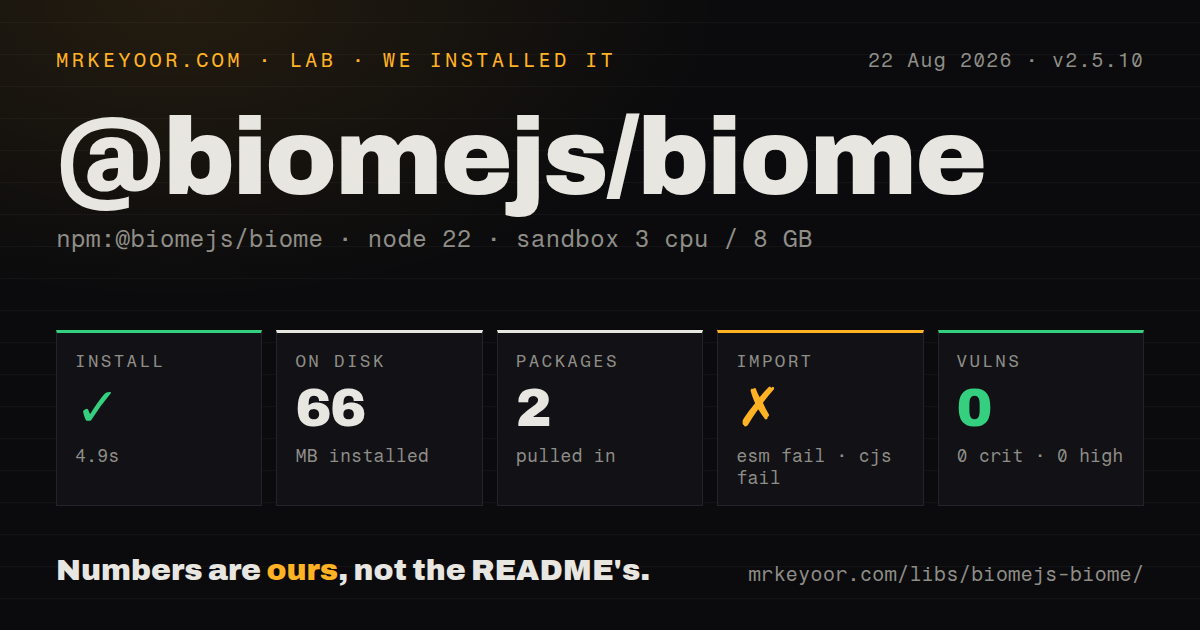

| Install | ✓ · 4.9s | 2 packages on disk · 66 MB |
| Import | ✗ | ESM import fails · require() fails · CommonJS package |
| Browser | n/a | could not be bundled for the browser (Node-only code, most likely) |
| Types | — | no TypeScript types found |
| Known vulns | 0 | 0 critical · 0 high · 0 moderate · 0 low (npm audit) |
Answers from our run
Does @biomejs/biome install cleanly?
Yes. In a fresh container with an empty cache, npm install @biomejs/biome finished in 5 seconds, leaving 2 packages and 66 MB on disk. npm audit reported no known vulnerabilities.
Can @biomejs/biome run in a browser?
Not directly: esbuild could not bundle it for the browser in our run, which normally means it depends on Node built-ins. Use it on the server, or find a browser-targeted alternative.
Does @biomejs/biome work with both ESM and CommonJS?
Neither plain import nor require succeeded in our sandbox, so it needs a bundler or extra setup.
Does @biomejs/biome include TypeScript types?
No type declarations were found in our install, so TypeScript users need their own declarations.
@biomejs/biome or eslint: which should you use?
eslint: Choose it when custom rules, framework plugins, or the broadest JavaScript lint ecosystem matter more than one-tool configuration. Install Biome when its built-in rules cover your repo and one CLI can replace two configuration stacks.
When should you not use @biomejs/biome?
Your policy depends on custom ESLint plugins: Biome cannot load an ESLint plugin's JavaScript rules, and migration only maps rules it knows
Use it if
- Your JavaScript or TypeScript repo needs formatting, lint rules, and import organization from one pinned command
- Editor feedback and CI should read the same biome.json instead of maintaining separate ESLint and Prettier settings
- You want a native executable that can run without a Node.js runtime after manual installation
- Your Astro or Vue project needs the parser fixes shipped in 2.5.10, including comment-only Astro expressions and Vue same-name bindings
- Your policy depends on custom ESLint plugins: Biome cannot load an ESLint plugin's JavaScript rules, and migration only maps rules it knows
- Markdown or YAML formatting is part of the same job: neither language appears in the formatter list in Biome's README, so another formatter remains necessary
- You need a library callable from Node: both require() and ESM import failed under Node 22.23.2 in our sandbox because this package is a CLI wrapper with no exported module API
- A browser bundle is required: esbuild could not build this package for the browser, and the supported browser route is Biome's separate WebAssembly playground
- Your team cannot absorb a formatter diff: the project reports 97% Prettier compatibility, which still leaves syntax where output differs
- You need mature third-party rule execution today: JavaScript plugins are still exposed through unstable work, while ESLint already has a large plugin catalogue
Setup reality
Our clean npm install of 2.5.10 finished in 4.9 seconds. It left 2 packages using 66 MB and npm audit reported 0 known vulnerabilities. The wrapper itself is 780 KB unpacked, declares no direct or peer dependencies, and requires Node 14.21.3 or newer for npm-based use. It is CommonJS with no exports map, but require() and ESM import both failed on Node 22.23.2. There are no TypeScript declarations because there is no supported module API.
Pin the dev dependency exactly, then run npx biome init if you want a biome.json. Biome also works with defaults. Existing projects can run biome migrate eslint --write and biome migrate prettier --write; inspect the result because an ESLint plugin rule with no Biome mapping cannot come across. Enable VCS integration if files.includes should respect .gitignore. Editors need the official extension or another LSP client, and competing format-on-save providers should be disabled for the same files.
The executable is selected for the host platform during installation, which explains why the on-disk result is far larger than the npm wrapper. A browser build failed in our esbuild check, so do not send it through an application bundler. biome check --write applies formatting, lint fixes, and assist actions. Unsafe fixes require an explicit option and deserve a diff review. For CI, use biome ci; it reports changes without writing them.
On a large repository, scope the input paths and use --changed --since=main when a full scan is unnecessary. Biome can read files ignored by Git unless VCS support is configured. Version 2.5.10 fixed an LSP memory leak, so editor users should update rather than leaving a long-running 2.5.9 server in place. Astro support also changed materially in this patch: comments between attributes, fragment shorthand, raw script content, and comment-only expressions now parse correctly.
Patterns
Pin the CLI in a project install-pinned
npm install --save-dev --save-exact @biomejs/biome@2.5.10An exact version keeps formatter output and diagnostics identical on developer machines and CI. The npm package selects a native executable for the current platform.
Create the initial configuration initialize-config
npx biome initThis writes biome.json with a schema reference. You can run Biome without it, but committing the file makes project choices explicit.
Format source files in place format-source
npx biome format --write ./srcRemove --write when you only want a check. Passing a directory avoids scanning unrelated fixtures or generated files outside that path.
Apply lint fixes marked safe lint-safe-fixes
npx biome lint --write ./srcThis leaves unsafe fixes untouched. Add --unsafe only in a reviewed cleanup branch because those edits may change program behavior.
Run formatting, linting, and assists together run-all-checks
npx biome check --write ./srccheck is the combined local command. With --write it can change formatting, apply safe lint fixes, and perform enabled source actions such as organizing imports.
Report violations without editing CI files check-in-ci
npx biome ci ./srcThe ci command does not write changes. A diagnostic produces a failing exit, which keeps an unformatted file or lint error out of the merge.
Inspect files changed since the main branch check-changed-files
npx biome check --changed --since=mainThis depends on VCS integration and repository history being available. Shallow CI clones may need a deeper fetch before Biome can compare against main.
Translate ESLint and Prettier settings migrate-existing-tools
npx biome migrate eslint --write
npx biome migrate prettier --write
Read the generated configuration before deleting old tools. Plugin rules and settings without a Biome equivalent need a manual decision.
Include source while excluding generated output scope-project-files
{
  "files": {
    "includes": ["src/**", "!src/generated/**", "!**/*.min.js"]
  }
}
Biome 2 expresses exclusions as negated entries inside files.includes. Put broad inclusions first, followed by the paths that should stay untouched.
Use Git ignore files during discovery respect-gitignore
{
  "vcs": {
    "enabled": true,
    "clientKind": "git",
    "useIgnoreFile": true
  }
}
This prevents Git-ignored build output from entering a normal scan. Explicit command-line paths can still deserve their own file scoping rules.
Set a rule severity in biome.json configure-lint-rule
{
  "linter": {
    "enabled": true,
    "rules": {
      "recommended": true,
      "suspicious": { "noExplicitAny": "warn" }
    }
  }
}
Rules are nested under their group. Use off, warn, or error deliberately because error-level findings affect the command exit status.
Explain a local rule suppression suppress-one-diagnostic
// biome-ignore lint/suspicious/noExplicitAny: vendor payload has no schema
const payload: any = readVendorMessage();
Name the full rule and give a concrete reason. A narrow suppression survives review better than disabling the rule for every file.
Alternatives
| Package | Registry | Pick it when |
|---|---|---|
| eslint | npm | Choose it when custom rules, framework plugins, or the broadest JavaScript lint ecosystem matter more than one-tool configuration. |
| prettier | npm | Choose it when formatting is the only job or when Markdown and YAML must share the formatter. |
| oxlint | npm | Choose it for a native JavaScript linter when you are happy to keep a separate formatter. |
More cli & tooling guides
commander · chalk · typescript · esbuild · yargs · click · the whole shelf →
How this guide is made: grounded in the library's documentation, release notes, changelog, and issue history, on a fixed rubric — not a hands-on install of every release. The 50 most-downloaded entries are additionally install-verified in clean containers. Corrections: contact the desk.