rich-click review
rich-click 1.9.8 keeps Click's decorators and parsing model but replaces help and error presentation with Rich tables, panels, themes, and markup. Adoption can be a replacement import, explicit RichCommand or RichGroup classes, or a global patch for Click objects created elsewhere. It can also capture another Click program's help as terminal output, HTML, or SVG. The current patch repairs global patching with Click 8.4.0 and warns that patching Typer 0.26 or newer is still broken. This package changes presentation; Click still owns parameters, callbacks, and process exits.
Our rich-click 1.9.8 install took 0.4 seconds, used 8 MB across 6 packages, imported in 0.20 seconds, and had no known audit findings. Add it when Click help needs real navigation; avoid the Typer 0.26-plus patch path and pin rendering inputs in tests.
We installed it
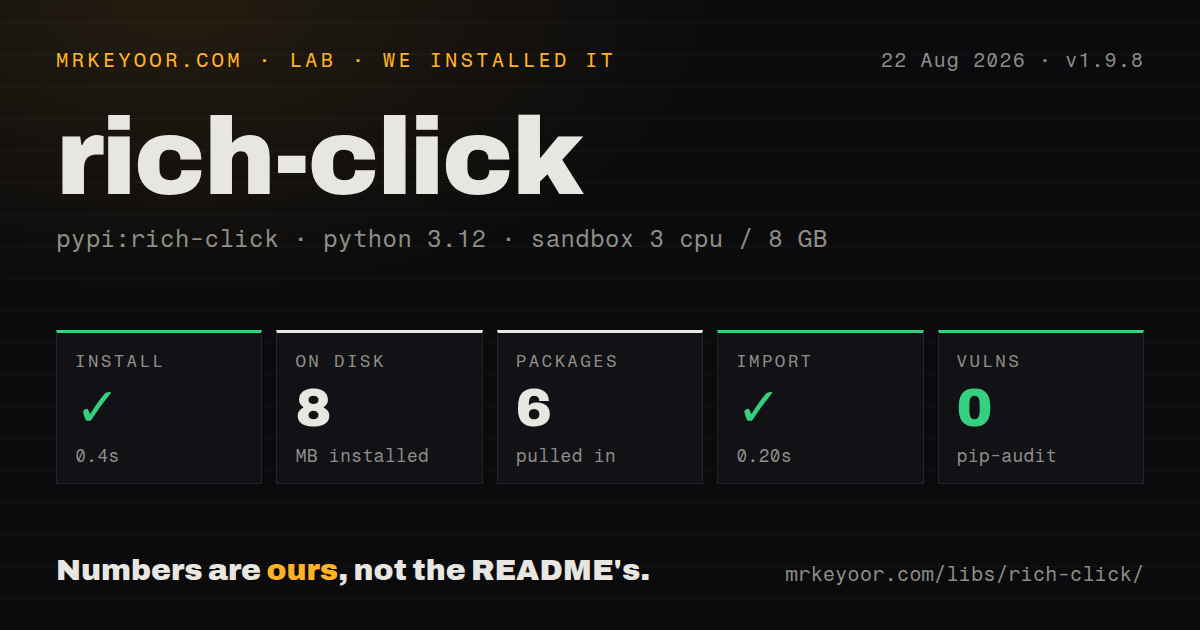
| Install | ✓ · 0.4s | 6 packages on disk · 8 MB |
| Import | ✓ | import rich_click in 0.20s · pure Python · py.typed · requires Python >=3.8 |
| Known vulns | 0 | (pip-audit) |
Answers from our run
Does rich-click install cleanly?
Yes. In a fresh container with an empty cache, pip install rich-click finished in 0.4s, leaving 6 packages and 8 MB on disk. pip-audit reported no known vulnerabilities.
What does rich-click need to run?
Python >=3.8, and nothing compiled: it is pure Python. In our run import rich_click succeeded in 0.20s, and the package ships py.typed for type checkers.
rich-click or click: which should you use?
click: Keep it alone when plain help is clear and another formatting dependency adds no useful navigation. Our rich-click 1.9.8 install took 0.4 seconds, used 8 MB across 6 packages, imported in 0.20 seconds, and had no known audit findings.
When should you not use rich-click?
The command has only a few options and plain Click help is readable; Rich formatting adds configuration without changing command behavior
Use it if
- A Click application has enough commands or flags that named panels reduce the time spent searching its help screen
- Existing Click decorators and callbacks should stay in place while usage, errors, and help gain Rich formatting
- Documentation needs HTML or SVG help captured from the actual command tree
- Your supported terminals can handle Rich output and the team will test width, color, markup, and theme settings
- The command has only a few options and plain Click help is readable; Rich formatting adds configuration without changing command behavior
- The application uses Typer 0.26 or newer through patch_typer, because the 1.9.8 release notes call that combination broken with no current fix
- Help output must be byte-identical at every terminal width; Rich wrapping and ANSI color depend on console and environment settings
- Process-wide patching is disallowed; rich_click.patch replaces Click classes and decorators for commands constructed after it runs
- You are starting a type-hint-led CLI and do not need Click compatibility; Typer or Cyclopts may remove duplicate parameter declarations
Setup reality
We installed rich-click 1.9.8 in a fresh Python 3.12 Bookworm sandbox in 0.4 seconds. The environment finished with 6 packages occupying 8 MB. The measured distribution declared 29 direct dependencies, requires Python 3.8 or newer, and is pure Python. It includes py.typed, and import rich_click completed in 0.20 seconds. pip-audit found zero known vulnerabilities. The installed license text is MIT. These results describe the released package rather than unreleased repository changes.
The simplest migration is import rich_click as click. Commands that import Click directly or pass custom cls implementations may keep the plain formatter, so inspect plugin and base-command code. Global patching must execute before modules construct their commands, and its changes affect the whole process. Version 1.9.8 fixes this route for Click 8.4.0. The Typer patch has a separate known failure with Typer 0.26 and newer, which makes version pinning mandatory for that integration.
Settings may live in module globals or a rich_config decorator. Passing a dict merges into inherited or global configuration, while a new RichHelpConfiguration begins from that object's defaults. A selected theme adds another layer. Users can override it through RICH_CLICK_THEME unless enable_theme_env_var is false. Rich and Markdown parsing are opt-in. Once Rich markup is enabled, literal square brackets in usage examples may be interpreted as tags and must be escaped.
Table and panel wrapping depends on console width. Tests should set a width, remove RICH_CLICK_THEME and forced-color variables, and disable color when ANSI bytes are outside the assertion. The rich-click executable imports or runs a target program to discover its command, so module-level side effects still happen. HTML and SVG captures also reflect theme and width; regenerate them whenever panel membership, command names, or presentation settings change.
Patterns
Swap the Click import replace-click-import
import rich_click as click

@click.command()
@click.option("--name", required=True, help="Account to greet")
def hello(name: str) -> None:
    """Print one greeting."""
    click.echo(f"Hello, {name}")

if __name__ == "__main__":
    hello()
Help and error rendering change here, while Click still controls parsing, callbacks, echo(), and exit status.
Opt in with explicit classes opt-in-command-class
import click
from rich_click import RichCommand, RichGroup

@click.group(cls=RichGroup)
def cli() -> None:
    """Manage builds."""

@cli.command(cls=RichCommand)
def status() -> None:
    """Print build status."""
A RichGroup does not automatically replace every custom child class; set RichCommand where plain formatting remains.
Attach typed help configuration configure-command-tree
import rich_click as click

help_config = click.RichHelpConfiguration(
    theme="nord-slim",
    show_arguments=True,
    commands_before_options=True,
)

@click.group()
@click.rich_config(help_config)
def cli() -> None:
    """Release tooling."""
A RichHelpConfiguration uses its own defaults, while passing a dict merges into inherited or global settings.
Place options in task panels group-options-in-panels
import rich_click as click

@click.command()
@click.option("--source", panel="Files", required=True)
@click.option("--destination", panel="Files", required=True)
@click.option("--verbose", panel="Output", is_flag=True)
def copy(source: str, destination: str, verbose: bool) -> None:
    """Copy one artifact."""
Panel labels live on the option decorators, which keeps presentation next to the flag it describes.
Group subcommands by job group-subcommands-in-panels
import rich_click as click

@click.group()
@click.command_panel("Deployments", commands=["plan", "apply"])
@click.command_panel("Accounts", commands=["login", "logout"])
def cli() -> None:
    """Operate the service."""

@cli.command()
def plan() -> None:
    """Preview a deployment."""
Panel lists use exposed Click names; a Python function underscore normally becomes a dash in a command name.
Enable Rich markup deliberately enable-rich-markup
import rich_click as click

@click.command()
@click.rich_config({"text_markup": "rich"})
@click.option("--force", is_flag=True, help="[red bold]Deletes existing output[/]")
def publish(force: bool) -> None:
    """Publish the [cyan]current build[/]."""
After text_markup is rich, bracketed examples may parse as tags and literal square brackets need escaping.
Disable user-selected themes disable-user-theme
import rich_click as click

@click.group()
@click.rich_config({
    "theme": "nord-slim",
    "enable_theme_env_var": False,
})
def cli() -> None:
    """Company CLI."""
RICH_CLICK_THEME can override styling by default; turn the environment override off when support output must match.
Add help for positional arguments show-argument-help
import rich_click as click

@click.command()
@click.argument("source", help="Local file to upload")
@click.argument("bucket", help="Destination bucket name")
def upload(source: str, bucket: str) -> None:
    """Upload one file."""
Argument help is a rich-click extension that produces a separate argument panel.
Preview an installed Click command format-an-installed-cli
rich-click flask --help
rich-click --theme=nord-slim celery --help
The wrapper imports or executes the target program, so startup and module-level side effects still run.
Export help for documentation export-help-for-docs
rich-click --output=svg mytool --help > docs/mytool-help.svg
rich-click --output=html mytool --help > docs/mytool-help.html
SVG and HTML captures depend on active width and theme; regenerate them after presentation or command-tree changes.
Patch Click before plugin imports patch-late-imports
from rich_click import RichHelpConfiguration
from rich_click.patch import patch

patch(RichHelpConfiguration(theme="nord-slim"))

import vendor_plugin  # noqa: E402,F401
Version 1.9.8 repairs patching with Click 8.4.0, but its Typer 0.26-plus patch remains broken.
Make help tests deterministic stabilize-help-test
from click.testing import CliRunner
from myapp.cli import cli

def test_help(monkeypatch):
    monkeypatch.setenv("TERMINAL_WIDTH", "100")
    monkeypatch.delenv("RICH_CLICK_THEME", raising=False)
    monkeypatch.delenv("FORCE_COLOR", raising=False)
    result = CliRunner().invoke(cli, ["--help"], color=False)
    assert result.exit_code == 0
    assert "Usage:" in result.output
Set terminal width and remove theme and forced-color variables before asserting labels or ANSI output.
Alternatives
| Package | Registry | Pick it when |
|---|---|---|
| click | PyPI | Keep it alone when plain help is clear and another formatting dependency adds no useful navigation |
| typer | PyPI | Use it for a new type-hint-driven command application that already wants Rich help |
| rich-argparse | PyPI | Use it when argparse is the parser you need to keep and only its formatter should change |
| cyclopts | PyPI | Use it for a type-hint command model when Click plugin compatibility is unnecessary |
More cli & tooling guides
commander · chalk · typescript · esbuild · yargs · click · the whole shelf →
How this guide is made: grounded in the library's documentation, release notes, changelog, and issue history, on a fixed rubric — not a hands-on install of every release. The 50 most-downloaded entries are additionally install-verified in clean containers. Corrections: contact the desk.