typer review
Typer 0.27.1 turns annotated Python functions into terminal commands. Function parameters become arguments or options, Python types drive conversion, and `Annotated` metadata supplies help, flag names, prompts, file checks, completion callbacks, and other CLI behavior. A `Typer` app groups commands and nested sub-apps, while Rich renders help and errors and the bundled parser follows Click's command model. The installed distribution now carries its Click-derived implementation under `typer._click` instead of declaring Click as an external runtime dependency. Version 0.27.1 changes how an application's `epilog` is formatted so it matches the other generated help sections, and its documentation now recommends uv-based project setup. The framework calls ordinary synchronous functions; registering `async def` does not create or run an event loop.
Typer 0.27.1 installed in 0.3 seconds, used 8 MB across 7 packages, imported in 0.24 seconds, and produced 0 audit findings in our sandbox. It suits an explicit, tested Python CLI; tiny scripts, Click-plugin hosts, and commands that require native async dispatch should choose a narrower fit.
We installed it
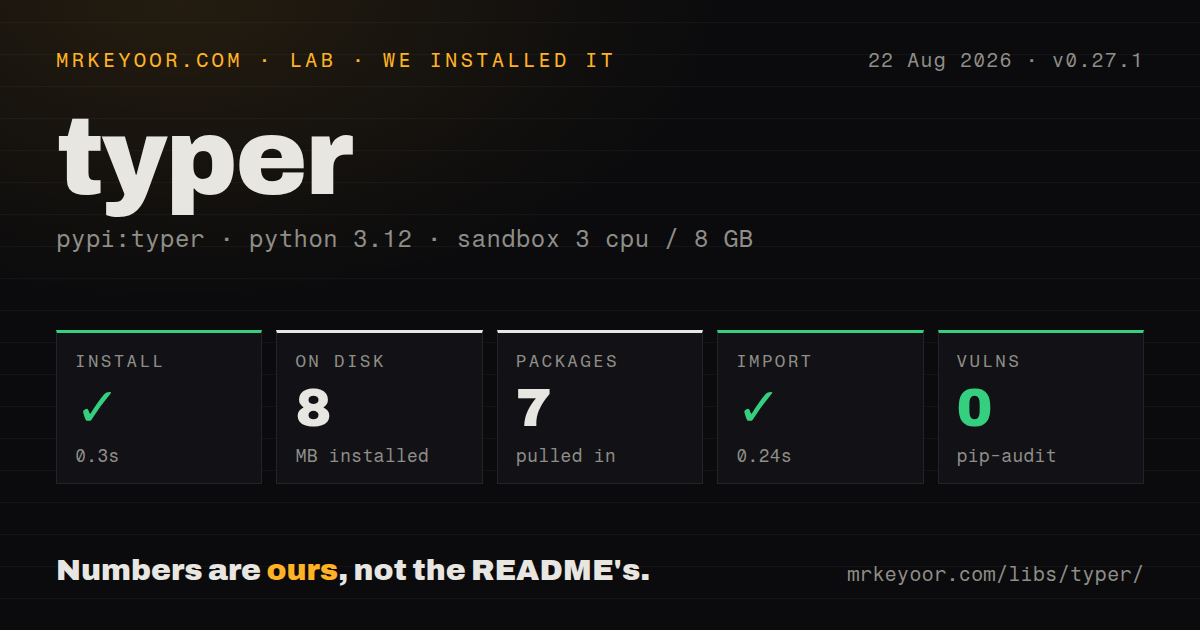
| Install | ✓ · 0.3s | 7 packages on disk · 8 MB |
| Import | ✓ | import typer in 0.24s · pure Python · py.typed · requires Python >=3.10 |
| Known vulns | 0 | (pip-audit) |
Answers from our run
Does typer install cleanly?
Yes. In a fresh container with an empty cache, pip install typer finished in 0.3s, leaving 7 packages and 8 MB on disk. pip-audit reported no known vulnerabilities.
What does typer need to run?
Python >=3.10, and nothing compiled: it is pure Python. In our run import typer succeeded in 0.24s, and the package ships py.typed for type checkers.
typer or click: which should you use?
click: Choose it when decorators, contexts, custom parameter types, and third-party Click extensions are the main interface. Typer 0.27.1 installed in 0.3 seconds, used 8 MB across 7 packages, imported in 0.24 seconds, and produced 0 audit findings in our sandbox.
When should you not use typer?
A short script can stay inside the standard library. argparse avoids 7 installed packages and removes Typer's 8 MB from the environment.
Discussed on
- hnThe Little Typer312 points
- hnThe Little Typer (2018)297 points
- hnHacker Typer272 points
- hnShow HN: Term Typer – Learn a language by typing220 points
- hnThe Little Typer (2018)179 points
Use it if
- A user-facing Python CLI needs typed arguments, options, generated help, completion, and several commands.
- Function signatures should be the source for parsing rules while `Annotated` carries terminal-specific metadata.
- Tests need to invoke the command tree in process and inspect stdout, exit codes, and exceptions.
- The project wants Rich help and prompts while retaining access to contexts, callbacks, custom parameter behavior, and nested command groups.
- A short script can stay inside the standard library. `argparse` avoids 7 installed packages and removes Typer's 8 MB from the environment.
- The team needs Click's public package and plugin surface directly. Typer 0.27.1 vendors Click-derived code under a private `_click` module, which third-party Click extensions should not import.
- An `async def` command is expected to be awaited automatically. Typer invokes commands synchronously, so async application code needs an explicit event-loop boundary.
- Every help or completion request must avoid application startup work. Python imports the command module to discover its tree, so database clients and model loading at module scope still run.
- The public CLI cannot tolerate parser or help changes before 1.0. Typer remains at 0.27.1, and generated output depends on Typer's parser and Rich rendering choices.
Setup reality
We installed Typer 0.27.1 in a fresh Python 3.12 Bookworm sandbox. Installation succeeded in 0.3 seconds, left 7 packages and 8 MB on disk, and import typer worked in 0.24 seconds. Pip-audit found 0 known vulnerabilities. The package is pure Python, requires Python 3.10 or newer, ships py.typed, and declares 4 direct dependencies. The installed package's license field was unknown in our measurement.
A single function can use typer.run(). Build a Typer() app once there are subcommands, a callback, shared context, or CliRunner tests. Current docs place typer.Option() and typer.Argument() inside Annotated, leaving ordinary Python defaults after the annotation. Search results still show the older style where those objects are defaults. Both may appear to work, but one convention makes reviews and migrations less confusing.
Typer imports the command module to build help and shell completion. Keep network clients, database connections, and large model loads inside commands or guarded callbacks so --help remains cheap. Completion needs installation per shell and works best through an installed console-script entry point. Version 0.27.1 also includes the typer executable, which can expose a plain script function as a command without editing that script.
Command callbacks are synchronous. Wrap async application work with asyncio.run() only when no event loop already owns the thread. Use typer.Exit(code=...) for deliberate automation outcomes and typer.Abort for cancellation. CliRunner changes process-like state during invocation, including environment and the isolated filesystem when requested, so avoid parallel tests that share global state even though the base import took only 0.24 seconds.
Patterns
Turn one function into a command run-one-function
import typer

def greet(name: str, times: int = 1) -> None:
    for _ in range(times):
        typer.echo(f"Hello {name}")

if __name__ == "__main__":
    typer.run(greet)
With one function, its name is omitted from the invocation. A second command changes the CLI into a command group, so choose an app early for a stable public syntax.
Create a command group register-commands
import typer

app = typer.Typer(help="Manage local projects")

@app.command()
def create(name: str) -> None:
    typer.echo(f"created {name}")

@app.command()
def remove(name: str) -> None:
    typer.echo(f"removed {name}")

if __name__ == "__main__":
    app()
Underscores in inferred command names become hyphens. Pass an explicit name to `@app.command("public-name")` before users depend on the spelling.
Describe an option with Annotated declare-option
from typing import Annotated
import typer

@app.command()
def export(
    output: Annotated[
        str,
        typer.Option("--output", "-o", help="File to write"),
    ] = "report.json",
) -> None:
    typer.echo(output)
Current docs keep `Option` metadata inside `Annotated` and the ordinary default after it. Many older examples put `Option` in the default position.
Require a readable input file validate-file
from pathlib import Path
from typing import Annotated
import typer

@app.command()
def import_data(
    source: Annotated[
        Path,
        typer.Argument(exists=True, file_okay=True, dir_okay=False, readable=True),
    ],
) -> None:
    typer.echo(source.read_text())
The path checks happen before the function body. File existence says nothing about the contents, so parsing errors still need command-level handling.
Expose positive and negative flags pair-boolean-flags
from typing import Annotated
import typer

@app.command()
def build(
    color: Annotated[bool, typer.Option("--color/--no-color")] = True,
) -> None:
    typer.echo(f"color={color}")
The paired spelling makes both states visible in help. Renaming either flag later can break shell scripts even when the Python parameter stays the same.
Prompt without echoing a secret prompt-for-secret
from typing import Annotated
import typer

@app.command()
def login(
    username: Annotated[str, typer.Option(prompt=True)],
    password: Annotated[
        str,
        typer.Option(prompt=True, hide_input=True, confirmation_prompt=True),
    ],
) -> None:
    authenticate(username, password)
Prompted values can block automation. Provide a noninteractive credential path and never print the password through logs or exception details.
Pass a global option through context share-global-option
from typing import Annotated
import typer

app = typer.Typer()

@app.callback()
def main(
    ctx: typer.Context,
    verbose: Annotated[bool, typer.Option()] = False,
) -> None:
    ctx.ensure_object(dict)
    ctx.obj["verbose"] = verbose

@app.command()
def sync(ctx: typer.Context) -> None:
    typer.echo(f"verbose={ctx.obj['verbose']}")
Global options appear before the subcommand, such as `tool --verbose sync`. Context avoids mutable module-level flags shared by tests or repeated invocations.
Mount a nested application nest-command-group
import typer

app = typer.Typer()
users = typer.Typer(help="Manage users")
app.add_typer(users, name="users")

@users.command("list")
def list_users() -> None:
    typer.echo("ada")
The resulting path is `tool users list`. The nested app owns its own callback, options, commands, help, and completion entries.
Return a deliberate nonzero status set-exit-code
import typer

@app.command()
def deploy(target: str) -> None:
    if target not in {"staging", "production"}:
        typer.echo("unknown target", err=True)
        raise typer.Exit(code=2)
`typer.Exit` stops command execution with the chosen code. Use `typer.Abort` for user cancellation, which carries different meaning in logs and tests.
Call async application code explicitly run-async-boundary
import asyncio
import typer

async def synchronize() -> int:
    return await sync_remote_records()

@app.command()
def sync() -> None:
    count = asyncio.run(synchronize())
    typer.echo(f"synced {count}")
Typer does not await `async def` commands. `asyncio.run()` works when the command thread has no active event loop; embedded environments may need a different boundary.
Invoke the app in a test test-command
from typer.testing import CliRunner
from mytool.cli import app

runner = CliRunner()

def test_create() -> None:
    result = runner.invoke(app, ["create", "demo"])
    assert result.exit_code == 0, result.exception
    assert "created demo" in result.stdout
Check `result.exception` when a command fails unexpectedly. Runner invocations can alter environment and filesystem state, so tests sharing those globals should stay serial.
Add a final help paragraph format-help-epilog
import typer

app = typer.Typer(
    help="Manage release artifacts",
    epilog="See the operations handbook before publishing.",
)

@app.command()
def inspect() -> None:
    typer.echo("checked")
Version 0.27.1 formats `epilog` consistently with other help sections. Treat its wording as public CLI documentation and cover the help output in a snapshot when layout matters.
Alternatives
| Package | Registry | Pick it when |
|---|---|---|
| click | PyPI | Choose it when decorators, contexts, custom parameter types, and third-party Click extensions are the main interface. |
| cyclopts | PyPI | Choose it to compare another annotation-led parser, especially when its coercion and nested configuration rules fit the command contract better. |
| fire | PyPI | Choose it for disposable internal commands that expose existing Python objects with little declaration code. |
More cli & tooling guides
commander · chalk · typescript · esbuild · yargs · click · the whole shelf →
How this guide is made: grounded in the library's documentation, release notes, changelog, and issue history, on a fixed rubric — not a hands-on install of every release. The 50 most-downloaded entries are additionally install-verified in clean containers. Corrections: contact the desk.