pgvector review
pgvector is the official Python adapter package for the pgvector PostgreSQL extension. It registers the extension's `vector`, `halfvec`, `bit`, and `sparsevec` types with database drivers and adds model fields, distance expressions, and index helpers for Django, SQLAlchemy, SQLModel, and Peewee. It does not install the server extension, connect to PostgreSQL, create embeddings, or provide a collection service. Version 0.5.0 removes the NumPy dependency, requires Python 3.10 and SQLAlchemy 2, adds experimental type hints, removes old utility re-exports, and changes results: ORM integrations return lists for vector and halfvec columns, while raw drivers return `Vector` objects for vector columns.
pgvector 0.5.0 is small, typed adapter code for teams that have already chosen PostgreSQL plus the pgvector extension. Check the new Python, SQLAlchemy, import, and return-type boundaries before upgrading; the hard performance decisions remain in database indexing and query plans.
We installed it
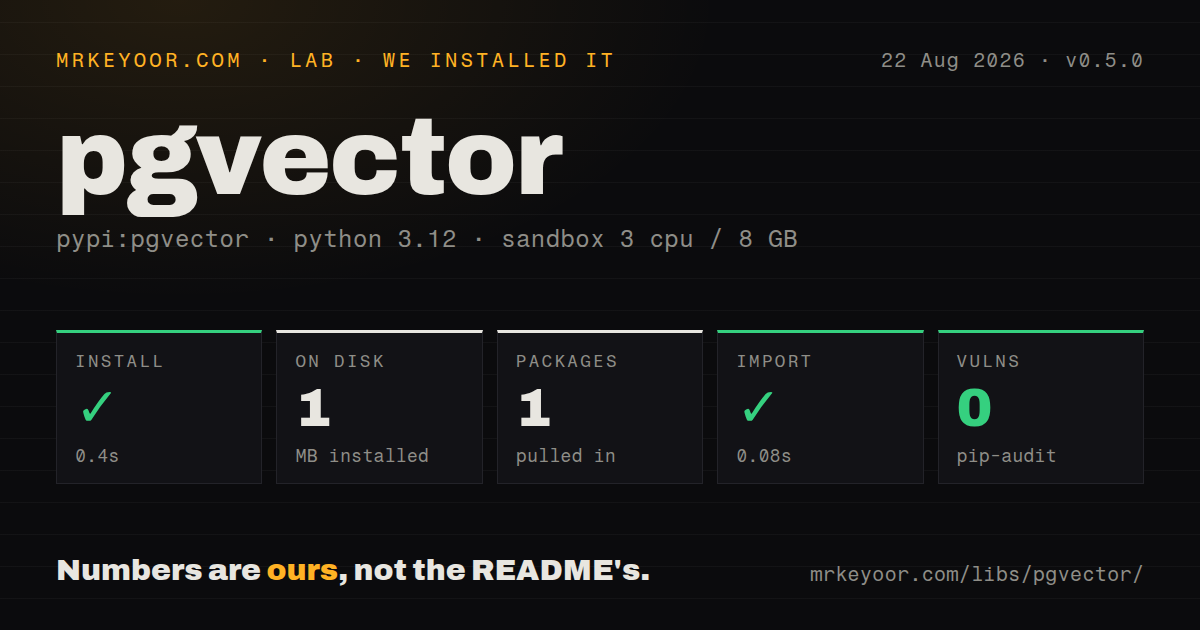
| Install | ✓ · 0.4s | 1 package on disk · 1 MB |
| Import | ✓ | import pgvector in 0.08s · pure Python · py.typed · requires Python >=3.10 |
| Known vulns | 0 | (pip-audit) |
Answers from our run
Does pgvector install cleanly?
Yes. In a fresh container with an empty cache, pip install pgvector finished in 0.4s, leaving 1 package and 1 MB on disk. pip-audit reported no known vulnerabilities.
What does pgvector need to run?
Python >=3.10, and nothing compiled: it is pure Python. In our run import pgvector succeeded in 0.08s, and the package ships py.typed for type checkers.
pgvector or chromadb: which should you use?
chromadb: Use it for a local collection-oriented vector store with embedding integrations and less PostgreSQL setup. pgvector 0.5.0 is small, typed adapter code for teams that have already chosen PostgreSQL plus the pgvector extension.
When should you not use pgvector?
Your PostgreSQL host cannot install or enable the pgvector server extension. This Python wheel contains adapters only and cannot supply missing database types.
Use it if
- Embeddings should live beside relational rows so similarity ordering can combine with SQL filters, joins, permissions, and transactions.
- Django or SQLAlchemy models need typed pgvector columns, distance expressions, and HNSW or IVFFlat index declarations.
- Psycopg, asyncpg, pg8000, or Peewee should adapt PostgreSQL vector values without hand-building text literals and casts.
- Half-precision, binary, or sparse vectors are needed to reduce storage or support their matching distance operators.
- Your PostgreSQL host cannot install or enable the pgvector server extension. This Python wheel contains adapters only and cannot supply missing database types.
- You expect built-in embedding models, collections, payload schemas, replication controls, or a hosted vector service API. Those belong to a vector database or application layer.
- The application depends on Python 3.9 or SQLAlchemy 1.4. Version 0.5.0 explicitly drops both compatibility lines.
- Existing code expects NumPy arrays from ORM vector columns. Version 0.5.0 returns Python lists from Django, SQLAlchemy, SQLModel, and Peewee and requires a migration check.
- A single raw SQL call is the whole integration. Your driver can pass a textual vector with an explicit cast, so adding an adapter package may provide little value.
Setup reality
We installed pgvector 0.5.0 in a fresh Python 3.12 Bookworm container. The install finished in 0.4 seconds, left one package, and used 1 MB on disk. It declares no direct dependencies, requires Python 3.10 or newer, and is pure Python. The wheel ships a py.typed marker, although the change log still labels type-hint support experimental. pip-audit found zero known vulnerabilities, and import pgvector worked in 0.08 seconds.
The database work comes first. PostgreSQL must already have compatible pgvector extension binaries, and a privileged migration must run CREATE EXTENSION vector. Managed services control which extension version is available, so Python code cannot assume every column type or index feature exists. Keep extension enablement in database migrations rather than application startup when the runtime role lacks extension privileges.
Raw drivers require type registration on every connection. Psycopg pools need a configure callback, asyncpg pools need an awaited init callback, and SQLAlchemy arrays of vectors need a connection event for the underlying driver. Missing registration commonly returns strings or produces adaptation errors. Version 0.5.0 also changes result shapes: ORMs return lists for vector and halfvec, while Psycopg, asyncpg, and pg8000 return Vector for vector values.
Index definitions must match query operators. L2 uses vector_l2_ops, cosine uses vector_cosine_ops, and inner product uses vector_ip_ops; a mismatch can leave PostgreSQL sorting without the intended ANN index. Build IVFFlat after representative data exists and tune its lists and probes. HNSW has different build-memory and search controls. Bulk loads should use COPY, then create the approximate index and measure recall against exact search on real filters.
Patterns
Create the database extension enable-vector-extension
from sqlalchemy import text

with engine.begin() as connection:
    connection.execute(text(
        'CREATE EXTENSION IF NOT EXISTS vector'
    ))
The server must already have pgvector installed, and the database role needs extension privileges. Put this in a controlled migration.
Register Psycopg 3 adapters register-psycopg-types
from pgvector.psycopg import register_vector

with psycopg.connect(dsn) as connection:
    register_vector(connection)
    row = connection.execute(
        'SELECT %s::vector',
        ([1.0, 2.0, 3.0],),
    ).fetchone()
Registration belongs to each physical connection. Pool users should call it from the pool's configure callback.
Register vector types on pool connections configure-asyncpg-pool
import asyncpg
from pgvector.asyncpg import register_vector

async def init(connection):
    await register_vector(connection)

pool = await asyncpg.create_pool(dsn, init=init)
The asyncpg registration function is awaited. A one-time call on a temporary connection does not configure later pool members.
Order rows by L2 distance query-raw-neighbors
from pgvector import Vector

query = Vector([1.0, 2.0, 3.0])
rows = connection.execute(
    '''SELECT id, embedding <-> %s AS distance
       FROM items
       ORDER BY embedding <-> %s
       LIMIT 5''',
    (query, query),
).fetchall()
`<->` is L2 distance. Use `<=>` for cosine or `<#>` for negative inner product, with a matching index operator class.
Map a fixed-dimension vector define-sqlalchemy-vector
from pgvector.sqlalchemy import VECTOR
from sqlalchemy.orm import Mapped, mapped_column

class Item(Base):
    __tablename__ = 'items'

    id: Mapped[int] = mapped_column(primary_key=True)
    embedding: Mapped[list[float]] = mapped_column(VECTOR(3))
PostgreSQL enforces the declared dimension. In version 0.5.0, SQLAlchemy vector results are Python lists rather than NumPy arrays.
Use a cosine-distance expression query-sqlalchemy-neighbors
from sqlalchemy import select

statement = (
    select(Item)
    .order_by(Item.embedding.cosine_distance([3, 1, 2]))
    .limit(10)
)
items = session.scalars(statement).all()
A cosine ANN index must use `vector_cosine_ops`. Confirm index use with EXPLAIN on the production filter shape.
Declare an HNSW index create-hnsw-index
from sqlalchemy import Index

Index(
    'items_embedding_hnsw',
    Item.embedding,
    postgresql_using='hnsw',
    postgresql_with={'m': 16, 'ef_construction': 64},
    postgresql_ops={'embedding': 'vector_cosine_ops'},
)
Index parameters trade build time, memory, recall, and query speed. Test them against exact results from your own embeddings.
Declare an IVFFlat index create-ivfflat-index
Index(
    'items_embedding_ivfflat',
    Item.embedding,
    postgresql_using='ivfflat',
    postgresql_with={'lists': 100},
    postgresql_ops={'embedding': 'vector_l2_ops'},
)
Create IVFFlat after loading representative data. Its list count and query-time probes need retuning as the table grows.
Add a vector field in Django define-django-vector
from pgvector.django import VectorField

class Item(models.Model):
    embedding = VectorField(dimensions=3)

nearest = Item.objects.order_by(
    L2Distance('embedding', [3, 1, 2])
)[:5]
Use `VectorExtension()` in a migration before creating this table. Django returns the column as a list in version 0.5.0.
Load vectors with binary COPY bulk-copy-vectors
from pgvector import Vector

with connection.cursor() as cursor:
    with cursor.copy(
        'COPY items (embedding) FROM STDIN WITH (FORMAT BINARY)'
    ) as copy:
        copy.set_types(['vector'])
        for values in embeddings:
            copy.write_row([Vector(values)])
Load the table before building IVFFlat or HNSW when possible. Commit the COPY before creating indexes in a separate migration step.
Use half-precision coordinates store-half-vectors
from pgvector import HalfVector
from pgvector.sqlalchemy import HALFVEC

class Item(Base):
    __tablename__ = 'half_items'
    id: Mapped[int] = mapped_column(primary_key=True)
    embedding: Mapped[list[float]] = mapped_column(HALFVEC(768))

value = HalfVector([0.1, -0.2, 0.3])
Half precision reduces coordinate storage and can alter neighbor ordering. Measure recall before changing an existing vector column or index.
Create a sparse vector value build-sparse-vector
from pgvector import SparseVector

value = SparseVector(
    {0: 1.0, 20: 0.5, 99: -0.25},
    100,
)
print(value.indices())
print(value.values())
Python indices are zero-based. The class handles conversion to pgvector's wire representation and validates the declared dimension.
Alternatives
| Package | Registry | Pick it when |
|---|---|---|
| chromadb | PyPI | Use it for a local collection-oriented vector store with embedding integrations and less PostgreSQL setup. |
| qdrant-client | PyPI | Use it with Qdrant when filtered ANN search and vector-service operations deserve a separate system. |
| pymilvus | PyPI | Use it with Milvus for distributed vector workloads that need its indexing and scaling model. |
| weaviate-client | PyPI | Use it when Weaviate's object schema and hosted or clustered service fit better than SQL tables. |
More ai / ml guides
@modelcontextprotocol/sdk · openai · mcp · huggingface-hub · @anthropic-ai/sdk · openai · the whole shelf →
How this guide is made: grounded in the library's documentation, release notes, changelog, and issue history, on a fixed rubric — not a hands-on install of every release. The 50 most-downloaded entries are additionally install-verified in clean containers. Corrections: contact the desk.