weaviate-client review
weaviate-client is the official Python interface to a separate Weaviate vector database. Its v4 collections API handles schema configuration, inserts, batches, vector and keyword search, hybrid ranking, filters, references, backups, and server-side generative queries through typed helper classes. Data operations use gRPC while administrative work also uses HTTP. Version 4.23.0 adds hybrid diversity, a cross-property BM25 AND operator, DeepSeek generation configuration, and more vectorizer options. It also fixes async waiting, async collection existence errors, validation, and batch error reporting.
weaviate-client 4.23.0 installed in 1.1 seconds, occupied 51 MB across 21 packages, and took 2.18 seconds to import with no audit findings in our sandbox. Use it only after choosing Weaviate and proving both HTTP and gRPC routes; it is neither an embedded vector store nor a generic vector utility.
We installed it
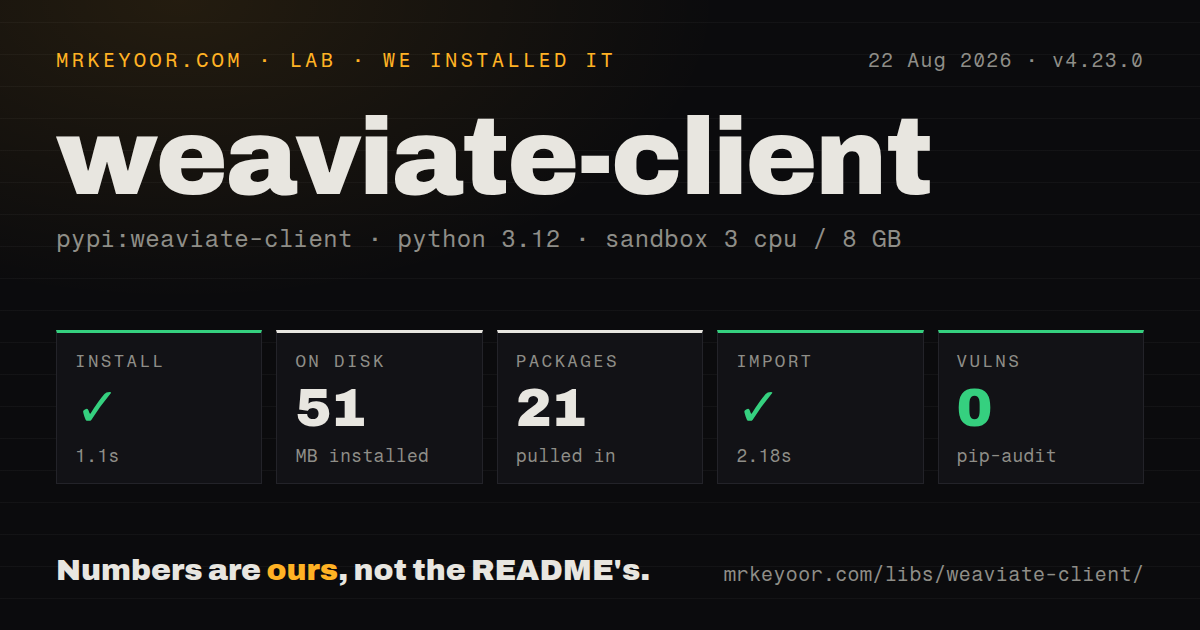
| Install | ✓ · 1.1s | 21 packages on disk · 51 MB |
| Import | ✓ | import weaviate in 2.18s · pure Python · py.typed · requires Python >=3.10 |
| Known vulns | 0 | (pip-audit) |
Answers from our run
Does weaviate-client install cleanly?
Yes. In a fresh container with an empty cache, pip install weaviate-client finished in 1 seconds, leaving 21 packages and 51 MB on disk. pip-audit reported no known vulnerabilities.
What does weaviate-client need to run?
Python >=3.10, and nothing compiled: it is pure Python. In our run import weaviate succeeded in 2.18s, and the package ships py.typed for type checkers.
weaviate-client or qdrant-client: which should you use?
qdrant-client: Use it with Qdrant when you prefer that server's filtering, deployment, and client model. weaviate-client 4.23.0 installed in 1.1 seconds, occupied 51 MB across 21 packages, and took 2.18 seconds to import with no audit findings in our sandbox.
When should you not use weaviate-client?
You do not want another stateful database service; this package is only a client and cannot provide an embedded store by itself
Use it if
- Your application has already chosen Weaviate Cloud or a self-hosted Weaviate cluster and needs the supported Python client
- Search combines BM25, vectors, metadata filters, and diversity controls within one collection query
- Bulk ingestion needs dynamic or fixed batches plus explicit inspection of failed objects and references
- Weaviate modules perform vectorization or generation and the client must configure provider-specific headers and collection settings
- You do not want another stateful database service; this package is only a client and cannot provide an embedded store by itself
- Postgres already owns the records and pgvector meets the search requirement, avoiding another backup, network, and consistency boundary
- Your proxy or ingress cannot carry gRPC to the Weaviate port; v4 data operations require more than an HTTP endpoint
- The codebase still uses weaviate.Client, client.schema, or v3 dict queries; the README marks v3 deprecated and the migration is a rewrite
- Per-object batch failures cannot be checked after ingestion; the batch API can complete while individual objects fail
Setup reality
Our clean Python 3.12 install of weaviate-client 4.23.0 finished in 1.1 seconds. Twenty-one packages occupied 51 MB, and pip-audit reported no known vulnerabilities. The distribution declares eight direct dependencies, requires Python 3.10 or newer, uses only Python code, includes py.typed, and carries a BSD 3-clause license. Importing weaviate took 2.18 seconds.
The package does nothing useful without a reachable Weaviate server. A typical local deployment exposes HTTP on 8080 and gRPC on 50051; cloud helpers derive the managed endpoints. Corporate proxies, Kubernetes ingress, and load balancers often pass HTTP while blocking or downgrading gRPC. Test client.is_ready() and a small data call through the real network path, because an HTTP readiness response does not prove that the gRPC route works.
Cloud authentication uses a Weaviate API key. Model providers may need separate X-*-Api-Key headers sent with the client, and those credentials are exercised only when vectorization or generation runs. Keep them in environment or secret storage. Collection configuration determines whether text is vectorized by Weaviate or the application must supply vectors. Calling collections.get() creates a local handle and may not verify the collection until the first operation.
Clients hold HTTP and gRPC resources, so use a context manager or close() them. Async code should use the async connection and await its methods; 4.23.0 specifically fixes a blocking sleep in async readiness waiting and an executor method that was not properly awaitable. Batch contexts can report object-level errors without raising one exception for the whole import. Inspect failed_objects, failed_references, and has_errors before marking a job complete. Tune fixed or dynamic batching against server capacity instead of assuming more concurrency always helps.
Patterns
Connect to local HTTP and gRPC ports connect-local-instance
import weaviate

with weaviate.connect_to_local(port=8080, grpc_port=50051) as client:
    assert client.is_ready()
Readiness uses the server connection, but a real collection operation is the stronger gRPC path check.
Authenticate to Weaviate Cloud connect-weaviate-cloud
import os
import weaviate
from weaviate.classes.init import Auth

client = weaviate.connect_to_weaviate_cloud(
    cluster_url=os.environ["WEAVIATE_URL"],
    auth_credentials=Auth.api_key(os.environ["WEAVIATE_API_KEY"]),
)
Close the client when finished. Provider model keys are separate headers when server-side vectorization or generation needs them.
Create a text-vectorized collection create-vectorized-collection
from weaviate.classes.config import Configure, DataType, Property

client.collections.create(
    name="Article",
    vector_config=Configure.Vectors.text2vec_openai(),
    properties=[
        Property(name="title", data_type=DataType.TEXT),
        Property(name="body", data_type=DataType.TEXT),
    ],
)
Current v4 examples use vector_config and Configure.Vectors. The OpenAI key must be available to Weaviate or sent in client headers.
Insert one object into a collection insert-one-object
articles = client.collections.get("Article")
object_id = articles.data.insert({
    "title": "Index maintenance",
    "body": "Operational notes...",
})
collections.get() may not verify the name immediately. A typo can surface only when the data request runs.
Import a fixed-size batch and inspect errors batch-import-objects
articles = client.collections.get("Article")
with articles.batch.fixed_size(batch_size=100) as batch:
    for row in rows:
        batch.add_object(properties=row)

if articles.batch.failed_objects:
    raise RuntimeError(articles.batch.failed_objects[0].message)
Per-object failures do not have to abort the context manager. Check failed objects before recording the import as successful.
Run semantic text search search-near-text
response = articles.query.near_text(
    query="grpc timeout behind ingress",
    limit=5,
)
for item in response.objects:
    print(item.properties["title"])
near_text needs a configured vectorizer. For application-supplied embeddings, create the query vector and call near_vector.
Blend BM25 and vector ranking search-hybrid
response = articles.query.hybrid(
    query="grpc connection timeout",
    alpha=0.45,
    limit=10,
)
alpha controls lexical versus vector weight. Measure it against labeled queries rather than treating one value as universal.
Apply a property filter to semantic search filter-search-results
from weaviate.classes.query import Filter

response = articles.query.near_text(
    query="index maintenance",
    filters=Filter.by_property("status").equal("published"),
    limit=10,
)
Filters compose with & and |. Model tenant or authorization boundaries explicitly rather than relying on the query text.
Return vector distance with each hit request-distance-metadata
from weaviate.classes.query import MetadataQuery

response = articles.query.near_text(
    query="backup recovery",
    return_metadata=MetadataQuery(distance=True),
    limit=5,
)
Metadata fields are opt-in. A missing distance without return_metadata is expected, not a server calculation failure.
Run grouped generation over search results generate-from-retrieved-objects
response = articles.generate.near_text(
    query="backup recovery",
    grouped_task="Summarize the recovery steps and cite each title.",
    limit=5,
)
print(response.generative.text)
The collection needs a generative module and provider credentials. Retrieved text may contain instructions, so prompts and downstream actions need an injection boundary.
Use the async cloud client connect-async-client
client = weaviate.use_async_with_weaviate_cloud(
    cluster_url=os.environ["WEAVIATE_URL"],
    auth_credentials=Auth.api_key(os.environ["WEAVIATE_API_KEY"]),
)
await client.connect()
try:
    ready = await client.is_ready()
finally:
    await client.close()
Do not mix synchronous collection methods into an async request handler. Version 4.23.0 includes fixes for async waiting and awaiting executor work.
Delete records selected by a filter delete-by-filter
from weaviate.classes.query import Filter

result = articles.data.delete_many(
    where=Filter.by_property("status").equal("expired"),
    dry_run=True,
)
print(result.matches)
Start with dry_run and review the match count. Server result limits can require repeated deletion for a large set.
Alternatives
| Package | Registry | Pick it when |
|---|---|---|
| qdrant-client | PyPI | Use it with Qdrant when you prefer that server's filtering, deployment, and client model |
| pinecone | PyPI | Use it when a proprietary managed vector service is preferable to operating Weaviate |
| pymilvus | PyPI | Use it when Milvus is the selected distributed vector database and its indexing model fits the workload |
More ai / ml guides
@modelcontextprotocol/sdk · openai · mcp · huggingface-hub · @anthropic-ai/sdk · openai · the whole shelf →
How this guide is made: grounded in the library's documentation, release notes, changelog, and issue history, on a fixed rubric — not a hands-on install of every release. The 50 most-downloaded entries are additionally install-verified in clean containers. Corrections: contact the desk.