nodemon review
nodemon 3.1.14 is a development command that starts a child process, watches files, and replaces that process after a matching change. It commonly wraps `node src/server.js`, but `--exec` can run Python, Ruby, TypeScript loaders, or another executable. Watch paths, extensions, ignore globs, delay, restart signal, and event commands can live in nodemon.json, package.json, or CLI options. The current patch fixes file watching on Windows. Our Node 22 checks loaded the CommonJS package through both require() and ESM import, and the installed package included TypeScript declarations. It is a process and filesystem tool, not code for a browser bundle.
nodemon 3.1.14 installed in 1.9 seconds and left 28 packages using 3 MB in our sandbox, with 0 audit findings and working CommonJS and ESM loads; it earns its devDependency when custom paths, commands, delays, or signals matter. Start with Node's built-in watch mode for plain JavaScript, or `tsx watch` when TypeScript execution is the actual requirement.
We installed it
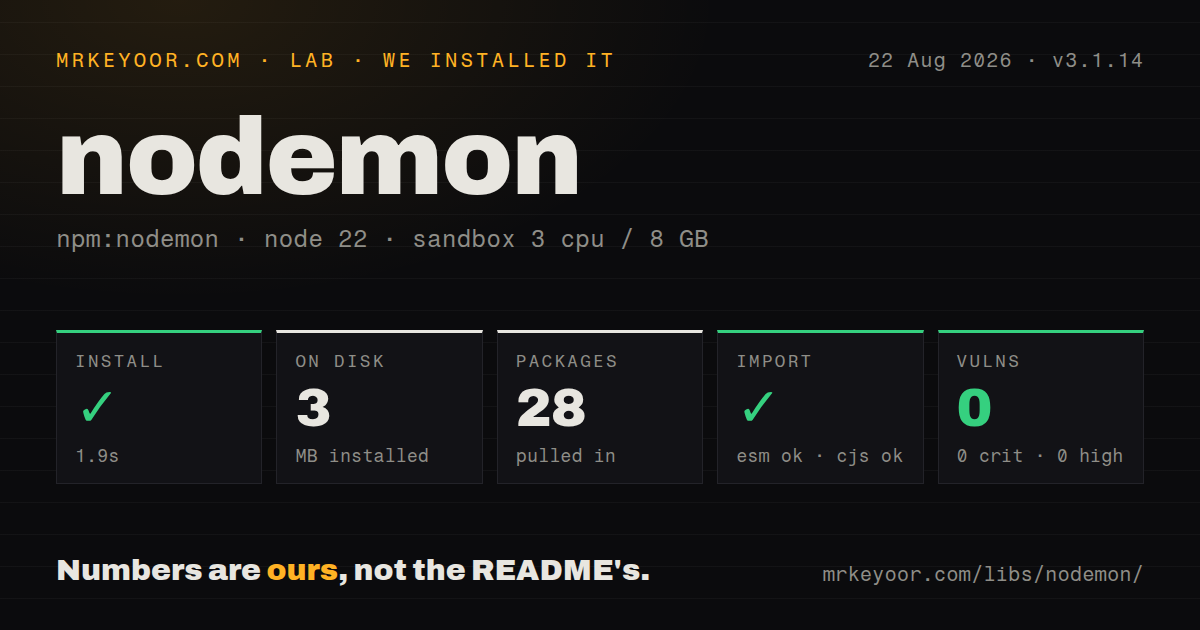
| Install | ✓ · 1.9s | 28 packages on disk · 3 MB |
| Import | ✓ | ESM import works · require() works · CommonJS package |
| Browser | n/a | could not be bundled for the browser (Node-only code, most likely) |
| Types | ✓ | TypeScript types bundled |
| Known vulns | 0 | 0 critical · 0 high · 0 moderate · 0 low (npm audit) |
Answers from our run
Does nodemon install cleanly?
Yes. In a fresh container with an empty cache, npm install nodemon finished in 2 seconds, leaving 28 packages and 3 MB on disk. npm audit reported no known vulnerabilities.
Can nodemon run in a browser?
Not directly: esbuild could not bundle it for the browser in our run, which normally means it depends on Node built-ins. Use it on the server, or find a browser-targeted alternative.
Does nodemon work with both ESM and CommonJS?
Yes. Both import 'nodemon' and require('nodemon') worked in Node 22 in our run. The package is published as CommonJS.
Does nodemon include TypeScript types?
Yes, type declarations ship inside the package, so no @types install is needed.
nodemon or tsx: which should you use?
tsx: Use tsx watch when TypeScript or ESM execution and file watching should come from one tool. nodemon 3.1.14 installed in 1.9 seconds and left 28 packages using 3 MB in our sandbox, with 0 audit findings and working CommonJS and ESM loads; it earns its devDependency when custom paths, commands, delays, or signals matter.
When should you not use nodemon?
A current Node application only needs basic restart-on-change behavior. node --watch provides that loop without adding 28 installed packages.
Use it if
- Your development loop needs exact watch directories, full-path ignore globs, extension filters, restart delay, or a chosen shutdown signal.
- One watcher must restart a non-Node command through --exec or an extension-to-command map.
- An existing project already relies on manual `rs` restarts, nodemon event hooks, or its requireable module API.
- Changes to templates, generated config, or files outside Node's imported module graph must restart the whole application.
- A current Node application only needs basic restart-on-change behavior. `node --watch` provides that loop without adding 28 installed packages.
- You mainly need to execute TypeScript. nodemon does not compile it; `tsx watch` handles execution and watching in one command.
- This is production supervision. The FAQ advises against production use, and nodemon does not provide boot persistence, clustering policy, or managed log retention.
- Application state must survive edits. Every restart replaces the child, so in-memory sessions, caches, open sockets, and unfinished work disappear unless the app shuts them down deliberately.
- Your code is on a bind mount or network share where native filesystem events fail and polling across the tree is too expensive. The documented legacy mode polls watched files.
Setup reality
Our nodemon 3.1.14 install completed in 1.9 seconds in a fresh Node 22 Bookworm container. It left 28 packages and 3 MB on disk, while npm audit reported 0 known vulnerabilities at every severity. The package declares 10 direct dependencies, 0 peers, 368 KB unpacked, an MIT license, and Node 10 or newer. It bundles TypeScript declarations. require() and ESM import both worked; our esbuild browser build failed because this is Node-only process and filesystem code.
Install it in devDependencies and call the local binary from an npm script. By default, nodemon scans the working directory recursively for js, mjs, coffee, litcoffee, and json changes, while ignoring .git, node_modules, coverage, and other generated directories. Set watch and ext for a smaller tree. Ignore patterns match full absolute paths, and ignore wins over watch. Quote shell globs and use ** when they must cross directory levels.
Configuration precedence is CLI, local nodemon.json, then the global file. A local file or --config causes the package.json nodemonConfig block to be ignored rather than merged. Major 3 also stopped reading .nodemonignore; move those rules into nodemon.json. Delay values have a unit trap: JSON numbers mean milliseconds, while a bare CLI number means seconds. --verbose prints loaded configs, watched extensions, ignore rules, child PID, and restart triggers.
Docker mounts and network filesystems may not forward change events. --legacy-watch uses Chokidar polling, so narrow watch paths before enabling it. The normal restart signal is SIGUSR2; a cleanup handler must eventually exit so replacement can continue. A custom signal travels through the process tree and can reach cluster workers. The module API can only be required once because it holds static config, which makes it a poor fit for supervising independent children inside one process.
Patterns
Run the project-local watcher add-development-script
npm install --save-dev nodemon

// package.json
{
  "scripts": {
    "dev": "nodemon src/server.js"
  }
}

npm run dev
An npm script resolves the local binary, so every developer and CI job uses the version recorded in the lockfile.
Watch source and configuration only limit-watch-paths
npx nodemon \
  --watch src \
  --watch config \
  --ext js,json,yaml \
  src/server.js
Any explicit --watch option narrows monitoring to the named paths. Add every directory or individual file that can affect the child.
Exclude tests and generated output ignore-generated-files
npx nodemon \
  --ignore '**/*.test.js' \
  --ignore '**/generated/**' \
  src/server.js
Ignore rules match absolute paths and take precedence over watch rules. Quote each glob so the shell leaves it intact.
Put watcher rules in nodemon.json create-local-config
{
  "watch": ["src", "config"],
  "ext": "js,json,yaml",
  "ignore": ["**/*.test.js"],
  "delay": 500,
  "exec": "node --enable-source-maps src/server.js"
}
A JSON delay of 500 means 500 milliseconds. On the CLI, a bare delay is seconds unless the value ends in ms.
Keep configuration beside npm scripts configure-package-json
{
  "scripts": { "dev": "nodemon" },
  "nodemonConfig": {
    "watch": ["src"],
    "ignore": ["**/test/**"],
    "exec": "node src/server.js"
  }
}
A local nodemon.json or explicit --config makes nodemon ignore this entire block. The sources are not merged.
Include a dotfile in restarts watch-environment-file
npx nodemon \
  --watch src \
  --watch .env \
  --ext js,json,env \
  src/server.js
The FAQ says .env needs an explicit watch entry. Keep the source path too, because adding --watch .env alone narrows the watched set.
Restart a TypeScript entry point run-typescript-loader
npx nodemon \
  --watch src \
  --ext ts,json \
  --exec 'node --import tsx' \
  src/server.ts
nodemon does not transpile TypeScript. Install the loader separately, or use `tsx watch` when no nodemon-only option is needed.
Restart a Python process watch-non-node-command
npx nodemon \
  --watch app \
  --ext py \
  --exec 'python -u' \
  app/main.py
--exec replaces the default Node command. Set the watched extensions yourself when more than the target file can change behavior.
Fall back to polling in a container poll-bind-mount
npx nodemon \
  --legacy-watch \
  --watch src \
  src/server.js
Legacy watch polls the filesystem and can use substantial CPU on a large tree. Limit --watch before turning it on.
Delay restart after a write burst debounce-generated-writes
npx nodemon --delay 750ms src/server.jsThe timer resets after each matching change. The explicit ms suffix avoids the CLI's default seconds interpretation.
Close resources before replacement handle-restart-signal
process.on('SIGUSR2', async () => {
  await server.close();
  await database.close();
  process.kill(process.pid, 'SIGTERM');
});
SIGUSR2 is nodemon's normal restart signal. The handler must terminate the child after cleanup or the new process cannot take its place.
Print loaded rules and triggers inspect-restart-decisions
npx nodemon --verbose src/server.jsVerbose mode reports config files, ignore rules, watched extensions, process IDs, matched paths, and the files that caused a restart.
Alternatives
| Package | Registry | Pick it when |
|---|---|---|
| tsx | npm | Use `tsx watch` when TypeScript or ESM execution and file watching should come from one tool. |
| node-dev | npm | Use it for a Node-specific loop that restarts from the loaded module dependency tree. |
| pm2 | npm | Use it for deployed process recovery, boot startup, clustering, and retained process logs. |
More cli & tooling guides
commander · chalk · typescript · esbuild · yargs · click · the whole shelf →
How this guide is made: grounded in the library's documentation, release notes, changelog, and issue history, on a fixed rubric — not a hands-on install of every release. The 50 most-downloaded entries are additionally install-verified in clean containers. Corrections: contact the desk.