pm2 review
PM2 7.0.4 is a resident process manager for applications running directly on a server. Its daemon starts and restarts programs, captures their output, reports CPU and memory, and restores a saved process list after reboot. Node and Bun network services can run as a cluster sharing one port; fork mode can supervise Python, Ruby, shell scripts, or executables. Version 7.0.4 adds native TypeScript launching on supported Node releases, fixes overlapping cluster reloads, stops start or restart RPCs from hanging when a worker dies before coming online, repairs container commands, and exposes real daemon errors. It is host operations software, not a browser library.
Our PM2 7.0.3 install used 25 MB across 76 packages and reported 2 high audit findings; the current 7.0.4 release was not re-audited in that sandbox. PM2 still fits small fleets of directly managed servers, but use the platform's own supervisor when one already exists and plan readiness, shutdown, state, logs, and reboot restoration before deployment.
We installed it
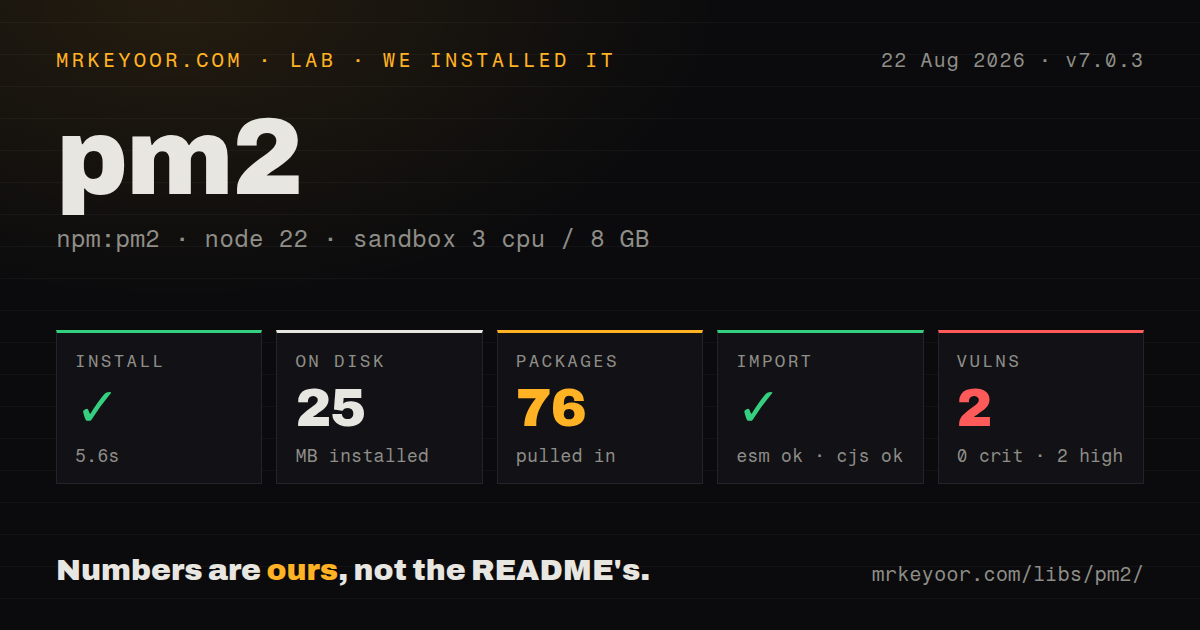
| Install | ✓ · 5.6s | 76 packages on disk · 25 MB |
| Import | ✓ | ESM import works · require() works · CommonJS package |
| Browser | n/a | could not be bundled for the browser (Node-only code, most likely) |
| Types | ✓ | TypeScript types bundled |
| Known vulns | 2 | 0 critical · 2 high · 0 moderate · 0 low (npm audit) |
Answers from our run
Does pm2 install cleanly?
Yes. In a fresh container with an empty cache, npm install pm2 finished in 6 seconds, leaving 76 packages and 25 MB on disk. npm audit reported 2 known vulnerabilities.
Can pm2 run in a browser?
Not directly: esbuild could not bundle it for the browser in our run, which normally means it depends on Node built-ins. Use it on the server, or find a browser-targeted alternative.
Does pm2 work with both ESM and CommonJS?
Yes. Both import 'pm2' and require('pm2') worked in Node 22 in our run. The package is published as CommonJS.
Does pm2 include TypeScript types?
Yes, type declarations ship inside the package, so no @types install is needed.
pm2 or forever: which should you use?
forever: Choose it for basic Node daemonization and crash restart without PM2's cluster and monitoring surface. Our PM2 7.0.3 install used 25 MB across 76 packages and reported 2 high audit findings; the current 7.0.4 release was not re-audited in that sandbox.
When should you not use pm2?
Kubernetes, ECS, Nomad, systemd, or a serverless platform already controls process health and restarts. PM2 would create a second lifecycle authority.
Use it if
- Several long-running Node or Bun services run directly on one Linux host or VM and need one status, logs, restart, and boot-persistence workflow.
- A stateless Node network service needs several workers on one port plus coordinated reloads without adding an orchestrator.
- A checked-in ecosystem file should define commands, working directories, environments, memory ceilings, readiness, and restart policy.
- Mixed scripts on one server benefit from names, namespaces, log access, and one service account owning their lifecycle.
- Kubernetes, ECS, Nomad, systemd, or a serverless platform already controls process health and restarts. PM2 would create a second lifecycle authority.
- Cluster workers keep sessions, WebSocket ownership, cron state, or job queues in memory. PM2's cluster model requires shared state to live outside each worker.
- Nobody will configure log rotation. PM2 writes log files, while retention needs `pm2-logrotate` or operating-system rotation to prevent disk growth.
- A one-process container only needs signal forwarding and platform restarts. Plain Node under a small init has fewer moving parts than a second daemon layer.
- AGPL-3.0 is incompatible with your distribution or modification policy, or 2 high npm audit findings like those in our 7.0.3 install cannot be accepted without reviewing the resolved advisories.
Setup reality
We installed PM2 7.0.3 in 5.6 seconds in a fresh Node 22 Bookworm sandbox. It placed 76 packages on disk and used 25 MB. The PM2 package itself was 1,992 KB unpacked with 22 direct dependencies and no peers. npm audit reported 2 known vulnerabilities, both high severity. CommonJS require() and ESM import worked, bundled TypeScript declarations were present, and the package declared Node 18 or newer under AGPL-3.0. Our browser build failed, as expected for host process-management code.
The registry now serves 7.0.4, so those audit and disk findings belong to the measured 7.0.3 graph. We did not re-audit 7.0.4. A global install matches the README but makes the host's active version less reproducible; a pinned local installation is easier to track, though the startup service still needs stable Node and PM2 paths. The daemon and saved state belong to the Unix user that launched them, so operate PM2 consistently through one service account.
Reboot persistence has 2 distinct steps. pm2 startup prints an init-system command that usually needs privilege, then pm2 save records the current process list. Missing either one leaves a partial setup. Node installations managed under a user's version manager can make the generated PATH stale after an upgrade. Environment blocks in an ecosystem file apply only when start or restart uses the matching --env value. Keep secrets outside that file.
Cluster mode suits stateless Node servers. For controlled reloads, enable wait_ready, send ready only after listeners and dependencies work, and set timeouts around startup and shutdown. PM2 eventually kills a process after kill_timeout, so handlers must stop new work and close resources. Core logs do not rotate. Use pm2-runtime inside a container. Version 7.0.4 refuses a second reload while one is active and fixes exit-before-online hangs, but an application still needs its own readiness, draining, health checks, and external state.
Patterns
Start one named server under the current user start-service
pm2 start dist/server.js --name api --time
pm2 list
pm2 describe api
The daemon and process list belong to the current operating-system user. Run later status, log, save, and startup commands as that same service account.
Check production process settings into the repo define-ecosystem
// ecosystem.config.js
module.exports = {
  apps: [{
    name: 'api',
    script: './dist/server.js',
    cwd: '/srv/my-api',
    instances: 2,
    exec_mode: 'cluster',
    max_memory_restart: '750M',
    time: true,
  }],
};

// pm2 start ecosystem.config.js
Relative script and log paths resolve from `cwd`. Keep secrets in the process environment rather than committing them in this file.
Apply the production environment block select-environment
// inside an app declaration
env: { NODE_ENV: 'development', PORT: 3000 },
env_production: { NODE_ENV: 'production', PORT: 8080 },

// pm2 start ecosystem.config.js --env production
`env_production` is chosen only by `--env production`. Use the same flag on restarts that must pick up changed production values.
Share one port across all CPU workers run-cluster
pm2 start dist/server.js --name api -i max
pm2 reload api
Cluster mode works for Node network servers. Sessions, scheduled jobs, WebSocket coordination, and mutable shared state must move outside individual workers.
Tell PM2 when a server is actually ready wait-for-readiness
// ecosystem.config.js
module.exports = { apps: [{
  name: 'api',
  script: './dist/server.js',
  wait_ready: true,
  listen_timeout: 10000,
}] };

server.listen(port, () => process.send?.('ready'));
With `wait_ready`, the process must send the exact ready message. Send it after required connections and the network listener are usable.
Close the listener and database before exit drain-on-stop
// ecosystem.config.js: kill_timeout: 10000

process.on('SIGINT', () => {
  server.close(async () => {
    await database.close();
    process.exit(0);
  });
});
PM2 kills the process after `kill_timeout`. Stop accepting work immediately and allow more time than the longest expected drain.
Slow down a worker crash loop backoff-restarts
module.exports = { apps: [{
  name: 'worker',
  script: './dist/worker.js',
  min_uptime: '10s',
  max_restarts: 10,
  exp_backoff_restart_delay: 100,
}] };
Backoff limits pressure during an outage but does not repair the fault. Alert on restart count and a final `errored` process state.
Restart a worker above a memory ceiling cap-memory
pm2 start dist/worker.js \
  --name worker \
  --max-memory-restart 750M
PM2 checks memory periodically, so this is not an exact hard limit. Leave host headroom and investigate leaks instead of relying on repeated restarts.
Watch source while ignoring generated logs watch-development-files
module.exports = { apps: [{
  name: 'dev-api',
  script: './src/server.js',
  watch: ['src'],
  watch_delay: 1000,
  ignore_watch: ['node_modules', 'logs'],
}] };
Watch mode belongs mainly in development. Disable watching when stopping the app or a later file change can start it again.
Inspect output and install bounded rotation rotate-logs
pm2 logs api --lines 200
pm2 install pm2-logrotate
pm2 set pm2-logrotate:max_size 50M
pm2 set pm2-logrotate:retain 14
PM2 core does not rotate its files. `pm2-logrotate` becomes another managed module whose state and upgrades need monitoring.
Create the init entry and snapshot processes restore-after-reboot
pm2 startup
# Run the exact privileged command printed above.
pm2 save
pm2 resurrect
`startup` installs boot integration while `save` records the apps to restore. A Node version-manager upgrade can invalidate the generated executable path.
Use the foreground runtime in a container run-container-foreground
FROM node:22-alpine
WORKDIR /app
COPY package*.json ./
RUN npm ci --omit=dev && npm install --global pm2@7.0.4
COPY . .
CMD ["pm2-runtime", "ecosystem.config.js", "--env", "production"]
`pm2-runtime` forwards container lifecycle and exit state. Plain `node` plus a small init is simpler when the platform already supervises one process per container.
Alternatives
| Package | Registry | Pick it when |
|---|---|---|
| forever | npm | Choose it for basic Node daemonization and crash restart without PM2's cluster and monitoring surface. |
| nodemon | npm | Choose it for development restarts on file changes, never as a replacement for a production service manager. |
| concurrently | npm | Choose it to run several local commands together when reboot persistence and production supervision are out of scope. |
More infra guides
semver · boto3 · opentelemetry-api · @opentelemetry/api · psutil · distro · the whole shelf →
How this guide is made: grounded in the library's documentation, release notes, changelog, and issue history, on a fixed rubric — not a hands-on install of every release. The 50 most-downloaded entries are additionally install-verified in clean containers. Corrections: contact the desk.