nanospinner review
nanospinner 1.2.2 animates one status line in a Node.js terminal, then replaces it with a success, error, warning, info, or custom mark. It includes text updates, frame and color choices, interval control, and stream selection, with picocolors as its only dependency. The current release still has one-spinner scope; multi-spinner support remains an unchecked README roadmap item. Our install confirmed bundled TypeScript declarations and Node-only behavior, which fits small CLIs but not browser interfaces or task orchestration.
Our nanospinner 1.2.2 install took 0.7 seconds, occupied 1 MB across 2 packages, and had 0 audit findings, but its browser build failed and it manages process signals while active. It is a good fit for one short Node CLI task; choose Listr2 when progress display becomes application state.
We installed it
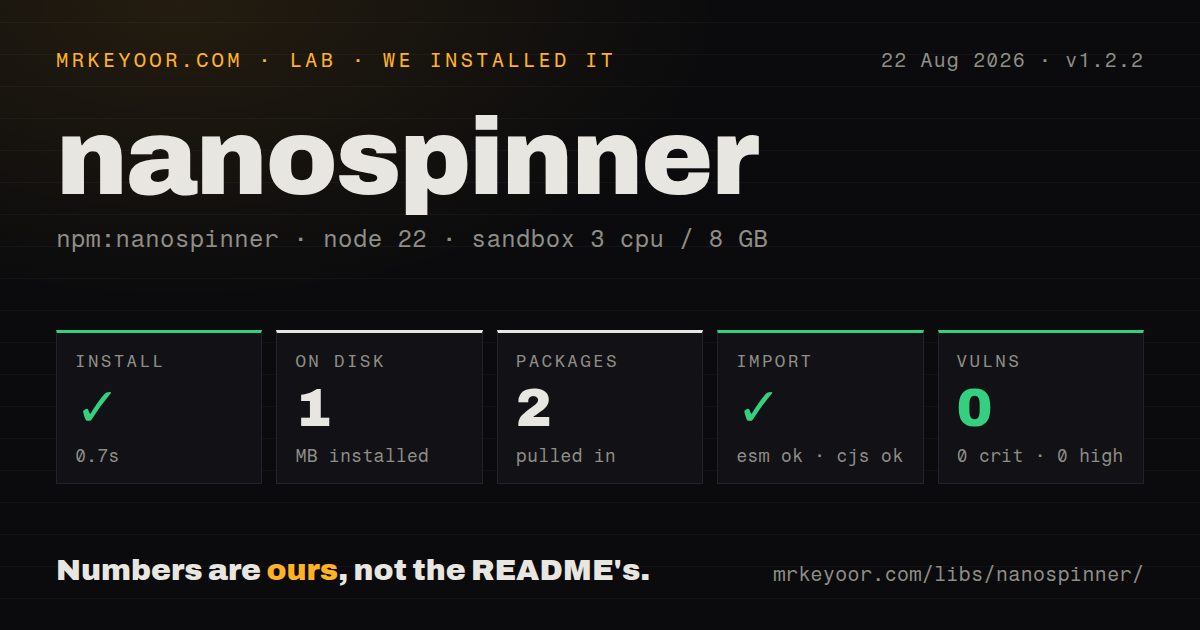
| Install | ✓ · 0.7s | 2 packages on disk · 1 MB |
| Import | ✓ | ESM import works · require() works · CommonJS package |
| Browser | n/a | could not be bundled for the browser (Node-only code, most likely) |
| Types | ✓ | TypeScript types bundled |
| Known vulns | 0 | 0 critical · 0 high · 0 moderate · 0 low (npm audit) |
Answers from our run
Does nanospinner install cleanly?
Yes. In a fresh container with an empty cache, npm install nanospinner finished in 0.7s, leaving 2 packages and 1 MB on disk. npm audit reported no known vulnerabilities.
Can nanospinner run in a browser?
Not directly: esbuild could not bundle it for the browser in our run, which normally means it depends on Node built-ins. Use it on the server, or find a browser-targeted alternative.
Does nanospinner work with both ESM and CommonJS?
Yes. Both import 'nanospinner' and require('nanospinner') worked in Node 22 in our run. The package is published as CommonJS.
Does nanospinner include TypeScript types?
Yes, type declarations ship inside the package, so no @types install is needed.
nanospinner or ora: which should you use?
ora: Use it for a more mature spinner with broader terminal behavior and options. Our nanospinner 1.2.2 install took 0.7 seconds, occupied 1 MB across 2 packages, and had 0 audit findings, but its browser build failed and it manages process signals while active.
When should you not use nanospinner?
Several tasks must animate at once; multi-spinner support is still unfinished in the README roadmap.
Use it if
- One asynchronous CLI operation needs a compact progress indicator and a final status line.
- A non-TTY run should print one plain line instead of scheduling animation frames.
- Custom frames, colors, intervals, and a chosen output stream cover the display requirements.
- Bundled TypeScript declarations and a single small runtime dependency matter.
- Several tasks must animate at once; multi-spinner support is still unfinished in the README roadmap.
- Nested tasks, persistent logs, indentation, or coordinated rendering are needed; use Listr2 or Ora.
- The application owns SIGINT and SIGTERM behavior because `start()` adds handlers that can call `process.exit`.
- stderr TTY detection must be exact: 1.2.2 checks file descriptor 1 even though output defaults to stderr.
- Browser output is required; our esbuild browser bundle failed on the package's Node terminal dependencies.
Setup reality
Our nanospinner 1.2.2 install completed in 0.7 seconds and left 2 packages using 1 MB on disk. The package is 40 KB unpacked, has 1 direct dependency and 0 peers, and returned 0 known vulnerabilities from npm audit. No native compilation, credential, or configuration file is involved.
The package is CommonJS without an exports map. Both require() and ESM import worked on Node 22, and declaration files are included. Create the spinner with its output stream and then call start(). Although the TypeScript option shape lets update() receive a stream, the 1.2.2 implementation does not replace the stream there.
Output defaults to stderr, but TTY capability is calculated from stdout file descriptor 1. Redirected stdout can therefore disable animation while stderr remains interactive. In CI or another non-TTY process, start() writes one hyphen-prefixed line and schedules no frames. clear() still emits cursor-control bytes, so avoid calling it in plain log mode.
An active spinner installs SIGINT and SIGTERM listeners that stop the display and exit with 130 or 143. Finish every path with success(), error(), warn(), info(), or stop('message') so the interval and listeners are removed. reset() cancels the timer but does not provide the same complete cleanup. Our browser build failed, confirming that its output logic belongs in Node terminals.
Patterns
Start and finish one task show-basic-spinner
import { createSpinner } from 'nanospinner'

const spinner = createSpinner('Downloading release').start()
await downloadRelease()
spinner.success({ text: 'Release downloaded' })
Call a terminal status method on every completion path so the interval and signal listeners are removed.
Replace animation with an error line report-task-failure
const spinner = createSpinner('Publishing').start()

try {
  await publish()
  spinner.success('Published')
} catch (error) {
  spinner.error('Publish failed')
  throw error
}
`error()` stops the timer and prints a failure mark; it does not throw or set the process exit code for your task.
Change text while work continues update-spinner-text
const spinner = createSpinner('Reading manifest').start()

const manifest = await readManifest()
spinner.update(`Installing ${manifest.dependencies.length} packages`)
await installDependencies(manifest)
spinner.success('Dependencies installed')
Version 1.2.2 applies text, color, frames, and interval updates, but does not switch the active stream through `update()`.
Provide frames and frame timing customize-animation
const spinner = createSpinner('Waiting for worker', {
  frames: ['.', '..', '...'],
  interval: 120,
  color: 'cyan',
}).start()

await waitForWorker()
spinner.success('Worker ready')
Short intervals generate more terminal writes; non-TTY mode prints once and does not animate those frames.
Select stdout when creating the spinner choose-output-stream
const spinner = createSpinner('Generating report', {
  stream: process.stdout,
}).start()

await generateReport()
spinner.success('Report generated')
TTY detection still reads file descriptor 1 in 1.2.2, regardless of the stream supplied to the spinner.
Finish with a warning status finish-with-warning
const spinner = createSpinner('Checking configuration').start()
const missing = await findOptionalSettings()

if (missing.length) {
  spinner.warn(`Missing optional settings: ${missing.join(', ')}`)
} else {
  spinner.success('Configuration complete')
}
A warning is only display output. The caller must decide whether the command should return a nonzero exit code.
Finish with an informational line finish-with-info
const spinner = createSpinner('Looking for updates').start()
const update = await findUpdate()

update
  ? spinner.info(`Version ${update.version} is available`)
  : spinner.success('Already up to date')
`info()` stops animation and writes one final line, making it suitable for a completed neutral outcome.
Print a custom completion mark use-custom-final-mark
const spinner = createSpinner('Skipping cached files').start()
await inspectCache()
spinner.stop({
  text: 'Cache is current',
  mark: '=',
  color: 'gray',
})
Keep the mark short because cursor clearing assumes a single terminal status line.
Check whether animation is active check-spinner-state
const spinner = createSpinner('Connecting').start()

try {
  await connect()
  if (spinner.isSpinning()) spinner.success('Connected')
} finally {
  if (spinner.isSpinning()) spinner.stop('Connection cancelled')
}
Use the exposed state for display decisions, not as proof that the underlying asynchronous operation is running.
Reuse one spinner sequentially reuse-spinner-instance
const spinner = createSpinner('Step one').start()
await stepOne()
spinner.success('Step one done')

spinner.reset().start('Step two')
await stepTwo()
spinner.success('Step two done')
The API models one active status at a time; finish the first operation before starting the next on the same instance.
Load nanospinner from CommonJS use-commonjs
const { createSpinner } = require('nanospinner')

const spinner = createSpinner('Building').start()
build().then(
  () => spinner.success('Built'),
  error => {
    spinner.error('Build failed')
    throw error
  },
)
CommonJS `require()` worked in our Node 22 sandbox despite the README leading with ESM syntax.
Disable animation for deterministic logs disable-spinner-explicitly
const quiet = process.env.CI || process.argv.includes('--json')
const spinner = quiet ? null : createSpinner('Loading').start()

const data = await loadData()
spinner?.success('Loaded')
if (process.argv.includes('--json')) console.log(JSON.stringify(data))
A disabled or non-TTY spinner should still produce a useful final line rather than cursor-control output.
Alternatives
| Package | Registry | Pick it when |
|---|---|---|
| ora | npm | Use it for a more mature spinner with broader terminal behavior and options. |
| listr2 | npm | Use it for multiple, nested, concurrent, or persistent CLI tasks. |
| cli-spinners | npm | Use it when you only need frame definitions and will own all rendering yourself. |
More cli & tooling guides
commander · chalk · typescript · esbuild · yargs · click · the whole shelf →
How this guide is made: grounded in the library's documentation, release notes, changelog, and issue history, on a fixed rubric — not a hands-on install of every release. The 50 most-downloaded entries are additionally install-verified in clean containers. Corrections: contact the desk.