marked-terminal review
marked-terminal 7.3.0 plugs a terminal renderer into Marked, turning parsed Markdown into strings styled with ANSI colors. It formats headings, nested lists, task boxes, tables, links, emoji, fenced code, and inline markup for Node command output. Marked remains a separate peer dependency and does the parsing. The renderer uses Chalk for styles, cli-highlight for code, and cli-table3 for tables. Version 7.3.0 widens the peer range to include Marked 15 and updates Chalk and node-emoji. Our install reached 42 packages and 9 MB, no TypeScript declarations were present, and a browser build failed.
marked-terminal 7.3.0 installed in 2.7 seconds and left 42 packages using 9 MB in our sandbox, so its tables and code coloring need to earn a real place in the CLI. It fits Marked-based Node tools with rich Markdown output; basic help text, browser rendering, Marked 16, and strict TypeScript are good reasons to walk away.
We installed it
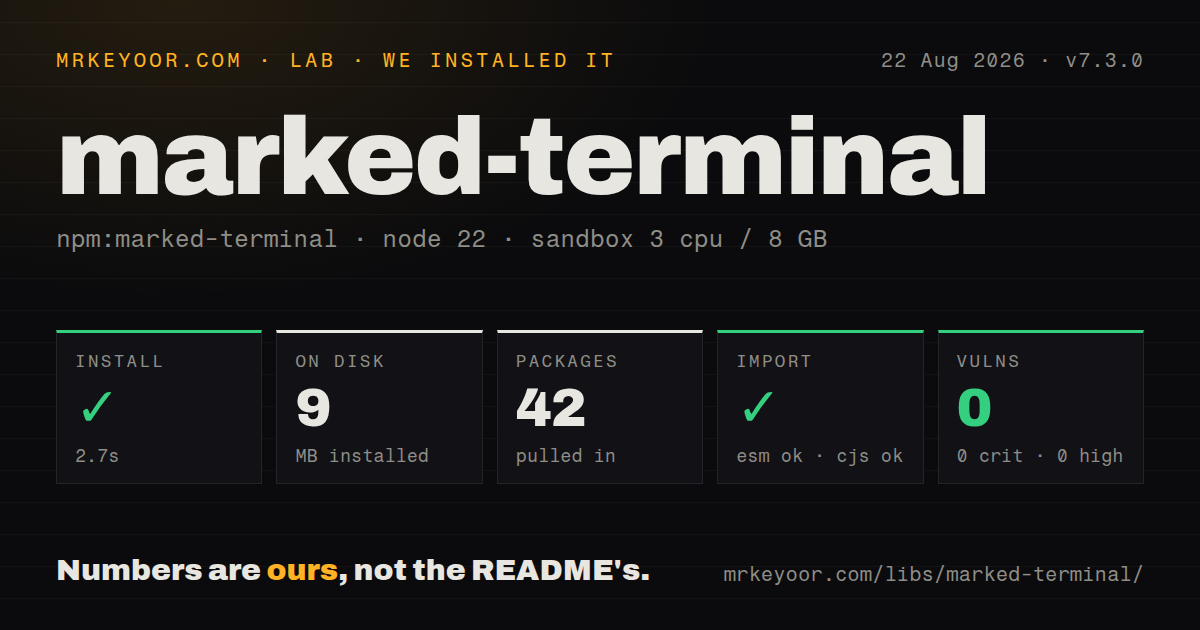
| Install | ✓ · 2.7s | 42 packages on disk · 9 MB |
| Import | ✓ | ESM import works · require() works · ESM package with exports map |
| Browser | n/a | could not be bundled for the browser (Node-only code, most likely) |
| Types | — | no TypeScript types found |
| Known vulns | 0 | 0 critical · 0 high · 0 moderate · 0 low (npm audit) |
Answers from our run
Does marked-terminal install cleanly?
Yes. In a fresh container with an empty cache, npm install marked-terminal finished in 3 seconds, leaving 42 packages and 9 MB on disk. npm audit reported no known vulnerabilities.
Can marked-terminal run in a browser?
Not directly: esbuild could not bundle it for the browser in our run, which normally means it depends on Node built-ins. Use it on the server, or find a browser-targeted alternative.
Does marked-terminal work with both ESM and CommonJS?
Yes. Both import 'marked-terminal' and require('marked-terminal') worked in Node 22 in our run. The package is published as ESM with an exports map.
Does marked-terminal include TypeScript types?
No type declarations were found in our install, so TypeScript users need their own declarations.
marked-terminal or markdown-to-ansi: which should you use?
markdown-to-ansi: Use it when direct Markdown-to-ANSI conversion is preferable to adopting Marked as a peer. marked-terminal 7.3.0 installed in 2.7 seconds and left 42 packages using 9 MB in our sandbox, so its tables and code coloring need to earn a real place in the CLI.
When should you not use marked-terminal?
Marked is not otherwise needed. It is a peer dependency, so a direct Markdown-to-ANSI converter can remove a parser integration step.
Use it if
- A Node CLI already uses Marked and needs ANSI-rendered help, release notes, diagnostics, or reports.
- Markdown tables and fenced code should become terminal tables and syntax-colored blocks without maintaining a full renderer.
- The output needs custom functions for headings, links, inline code, images, list markers, or table borders.
- The same package must load through ESM import and CommonJS require on Node 16 or newer.
- Marked is not otherwise needed. It is a peer dependency, so a direct Markdown-to-ANSI converter can remove a parser integration step.
- The application is upgrading to Marked 16 or later. Version 7.3.0 declares support for Marked versions from 1 up to, but excluding, 16.
- Strict TypeScript builds require library-owned declarations. The published package contains only JavaScript and has no `types` or `typings` entry.
- A 42-package, 9 MB installed tree is too much for command help. Plain strings or a small custom Marked renderer have a lower dependency cost.
- Rendering must run in a browser. Our esbuild browser bundle failed, and the source reads terminal state through `process.stdout` and terminal-capability packages.
- Markdown comes from an untrusted party and terminal control sequences must be neutralized. The text renderer applies styles but passes ordinary text through; it is not an input sanitizer.
Setup reality
Our fresh Node 22 sandbox installed marked-terminal 7.3.0 in 2.7 seconds. It left 42 packages and 9 MB on disk. The package declares 7 direct dependencies and 1 peer dependency, with an unpacked size of 1928 KB. npm audit found 0 known vulnerabilities at every severity. The package is ESM with an exports map, and both require() and ESM import worked. We found no TypeScript types.
Install marked yourself, then call marked.use(markedTerminal()) once during startup. Version 7.3.0 requires Node 16 or newer and accepts Marked 1 through 15. The README starts with this named extension API, but its later constructor example belongs to an older integration style. A dedicated Marked instance keeps renderer settings local when tests or commands need different output policies.
Text reflow is off until reflowText: true; only then does the width option apply. The default width is 80, while horizontal rules can consult process.stdout.columns. Redirected output and CI may not expose terminal columns, so choose an explicit fallback. cli-highlight handles fenced-code languages, cli-table3 lays out tables, and supports-hyperlinks decides whether links become terminal hyperlinks or visible text plus a URL.
Our browser bundle attempt failed, which is consistent with code that reads Node terminal state. Keep rendering in the CLI process. Raw Markdown text is not cleaned of terminal control bytes before style functions receive it, so validate hostile input before parsing. Custom Chalk functions require your project to depend on Chalk directly. TypeScript users must maintain a local declaration and recheck it against the JavaScript exports after upgrades.
Patterns
Register the current extension API render-markdown
import { marked } from 'marked';
import { markedTerminal } from 'marked-terminal';

marked.use(markedTerminal());
process.stdout.write(
  marked.parse('# Status\n\n**Ready** to deploy.')
);
Version 7.3.0 documents `marked.use(markedTerminal())` at the top of its README; register it once during startup.
Load the CommonJS condition render-commonjs
const { marked } = require('marked');
const { markedTerminal } = require('marked-terminal');

marked.use(markedTerminal());
console.log(marked.parse('## Results'));
The 7.3.0 export map provides `index.cjs` for `require()`, and our sandbox confirmed that path loads.
Keep renderer settings on one Marked instance isolate-parser
import { Marked } from 'marked';
import { markedTerminal } from 'marked-terminal';

const terminalMarkdown = new Marked();
terminalMarkdown.use(markedTerminal({ emoji: false }));
console.log(terminalMarkdown.parse(source));
A separate Marked instance prevents one command's version 7 renderer options from mutating the shared default parser.
Wrap prose to the terminal width reflow-output
const width = Math.max(40, process.stdout.columns || 80);

marked.use(markedTerminal({
  reflowText: true,
  width,
}));
The `width` option has no effect until `reflowText` is true; CI often needs the explicit 80-column fallback.
Replace the default Chalk styles style-output
import chalk from 'chalk';

marked.use(markedTerminal({
  firstHeading: chalk.cyan.bold,
  heading: chalk.blue.bold,
  codespan: chalk.yellow,
  blockquote: chalk.gray.italic,
}));
marked-terminal 7.3.0 accepts style functions, but import Chalk from your own declared dependency instead of its dependency tree.
Pass options to fenced-code highlighting configure-highlighting
marked.use(markedTerminal(
  { code: (text) => text },
  { ignoreIllegals: true },
));

console.log(marked.parse(
  '~~~js\nconst answer = 42;\n~~~'
));
The second options object goes to cli-highlight; an unknown language falls back to the configured `code` style.
Set table padding and border characters configure-tables
marked.use(markedTerminal({
  tableOptions: {
    chars: {
      top: '-',
      'top-mid': '+',
      'top-left': '+',
      'top-right': '+',
    },
    style: { 'padding-left': 1, 'padding-right': 1 },
  },
}));
Version 7 passes `tableOptions` into cli-table3, so wide cell content can still overflow a narrow terminal.
Preserve colon-delimited emoji names disable-emoji
marked.use(markedTerminal({ emoji: false }));
console.log(marked.parse('Build status: :warning:'));
Emoji replacement is on by default in 7.3.0; disabling it leaves the original `:warning:` text unchanged.
Remove hash prefixes from headings hide-heading-prefix
marked.use(markedTerminal({
  showSectionPrefix: false,
}));
The default adds Markdown hash prefixes according to heading depth; this option removes those prefixes from terminal output.
Print useful text for images render-image-fallback
marked.use(markedTerminal({
  image: (href, title, text) =>
    `[image: ${text || title || 'untitled'}] ${href}\n`,
}));
A terminal cannot draw the Markdown image, and version 7 calls this function with its URL, title, and alt text.
Leave HTML entities encoded preserve-entities
marked.use(markedTerminal({ unescape: false }));
console.log(marked.parse('Show <tag> as encoded text.'));
Entity unescaping defaults to true in 7.3.0; set it false when the encoded form is the intended terminal output.
Suppress raw HTML tokens drop-raw-html
marked.use(markedTerminal({
  html: () => '',
}));
console.log(marked.parse('before <span>hidden</span> after'));
The default renderer prints raw HTML with a gray style; returning an empty string removes those tokens but does not sanitize other terminal controls.
Alternatives
| Package | Registry | Pick it when |
|---|---|---|
| markdown-to-ansi | npm | Use it when direct Markdown-to-ANSI conversion is preferable to adopting Marked as a peer. |
| marked-man | npm | Use it when Markdown must become roff for a Unix man page instead of live colored terminal output. |
| marked | npm | Use Marked alone when a short custom renderer covers the limited syntax accepted by the command. |
| markdown-it | npm | Use it when parser plugins and token rules matter more than marked-terminal's ready-made ANSI presentation. |
More cli & tooling guides
commander · chalk · typescript · esbuild · yargs · click · the whole shelf →
How this guide is made: grounded in the library's documentation, release notes, changelog, and issue history, on a fixed rubric — not a hands-on install of every release. The 50 most-downloaded entries are additionally install-verified in clean containers. Corrections: contact the desk.