markdown-it review
markdown-it 15 turns CommonMark input into HTML with a configurable tokenizer and renderer. Applications can enable tables, strikethrough, link detection, typography, or line breaks, inspect block and inline tokens, and replace rendering for a specific token type. Its plugin API supports additions such as footnotes and containers. Version 15 adds bundled TypeScript declarations, changes browser distribution paths, closes internal module imports, removes three md.utils helpers, and stops linking fuzzy bare domains unless that behavior is enabled explicitly.
markdown-it 15 installed in 0.5 seconds with zero audit findings, but our browser build was 46.7 KB gzipped. Choose it when renderer hooks or its plugin family pay for that client cost; choose a smaller converter or AST pipeline when they do not.
We installed it
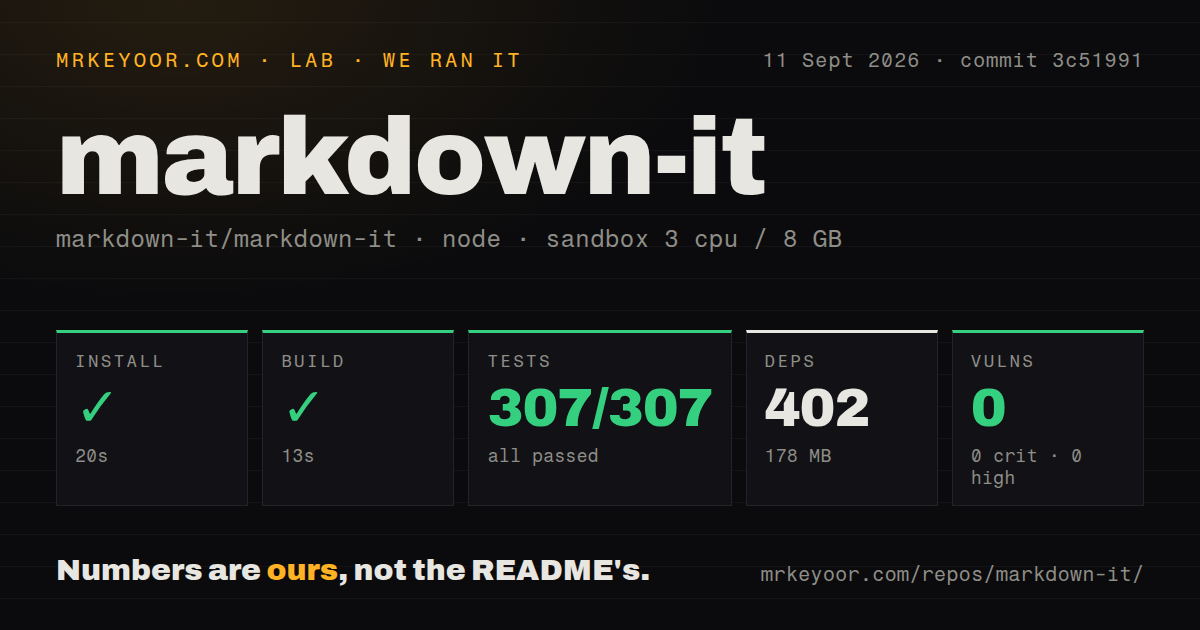
| Install | ✓ · 0.5s | 7 packages on disk · 3 MB |
| Import | ✓ | ESM import works · require() works · CommonJS package with exports map |
| Browser | 46.7 KB | gzipped (110 KB minified), bundled with esbuild |
| Types | ✓ | TypeScript types bundled |
| Known vulns | 0 | 0 critical · 0 high · 0 moderate · 0 low (npm audit) |
Answers from our run
Does markdown-it install cleanly?
Yes. In a fresh container with an empty cache, npm install markdown-it finished in 0.5s, leaving 7 packages and 3 MB on disk. npm audit reported no known vulnerabilities.
How much does markdown-it add to a browser bundle?
46.7 KB gzipped (110 KB minified) when the whole package is bundled for the browser with esbuild. Importing only part of it is usually smaller.
Does markdown-it work with both ESM and CommonJS?
Yes. Both import 'markdown-it' and require('markdown-it') worked in Node 22 in our run. The package is published as CommonJS with an exports map.
Does markdown-it include TypeScript types?
Yes, type declarations ship inside the package, so no @types install is needed.
markdown-it or marked: which should you use?
marked: Use it for direct HTML conversion when a smaller browser parser matters more than token hooks. markdown-it 15 installed in 0.5 seconds with zero audit findings, but our browser build was 46.7 KB gzipped.
When should you not use markdown-it?
A 46.7 KB gzipped parser exceeds the client budget; that is the size our import-all browser build produced.
Use it if
- CommonMark output needs selected extras such as tables, strikethrough, or automatic URL links.
- One element needs a custom renderer without post-processing the entire HTML string.
- The chosen Markdown dialect already depends on maintained markdown-it plugins.
- A restricted parser should start from the zero preset and enable named rules only.
- A 46.7 KB gzipped parser exceeds the client budget; that is the size our import-all browser build produced.
- Transforms are easiest on one nested syntax tree. markdown-it exposes paired block tokens and inline child arrays instead of a uniform AST.
- The product must edit Markdown and serialize source structure back. The built-in output target is HTML.
- Untrusted authors can submit raw HTML and no sanitizer is available. html:true passes source tags into output without cleaning them.
- A required plugin imports markdown-it/lib or uses removed md.utils helpers. Version 15 permits only public exports and removed assign, has, and isString.
Setup reality
We installed markdown-it 15.0.0 in 0.5 seconds in a new Node 22 container. Seven packages occupied 3 MB. Package metadata declares six direct dependencies, no peer dependencies, 1,952 KB unpacked, bundled types, and an MIT license. npm audit found zero vulnerabilities. The distribution is CommonJS with an exports map, and both require() and ESM import succeeded in our checks.
Our browser build measured 110 KB minified and 46.7 KB gzipped when importing the package namespace. Version 15 moved browser artifacts, so verify old CDN URLs against the current dist directory. Remove @types/markdown-it because declarations now ship in the package. Deep imports such as markdown-it/lib/token.mjs no longer resolve; Token, Renderer, and other supported parser classes are static properties on the main export.
Build one parser with its final options and reuse it. linkify handles explicit URLs, while a bare example.com stays text in version 15 unless md.linkify.set({fuzzyLink:true}) is applied. html defaults to false. Turning it on allows raw tags through and still requires a separate sanitizer for hostile input. Parsing is synchronous, so enforce an input-size limit on server request paths.
Plugin order can change results when two extensions replace the same rule or renderer. Call an earlier renderer when decorating output so another plugin's attributes survive. A third-party plugin that relied on internal modules may break on 15 even if ordinary render calls work. Test the exact plugin set during migration, including link behavior and custom fence highlighting.
Patterns
Convert a complete document render-markdown
import MarkdownIt from 'markdown-it'

const md = new MarkdownIt()
const html = md.render('# Notes\n\nUse **carefully**.')
Reuse the configured parser; constructing one for every request repeats rule and plugin setup.
Set HTML and newline rules configure-rendering
const md = new MarkdownIt({html: false, linkify: true, breaks: true, typographer: false})html:false escapes source tags. breaks:true changes a single newline into a line break, which differs from base CommonMark paragraphs.
Create a narrow Markdown dialect allowlist-rules
const md = new MarkdownIt('zero')
md.enable(['paragraph', 'text', 'emphasis', 'link'])
const html = md.render(userText)
The zero preset makes the rule list an allowlist; disabling only a few defaults can leave unrelated syntax active.
Render a label without paragraph tags render-inline
const html = md.renderInline('Status: **ready**')renderInline does not process headings, fenced code, lists, blockquotes, or other block constructs.
Register a footnote plugin add-footnotes
import footnote from 'markdown-it-footnote'
const md = new MarkdownIt().use(footnote)
const html = md.render('Claim.[^1]\n\n[^1]: Source.')
Check that every community plugin supports version 15, especially if it previously imported files below markdown-it/lib.
Link a bare domain on version 15 enable-fuzzy-links
const md = new MarkdownIt({linkify: true})
md.linkify.set({fuzzyLink: true})
const html = md.render('See example.com')
linkify alone recognizes explicit URLs; version 15 requires fuzzyLink:true for a domain without a scheme.
Walk block and inline token lists inspect-tokens
const tokens = md.parse('# Report\n\n- first', {})
for (const token of tokens) {
  console.log(token.type, token.nesting)
  for (const child of token.children || []) console.log(child.type)
}
Blocks use separate opening and closing tokens, while inline syntax lives inside each inline token's children array.
Clean output when raw HTML is allowed sanitize-html-output
const md = new MarkdownIt({html: true})
const safeHtml = sanitizer.sanitize(md.render(userMarkdown))
markdown-it does not sanitize raw source tags. Clean the final HTML before inserting it into a page.
Import Token through the public surface access-token-class
const Token = MarkdownIt.Token
const token = new Token('html_block', '', 0)
token.content = '<hr>'
Version 15 blocks markdown-it/lib/token.mjs; supported parser classes are available as properties of MarkdownIt.
Alternatives
| Package | Registry | Pick it when |
|---|---|---|
| marked | npm | Use it for direct HTML conversion when a smaller browser parser matters more than token hooks. |
| micromark | npm | Use it as a CommonMark tokenizer when you are building the later processing stages yourself. |
| showdown | npm | Use it when an established converter-style API and its option set already fit an older application. |
More utils guides
lru-cache · type-fest · ajv · zod · p-limit · find-up · the whole shelf →
How this guide is made: grounded in the library's documentation, release notes, changelog, and issue history, on a fixed rubric — not a hands-on install of every release. The 50 most-downloaded entries are additionally install-verified in clean containers. Corrections: contact the desk.