markdown-to-jsx review
markdown-to-jsx 9.10.2 parses CommonMark plus GitHub Flavored Markdown and can emit React, React Native, Solid, Vue, HTML, normalized Markdown, or a typed AST. Its React renderer converts raw HTML without `dangerouslySetInnerHTML`, while overrides can replace generated tags or author-written custom elements with application components. Version 9.10.2 changes pathological runs of `[` and footnote markers from slow parsing to linear time, a server-side concern for hostile input. The nearby 9.10 releases also fixed browser environment checks, hardened dangerous URL and style filtering, made duplicate heading IDs unique, and based heading slugs on visible text.
markdown-to-jsx 9.10.2 installed in 1.3 seconds and used 5 MB in our sandbox, but both root module loads and our blanket browser build failed; test the renderer subpath with its declared peer before adopting it. Its strongest case is one parser spanning several UI targets or a controlled component override system, while ordinary React Markdown may fit the unified ecosystem better.
We installed it
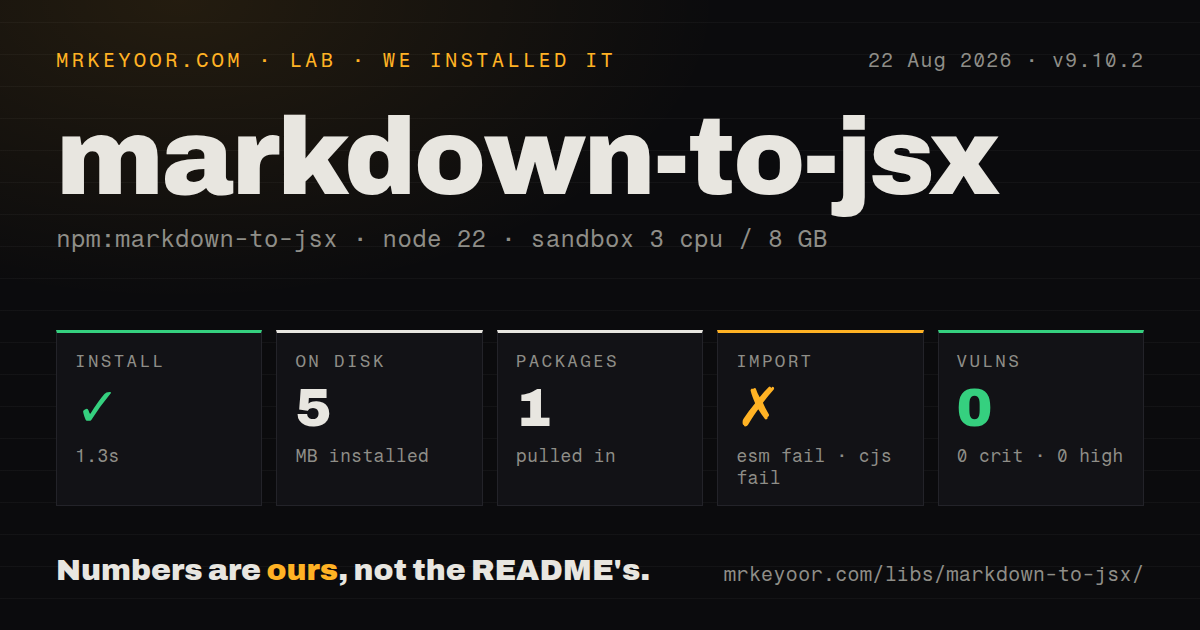
| Install | ✓ · 1.3s | 1 package on disk · 5 MB |
| Import | ✗ | ESM import fails · require() fails · ESM package with exports map |
| Browser | n/a | could not be bundled for the browser (Node-only code, most likely) |
| Types | ✓ | TypeScript types bundled |
| Known vulns | 0 | 0 critical · 0 high · 0 moderate · 0 low (npm audit) |
Answers from our run
Does markdown-to-jsx install cleanly?
Yes. In a fresh container with an empty cache, npm install markdown-to-jsx finished in 1 seconds, leaving 1 package and 5 MB on disk. npm audit reported no known vulnerabilities.
Can markdown-to-jsx run in a browser?
Not directly: esbuild could not bundle it for the browser in our run, which normally means it depends on Node built-ins. Use it on the server, or find a browser-targeted alternative.
Does markdown-to-jsx work with both ESM and CommonJS?
Neither plain import nor require succeeded in our sandbox, so it needs a bundler or extra setup.
Does markdown-to-jsx include TypeScript types?
Yes, type declarations ship inside the package, so no @types install is needed.
markdown-to-jsx or react-markdown: which should you use?
react-markdown: Choose it when React output should plug into remark and rehype transforms, syntax extensions, and sanitizers. markdown-to-jsx 9.10.2 installed in 1.3 seconds and used 5 MB in our sandbox, but both root module loads and our blanket browser build failed; test the renderer subpath with its declared peer before adopting it.
When should you not use markdown-to-jsx?
Your React stack already uses unified plugins. This package has overrides and renderRule, while react-markdown participates in the remark and rehype plugin system.
Use it if
- One Markdown grammar must feed React, React Native, Solid, Vue, HTML strings, or normalized Markdown in the same codebase.
- Documentation needs selected application components embedded through explicit tag overrides.
- A transform needs the typed parser output before a framework renderer handles the nodes.
- Streaming text should hide unfinished links, tables, emphasis, and raw HTML until enough input arrives to parse them.
- Your React stack already uses unified plugins. This package has overrides and `renderRule`, while `react-markdown` participates in the remark and rehype plugin system.
- Untrusted authors must never reach application components. Overrides apply to matching raw HTML and custom JSX tags, so the allowlist and accepted props need a threat model.
- The deployment uses Node 16 or older. Version 9.10.2 declares Node 18 as its minimum engine.
- A v8 integration depends on `compiler(source, { ast: true })`, old entity options, or unchanged heading anchors. Version 9 moved AST access to `parser()` and 9.10 changed IDs for linked or duplicate headings.
- Someone proposes `evalUnserializableExpressions` for user Markdown. The option calls eval for expression props and the README warns that it can run arbitrary code.
Setup reality
We installed markdown-to-jsx 9.10.2 in a clean Node 22 sandbox in 1.3 seconds. It left one package and 5 MB on disk; the tarball expands to 5012 KB and declares zero direct dependencies plus 3 peer dependencies. The license is MIT, Node 18 is required, bundled TypeScript declarations are present, and npm audit found zero known vulnerabilities. Root require() and ESM import both failed on Node 22.23.2. Our esbuild browser attempt failed as well, so verify the exact framework subpath with its peer installed.
Version 9 has renderer-specific entries such as /react, /native, /solid, /vue, /html, and /markdown. Install React, Solid, or Vue only for the renderer you use. Raw HTML parsing is enabled by default. Tag filtering escapes dangerous element names, attribute filtering removes event handlers and hostile URL or style values, and the sanitizer checks link schemes. Keep those layers enabled for user content and disable raw HTML parsing when it adds no product value.
Overrides can expose your own components and their props to Markdown authors. Treat that map as an allowlist; a safe anchor override does not make a payment or admin component safe. Never enable expression evaluation for untrusted text. Large Markdown is better passed as a string or loaded file because indentation and newlines inside JSX can change the source. Fenced code receives language classes, while syntax coloring still needs a highlighter.
Multiple top-level blocks receive a wrapper unless you configure another element, a fragment, or null where the compiler permits it. optimizeForStreaming withholds incomplete structures near the live edge; version 9.10.2 also prevents long bracket and footnote-marker runs from consuming superlinear parser time. Heading IDs now come from visible text and receive numeric suffixes on duplicates, so inbound anchors may change during a 9.10 upgrade.
Patterns
Render a Markdown string in React render-react-markdown
import Markdown from 'markdown-to-jsx/react';

export function Article({source}: {source: string}) {
  return <Markdown>{source}</Markdown>;
}
Version 9 prefers the `/react` entry. Install a compatible React peer and test this subpath in the target bundler.
Wrap block output in an article choose-semantic-wrapper
<Markdown options={{
  wrapper: 'article',
  wrapperProps: {className: 'prose', 'data-testid': 'article'},
}}>
  {source}
</Markdown>
Several top-level blocks otherwise use a div. Wrapper props are ignored when no wrapper is rendered.
Route links through an application component override-rendered-tags
<Markdown options={{
  overrides: {
    a: {component: AppLink, props: {source: 'docs'}},
    h2: {props: {className: 'section-title'}},
  },
}}>
  {source}
</Markdown>
Overrides affect Markdown-generated tags and matching raw HTML. Expose only components and props that content authors may safely invoke.
Render raw HTML as text disable-raw-html
<Markdown options={{disableParsingRawHTML: true}}>
  {userMarkdown}
</Markdown>
Use this for user content that needs Markdown syntax but no embedded HTML. Keep the default tag and URL protections enabled too.
Restrict link destinations allow-safe-url-schemes
import Markdown, {sanitizer} from 'markdown-to-jsx/react';

function safeUrl(value: string, tag: string, attribute: string) {
  if (value.startsWith('https://') || value.startsWith('mailto:')) return value;
  return sanitizer(value, tag, attribute);
}

<Markdown options={{sanitizer: safeUrl}}>{source}</Markdown>
URL sanitization and raw-attribute filtering cover different paths. Returning every input unchanged would remove scheme protection.
Inspect heading nodes before rendering parse-markdown-ast
import {parser, RuleType} from 'markdown-to-jsx/react';

const ast = parser(source);
const headings = ast.filter((node) => node.type === RuleType.heading);
Version 9 removed the old compiler AST option. Call `parser()` when code needs nodes instead of rendered output.
Produce HTML without React compile-html-string
import {compiler} from 'markdown-to-jsx/html';

const html = compiler('# Release notes\n\n- Fixed login');
The HTML entry returns a string. Decide how that string is sanitized and inserted before using it in a browser response.
Write parsed content back as Markdown normalize-markdown-source
import {compiler} from 'markdown-to-jsx/markdown';

const normalized = compiler(source);
Formatting can change while the document structure remains equivalent. Diff author-owned files before overwriting them.
Hide unfinished streaming syntax render-streaming-input
export function LiveAnswer({text}: {text: string}) {
  return (
    <Markdown options={{optimizeForStreaming: true}}>
      {text}
    </Markdown>
  );
}
Incomplete tables, links, emphasis, and HTML at the live edge stay hidden until the parser can complete them.
Control the base heading ID customize-heading-slugs
const slugify = (text: string) => text
  .normalize('NFKD')
  .toLowerCase()
  .replace(/[^a-z0-9]+/g, '-')
  .replace(/^-|-$/g, '');

<Markdown options={{slugify}}>{source}</Markdown>
Version 9.10 adds `-1`, `-2`, and later suffixes when the base ID repeats, even with a custom slug function.
Handle fenced code through a rule render-code-with-highlighter
import Markdown, {RuleType} from 'markdown-to-jsx/react';

<Markdown options={{
  renderRule(next, node, _children, state) {
    if (node.type === RuleType.codeBlock) {
      return <CodeBlock key={state.key} code={node.text} language={node.lang} />;
    }
    return next();
  },
}}>
  {source}
</Markdown>
The default renderer adds language classes but performs no syntax coloring. The code block node supplies text and language to your component.
Drop an iframe override remove-specific-element
const Remove = () => null;

<Markdown options={{overrides: {iframe: Remove}}}>
  {source}
</Markdown>
Default tag filtering escapes iframe markup as inert text. This override removes matched elements completely when raw HTML handling is enabled.
Alternatives
| Package | Registry | Pick it when |
|---|---|---|
| react-markdown | npm | Choose it when React output should plug into remark and rehype transforms, syntax extensions, and sanitizers. |
| marked | npm | Use it for direct Markdown-to-HTML conversion when you will supply a separate sanitizer and do not need framework components. |
| markdown-it | npm | Choose it for a configurable token parser with an established plugin catalog and HTML-oriented output. |
| @mdx-js/mdx | npm | Use it when authored Markdown is trusted build-time source that intentionally imports and executes JSX components. |
More web frontend guides
postcss · react · react-dom · tailwindcss · clsx · htmlparser2 · the whole shelf →
How this guide is made: grounded in the library's documentation, release notes, changelog, and issue history, on a fixed rubric — not a hands-on install of every release. The 50 most-downloaded entries are additionally install-verified in clean containers. Corrections: contact the desk.