tailwindcss review
Tailwind CSS scans project source for utility class candidates and compiles the matching CSS. Instead of naming a selector for each component, developers compose classes for layout, spacing, color, typography, states, breakpoints, and modern CSS features in markup. Version 4 puts design tokens in CSS through @theme and splits Vite, PostCSS, and CLI integration into separate packages. The 4.3.3 patch adds polling to CLI watch mode and fixes source scanning, PostCSS rebuilds after preprocessor changes, Firefox iframe focus outlines, CJK platform fonts on Windows, nested CSS without Lightning CSS, color canonicalization, and several shadow and selector cases. Our package check confirms the core is build-time tooling, not a browser runtime.
Tailwind CSS 4.3.3 installed in 1.1 seconds as one 1 MB package in our sandbox, but importing the compiler for a browser produced 279.9 KB minified and 72.2 KB gzipped. Use it as build-time tooling when utility-heavy markup fits the team; leave a stable version 3 project alone unless version 4 solves a measured build or token-system problem.
We installed it
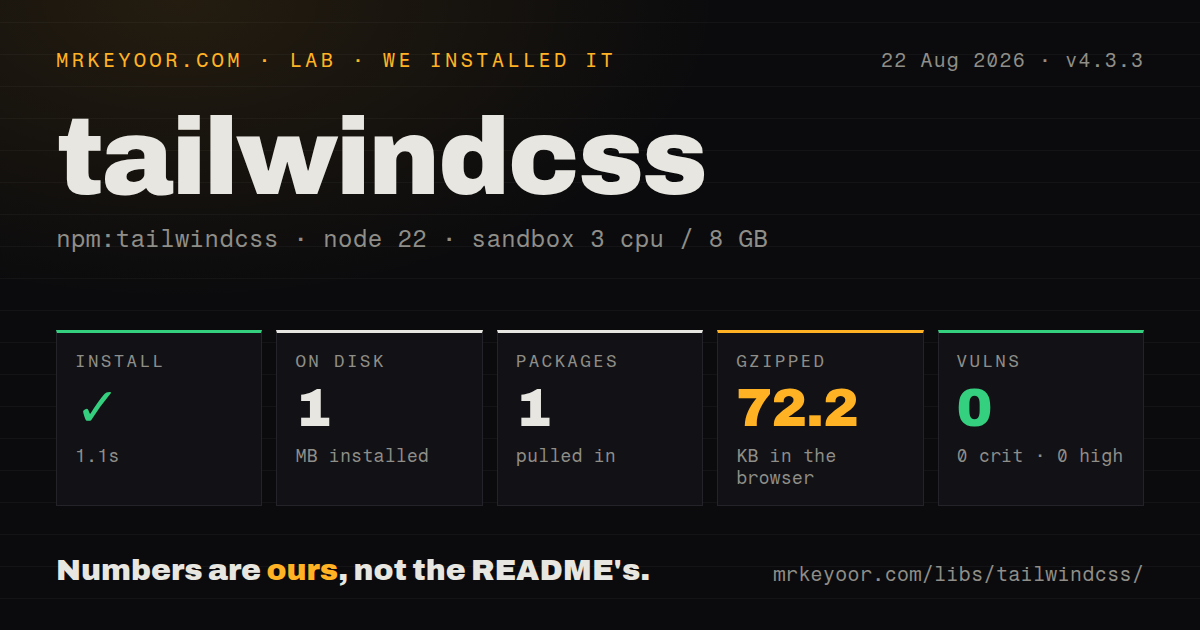
| Install | ✓ · 1.1s | 1 package on disk · 1 MB |
| Import | ✓ | ESM import works · require() works · CommonJS package with exports map |
| Browser | 72.2 KB | gzipped (279.9 KB minified), bundled with esbuild |
| Types | — | no TypeScript types found |
| Known vulns | 0 | 0 critical · 0 high · 0 moderate · 0 low (npm audit) |
Answers from our run
Does tailwindcss install cleanly?
Yes. In a fresh container with an empty cache, npm install tailwindcss finished in 1 seconds, leaving 1 package and 1 MB on disk. npm audit reported no known vulnerabilities.
How much does tailwindcss add to a browser bundle?
72.2 KB gzipped (279.9 KB minified) when the whole package is bundled for the browser with esbuild. Importing only part of it is usually smaller.
Does tailwindcss work with both ESM and CommonJS?
Yes. Both import 'tailwindcss' and require('tailwindcss') worked in Node 22 in our run. The package is published as CommonJS with an exports map.
Does tailwindcss include TypeScript types?
No type declarations were found in our install, so TypeScript users need their own declarations.
tailwindcss or unocss: which should you use?
unocss: Use it when an on-demand utility engine with programmable presets and shortcuts suits the project better. Tailwind CSS 4.3.3 installed in 1.1 seconds as one 1 MB package in our sandbox, but importing the compiler for a browser produced 279.9 KB minified and 72.2 KB gzipped.
When should you not use tailwindcss?
You cannot edit the generated HTML class attributes; Tailwind utilities need class candidates in source or an explicit source list
Discussed on
- hnTailwindCSS v2.0927 points
- hnTailwind CSS v3.0841 points
- hnTailwind CSS v4.0468 points
- hnTailwind CSS: From Side-Project Byproduct to Multi-Million Dollar Business308 points
- hnPlay with TailwindCSS in the Browser260 points
Use it if
- A product team wants one explicit token scale for color, spacing, typography, breakpoints, and shadows across component markup
- Components change often enough that colocated utility classes are easier to delete and review than a growing selector hierarchy
- Your stack uses a Tailwind-based component source such as shadcn/ui and you intend to own the resulting markup
- The build already runs Vite, PostCSS, or a dedicated CSS command where Tailwind candidate scanning fits naturally
- You cannot edit the generated HTML class attributes; Tailwind utilities need class candidates in source or an explicit source list
- Your team prefers semantic selectors and long-lived stylesheet rules over repeated class strings in templates; Tailwind keeps that markup tradeoff visible
- A stable version 3 project depends on JavaScript configuration and older plugins; version 4 moves configuration into CSS and adapter packages, so migration has real review cost
- Runtime data constructs class names such as `bg-${color}-600`; the scanner does not execute code and cannot generate utilities it never sees as complete candidates
- You intend to import the compiler into client JavaScript; our browser build measured 279.9 KB minified and 72.2 KB gzipped, while normal Tailwind output is precompiled CSS
Setup reality
Our fresh Node 22 sandbox installed tailwindcss 4.3.3 in 1.1 seconds. One package occupied 1 MB, and npm audit reported 0 known vulnerabilities at every severity. The package declares 0 direct dependencies and 0 peer dependencies; it is 860 KB unpacked under the MIT license. It is CommonJS with an exports map, and both require() and ESM import worked. Our inspection found no TypeScript types. A full browser import built to 279.9 KB minified and 72.2 KB gzipped, which is compiler code you should not send to ordinary clients.
Installing tailwindcss alone does not add a CLI executable or connect a bundler. Vite projects also install @tailwindcss/vite; PostCSS projects install @tailwindcss/postcss; direct command use installs @tailwindcss/cli. The CSS entry starts with @import "tailwindcss". Version 4 uses CSS directives such as @theme, @source, @utility, and @custom-variant. A legacy tailwind.config.js is not the default control plane, and older plugin instructions often target version 3. No credentials are involved.
Scanning is text detection rather than JavaScript evaluation. Complete class names must appear in recognized source files, or be supplied through @source. Dependencies inside node_modules are ignored by default and need an explicit @source path when they ship class-bearing markup. Generated templates outside the normal project tree need the same treatment. Dynamic concatenation fails silently at runtime because the CSS rule was never emitted. Map application states to complete class strings, and include content fixtures in production builds so missing utilities surface before deployment.
Preflight resets browser defaults when Tailwind is imported. Audit forms, headings, lists, embedded content, and third-party widgets rather than assuming the reset is neutral. Version 4.3.3 stops Preflight from replacing Firefox's native iframe focus-visible outline and adjusts Windows CJK font selection using explicit platform fonts. Watch mode can use --poll when filesystem events are unavailable, but polling costs repeated filesystem work. Sass or another preprocessor also changes ordering concerns; the 4.3.3 PostCSS fix rebuilds when transformed CSS changes without the input file timestamp changing.
Patterns
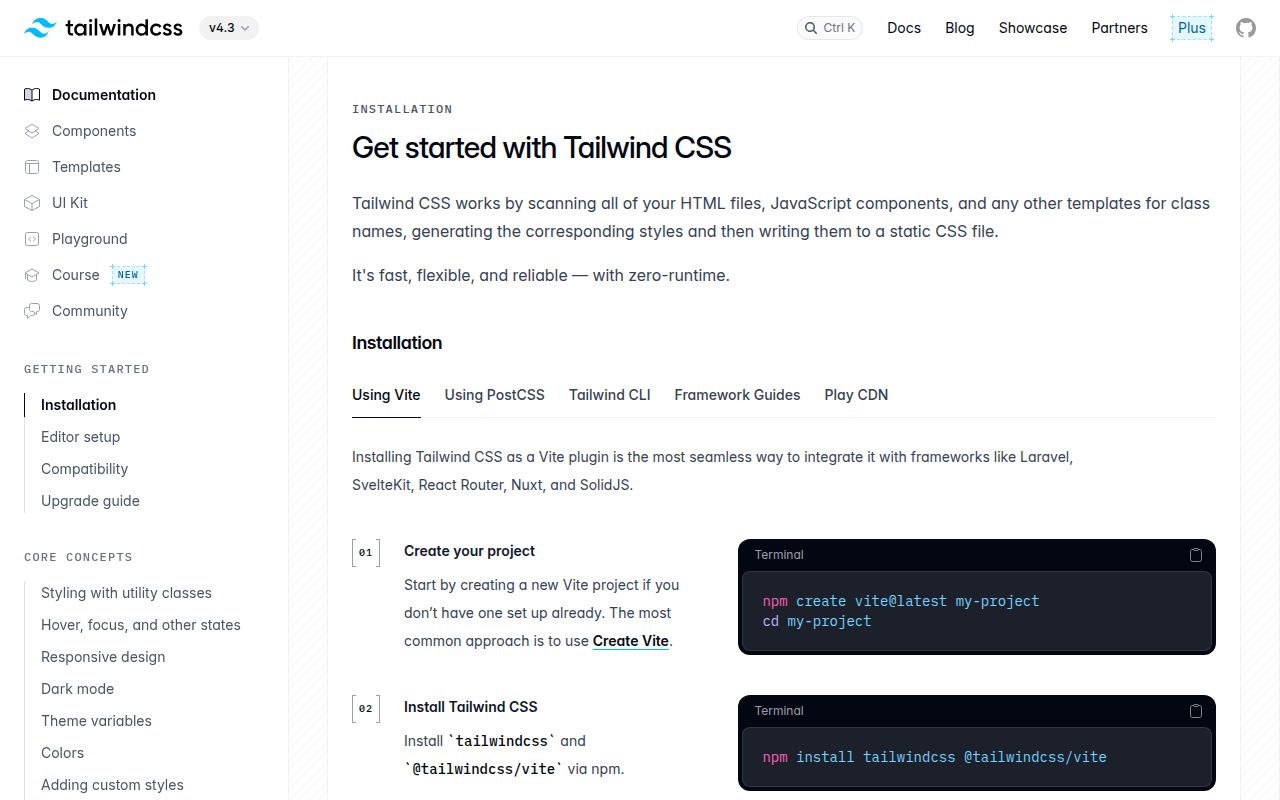
Connect Tailwind to Vite install-with-vite
npm install tailwindcss @tailwindcss/vite

// vite.config.js
import { defineConfig } from "vite";
import tailwindcss from "@tailwindcss/vite";

export default defineConfig({
  plugins: [tailwindcss()],
});

/* src/app.css */
@import "tailwindcss";
Version 4 does not require an init command or tailwind.config.js for this basic setup.
Connect Tailwind to PostCSS install-with-postcss
npm install tailwindcss @tailwindcss/postcss postcss

// postcss.config.mjs
export default {
  plugins: {
    "@tailwindcss/postcss": {},
  },
};

/* src/app.css */
@import "tailwindcss";
The version 4 PostCSS plugin is @tailwindcss/postcss. Configuring tailwindcss itself as the plugin follows old instructions.
Compile CSS without a bundler build-with-the-cli
npm install tailwindcss @tailwindcss/cli
npx @tailwindcss/cli -i ./src/input.css -o ./dist/app.css --minify
The core tailwindcss package has no CLI binary in version 4. Install @tailwindcss/cli explicitly.
Create project color and spacing utilities define-theme-tokens
@import "tailwindcss";

@theme {
  --color-brand: oklch(0.62 0.19 252);
  --spacing-gutter: 2.25rem;
  --font-display: "Sora", sans-serif;
}

/* Enables bg-brand, px-gutter, and font-display. */
@theme variables generate utility APIs and remain available as CSS custom properties. Keep ordinary private variables outside @theme.
Use a class-controlled dark variant toggle-dark-mode
@import "tailwindcss";
@custom-variant dark (&:where(.dark, .dark *));

/* markup */
<div class="bg-white text-slate-900 dark:bg-slate-950 dark:text-white">
  ...
</div>
Without the custom variant, dark: follows the default media-query behavior rather than an application class.
Keep conditional candidates complete map-runtime-states
const toneClasses = {
  success: "bg-emerald-600 text-white",
  danger: "bg-red-600 text-white",
};

button.className = toneClasses[state];
Do not build `bg-${color}-600`. The scanner sees source strings, not the runtime result of concatenation.
Include classes from a dependency scan-a-component-package
@import "tailwindcss";
@source "../node_modules/@acme/ui/dist";
Dependency directories are ignored by automatic source detection. Point @source at the files containing complete class names.
Add a utility that accepts variants register-a-custom-utility
@utility content-auto {
  content-visibility: auto;
}

/* markup */
<section class="content-auto lg:content-auto">...</section>
@utility integrates the selector with variants. A plain authored class still works as CSS but does not gain Tailwind's utility expansion rules.
Apply a true one-off value use-arbitrary-values
<aside class="grid grid-cols-[18rem_1fr] top-[73px] bg-[#0b1020]">
  ...
</aside>
Repeated bracket values are design tokens in disguise. Move them to @theme or a custom utility once they recur.
Respond to a parent container style-container-breakpoints
<section class="@container">
  <article class="grid grid-cols-1 @md:grid-cols-2">
    ...
  </article>
</section>
Container variants respond to the marked ancestor's size. They are different from md: viewport breakpoints.
Reference theme values in isolated CSS reuse-theme-in-component-css
/* Button.module.css */
@reference "../app.css";

.button {
  @apply rounded-lg bg-brand px-gutter font-semibold text-white;
}
@reference makes theme definitions available without duplicating their CSS. Check the path from each isolated stylesheet or style block.
Poll when filesystem events do not arrive watch-with-polling
npx @tailwindcss/cli -i ./src/input.css -o ./dist/app.css --watch --poll=500Polling support was fixed in 4.3.3 for unreliable filesystems. It performs repeated scans, so use native events when they work.
Alternatives
| Package | Registry | Pick it when |
|---|---|---|
| unocss | npm | Use it when an on-demand utility engine with programmable presets and shortcuts suits the project better. |
| bootstrap | npm | Use it when predesigned components and conventional class names matter more than composing a custom visual system. |
| open-props | npm | Use it when you want reusable CSS custom properties while keeping ordinary selectors and authored stylesheets. |
More web frontend guides
postcss · react · react-dom · clsx · htmlparser2 · tailwind-merge · the whole shelf →
How this guide is made: grounded in the library's documentation, release notes, changelog, and issue history, on a fixed rubric — not a hands-on install of every release. The 50 most-downloaded entries are additionally install-verified in clean containers. Corrections: contact the desk.