@mdx-js/mdx review
@mdx-js/mdx 3.1.1 turns Markdown mixed with JSX, expressions, and ESM declarations into JavaScript component modules. Its compile path can run remark transforms on the Markdown tree, rehype transforms on the HTML tree, and recma transforms on the JavaScript tree. evaluate() compiles and executes trusted input, while run() executes function-body output prepared elsewhere. The current patch declares acorn as a direct dependency, fixes declaration types for import and export attributes, and accompanies fixes in the repository's esbuild and Rollup adapters. Our full browser import was 445.5 KB minified and 127.9 KB gzipped.
@mdx-js/mdx 3.1.1 installed 111 packages in 11.7 seconds, and our full browser import measured 127.9 KB gzipped with no audit findings. Use the compiler directly for a trusted custom content pipeline; take a framework adapter for ordinary builds and a non-executable Markdown renderer for untrusted text.
We installed it
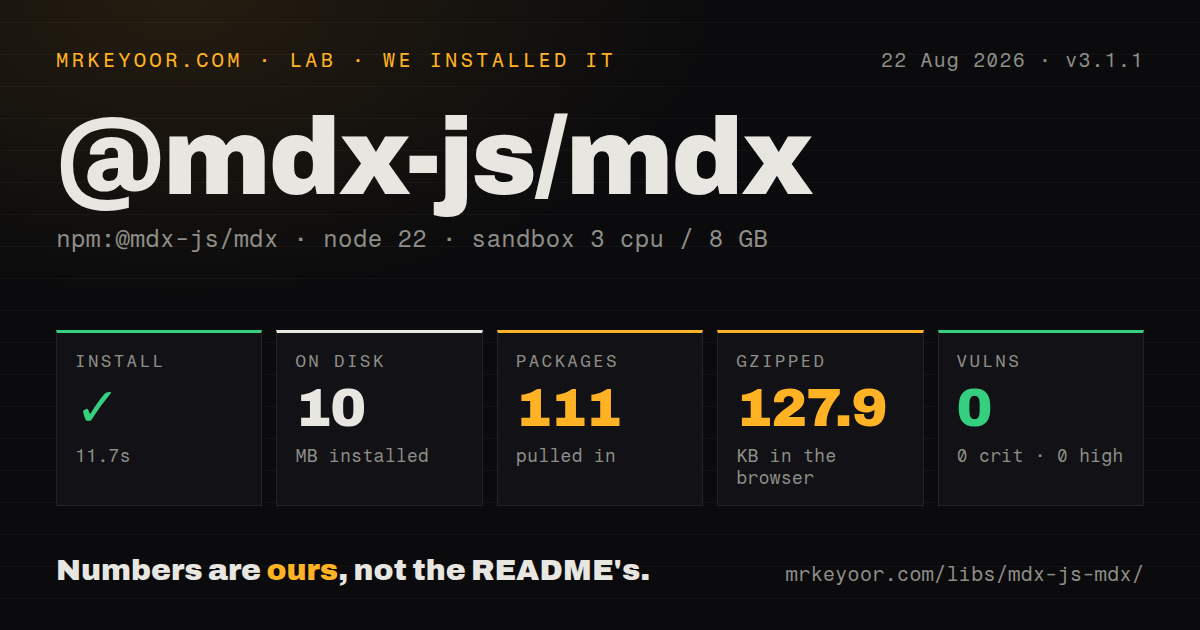
| Install | ✓ · 11.7s | 111 packages on disk · 10 MB |
| Import | ✓ | ESM import works · require() works · ESM package with exports map |
| Browser | 127.9 KB | gzipped (445.5 KB minified), bundled with esbuild |
| Types | ✓ | TypeScript types bundled |
| Known vulns | 0 | 0 critical · 0 high · 0 moderate · 0 low (npm audit) |
Answers from our run
Does @mdx-js/mdx install cleanly?
Yes. In a fresh container with an empty cache, npm install @mdx-js/mdx finished in 12 seconds, leaving 111 packages and 10 MB on disk. npm audit reported no known vulnerabilities.
How much does @mdx-js/mdx add to a browser bundle?
127.9 KB gzipped (445.5 KB minified) when the whole package is bundled for the browser with esbuild. Importing only part of it is usually smaller.
Does @mdx-js/mdx work with both ESM and CommonJS?
Yes. Both import '@mdx-js/mdx' and require('@mdx-js/mdx') worked in Node 22 in our run. The package is published as ESM with an exports map.
Does @mdx-js/mdx include TypeScript types?
Yes, type declarations ship inside the package, so no @types install is needed.
@mdx-js/mdx or @next/mdx: which should you use?
@next/mdx: Use it for source-tree MDX in Next.js when the framework should own compilation and routing. @mdx-js/mdx 3.1.1 installed 111 packages in 11.7 seconds, and our full browser import measured 127.9 KB gzipped with no audit findings.
When should you not use @mdx-js/mdx?
Your framework already has an MDX adapter. @next/mdx, @mdx-js/rollup, or @mdx-js/loader handles build integration with fewer custom moving parts.
Use it if
- You are building a docs or publishing compiler and need direct control over remark, rehype, and recma stages.
- Trusted MDX stored outside the source tree must become a React, Preact, or other JSX-runtime component.
- Compilation should happen during a build or on a server, with function-body output executed in a separate runtime step.
- Authors truly need imports, exports, expressions, and named components inside prose instead of plain Markdown.
- Your framework already has an MDX adapter. @next/mdx, @mdx-js/rollup, or @mdx-js/loader handles build integration with fewer custom moving parts.
- Content comes from unknown authors. evaluate() and run() execute JavaScript; sanitizing the eventual HTML does not neutralize hostile expressions or imports.
- Compilation would happen in a user-facing browser path. Our complete import cost 445.5 KB minified and 127.9 KB gzipped before adding a JSX runtime or plugins.
- The documents are plain Markdown. react-markdown or marked avoids executable expressions and the compatibility work across unified plugins.
- Existing prose uses unmatched braces or angle brackets literally. MDX parses those characters as expressions or JSX and rejects invalid syntax.
- Your runtime cannot load modern ESM dependencies. Node 22 require() passed our check, but this package declares type: module and its documented API uses ESM imports.
Setup reality
We installed @mdx-js/mdx 3.1.1 in a clean, unprivileged Node 22 Bookworm container. npm took 11.7 seconds, put 111 packages on disk, and used 10 MB. The package declares 25 direct dependencies and zero peers, with 384 KB unpacked. It includes TypeScript declarations, is ESM with an exports map, and worked through both require() and ESM import in our Node 22 sandbox. npm audit reported zero known vulnerabilities.
There are no credentials or required config files. compile() returns JavaScript source, not rendered HTML. evaluate() and run() need functions from a JSX runtime, and imports resolved during evaluation need a baseUrl. Pass a VFile with path and value when useful file names should appear in diagnostics. Version 3.1.1 now lists acorn directly instead of relying on its presence elsewhere in the resolved graph.
Plugin versions are the common failure point. MDX 3 expects current unified, remark, rehype, and recma conventions; an old visitor or AST assumption can fail deep inside processing. Pin compatible plugin majors and test real documents. format: 'md' treats braces and JSX-looking text as Markdown, while createProcessor() requires one fixed format and can process many files without recreating the pipeline each time.
Our esbuild measurement for an all-exports browser import was 445.5 KB minified and 127.9 KB gzipped. Precompiled component output is a different and usually smaller artifact. Compile at build time or on a trusted server. Function-body output can move the compiler out of the request path, but run() still executes code with every capability supplied in its options. Unknown-user text should stay in a non-executable Markdown renderer.
Patterns
Emit a JavaScript component module compile-mdx-file
import fs from 'node:fs/promises'
import {compile} from '@mdx-js/mdx'

const source = await fs.readFile('article.mdx')
const file = await compile({path: 'article.mdx', value: source})
await fs.writeFile('article.js', String(file))
compile returns JavaScript, not HTML. Supplying article.mdx as the VFile path gives parser and plugin errors a useful filename.
Create a component from trusted source evaluate-trusted-mdx
import {evaluate} from '@mdx-js/mdx'
import * as runtime from 'react/jsx-runtime'

const module = await evaluate(source, {
  ...runtime,
  baseUrl: import.meta.url,
})
const Content = module.default
evaluate executes the MDX as JavaScript. Only pass content trusted to the same degree as source code in the application repository.
Move compilation out of the runtime compile-then-run
// trusted build service
const code = String(await compile(source, {
  outputFormat: 'function-body',
}))

// application runtime
import {run} from '@mdx-js/mdx'
import * as runtime from 'react/jsx-runtime'
const {default: Content} = await run(code, {
  ...runtime,
  baseUrl: import.meta.url,
})
function-body output avoids loading the compiler in the final render step. run still executes the supplied code and is not a sandbox.
Add GFM and heading identifiers configure-tree-plugins
import {compile} from '@mdx-js/mdx'
import rehypeSlug from 'rehype-slug'
import remarkGfm from 'remark-gfm'

const file = await compile(source, {
  remarkPlugins: [remarkGfm],
  rehypePlugins: [rehypeSlug],
})
remark plugins receive the Markdown tree and rehype plugins receive the HTML tree. Match their major versions to the unified stack used by MDX 3.
Replace generated elements at render time map-markdown-elements
<Content components={{
  h1: PageTitle,
  a: TrackedLink,
  pre: CodeBlock,
  wrapper: ArticleLayout,
}} />
This mapping changes elements produced from Markdown syntax. A component explicitly written in MDX keeps the identifier chosen by the author.
Read component mappings from a provider provide-components-through-context
// compiler option
await compile(source, {
  providerImportSource: '@mdx-js/react',
})

// React tree
<MDXProvider components={{h2: SectionTitle, code: InlineCode}}>
  <Post />
</MDXProvider>
The provider works only when compilation emits the matching useMDXComponents import through providerImportSource.
Convert YAML metadata into an export export-frontmatter-data
import remarkFrontmatter from 'remark-frontmatter'
import remarkMdxFrontmatter from 'remark-mdx-frontmatter'

const file = await compile(source, {
  remarkPlugins: [
    remarkFrontmatter,
    [remarkMdxFrontmatter, {name: 'frontmatter'}],
  ],
})
remark-frontmatter recognizes the YAML block; remark-mdx-frontmatter creates the named JavaScript export. Both plugins are required for this result.
Treat braces and tags as ordinary Markdown parse-plain-markdown
const file = await compile(markdown, {
  format: 'md',
})
md format disables MDX expressions, JSX, imports, and exports. Use it for legacy documents that contain literal braces or angle brackets.
Return the location of invalid syntax report-source-position
try {
  await compile({path: 'draft.mdx', value: source})
} catch (error) {
  console.error({
    line: error.line,
    column: error.column,
    reason: error.reason,
  })
}
Parse failures expose VFileMessage positions. Nonfatal lint or transform messages may instead be collected on the returned file.messages array.
Keep source locations during evaluation enable-development-output
import * as runtime from 'react/jsx-dev-runtime'

const {default: Content} = await evaluate(source, {
  development: true,
  ...runtime,
  baseUrl: import.meta.url,
})
development: true expects jsx-dev-runtime. Mixing it with the production runtime causes missing helper errors.
Compile imports for Preact target-preact-runtime
const file = await compile(source, {
  jsxImportSource: 'preact',
})
Generated module output imports preact/jsx-runtime. evaluate receives runtime functions directly instead of using jsxImportSource for execution.
Process many files with one configuration reuse-configured-processor
import {createProcessor} from '@mdx-js/mdx'
import remarkGfm from 'remark-gfm'

const processor = createProcessor({
  format: 'mdx',
  remarkPlugins: [remarkGfm],
})

for (const document of documents) {
  const file = await processor.process(document)
  save(String(file))
}
createProcessor requires a fixed md or mdx format. It cannot auto-detect a different format for each document in the loop.
Alternatives
| Package | Registry | Pick it when |
|---|---|---|
| @next/mdx | npm | Use it for source-tree MDX in Next.js when the framework should own compilation and routing. |
| next-mdx-remote | npm | Use it for remotely stored MDX in Next.js when its serialization model fits your trust boundary. |
| react-markdown | npm | Use it to render non-executable Markdown as React elements, especially for user-authored content. |
| marked | npm | Use it when an HTML string is enough and component syntax has no role in the content. |
More web frontend guides
postcss · react · react-dom · tailwindcss · clsx · htmlparser2 · the whole shelf →
How this guide is made: grounded in the library's documentation, release notes, changelog, and issue history, on a fixed rubric — not a hands-on install of every release. The 50 most-downloaded entries are additionally install-verified in clean containers. Corrections: contact the desk.