react-markdown review
react-markdown turns a Markdown string into React elements through the unified, remark, and rehype syntax-tree pipeline. CommonMark works out of the box; plugins add dialect features or transform the tree, and a `components` map replaces generated tags with router links, design-system elements, or code renderers. Raw HTML is not interpreted by the default path. Version 10 removed the component's `className` prop, while 10.1.0 adds fallback content to `MarkdownHooks` and fixes a race between async processing runs. Our complete browser import measured 38.3 KB gzipped.
react-markdown 10.1.0 took 7.4 seconds to install and added 84 packages in our sandbox; its complete browser import measured 123.7 KB minified and 38.3 KB gzipped with 0 audit findings. Pay that cost when Markdown needs safe React elements, component replacement, and unified plugins; use a smaller parser for a narrow static subset.
We installed it
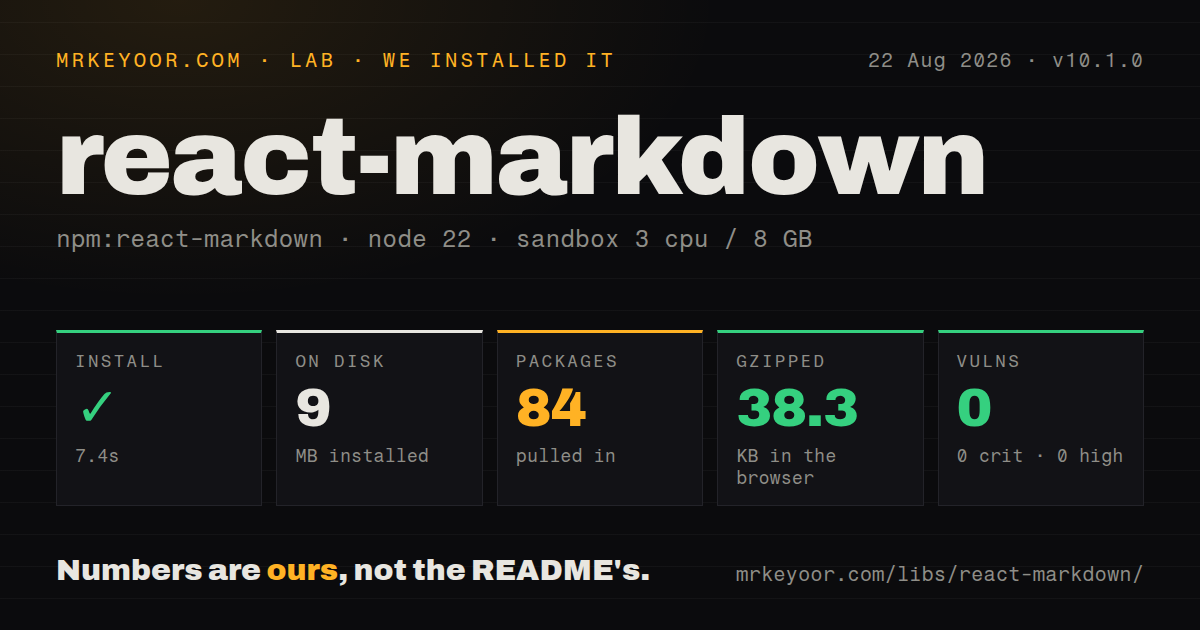
| Install | ✓ · 7.4s | 84 packages on disk · 9 MB |
| Import | ✓ | ESM import works · require() works · ESM package with exports map |
| Browser | 38.3 KB | gzipped (123.7 KB minified), bundled with esbuild |
| Types | ✓ | TypeScript types bundled |
| Known vulns | 0 | 0 critical · 0 high · 0 moderate · 0 low (npm audit) |
Answers from our run
Does react-markdown install cleanly?
Yes. In a fresh container with an empty cache, npm install react-markdown finished in 7 seconds, leaving 84 packages and 9 MB on disk. npm audit reported no known vulnerabilities.
How much does react-markdown add to a browser bundle?
38.3 KB gzipped (123.7 KB minified) when the whole package is bundled for the browser with esbuild. Importing only part of it is usually smaller.
Does react-markdown work with both ESM and CommonJS?
Yes. Both import 'react-markdown' and require('react-markdown') worked in Node 22 in our run. The package is published as ESM with an exports map.
Does react-markdown include TypeScript types?
Yes, type declarations ship inside the package, so no @types install is needed.
react-markdown or markdown-to-jsx: which should you use?
markdown-to-jsx: Use it when a smaller React-oriented parser with tag overrides covers the Markdown features you need. react-markdown 10.1.0 took 7.4 seconds to install and added 84 packages in our sandbox; its complete browser import measured 123.7 KB minified and 38.3 KB gzipped with 0 audit findings.
When should you not use react-markdown?
A route cannot spare the 123.7 KB minified, 38.3 KB gzipped browser bundle we measured for a full package import.
Discussed on
Use it if
- Markdown from users, an API, or generated content must become React nodes without inserting an HTML string.
- Links, images, headings, tables, or fenced code need to pass through application-specific React components.
- The product needs selected remark or rehype plugins while retaining one visible processing pipeline.
- Server rendering and React reconciliation should operate on an element tree rather than pre-rendered HTML.
- A route cannot spare the 123.7 KB minified, 38.3 KB gzipped browser bundle we measured for a full package import.
- Trusted authors need imports and JSX components inside Markdown files. That content model belongs to MDX.
- You expect tables, task lists, strikethrough, and bare URL links in the base package. Those GFM features require `remark-gfm`.
- The UI feeds one streaming token at a time into the component. Each change reparses the accumulated document, and unfinished Markdown can repeatedly change the tree.
- Untrusted content must preserve arbitrary embedded HTML. Enabling `rehype-raw` expands the input surface and requires a tested `rehype-sanitize` schema.
Setup reality
We installed react-markdown 10.1.0 in a clean Node 22 Bookworm sandbox in 7.4 seconds. The install left 84 packages using 9 MB, and npm audit returned 0 known vulnerabilities across all severities. The package has 11 direct dependencies, 2 peer dependencies, and an 88 KB unpacked tarball. It carries an MIT license and bundled TypeScript declarations. Our full browser import built to 123.7 KB minified and 38.3 KB gzipped.
React 18 or newer and @types/react 18 or newer are peers. Version 10.1.0 is ESM with an exports map. ESM import worked in our sandbox; require() also worked under Node 22, despite the README describing the package as ESM-only. Treat ESM as the supported contract for older bundlers. The package provides no CSS, so headings, lists, block quotes, tables, and code blocks inherit your site's typography and overflow behavior.
CommonMark is the default syntax. Add remark-gfm for GFM tables, task lists, deleted text, and autolinked URLs. Embedded HTML stays outside the normal render path. Trusted HTML can be parsed with rehype-raw; untrusted HTML then needs rehype-sanitize after raw parsing, with an allowlist covering only the tags, classes, and attributes the application uses. A plugin, custom component, or replacement urlTransform can weaken the package's default URL safety.
Pass Markdown as a JavaScript string because JSX indentation and collapsed line endings can change its meaning. Hoist plugin arrays and component maps so renders do not rebuild processor options needlessly. Every source update reparses the document, which makes token-by-token output expensive. Async server plugins use MarkdownAsync; client-side async work uses MarkdownHooks, whose 10.1.0 fallback prop covers the initial empty render while its effect runs.
Patterns
Render a Markdown value render-markdown-string
import Markdown from 'react-markdown'

export function Article({source}) {
  return <Markdown>{source}</Markdown>
}
`children` must be a string; react-markdown parses it into React elements and does not use `dangerouslySetInnerHTML`.
Add tables and task lists enable-gfm-syntax
import Markdown from 'react-markdown'
import remarkGfm from 'remark-gfm'

<Markdown remarkPlugins={[remarkGfm]}>
  {source}
</Markdown>
CommonMark is the base dialect; tables, task lists, strikethrough, and bare URL links come from `remark-gfm`.
Route internal links through the app override-link-component
<Markdown
  components={{
    a({href = '', children, ...props}) {
      if (href.startsWith('/')) return <AppLink to={href}>{children}</AppLink>
      return <a href={href} rel='noreferrer' {...props}>{children}</a>
    },
  }}
>
  {source}
</Markdown>
Component overrides receive the generated element props plus `node`; decide internal and external URL behavior in this function.
Apply a class around rendered content style-with-wrapper
export function Prose({source}) {
  return (
    <div className='prose prose-slate'>
      <Markdown>{source}</Markdown>
    </div>
  )
}
Version 10 removed the `className` prop from Markdown itself; put layout and typography classes on a wrapper.
Control generated image elements lazy-load-images
<Markdown
  components={{
    img({alt, ...props}) {
      return <img loading='lazy' decoding='async' alt={alt ?? ''} {...props} />
    },
  }}
>
  {source}
</Markdown>
The component map can add loading behavior, but the application still needs an image-host policy and size controls.
Replace fenced code blocks highlight-fenced-code
<Markdown
  components={{
    code({className, children, ...props}) {
      const match = /language-(\w+)/.exec(className || '')
      return match
        ? <CodeBlock language={match[1]} code={String(children).replace(/\n$/, '')} />
        : <code className={className} {...props}>{children}</code>
    },
  }}
>
  {source}
</Markdown>
Fenced languages arrive through a `language-*` class; keep the inline-code fallback when no language class exists.
Allow a small element set restrict-output-elements
<Markdown
  allowedElements={['p', 'strong', 'em', 'a', 'code']}
  unwrapDisallowed
>
  {source}
</Markdown>
`allowedElements` and `disallowedElements` cannot be combined; `unwrapDisallowed` keeps child text while dropping a blocked wrapper.
Handle trusted embedded HTML deliberately parse-and-sanitize-html
import rehypeRaw from 'rehype-raw'
import rehypeSanitize from 'rehype-sanitize'

<Markdown rehypePlugins={[rehypeRaw, rehypeSanitize]}>
  {source}
</Markdown>
`rehype-raw` must run before `rehype-sanitize`; customize the sanitize schema before allowing application-specific classes or attributes.
Keep the default URL filter while adding one scheme extend-safe-url-policy
import Markdown, {defaultUrlTransform} from 'react-markdown'

function urlTransform(url) {
  if (url.startsWith('tel:')) return url
  return defaultUrlTransform(url)
}

<Markdown urlTransform={urlTransform}>{source}</Markdown>
The default accepts web, mail, IRC, XMPP, and relative URLs; replacing it wholesale can admit unsafe protocols.
Await an async plugin on the server render-async-server
import {MarkdownAsync} from 'react-markdown'

export async function Article({source}) {
  return await MarkdownAsync({
    children: source,
    remarkPlugins: [asyncRemarkPlugin],
  })
}
`MarkdownAsync` returns a promise and is intended for server environments that can await plugin work during rendering.
Render fallback UI during client processing show-async-client-fallback
'use client'

import {MarkdownHooks} from 'react-markdown'

export function Preview({source}) {
  return (
    <MarkdownHooks
      remarkPlugins={[asyncRemarkPlugin]}
      fallback={<p>Rendering preview...</p>}
    >
      {source}
    </MarkdownHooks>
  )
}
Version 10.1.0 adds `fallback` to `MarkdownHooks`; processing starts in an effect, so the final output is not available on the first client render.
Pass multiline Markdown without JSX rewriting preserve-source-linebreaks
const source = `# Release notes

- Fixed login
- Added export
`

return <Markdown>{source}</Markdown>
A string preserves the blank line before the list; indented template content can accidentally become an indented code block.
Alternatives
| Package | Registry | Pick it when |
|---|---|---|
| markdown-to-jsx | npm | Use it when a smaller React-oriented parser with tag overrides covers the Markdown features you need. |
| marked | npm | Use it for direct Markdown-to-HTML conversion when sanitization and React insertion are handled elsewhere. |
| @mdx-js/react | npm | Use it with compiled MDX when trusted content authors need JSX components and imports. |
| react-remark | npm | Use it when a hooks-based unified processor fits the component lifecycle better than a renderer component. |
More web frontend guides
postcss · react · react-dom · tailwindcss · clsx · htmlparser2 · the whole shelf →
How this guide is made: grounded in the library's documentation, release notes, changelog, and issue history, on a fixed rubric — not a hands-on install of every release. The 50 most-downloaded entries are additionally install-verified in clean containers. Corrections: contact the desk.