react-dom review
react-dom 19.2.8 is React's web renderer. `react-dom/client` creates a browser root or hydrates server markup, `react-dom/server` writes React trees to Node or Web streams, and the root entry supplies portals, `flushSync`, and resource hints. Applications install it beside a compatible `react` package; this release requires React `^19.2.8` as a peer. The only documented 19.2.8 change is faster React Server Component decoding. It does not introduce a component feature, and a framework should normally own the server-rendering and Server Component transport details.
react-dom 19.2.8 installed in 0.9 seconds as three packages using 8 MB in our sandbox, passed npm audit, and its full import bundled to 4.3 KB gzipped, but the package contained no TypeScript types. Install it only as the version-matched web renderer for React, and let a supported framework own streaming and Server Component protocol work.
We installed it
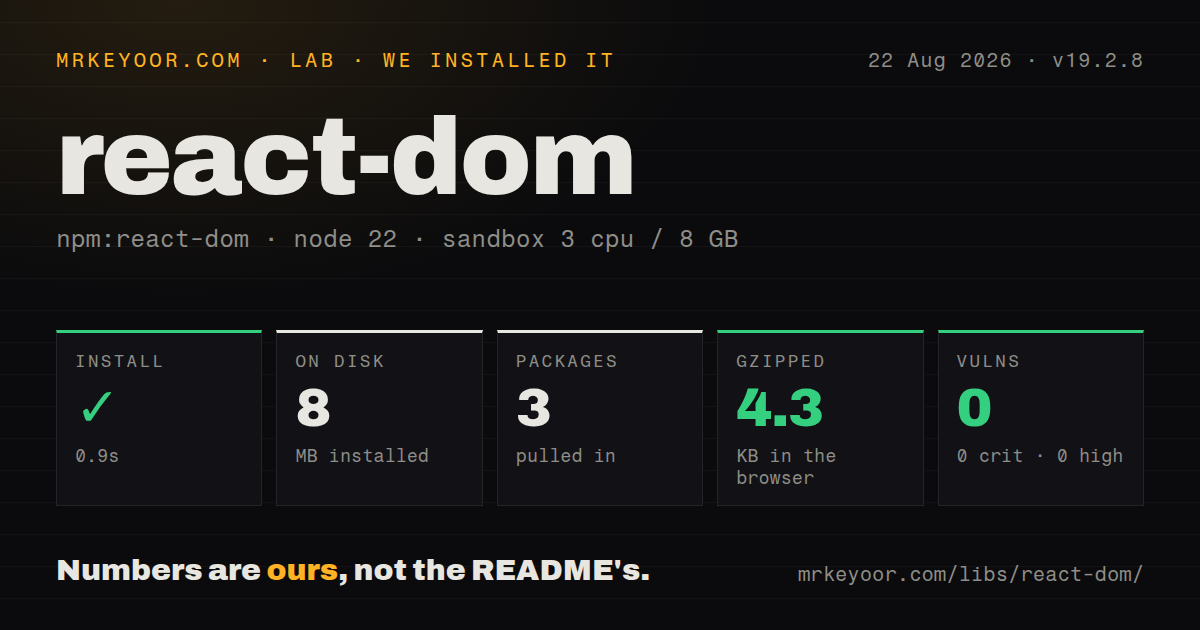
| Install | ✓ · 0.9s | 3 packages on disk · 8 MB |
| Import | ✓ | ESM import works · require() works · CommonJS package with exports map |
| Browser | 4.3 KB | gzipped (12 KB minified), bundled with esbuild |
| Types | — | no TypeScript types found |
| Known vulns | 0 | 0 critical · 0 high · 0 moderate · 0 low (npm audit) |
Answers from our run
Does react-dom install cleanly?
Yes. In a fresh container with an empty cache, npm install react-dom finished in 0.9s, leaving 3 packages and 8 MB on disk. npm audit reported no known vulnerabilities.
How much does react-dom add to a browser bundle?
4.3 KB gzipped (12 KB minified) when the whole package is bundled for the browser with esbuild. Importing only part of it is usually smaller.
Does react-dom work with both ESM and CommonJS?
Yes. Both import 'react-dom' and require('react-dom') worked in Node 22 in our run. The package is published as CommonJS with an exports map.
Does react-dom include TypeScript types?
No type declarations were found in our install, so TypeScript users need their own declarations.
react-dom or preact: which should you use?
preact: Use it when a smaller React-like renderer matters and every required React ecosystem package passes compatibility testing. react-dom 19.2.8 installed in 0.9 seconds as three packages using 8 MB in our sandbox, passed npm audit, and its full import bundled to 4.3 KB gzipped, but the package contained no TypeScript types.
When should you not use react-dom?
The target is React Native. It uses another renderer, while react-dom implements browser DOM and web server output.
Discussed on
Use it if
- A React 19 application needs to render components into a browser DOM container through `createRoot` or `hydrateRoot`.
- An existing non-React page embeds a React widget and needs an explicit root that can later be unmounted.
- A supported framework requires the matching DOM renderer for streaming HTML, hydration, or Server Component decoding.
- A dialog or overlay must render outside an ancestor's clipping or stacking context while retaining React context and events.
- The target is React Native. It uses another renderer, while react-dom implements browser DOM and web server output.
- The page has no interactive React tree. Static templates or web components avoid both the React runtime and this renderer.
- You plan to invent a React Server Components wire protocol. React documents those integrations as framework work, and the transport surface changes faster than ordinary components.
- TypeScript declarations must come from the runtime package. We found none in 19.2.8; typed projects normally install matching `@types/react` and `@types/react-dom` releases.
- The application remains on React 18 or another release line. react-dom 19.2.8 declares `react ^19.2.8` as a peer, and mixing renderer and core versions is unsupported.
Setup reality
We installed react-dom 19.2.8 without a cache in an unprivileged Node 22 Bookworm container. npm finished in 0.9 seconds, leaving three packages that used 8 MB. react-dom declares one direct dependency and one peer; its own unpacked contents are 7,272 KB. npm audit returned zero known vulnerabilities at every severity. The package is CommonJS with an exports map, and both require() and ESM import worked. We found no TypeScript declarations.
Install react and react-dom on compatible versions; 19.2.8 asks for react ^19.2.8. Browser roots come from react-dom/client. Use createRoot for a new client tree and hydrateRoot only when React already produced the container's server HTML. There are no credentials or react-dom config files, but JSX compilation, route boundaries, asset loading, and server versus client module rules belong to the framework or bundler. Our full-package esbuild browser import measured 12 KB minified and 4.3 KB gzipped.
Hydration expects the initial browser tree to match the server structure. Random values, current time, browser-only branches, invalid nesting, or data drift can produce mismatches. React can recover from some cases, yet the recovery can discard server work or attach behavior incorrectly. Supply onRecoverableError to hydrateRoot so production telemetry captures them. When another UI system permanently removes an embedded container, call root.unmount() to clean up React effects and subscriptions.
Updates are scheduled and batched, so code after root.render() cannot assume effects have completed. flushSync forces pending work into the DOM for an external browser or library API, but React warns that it can hurt performance and reveal Suspense fallbacks. A portal moves DOM placement while context and event bubbling still follow the React tree. On the server, choose the documented Node or Web Stream entry for the runtime, and let the framework handle aborts, status codes, hydration data, and Server Component framing.
Patterns
Mount one React root create-browser-root
import {createRoot} from 'react-dom/client';
import {App} from './App.js';

const container = document.getElementById('app');
const root = createRoot(container);
root.render(<App />);
Create one root per container and retain it when an external lifecycle will need to call `unmount()`.
Hydrate matching server markup hydrate-server-html
import {hydrateRoot} from 'react-dom/client';

hydrateRoot(document.getElementById('app'), <App />, {
  onRecoverableError(error, info) {
    reportHydrationError(error, info.componentStack);
  },
});
The first client render must reproduce the server tree. Send recoverable mismatches to telemetry instead of silently ignoring them.
Clean up an embedded root unmount-embedded-root
const root = createRoot(container);
root.render(<Widget />);

externalPanel.onRemove(() => {
  root.unmount();
});
Call `unmount()` before non-React code permanently removes the container so effects and subscriptions can clean up.
Place a modal outside its DOM ancestor render-portal
import {createPortal} from 'react-dom';

function Modal({children}) {
  return createPortal(
    <div role="dialog" aria-modal="true">{children}</div>,
    document.getElementById('modal-root'),
  );
}
A portal changes DOM location, while React context and event propagation still follow the component tree; focus handling remains your job.
Synchronize with an external DOM reader force-dom-update
import {flushSync} from 'react-dom';

flushSync(() => {
  setExpanded(true);
});
measurePanel();
Reserve `flushSync` for APIs that inspect the DOM immediately. It can reduce performance and expose Suspense fallbacks.
Stream a React shell through Node stream-node-html
import {renderToPipeableStream} from 'react-dom/server';

const stream = renderToPipeableStream(<App />, {
  onShellReady() {
    response.setHeader('content-type', 'text/html');
    stream.pipe(response);
  },
  onError(error) {
    console.error(error);
  },
});
`renderToPipeableStream` targets Node streams; production code also needs abort timing, status handling, and document framing.
Return React HTML as a Web Stream stream-web-html
import {renderToReadableStream} from 'react-dom/server';

const stream = await renderToReadableStream(<App />);
return new Response(stream, {
  headers: {'content-type': 'text/html; charset=utf-8'},
});
Select the server entry supported by the deployment runtime and add request abort handling around the stream.
Generate HTML that will stay static render-static-email
import {renderToStaticMarkup} from 'react-dom/server';

const html = renderToStaticMarkup(<Receipt order={order} />);
`renderToStaticMarkup` output cannot be hydrated, which fits email and fixed documents but not an interactive application shell.
Preload a font discovered during render preload-resource
import {preload} from 'react-dom';

preload('/fonts/inter.woff2', {as: 'font', type: 'font/woff2', crossOrigin: ''});
The `as`, MIME type, and cross-origin options must match the resource; a framework may already emit an identical hint.
Preconnect to a likely asset host preconnect-origin
import {preconnect} from 'react-dom';

preconnect('https://cdn.example.com', {crossOrigin: 'anonymous'});
Each speculative connection costs browser and server resources, so add it only for origins the page is expected to use.
Update props without replacing the root update-existing-root
root.render(<Dashboard accountId={nextAccountId} />);A later `root.render()` preserves component state where element positions and keys still match.
Keep generated IDs unique across roots use-root-prefix
const root = createRoot(container, {
  identifierPrefix: 'checkout-',
});
root.render(<Checkout />);
A hydrated root needs the same `identifierPrefix` on server and client, especially when several roots share one page.
Alternatives
| Package | Registry | Pick it when |
|---|---|---|
| preact | npm | Use it when a smaller React-like renderer matters and every required React ecosystem package passes compatibility testing. |
| solid-js | npm | Use it when fine-grained reactive updates and compiled components are an intentional architectural choice. |
| vue | npm | Use it when template-oriented single-file components and Vue's reactivity model fit the team better. |
More web frontend guides
postcss · react · tailwindcss · clsx · htmlparser2 · tailwind-merge · the whole shelf →
How this guide is made: grounded in the library's documentation, release notes, changelog, and issue history, on a fixed rubric — not a hands-on install of every release. The 50 most-downloaded entries are additionally install-verified in clean containers. Corrections: contact the desk.