htmlparser2 review
htmlparser2 12.0.0 tokenizes HTML or XML as chunks arrive. Its `Parser` calls handlers for opening tags, attributes, text, comments, and closing tags without requiring a tree. `parseDocument()` takes the other route and builds domhandler nodes that `DomUtils`, `css-select`, or Cheerio can query. Dedicated adapters accept Node Writable input and Web Streams, and `parseFeed()` recognizes RSS, Atom, and RDF. Version 12 changes HTML mode around raw-text elements, `<textarea>` entities, SVG and MathML casing, bogus comments, doctypes, nested anchors and forms, implied heading closures, and parser reset state. The README still directs browser-spec tree construction to parse5.
htmlparser2 12.0.0 installed in 0.6 seconds with 6 packages, 2 MB on disk, and 0 audit findings in our sandbox; a complete browser import measured 34.1 KB gzipped. Use it for incremental extraction or its shared DOM ecosystem, and use parse5 when browser-equivalent recovery is a test requirement.
We installed it
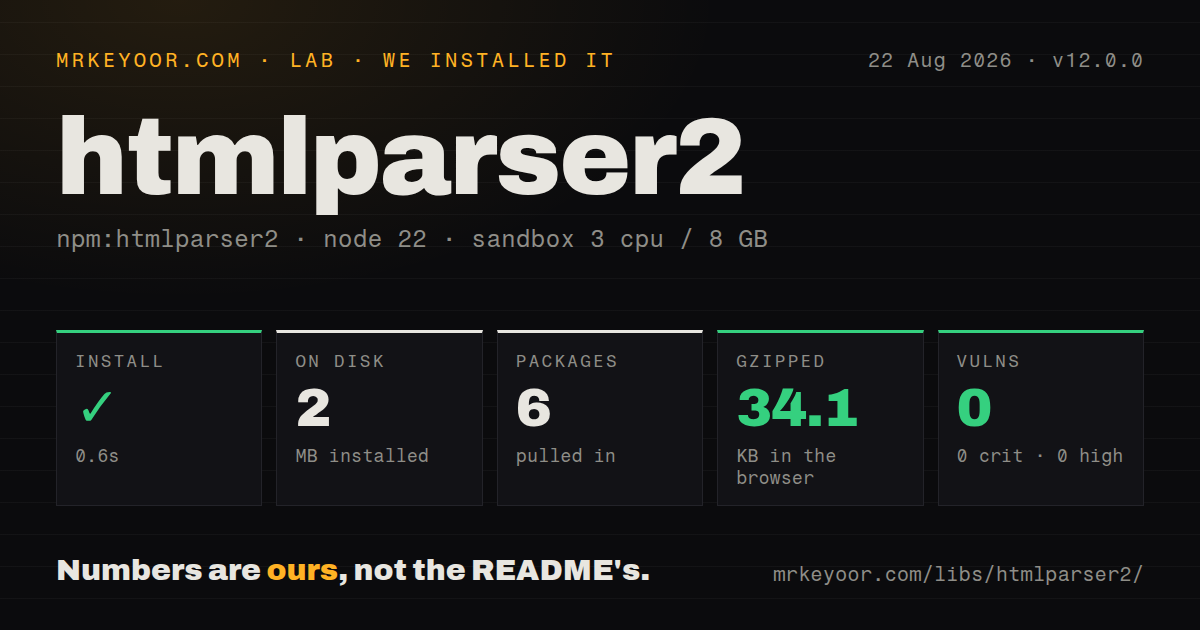
| Install | ✓ · 0.6s | 6 packages on disk · 2 MB |
| Import | ✓ | ESM import works · require() works · ESM package with exports map |
| Browser | 34.1 KB | gzipped (79.2 KB minified), bundled with esbuild |
| Types | ✓ | TypeScript types bundled |
| Known vulns | 0 | 0 critical · 0 high · 0 moderate · 0 low (npm audit) |
Answers from our run
Does htmlparser2 install cleanly?
Yes. In a fresh container with an empty cache, npm install htmlparser2 finished in 0.6s, leaving 6 packages and 2 MB on disk. npm audit reported no known vulnerabilities.
How much does htmlparser2 add to a browser bundle?
34.1 KB gzipped (79.2 KB minified) when the whole package is bundled for the browser with esbuild. Importing only part of it is usually smaller.
Does htmlparser2 work with both ESM and CommonJS?
Yes. Both import 'htmlparser2' and require('htmlparser2') worked in Node 22 in our run. The package is published as ESM with an exports map.
Does htmlparser2 include TypeScript types?
Yes, type declarations ship inside the package, so no @types install is needed.
htmlparser2 or parse5: which should you use?
parse5: Choose it when WHATWG-compatible HTML tree construction matters more than the shortcut-oriented parser. htmlparser2 12.0.0 installed in 0.6 seconds with 6 packages, 2 MB on disk, and 0 audit findings in our sandbox; a complete browser import measured 34.1 KB gzipped.
When should you not use htmlparser2?
Tests compare the output tree with a browser's WHATWG tree builder. The project's own README recommends parse5 for strict specification behavior.
Use it if
- A crawler or transform needs selected tags and text from a stream without retaining a complete document tree.
- Malformed web markup should produce useful events even when browser-identical tree construction is unnecessary.
- The same node model must work with domhandler, DomUtils, css-select, dom-serializer, or Cheerio.
- One parser must switch deliberately between forgiving HTML rules and case-sensitive XML, RSS, or Atom handling.
- Tests compare the output tree with a browser's WHATWG tree builder. The project's own README recommends parse5 for strict specification behavior.
- Untrusted markup will be displayed after parsing. htmlparser2 does not remove scripts, event-handler attributes, or dangerous URL schemes; use a sanitizer.
- Your supported Node release is older than 20.19.0. Version 12 declares that exact engine minimum.
- A jQuery-like selector and mutation surface is the main requirement. Cheerio packages that higher-level interface around the same DOM family.
- A 34.1 KB gzipped browser cost is too much for the feature. That is what our complete htmlparser2 import measured before application code.
Setup reality
We installed htmlparser2 12.0.0 in a fresh Node 22 Bookworm sandbox in 0.6 seconds. The install left 6 packages and 2 MB on disk; npm audit reported 0 known vulnerabilities. htmlparser2 declares 4 direct dependencies and 0 peers, with 312 KB unpacked. It requires Node 20.19.0 or newer and ships TypeScript declarations. The package is marked as ESM behind an exports map, and both require() and ESM import worked in our test.
There are no credentials or project files to configure. Decide whether to keep a tree before choosing the API. Parser emits callbacks and can avoid DOM allocation. parseDocument() retains domhandler nodes, which makes traversal easier and memory use proportional to the document. CSS selector strings require the separate css-select package or Cheerio. HTML mode lowercases names by default; xmlMode: true changes casing, entities, CDATA, and self-closing behavior.
Text callback boundaries follow parser chunks, not logical text nodes. Accumulate ontext data until the surrounding element closes when a complete value matters. Direct Parser.write() takes strings. htmlparser2/WritableStream decodes Node byte chunks across character boundaries, while htmlparser2/WebWritableStream accepts a fetch body. Always finish direct input with end() so decoder state and onend are flushed.
Our full browser import measured 79.2 KB minified and 34.1 KB gzipped. Version 12 brings more HTML recovery cases in line with WHATWG, yet the project still describes its parser as shortcut-taking and forgiving. Keep fixtures for malformed input during the upgrade because implied opens and closes can change callback sequences. parseFeed() supplies XML mode by default; if you pass an options object, include xmlMode: true yourself. Parsing never makes hostile markup safe to render.
Patterns
Extract links without building a DOM consume-parser-events
import { Parser } from 'htmlparser2';

const links = [];
const parser = new Parser({
  onopentag(name, attrs) {
    if (name === 'a' && attrs.href) links.push(attrs.href);
  },
});
parser.end(html);
Parser callbacks allocate no document tree here; version 12 still reports implied HTML opens and closes where its recovery rules require them.
Join text callback fragments collect-element-text
let inTitle = false;
let title = '';
const parser = new Parser({
  onopentag(name) { if (name === 'title') inTitle = true; },
  ontext(chunk) { if (inTitle) title += chunk; },
  onclosetag(name) { if (name === 'title') inTitle = false; },
});
parser.end(html);
One logical text node can arrive through several `ontext` calls, so append chunks instead of replacing the value.
Write markup incrementally feed-string-chunks
const parser = new Parser({
  oncomment(data) { console.log(data); },
  onend() { console.log('done'); },
});

parser.write('<main><!-- par');
parser.write('tial --></main>');
parser.end();
Call `end()` after the final string; it flushes pending parser state and triggers `onend`.
Pipe a Node file stream pipe-node-readable
import { createReadStream } from 'node:fs';
import { WritableStream } from 'htmlparser2/WritableStream';

const parserSink = new WritableStream({
  onopentagname(name) { console.log(name); },
});
await new Promise((resolve, reject) => {
  createReadStream('page.html').pipe(parserSink)
    .on('finish', resolve).on('error', reject);
});
The WritableStream subpath uses a StringDecoder so a multibyte character split between byte chunks is reconstructed.
Parse a fetch response body pipe-web-stream
import { WebWritableStream } from 'htmlparser2/WebWritableStream';

const response = await fetch(url);
if (!response.ok || !response.body) throw new Error(`HTTP ${response.status}`);
await response.body.pipeTo(new WebWritableStream({
  ontext(text) { processText(text); },
}));
The WebWritableStream entry accepts Uint8Array data from fetch and flushes its decoder when the stream closes.
Build and inspect a document create-dom-tree
import { parseDocument, DomUtils } from 'htmlparser2';

const doc = parseDocument('<main><h1>Guide</h1></main>');
const heading = DomUtils.getElementsByTagName('h1', doc)[0];
console.log(DomUtils.textContent(heading));
parseDocument retains the full domhandler tree; use callback parsing when only a few values are needed from a large document.
Select matching DOM nodes query-css-selector
import { parseDocument } from 'htmlparser2';
import { selectAll } from 'css-select';

const doc = parseDocument(html);
const links = selectAll('main article a[href]', doc);
Selector strings come from the separate css-select package. DomUtils itself has tag, class, id, predicate, and traversal helpers.
Record node source indices preserve-source-offsets
const doc = parseDocument(html, {
  withStartIndices: true,
  withEndIndices: true,
});
const node = DomUtils.getElementsByTagName('article', doc)[0];
console.log(node.startIndex, node.endIndex);
Index fields are disabled by default and may be null on nodes without a direct source span.
Apply XML parsing rules parse-xml-case-sensitively
const parser = new Parser({
  onopentag(name, attrs) { console.log(name, attrs); },
}, {
  xmlMode: true,
  lowerCaseTags: false,
  lowerCaseAttributeNames: false,
});
parser.end('<Item SKU="A1"/>');
XML mode recognizes self-closing tags and preserves case under these options; HTML recovery rules are unsuitable for an XML feed.
Remove a node and serialize edit-and-serialize-dom
const doc = parseDocument('<ul><li>A</li><li>B</li></ul>');
const items = DomUtils.getElementsByTagName('li', doc);
DomUtils.removeElement(items[0]);
const output = DomUtils.getOuterHTML(doc);
Serialization writes from the DOM shape and can normalize quoting or whitespace rather than reproducing the exact source bytes.
Parse feed metadata and entries read-rss-feed
import { parseFeed } from 'htmlparser2';

const feed = parseFeed(xml, { xmlMode: true });
if (!feed) throw new Error('unrecognized feed');
for (const item of feed.items) console.log(item.title, item.link);
When supplying custom parseFeed options, version 12 requires you to include `xmlMode: true` to retain the normal feed parsing mode.
Parse another complete string reuse-parser-instance
const values = [];
const parser = new Parser({ ontext(text) { values.push(text); } });

parser.parseComplete('<p>first</p>');
parser.parseComplete('<p>second</p>');
parseComplete resets the instance before each string. Version 12 fixed attribute state leaking between repeated calls.
Alternatives
| Package | Registry | Pick it when |
|---|---|---|
| parse5 | npm | Choose it when WHATWG-compatible HTML tree construction matters more than the shortcut-oriented parser. |
| cheerio | npm | Choose it when CSS selectors and jQuery-style traversal are the everyday interface. |
| html-react-parser | npm | Choose it when the output should become React elements and you accept its security and replacement rules. |
More web frontend guides
postcss · react · react-dom · tailwindcss · clsx · tailwind-merge · the whole shelf →
How this guide is made: grounded in the library's documentation, release notes, changelog, and issue history, on a fixed rubric — not a hands-on install of every release. The 50 most-downloaded entries are additionally install-verified in clean containers. Corrections: contact the desk.