react review
React 19.2.8 is the component, state, and reconciliation layer for user interfaces. Components describe output from props and state; hooks connect that render model to stateful logic and external systems. A renderer such as `react-dom` attaches the tree to a browser or server stream, and state follows positions and keys in that tree. The 19.2 line includes Actions, `use`, Activity, effect events, and server-facing APIs. Patch 19.2.8 makes React Server Component decoding faster. The core package does not choose routing, data loading, CSS, deployment, or the Server Component transport.
React 19.2.8 installed in 0.5 seconds as one 1 MB package, bundled to 3.2 KB gzipped, and returned 0 audit findings in our sandbox. Choose it for interaction-heavy products with a deliberate renderer or framework; the core package alone is not a web stack.
We installed it
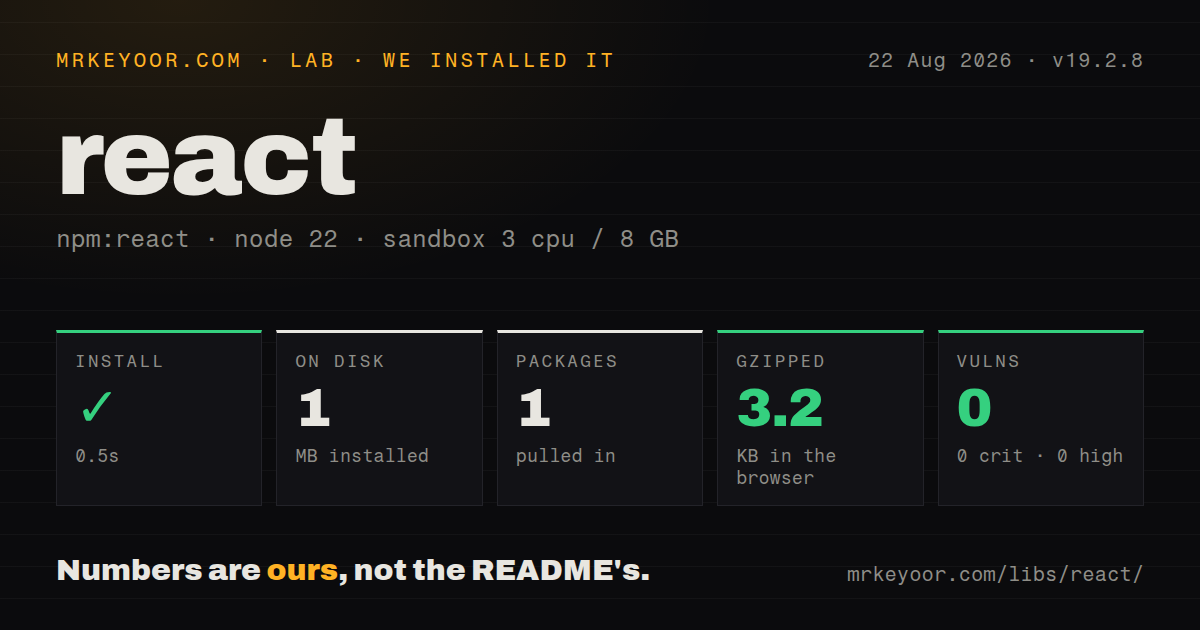
| Install | ✓ · 0.5s | 1 package on disk · 1 MB |
| Import | ✓ | ESM import works · require() works · CommonJS package with exports map |
| Browser | 3.2 KB | gzipped (8.2 KB minified), bundled with esbuild |
| Types | — | no TypeScript types found |
| Known vulns | 0 | 0 critical · 0 high · 0 moderate · 0 low (npm audit) |
Answers from our run
Does react install cleanly?
Yes. In a fresh container with an empty cache, npm install react finished in 0.5s, leaving 1 package and 1 MB on disk. npm audit reported no known vulnerabilities.
How much does react add to a browser bundle?
3.2 KB gzipped (8.2 KB minified) when the whole package is bundled for the browser with esbuild. Importing only part of it is usually smaller.
Does react work with both ESM and CommonJS?
Yes. Both import 'react' and require('react') worked in Node 22 in our run. The package is published as CommonJS with an exports map.
Does react include TypeScript types?
No type declarations were found in our install, so TypeScript users need their own declarations.
react or preact: which should you use?
preact: Choose it for React-like components when a smaller client runtime matters more than exact ecosystem behavior. React 19.2.8 installed in 0.5 seconds as one 1 MB package, bundled to 3.2 KB gzipped, and returned 0 audit findings in our sandbox.
When should you not use react?
The product is mainly documents and ordinary forms; server HTML plus small scripts can avoid shipping and hydrating a component tree
Use it if
- A stateful interface benefits from reusable components, one-way data flow, and predictable rerenders
- The chosen framework, renderer, component system, or native platform already targets React 19
- The team needs the widest selection of UI libraries, integrations, debugging material, and experienced developers
- You have decided where rendering and data fetching happen instead of expecting the core package to supply an application architecture
- The product is mainly documents and ordinary forms; server HTML plus small scripts can avoid shipping and hydrating a component tree
- A small embedded widget needs React-shaped components at a lower client cost; compare Preact and verify compatibility first
- The team prefers template syntax and coordinated first-party router or state choices; Vue may create fewer stack decisions
- Routing, server rendering, data loading, assets, and deployment need one supported answer; select a React framework or a different full framework rather than bare React
- Effects would become the default route for derived data and network fetching; unnecessary effects cause duplicate work, stale results, and Strict Mode cleanup failures
Setup reality
We installed React 19.2.8 in a fresh Node 22 Bookworm container in 0.5 seconds. It left 1 package using 1 MB, and npm audit reported 0 known vulnerabilities at all severities. React declares 0 direct dependencies and 0 peer dependencies, is 260 KB unpacked, and uses the MIT license. The package is CommonJS with an exports map; both require() and ESM import worked. We found no TypeScript declarations. Our all-exports browser build was 8.2 KB minified and 3.2 KB gzipped.
The single package cannot mount a browser tree. Install react-dom at the same version and call createRoot() or hydrateRoot() from react-dom/client. TypeScript applications normally add @types/react and @types/react-dom because the runtime ships no declarations. JSX also needs a compiler, bundler, or framework transform. Bare React leaves the router, server boundary, CSS pipeline, build output, test runner, and deployment target to the project.
Strict Mode repeats selected component bodies, state initializers, ref callbacks, and effects during development to find impure code and missing cleanup. A network request in an effect can appear twice. Abort stale requests or use the data layer supplied by the framework. Effects never run during server rendering. They are for synchronizing with systems outside React, while values derived solely from props and state should usually be calculated during render.
State belongs to a component type at a tree position. A changed type or key resets it; unstable list keys can attach state to the wrong record. React batches updates, so functional setters are required when the next value depends on the previous value. Server Components add a build and transport boundary maintained by supported frameworks, and client modules using browser hooks must declare their client boundary. Patch 19.2.8 improves decoding speed but does not make that protocol a do-it-yourself public integration.
Patterns
Attach one React root to the page mount-browser-root
import {StrictMode} from 'react';
import {createRoot} from 'react-dom/client';
import App from './App.jsx';

createRoot(document.getElementById('root')).render(
  <StrictMode><App /></StrictMode>
);
`createRoot()` comes from `react-dom/client`, which is a separate package. Create one root for each owned container and make subscriptions and effects safe under Strict Mode checks.
Calculate the next count from queued state update-previous-state
import {useState} from 'react';

function Counter() {
  const [count, setCount] = useState(0);
  return <button onClick={() => setCount(value => value + 1)}>
    {count}
  </button>;
}
The updater receives the latest queued value, so repeated increments compose under batching. Reading `count` and setting `count + 1` several times can reuse the same render snapshot.
Pair an external connection with cleanup synchronize-effect
import {useEffect} from 'react';

useEffect(() => {
  const connection = connect(roomId);
  connection.start();
  return () => connection.stop();
}, [roomId]);
Every reactive value read by the effect belongs in its dependency list. Cleanup must tolerate the development setup-cleanup-setup cycle used by Strict Mode.
Abort a request when its component input changes cancel-fetch
useEffect(() => {
  const controller = new AbortController();
  fetch(`/api/users/${id}`, {signal: controller.signal})
    .then(response => response.json())
    .then(setUser)
    .catch(error => {
      if (error.name !== 'AbortError') setError(error);
    });
  return () => controller.abort();
}, [id]);
This prevents an old request from winning after `id` changes. Effects do not fetch during server rendering; framework loaders and query caches usually handle SSR and deduplication better.
Bind row state to a database identifier render-stable-list
<ul>
  {todos.map(todo => (
    <TodoRow key={todo.id} todo={todo} />
  ))}
</ul>
A key identifies the component between renders. Array indexes attach state incorrectly when rows are inserted, removed, or reordered.
Read a React 19 context value in a descendant share-context
import {createContext, useContext} from 'react';

const Theme = createContext('light');

function Label() {
  const theme = useContext(Theme);
  return <span className={theme}>Status</span>;
}

<Theme value='dark'><Label /></Theme>
React 19 accepts the context object directly as a provider. Consumers rerender when the provider value changes identity, so avoid recreating large object values without need.
Track form action state and pending work submit-action
import {useActionState} from 'react';

function Rename() {
  const [message, action, pending] = useActionState(saveName, null);
  return <form action={action}>
    <input name='name' />
    <button disabled={pending}>Save</button>
    {message && <p>{message}</p>}
  </form>;
}
The action receives the previous state before its `FormData`. Framework server actions add their own serialization, authentication, and deployment rules around this React API.
Put one code split behind Suspense lazy-load-component
import {lazy, Suspense} from 'react';

const Reports = lazy(() => import('./Reports.jsx'));

<Suspense fallback={<p>Loading...</p>}>
  <Reports />
</Suspense>
The imported module must expose the component as its default export. The bundler decides whether the dynamic import becomes a separate client chunk.
Use a ref for an imperative DOM action focus-element
import {useRef} from 'react';

function Form() {
  const input = useRef(null);
  return <>
    <input ref={input} />
    <button onClick={() => input.current?.focus()}>Focus</button>
  </>;
}
Changing `ref.current` does not trigger a render. Refs suit focus, measurements, and external imperative APIs; visible application state belongs in state or props.
Discard form state when the selected record changes reset-with-key
function Editor({selectedId}) {
  return <ContactForm key={selectedId} contactId={selectedId} />;
}
A new key creates a new component identity at that position and drops its previous local state. Use this deliberately, since it also reruns initialization and effects.
Let urgent input update before a slow result list defer-expensive-view
import {useDeferredValue} from 'react';

function SearchResults({query}) {
  const deferredQuery = useDeferredValue(query);
  const stale = query !== deferredQuery;
  return <div style={{opacity: stale ? 0.6 : 1}}>
    <SlowList query={deferredQuery} />
  </div>;
}
A deferred value schedules a lower-priority render; it does not debounce network calls or impose a fixed delay. Cache or cancel data requests separately.
Link a label and input across server and client renders generate-accessible-id
import {useId} from 'react';

function PasswordField() {
  const id = useId();
  return <>
    <label htmlFor={id}>Password</label>
    <input id={id} type='password' />
  </>;
}
`useId()` creates hydration-safe accessibility IDs. Do not use it as a list key; list identity must come from the underlying records.
Alternatives
| Package | Registry | Pick it when |
|---|---|---|
| preact | npm | Choose it for React-like components when a smaller client runtime matters more than exact ecosystem behavior. |
| vue | npm | Choose it when templates and Vue's coordinated progressive stack suit the team better. |
| lit | npm | Choose it for standards-based web components intended to run under several host frameworks. |
More web frontend guides
postcss · react-dom · tailwindcss · clsx · htmlparser2 · tailwind-merge · the whole shelf →
How this guide is made: grounded in the library's documentation, release notes, changelog, and issue history, on a fixed rubric — not a hands-on install of every release. The 50 most-downloaded entries are additionally install-verified in clean containers. Corrections: contact the desk.