log4js review
Our log4js 6.9.1 install finished in 1.2 seconds and used 2 MB across 12 packages. This is a Node logger built around categories, severity thresholds, appenders, and layouts. It can send the same event to stdout, filtered files, rolling files, TCP endpoints, or Express access logs, with dotted category names inheriting configuration from their parents. Version 6.9.1 repairs a stack-trace regular expression that regressed in 6.8.0. The package includes TypeScript declarations, stays on CommonJS, and should not be mistaken for Java Log4j 2.
log4js 6.9.1 took 1.2 seconds and 2 MB in our install, passed npm audit with 0 findings, and failed a browser bundle. Use it for category-based Node server logging with owned appenders; prefer Pino when the deployment only needs structured stdout.
We installed it
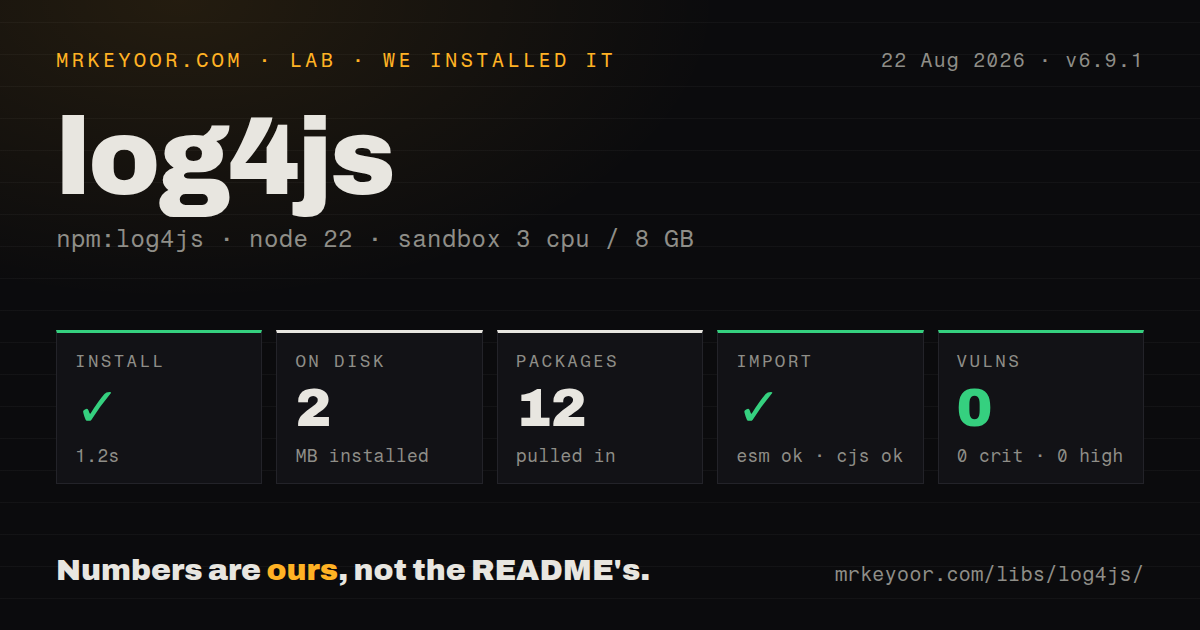
| Install | ✓ · 1.2s | 12 packages on disk · 2 MB |
| Import | ✓ | ESM import works · require() works · CommonJS package |
| Browser | n/a | could not be bundled for the browser (Node-only code, most likely) |
| Types | ✓ | TypeScript types bundled |
| Known vulns | 0 | 0 critical · 0 high · 0 moderate · 0 low (npm audit) |
Answers from our run
Does log4js install cleanly?
Yes. In a fresh container with an empty cache, npm install log4js finished in 1 seconds, leaving 12 packages and 2 MB on disk. npm audit reported no known vulnerabilities.
Can log4js run in a browser?
Not directly: esbuild could not bundle it for the browser in our run, which normally means it depends on Node built-ins. Use it on the server, or find a browser-targeted alternative.
Does log4js work with both ESM and CommonJS?
Yes. Both import 'log4js' and require('log4js') worked in Node 22 in our run. The package is published as CommonJS.
Does log4js include TypeScript types?
Yes, type declarations ship inside the package, so no @types install is needed.
log4js or pino: which should you use?
pino: Choose Pino for structured JSON on stdout, especially in containers with an external log collector. log4js 6.9.1 took 1.2 seconds and 2 MB in our install, passed npm audit with 0 findings, and failed a browser bundle.
When should you not use log4js?
Your platform collects newline-delimited JSON from stdout. Pino is a cleaner fit for that pipeline than configuring log4js layouts and routes.
Use it if
- A Node service needs one category tree to route different severities to console, files, or network appenders.
- The application owns local log files and needs built-in rotation by size, date, or both.
- Express access logs need response-status levels, request filters, and an application-specific format.
- An existing system already relies on log4js layouts or community appenders and changing event shape would disrupt operations.
- Your platform collects newline-delimited JSON from stdout. Pino is a cleaner fit for that pipeline than configuring log4js layouts and routes.
- The target is a browser bundle. Our esbuild browser build failed, and the package loads Node appenders dynamically.
- You expect Java Log4j 2 files, plugins, or behavior. The project's own README warns that the shared name leads to confusion.
- Several unrelated Node processes will write and rotate one local file. Core cluster is handled specially, but independent processes need a TCP or multiprocess design.
- You need an actively shipped stream of npm releases. Version 6.9.1 was published in March 2023 even though repository work continued into July 2026.
Setup reality
We installed log4js 6.9.1 in a clean Node 22 Bookworm container in 1.2 seconds. The result was 12 packages and 2 MB on disk. Its package metadata lists 5 direct dependencies, 0 peer dependencies, and 260 KB unpacked. npm audit returned 0 findings at every severity. The package bundles TypeScript declarations. It is CommonJS with no exports map; both require() and ESM import worked in our run.
An unconfigured logger is deliberately quiet because the default category starts at OFF. A useful configuration needs at least 1 appender plus the default category, and invalid references throw during configure(). You may pass an object or a JSON filename, and LOG4JS_CONFIG is also recognized. Dotted categories inherit levels and appenders from the closest parent unless inherit is false, so review the effective routes before enabling verbose database or request logs.
File output needs a writable path, retention limits, and disk alerts. A dateFile rolls on the first write after its pattern changes; there is no midnight timer. Node's core cluster sends worker events to the primary process so one writer owns the appender. Separate processes require the multiprocess TCP appender or an external collector. Setting disableClustering gives each worker its own appenders and can produce competing file writers.
File and socket appenders finish work asynchronously, so call log4js.shutdown(callback) during termination and wait for the callback. Logger instances share state by category: changing logger.level affects loggers with that name, and uncleared context can attach an old request ID to later events. The browser bundle attempt failed in our sandbox, so keep log4js on the server side even though ESM import succeeds under Node 22.
Patterns
Enable stdout at info level configure-stdout
const log4js = require('log4js');

log4js.configure({
  appenders: { stdout: { type: 'stdout' } },
  categories: { default: { appenders: ['stdout'], level: 'info' } },
});

log4js.getLogger().info('service ready');
The built-in default category is `OFF`; this 1-appender configuration is enough to make info events visible.
Set a separate database threshold route-category
log4js.configure({
  appenders: { stdout: { type: 'stdout' } },
  categories: {
    default: { appenders: ['stdout'], level: 'info' },
    database: { appenders: ['stdout'], level: 'warn' },
  },
});

const dbLog = log4js.getLogger('database');
dbLog.error('pool unavailable');
A category at `warn` drops trace, debug, and info events before they reach its appenders.
Inherit configuration through a dotted name inherit-category
const queryLog = log4js.getLogger('app.database.query');
queryLog.info('query finished', { durationMs: 18 });
`app.database.query` uses the closest configured parent and also receives parent appenders unless that category sets `inherit: false`.
Compress three size-based backups roll-file-by-size
log4js.configure({
  appenders: {
    appFile: {
      type: 'file',
      filename: 'logs/app.log',
      maxLogSize: '10M',
      backups: 3,
      compress: true,
    },
  },
  categories: { default: { appenders: ['appFile'], level: 'info' } },
});
`maxLogSize: '10M'` rolls the active file at that threshold and keeps 3 old files outside the live one.
Retain fourteen daily log files roll-file-by-date
log4js.configure({
  appenders: {
    audit: {
      type: 'dateFile',
      filename: 'logs/audit.log',
      pattern: 'yyyy-MM-dd',
      numBackups: 14,
      compress: true,
    },
  },
  categories: { default: { appenders: ['audit'], level: 'info' } },
});
The date appender checks its pattern on each write, so an idle process does not rotate at midnight by itself.
Print a request ID from logger context add-request-context
log4js.configure({
  appenders: {
    stdout: {
      type: 'stdout',
      layout: { type: 'pattern', pattern: '%d %p %c %X{requestId} %m%n' },
    },
  },
  categories: { default: { appenders: ['stdout'], level: 'info' } },
});
`%X{requestId}` reads the named value from the logger context and prints an empty value when that key is absent.
Remove context after asynchronous work clear-request-context
const requestLog = log4js.getLogger('http.request');
requestLog.addContext('requestId', request.id);
try {
  requestLog.info('started');
  await handle(request);
} finally {
  requestLog.removeContext('requestId');
}
Loggers are shared by category, so the `finally` block prevents one request ID from reaching a later request's events.
Assign access-log levels from HTTP status log-express-requests
const accessLog = log4js.getLogger('http');

app.use(log4js.connectLogger(accessLog, {
  level: 'auto',
  format: ':remote-addr :method :url :status :response-time ms',
  nolog: (req) => req.path === '/health',
}));
The documented `auto` mode maps 3xx responses to WARN, 4xx and 5xx to ERROR, and other statuses to INFO.
Copy errors into a dedicated file filter-error-file
log4js.configure({
  appenders: {
    stdout: { type: 'stdout' },
    errorFile: { type: 'file', filename: 'logs/errors.log' },
    errors: { type: 'logLevelFilter', appender: 'errorFile', level: 'error' },
  },
  categories: { default: { appenders: ['stdout', 'errors'], level: 'info' } },
});
Add only the `errors` wrapper to the category; adding `errorFile` too would duplicate qualifying events.
Skip expensive data when debug is disabled guard-debug-computation
if (logger.isDebugEnabled()) {
  logger.debug('cache state', buildDiagnosticSnapshot());
}
JavaScript evaluates function arguments before `logger.debug`, while `isDebugEnabled()` avoids building the object below DEBUG.
Configure from a JSON file load-json-config
const log4js = require('log4js');
log4js.configure('./config/log4js.json');
const logger = log4js.getLogger('worker');
A string passed to `configure()` is treated as a JSON filename, and invalid appender references throw during loading.
Wait for appenders during shutdown flush-before-exit
process.once('SIGTERM', () => {
  server.close(() => {
    log4js.shutdown((error) => {
      process.exitCode = error ? 1 : 0;
    });
  });
});
`shutdown` calls back after file writes finish and sockets close; forcing `process.exit()` earlier can lose queued events.
Alternatives
| Package | Registry | Pick it when |
|---|---|---|
| pino | npm | Choose Pino for structured JSON on stdout, especially in containers with an external log collector. |
| winston | npm | Choose Winston when its transport catalog and format composition match an existing Node deployment. |
| bunyan | npm | Keep Bunyan for an established JSON stream and CLI workflow where migration has little operational payoff. |
| consola | npm | Choose Consola for developer-facing CLIs and tools that need readable reporters rather than file rotation. |
More infra guides
semver · boto3 · opentelemetry-api · @opentelemetry/api · psutil · distro · the whole shelf →
How this guide is made: grounded in the library's documentation, release notes, changelog, and issue history, on a fixed rubric — not a hands-on install of every release. The 50 most-downloaded entries are additionally install-verified in clean containers. Corrections: contact the desk.