pino review
Pino 10.3.1 turns Node log calls into newline-delimited JSON with numeric levels, timestamps, child bindings, serializers, and path-based redaction. The fast path writes records; pretty formatting and remote delivery normally run in a worker transport or downstream collector. This patch cleans invalid preload flags inherited by transport workers through `NODE_OPTIONS` and documents a level-filtering trap: a transport cannot receive a record that the logger already discarded. Version 10.3.0 also named worker threads and corrected the TypeScript return type for `multistream().clone()`. Pino fits services whose logs are data first and terminal output second.
Pino 10.3.1 installed in 1 second and used 3 MB across 14 packages, with no npm audit findings and a 3.6 KB gzipped browser bundle in our sandbox. It is a good default for Node services that ship JSON to a collector; choose another logger when in-process formatting and destination orchestration are the main job.
We installed it
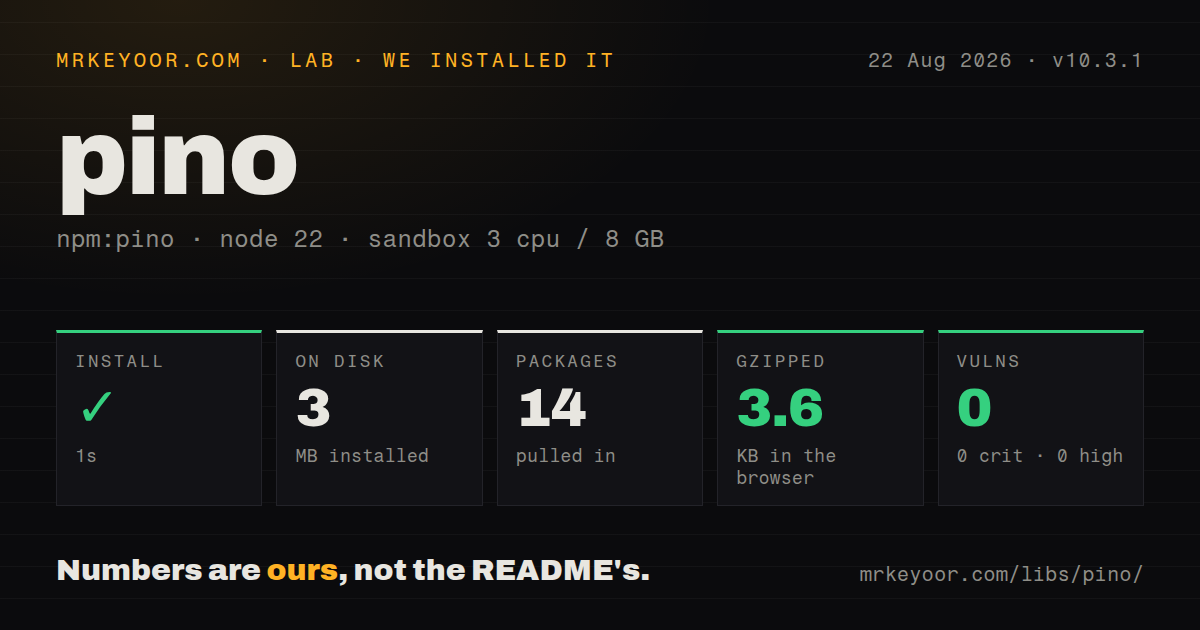

| Install | ✓ · 1s | 14 packages on disk · 3 MB |
| Import | ✓ | ESM import works · require() works · CommonJS package |
| Browser | 3.6 KB | gzipped (8.8 KB minified), bundled with esbuild |
| Types | ✓ | TypeScript types bundled |
| Known vulns | 0 | 0 critical · 0 high · 0 moderate · 0 low (npm audit) |
Answers from our run
Does pino install cleanly?
Yes. In a fresh container with an empty cache, npm install pino finished in 1 seconds, leaving 14 packages and 3 MB on disk. npm audit reported no known vulnerabilities.
How much does pino add to a browser bundle?
3.6 KB gzipped (8.8 KB minified) when the whole package is bundled for the browser with esbuild. Importing only part of it is usually smaller.
Does pino work with both ESM and CommonJS?
Yes. Both import 'pino' and require('pino') worked in Node 22 in our run. The package is published as CommonJS.
Does pino include TypeScript types?
Yes, type declarations ship inside the package, so no @types install is needed.
pino or winston: which should you use?
Pick winston when several in-process destinations and independent formats define the logging design. Pino 10.3.1 installed in 1 second and used 3 MB across 14 packages, with no npm audit findings and a 3.6 KB gzipped browser bundle in our sandbox.
When should you not use pino?
One package must provide pretty files, rotation, and retention. pino-pretty and rotation remain separate pieces.
Use it if
- A Node service writes JSON to stdout for a container runtime or log collector.
- Request IDs and component fields should be bound once on child loggers.
- Known object paths containing credentials must be censored before serialization.
- Formatting or network delivery should leave the application event loop and run in a transport worker.
- One package must provide pretty files, rotation, and retention. `pino-pretty` and rotation remain separate pieces.
- Each destination needs an unrelated format and level policy inside the main process. Winston is organized around that transport model.
- Secrets appear in arbitrary keys or free-text messages. Path redaction only removes locations it can name.
- The deploy artifact is a single bundle that cannot carry worker-loadable transport targets. Pino requires explicit bundler handling for them.
- A tiny script does not use structured context, serializers, or redaction. Its 11 direct dependencies may buy nothing over `console`.
Setup reality
We installed Pino 10.3.1 in a fresh Node 22 Bookworm container. npm finished in 1 second, leaving 14 packages and 3 MB on disk, and reported zero vulnerabilities at every severity. Pino declares 11 direct dependencies and no peers; its package is 1,280 KB unpacked and includes TypeScript declarations. It is CommonJS without an exports map, though both require() and ESM import worked. Our full browser import bundled to 8.8 KB minified and 3.6 KB gzipped.
Plain stdout JSON needs no account, credential, or config file. Create one logger, pass fields in the first object argument, and use children for stable context such as requestId. Log an exception under err or assign an error serializer so its name and stack survive. Redaction accepts specific paths and wildcards before serialization. It cannot remove a credential that has already been interpolated into the message string.
Readable local output requires pino-pretty or another separate target. Network delivery, reformatting, and alerts fit transport workers because the main event loop keeps writing records. That worker must resolve its target from the deployed filesystem, which complicates one-file server bundles. Pino 10.3.1 filters invalid NODE_OPTIONS preload arguments before worker startup, fixing a failure seen with some monitoring preloads.
Buffered output can lose the last records when a process exits abruptly. During normal shutdown, stop accepting work, flush a supporting destination, and allow the event loop to finish instead of calling process.exit() after fatal(). Filtering occurs at the logger before the transport, so an info logger never sends debug records to a debug transport. The browser API uses transmit hooks and different serialization behavior; Node destinations and workers are not available there despite our 8.8 KB bundle result.
Patterns
Log fields beside a message write-structured-log
import pino from 'pino';

const logger = pino({ level: process.env.LOG_LEVEL ?? 'info' });
logger.info({ orderId: 'ord_42', amount: 19.5 }, 'order accepted');
Pino treats the leading object as structured fields. Interpolating the same values into the message leaves collectors with text to parse.
Bind request fields once create-child-logger
const requestLog = logger.child({
  requestId: request.id,
  route: request.route,
});
requestLog.info('request started');
requestLog.warn({ elapsedMs }, 'request slow');
Every child record inherits these bindings. Create the child at the request or component boundary instead of repeating identifiers at each call.
Preserve an error stack log-error-object
try {
  await saveOrder(order);
} catch (error) {
  logger.error({ err: error, orderId: order.id }, 'save failed');
  throw error;
}
The built-in `err` serializer keeps the error name, message, and stack. A template string normally records only the message text.
Remove known secret fields redact-secret-paths
const logger = pino({
  redact: {
    paths: ['req.headers.authorization', 'user.password', 'cards[*].number'],
    censor: '[REDACTED]',
  },
});
Redaction matches the configured object paths before output. Tokens embedded inside `msg` are outside those paths and remain visible.
Use readable local output pretty-print-development
const logger = pino({
  transport: process.env.NODE_ENV === 'development'
    ? { target: 'pino-pretty', options: { colorize: true } }
    : undefined,
});
`pino-pretty` is another package. Keep production output as JSON when a collector needs indexed fields.
Move processing to a transport worker send-worker-transport
const transport = pino.transport({
  target: './log-transport.js',
  options: { endpoint: process.env.LOG_ENDPOINT },
});
const logger = pino(transport);
The worker resolves this target at runtime. A bundler must copy or map the module rather than hiding it inside an unreachable bundle chunk.
Trim request and response objects set-custom-serializers
const logger = pino({
  serializers: {
    req: request => ({ method: request.method, url: request.url }),
    res: response => ({ statusCode: response.statusCode }),
  },
});
Whole server objects may expose credentials, sockets, or cycles. Returning a small known shape also keeps record volume predictable.
Flush during controlled shutdown flush-before-shutdown
process.once('SIGTERM', async () => {
  logger.info('shutdown requested');
  await stopServer();
  logger.flush();
  process.exitCode = 0;
});
An immediate `process.exit()` can cut off buffered records. Set the exit code after cleanup and let the process drain normally.
Alternatives
| Package | Registry | Pick it when |
|---|---|---|
| winston | npm | Pick it when several in-process destinations and independent formats define the logging design. |
| bunyan | npm | Keep it in an established service that already depends on Bunyan serializers and tooling. |
| consola | npm | Pick it for developer-facing commands where readable terminal reporters matter more than collector-ready JSON. |
More utils guides
lru-cache · type-fest · ajv · zod · p-limit · find-up · the whole shelf →
How this guide is made: grounded in the library's documentation, release notes, changelog, and issue history, on a fixed rubric — not a hands-on install of every release. The 50 most-downloaded entries are additionally install-verified in clean containers. Corrections: contact the desk.