@lexical/markdown review
@lexical/markdown 0.49.0 translates between Markdown text and a Lexical editor tree, and it can turn typed markers into rich editor nodes. You supply a transformer list that defines accepted blocks and inline syntax, including headings, quotes, lists, fenced code, links, and text formats. The 0.49 release fixes a case where typing a list marker at the start of a heading incorrectly replaced that heading with a list. This is a Lexical adapter rather than a standalone Markdown parser: our full-namespace browser build reached 358.2 KB minified and 116.3 KB gzipped because it pulls in the editor stack.
@lexical/markdown 0.49.0 installed 16 packages in 8.4 seconds and made our namespace browser build 116.3 KB gzipped, so it earns its place only when Markdown must cross a Lexical editor boundary. For parsing or read-only rendering, install a standalone Markdown tool instead.
We installed it
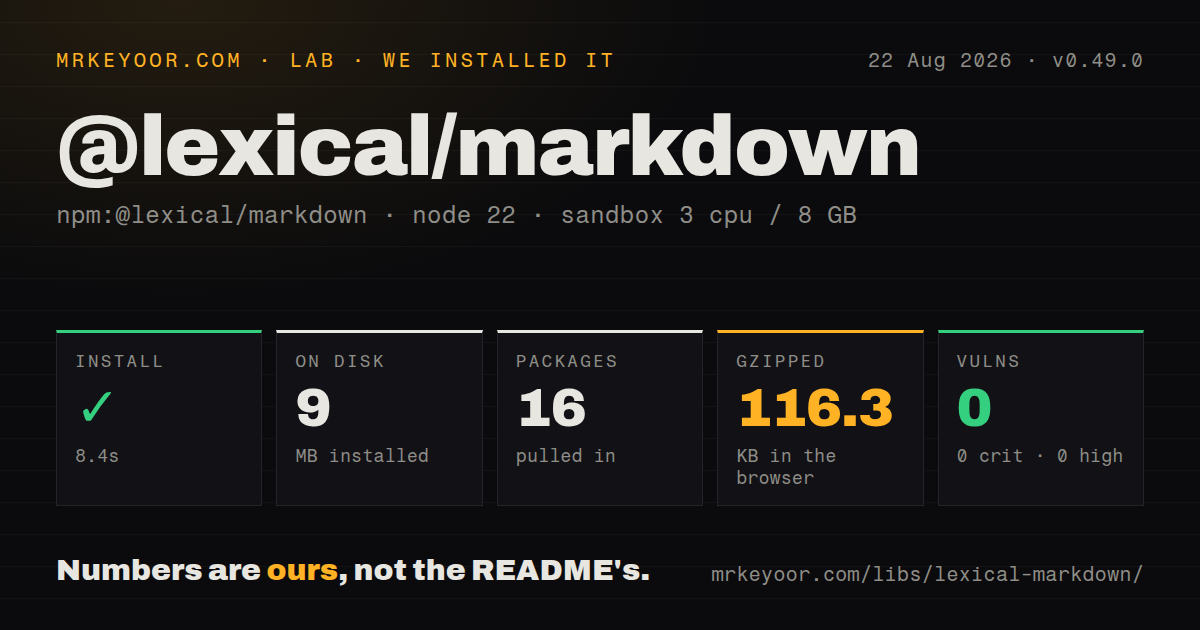
| Install | ✓ · 8.4s | 16 packages on disk · 9 MB |
| Import | ✓ | ESM import works · require() works · CommonJS package with exports map |
| Browser | 116.3 KB | gzipped (358.2 KB minified), bundled with esbuild |
| Types | ✓ | TypeScript types bundled |
| Known vulns | 0 | 0 critical · 0 high · 0 moderate · 0 low (npm audit) |
Answers from our run
Does @lexical/markdown install cleanly?
Yes. In a fresh container with an empty cache, npm install @lexical/markdown finished in 8 seconds, leaving 16 packages and 9 MB on disk. npm audit reported no known vulnerabilities.
How much does @lexical/markdown add to a browser bundle?
116.3 KB gzipped (358.2 KB minified) when the whole package is bundled for the browser with esbuild. Importing only part of it is usually smaller.
Does @lexical/markdown work with both ESM and CommonJS?
Yes. Both import '@lexical/markdown' and require('@lexical/markdown') worked in Node 22 in our run. The package is published as CommonJS with an exports map.
Does @lexical/markdown include TypeScript types?
Yes, type declarations ship inside the package, so no @types install is needed.
@lexical/markdown or markdown-it: which should you use?
markdown-it: Use it for extensible Markdown-to-HTML rendering when no Lexical editor tree is involved. @lexical/markdown 0.49.0 installed 16 packages in 8.4 seconds and made our namespace browser build 116.3 KB gzipped, so it earns its place only when Markdown must cross a Lexical editor boundary.
When should you not use @lexical/markdown?
You need Markdown to HTML or a syntax tree without an editor. This package has 9 direct dependencies tied to Lexical, while marked, markdown-it, or remark-parse handles that job directly.
Use it if
- A Lexical editor must import existing Markdown and serialize edited content back to a text format.
- Writers should get heading, quote, list, code, link, and emphasis shortcuts while typing in a Lexical surface.
- The product needs an explicit allowlist of Markdown features instead of accepting every syntax extension.
- Copy or export flows need Markdown for only the current Lexical selection.
- You need Markdown to HTML or a syntax tree without an editor. This package has 9 direct dependencies tied to Lexical, while marked, markdown-it, or remark-parse handles that job directly.
- Exact source round trips matter. Import builds Lexical nodes and export writes fresh Markdown, so spacing, delimiter choices, and other source details can change.
- Your documents require built-in tables or images. The published transformer set does not supply those constructs, and CHECK_LIST must be added separately from TRANSFORMERS.
- You cannot upgrade the Lexical family together. Version 0.49.0 pins lexical and 8 @lexical packages to exactly 0.49.0.
- The project is on TypeScript below 5.2. The package declares TypeScript >=5.2 and maps older compilers to an incompatibility declaration.
- A 116.3 KB gzip namespace bundle is too much for a small read-only Markdown view. A renderer without Lexical carries less editor machinery.
Setup reality
We installed @lexical/markdown 0.49.0 in a fresh Node 22 Bookworm sandbox. npm took 8.4 seconds, leaving 16 packages and 9 MB on disk. The package itself is 456 KB unpacked, declares 9 direct dependencies and 1 peer dependency, and returned 0 npm audit findings. It is published as CommonJS with an exports map, bundled TypeScript declarations, and working require() and ESM import paths. Our namespace browser build measured 358.2 KB minified and 116.3 KB gzipped.
There are no credentials or config files. The setup cost is node registration: headings and quotes need rich-text nodes, lists need ListNode and ListItemNode, links need LinkNode, and fenced code needs CodeNode. registerMarkdownShortcuts checks required nodes and can throw during setup. Keep every Lexical package on 0.49.0, register the nodes before conversion, and use one transformer array for import, shortcuts, and export.
The conversion helpers start with $, so call them inside editor.update(), an editor-state read, or LexicalComposer's editorState initializer. $convertFromMarkdownString clears its target root by default and repositions selection. $generateNodesFromMarkdownString is safer when inserting into an existing document because it returns detached nodes. Non-React integrations must retain and call the cleanup function returned by registerMarkdownShortcuts.
TRANSFORMERS is a product choice, not full Markdown compatibility. It includes a highlight syntax written as ==text==, excludes the separately exported CHECK_LIST, and has no built-in table or image transformer. Version 0.49.0 fixes the heading-to-list shortcut bug, but Markdown still will not preserve every source token. Test import followed by export on real documents before treating the text as canonical storage.
Patterns
Keep Markdown and core Lexical on one release install-matched-packages
npm install lexical@0.49.0 @lexical/markdown@0.49.0@lexical/markdown 0.49.0 declares exact 0.49.0 runtime dependencies. Do not mix its version with another Lexical line.
Load Markdown into the editor root replace-editor-from-markdown
import { $convertFromMarkdownString, TRANSFORMERS } from '@lexical/markdown';

editor.update(() => {
  $convertFromMarkdownString(markdown, TRANSFORMERS);
});
The call clears the target root by default. Run it inside editor.update() or the editor-state initializer.
Read the editor state as Markdown serialize-editor-to-markdown
import { $convertToMarkdownString, TRANSFORMERS } from '@lexical/markdown';

const markdown = editor.getEditorState().read(() =>
  $convertToMarkdownString(TRANSFORMERS),
);
Use the same transformer array used for import. A missing exporter can turn a rich node into plain text or omit its structure.
Create a React editor from Markdown initialize-composer-from-markdown
const initialConfig = {
  namespace: 'Article',
  nodes: [HeadingNode, QuoteNode, ListNode, ListItemNode, LinkNode, CodeNode],
  onError(error) { throw error; },
  editorState: () => $convertFromMarkdownString(markdown, TRANSFORMERS),
};

<LexicalComposer initialConfig={initialConfig}>{children}</LexicalComposer>
All 6 node classes shown support constructs in TRANSFORMERS. Register them before the initializer converts content.
Turn typed markers into rich nodes enable-react-shortcuts
import { TRANSFORMERS } from '@lexical/markdown';
import { MarkdownShortcutPlugin } from '@lexical/react/LexicalMarkdownShortcutPlugin';

<MarkdownShortcutPlugin transformers={TRANSFORMERS} />
The plugin changes editor nodes as the user types. Lexical state remains a node tree rather than a Markdown string.
Install shortcuts without React register-vanilla-shortcuts
const removeShortcuts = registerMarkdownShortcuts(editor, TRANSFORMERS);

// during teardown
removeShortcuts();
The returned function removes listeners and commands. Call it when the editor integration is disposed.
Limit authors to selected syntax allow-markdown-subset
import { BOLD_STAR, HEADING, ITALIC_STAR, LINK, QUOTE } from '@lexical/markdown';

const ARTICLE_TRANSFORMERS = [
  HEADING, QUOTE, BOLD_STAR, ITALIC_STAR, LINK,
];
Transformer order affects overlapping inline markers. Preserve the package ordering for formats that can share delimiters.
Include task-list conversion explicitly add-check-list-syntax
import { CHECK_LIST, TRANSFORMERS } from '@lexical/markdown';

const transformers = [CHECK_LIST, ...TRANSFORMERS];
CHECK_LIST is exported but absent from TRANSFORMERS. Register ListNode and ListItemNode before using it.
Keep each source newline during import preserve-import-newlines
editor.update(() => {
  $convertFromMarkdownString(markdown, TRANSFORMERS, undefined, true);
});
The fourth argument preserves newlines and changes how adjacent text lines become editor blocks.
Merge adjacent text lines merge-commonmark-lines
editor.update(() => {
  $convertFromMarkdownString(markdown, TRANSFORMERS, undefined, false, true);
});
The fifth argument merges adjacent lines only when preserveNewLines is false. Test hard breaks in your own documents.
Insert parsed nodes at the selection insert-markdown-fragment
editor.update(() => {
  const selection = $getSelection();
  const nodes = $generateNodesFromMarkdownString(markdown, TRANSFORMERS);
  selection?.insertNodes(nodes);
});
$generateNodesFromMarkdownString returns detached nodes and does not clear the existing root.
Copy only selected content as Markdown export-current-selection
const text = editor.getEditorState().read(() =>
  $convertSelectionToMarkdownString(TRANSFORMERS, $getSelection()),
);
A missing or collapsed selection yields an empty string rather than exporting the whole editor.
Alternatives
| Package | Registry | Pick it when |
|---|---|---|
| markdown-it | npm | Use it for extensible Markdown-to-HTML rendering when no Lexical editor tree is involved. |
| marked | npm | Use it for a direct lexer and renderer with a small standalone API. |
| remark-parse | npm | Use it when Markdown should become a mdast tree processed by unified plugins. |
| react-markdown | npm | Use it to render Markdown as React elements without adding an editable Lexical document model. |
More web frontend guides
postcss · react · react-dom · tailwindcss · clsx · htmlparser2 · the whole shelf →
Related reading
How this guide is made: grounded in the library's documentation, release notes, changelog, and issue history, on a fixed rubric — not a hands-on install of every release. The 50 most-downloaded entries are additionally install-verified in clean containers. Corrections: contact the desk.