langchain review
LangChain 1.3.17 is the Python layer that turns chat models, typed tools, middleware, structured responses, and LangGraph execution into one agent API. The top-level distribution does not contain each model SDK or data connector; provider packages such as langchain-openai and langchain-anthropic supply those pieces. create_agent builds on LangGraph, while init_chat_model gives providers a common invocation shape. The current patch frames custom human-in-the-loop rejection reasons correctly and updates companion dependencies. That fix matters when an operator denies a proposed action and the model needs an accurate reason for its next step.
Our LangChain 1.3.16 install took 1 second and 52 MB across 36 packages, then imported in 0.02 seconds with 0 audit findings. Install the current 1.3.17 release for multi-tool agents and provider-neutral middleware; use the provider SDK for a single request path.
We installed it
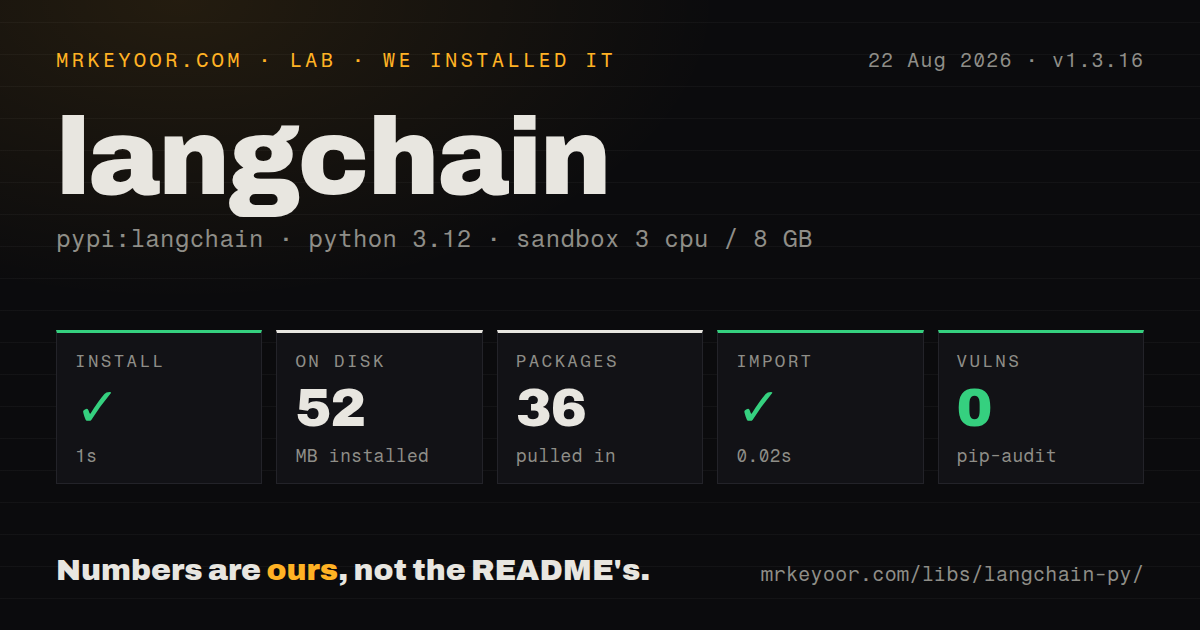
| Install | ✓ · 1s | 36 packages on disk · 52 MB |
| Import | ✓ | import langchain in 0.02s · pure Python · py.typed · requires Python <4.0.0,>=3.10.0 |
| Known vulns | 0 | (pip-audit) |
Answers from our run
Does langchain install cleanly?
Yes. In a fresh container with an empty cache, pip install langchain finished in 1 seconds, leaving 36 packages and 52 MB on disk. pip-audit reported no known vulnerabilities.
What does langchain need to run?
Python <4.0.0,>=3.10.0, and nothing compiled: it is pure Python. In our run import langchain succeeded in 0.02s, and the package ships py.typed for type checkers.
langchain or pydantic-ai: which should you use?
pydantic-ai: Choose it for a type-driven agent built around Pydantic models with fewer framework layers. Our LangChain 1.3.16 install took 1 second and 52 MB across 36 packages, then imported in 0.02 seconds with 0 audit findings.
When should you not use langchain?
The feature sends one prompt and reads one answer; a provider SDK avoids the 21 direct dependencies measured in the LangChain package metadata
Discussed on
- hnWhy we no longer use LangChain for building our AI agents480 points
- hnLangchain Is Pointless386 points
- hnLangChain: Build AI apps with LLMs through composability372 points
- hnThe Problem with LangChain268 points
- hnRe-implementing LangChain in 100 lines of code252 points
Use it if
- An agent uses several typed tools and needs middleware, streaming, and schema-constrained responses around the loop
- The same application calls more than one model provider and benefits from shared messages and tool declarations
- Conversation checkpoints or human approval steps should run on LangGraph instead of a custom recursive controller
- The team can pin the core, graph, and provider distributions together and exercise them in integration tests
- The feature sends one prompt and reads one answer; a provider SDK avoids the 21 direct dependencies measured in the LangChain package metadata
- Installation must include all connectors automatically; model clients, vector stores, and community integrations are separate distributions
- Every workflow transition must be explicit and reproducible; a direct LangGraph graph or ordinary state machine makes control flow easier to audit
- The project cannot run compatibility tests on upgrades; langchain, langchain-core, LangGraph, and provider packages ship on separate schedules
- A hosted tracing account is unacceptable and no local telemetry plan exists; LangSmith is optional but separate, so observability must be designed deliberately
Setup reality
We installed LangChain 1.3.16 in a fresh, cache-free Python 3.12 Bookworm sandbox. The install completed in 1 second, left 36 packages, and occupied 52 MB. Its metadata listed 21 direct dependencies. pip-audit found 0 known vulnerabilities. The distribution is pure Python, requires Python 3.10 or newer and below 4.0, carries an MIT license, and includes py.typed. import langchain worked in 0.02 seconds.
That base install still cannot call a hosted model. Add the provider distribution, then set its API key, endpoint, account, and region variables as required. A name such as openai:model only selects an integration; it does not supply credentials or equalize provider billing, quotas, streaming chunks, or tool support. Keep secrets outside code and test the exact provider package version.
Version 1.3 agents created by create_agent execute through LangGraph. Type annotations and docstrings become the model-visible tool schema, so vague parameter descriptions produce vague calls. Provider-native structured output and tool-based fallback both check shape, not truth. Validate identifiers, permissions, and business constraints in code before any write, and bound model and tool retries.
Use ainvoke and astream through an asynchronous call path; a blocking database tool will still block the event loop. A thread_id names state but does not store it. Persistence requires a checkpointer, retention rules, and access control for saved messages. Put approval in front of payments, deletion, messaging, and other irreversible tools, and make handlers idempotent because a retried graph step can call them again.
Patterns
Send one request through a named provider invoke-model
from langchain.chat_models import init_chat_model

model = init_chat_model('openai:gpt-5.5')
reply = model.invoke('Summarize this incident in two sentences.')
The provider prefix selects an integration. Install its package and supply that provider's credentials before the first call.
Consume a response as it arrives stream-model
for chunk in model.stream('Explain the query plan'):
    print(chunk.content, end='', flush=True)
A provider can return content blocks instead of one string. Inspect chunk content before assuming text concatenation is sufficient.
Publish a Python function as a tool define-tool
from langchain.tools import tool

@tool
def lookup_order(order_id: str) -> str:
    """Return the current status for one order ID."""
    return orders.get_status(order_id)
The function annotation and docstring form the model-facing argument schema. Authorization still belongs inside the function or its caller.
Run a model with an order lookup create-agent
from langchain.agents import create_agent

agent = create_agent(model, tools=[lookup_order], system_prompt='Answer only from tool results.')
result = agent.invoke({'messages': [{'role': 'user', 'content': 'Where is A42?'}]})
The prompt limits model behavior only by instruction. Code must validate the order ID and the caller's access before returning data.
Parse an agent result into Pydantic structured-response
from pydantic import BaseModel

class Ticket(BaseModel):
    priority: str
    summary: str

agent = create_agent(model, response_format=Ticket)
Pydantic verifies fields and types. Use Literal or an enum for permitted priorities, then check factual claims against source data.
Observe every model request add-middleware
from langchain.agents.middleware import wrap_model_call

@wrap_model_call
def audit_request(request, handler):
    record_model(request.model)
    return handler(request)
Middleware surrounds model execution. A retry or provider switch here changes cost and call counts, so add an explicit ceiling.
Invoke the graph without blocking its caller invoke-async
result = await agent.ainvoke({'messages': [{'role': 'user', 'content': question}]})ainvoke cannot make a synchronous database or HTTP tool nonblocking. Implement network-bound tools with async clients too.
Keep test conversation state by thread persist-thread
from langgraph.checkpoint.memory import InMemorySaver

agent = create_agent(model, tools=tools, checkpointer=InMemorySaver())
config = {'configurable': {'thread_id': 'case-42'}}
agent.invoke({'messages': [{'role': 'user', 'content': 'Remember this'}]}, config)
InMemorySaver loses state with the process and suits tests. Production needs a durable saver plus retention and tenant isolation.
Inspect tool requests without an agent loop bind-tools
tool_model = model.bind_tools([lookup_order])
message = tool_model.invoke('Check order A42')
for call in message.tool_calls:
    print(call['name'], call['args'])
bind_tools asks the model to describe calls; it executes none of them. Validate each name and argument before dispatch.
Bound parallel independent calls batch-requests
replies = model.batch(['Summarize A', 'Summarize B'], config={'max_concurrency': 2})max_concurrency controls local scheduling, while the provider's rate and token limits still decide what succeeds.
Watch graph progress by step stream-agent-updates
for update in agent.stream(
    {'messages': [{'role': 'user', 'content': question}]},
    stream_mode='updates',
):
    print(update)
updates emits state changes from graph steps rather than a finished answer. Do not expose raw tool results to an untrusted client.
Supply request-scoped context pass-runtime-context
from dataclasses import dataclass

@dataclass
class Context:
    user_id: str

agent = create_agent(model, tools=tools, context_schema=Context)
result = agent.invoke(
    {'messages': [{'role': 'user', 'content': question}]},
    context=Context(user_id='u-42'),
)
Runtime context is available to tools and middleware without placing private identifiers in model-visible message text.
Alternatives
| Package | Registry | Pick it when |
|---|---|---|
| pydantic-ai | PyPI | Choose it for a type-driven agent built around Pydantic models with fewer framework layers. |
| llama-index | PyPI | Choose it when ingestion, indexing, retrieval, and document-grounded querying are the main workload. |
| haystack-ai | PyPI | Choose it for explicit retrieval pipelines whose components and branches should remain visible. |
More ai / ml guides
@modelcontextprotocol/sdk · openai · mcp · huggingface-hub · @anthropic-ai/sdk · openai · the whole shelf →
Related reading
How this guide is made: grounded in the library's documentation, release notes, changelog, and issue history, on a fixed rubric — not a hands-on install of every release. The 50 most-downloaded entries are additionally install-verified in clean containers. Corrections: contact the desk.