minimist review
minimist 1.2.8 is one function that maps an argv array to an object. Non-options land in _, long and short flags become properties, --no-x becomes x: false, and numeric-looking tokens become numbers unless declared as strings. Options cover aliases, defaults, booleans, strings, early stopping, a separate -- tail, and an unknown-token callback. It does not provide help, subcommands, required arguments, choices, or structured usage errors. Our install measured a 3.8 KB minified and 1.6 KB gzipped browser bundle, though command-line parsing normally stays in Node.
minimist 1.2.8 installed in 0.3 seconds as one 1 MB package with 0 audit findings in our sandbox, but it supplies no types or usage errors. Keep it for tiny or compatibility-sensitive parsers; current Node scripts should try node:util parseArgs, and public CLIs should use a command framework.
We installed it
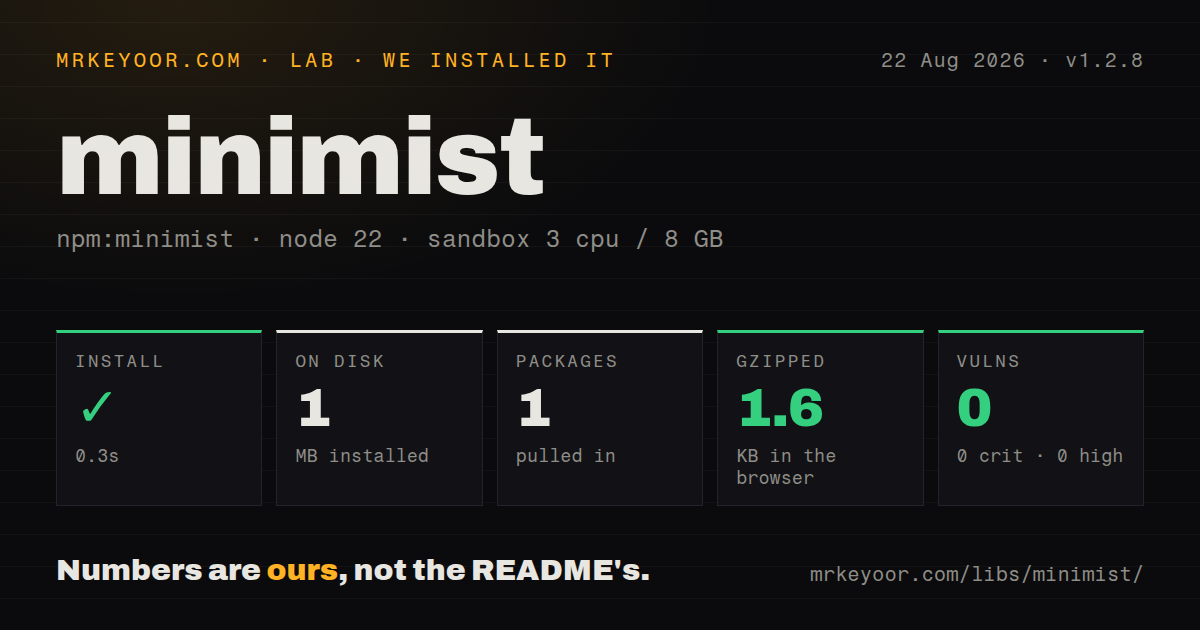
| Install | ✓ · 0.3s | 1 package on disk · 1 MB |
| Import | ✓ | ESM import works · require() works · CommonJS package |
| Browser | 1.6 KB | gzipped (3.8 KB minified), bundled with esbuild |
| Types | — | no TypeScript types found |
| Known vulns | 0 | 0 critical · 0 high · 0 moderate · 0 low (npm audit) |
Answers from our run
Does minimist install cleanly?
Yes. In a fresh container with an empty cache, npm install minimist finished in 0.3s, leaving 1 package and 1 MB on disk. npm audit reported no known vulnerabilities.
How much does minimist add to a browser bundle?
1.6 KB gzipped (3.8 KB minified) when the whole package is bundled for the browser with esbuild. Importing only part of it is usually smaller.
Does minimist work with both ESM and CommonJS?
Yes. Both import 'minimist' and require('minimist') worked in Node 22 in our run. The package is published as CommonJS.
Does minimist include TypeScript types?
No type declarations were found in our install, so TypeScript users need their own declarations.
minimist or mri: which should you use?
mri: Choose it for another compact parser with aliases and declared string or boolean flags. minimist 1.2.8 installed in 0.3 seconds as one 1 MB package with 0 audit findings in our sandbox, but it supplies no types or usage errors.
When should you not use minimist?
Supported Node versions include node:util parseArgs, which declares option types and can reject unknown flags without an npm package.
Use it if
- A small Node script needs loose parsing for a few flags and must still run where node:util parseArgs is unavailable.
- A wrapper deliberately forwards unknown arguments after -- to another executable.
- An older tool already depends on minimist behavior for grouped short flags, number coercion, and aliases.
- stopEarly is enough to separate one command word from a second tiny parsing pass.
- Supported Node versions include node:util parseArgs, which declares option types and can reject unknown flags without an npm package.
- A public CLI needs generated help, subcommands, required values, choices, conflicts, or useful error messages. Minimist implements none of them.
- Option typos must fail by default. Undeclared flags become properties unless an unknown callback enforces a policy.
- Versions, postal codes, account IDs, or long identifiers must never be numerically guessed. Each key and positional policy needs explicit string configuration.
- Consumers expect package-supplied TypeScript declarations. Our inspection of 1.2.8 found none.
Setup reality
We installed minimist 1.2.8 in a clean Node 22 Bookworm sandbox. npm finished in 0.3 seconds and left one package using 1 MB. The package was 136 KB unpacked and declared 0 direct dependencies and 0 peers. npm audit reported 0 known vulnerabilities. It is CommonJS with no exports map; require() and ESM default import both worked in our checks. We found no TypeScript declarations.
Pass process.argv.slice(2), or Node's executable and script path appear in _. Minimist coerces numeric-looking tokens unless their names are listed under string; putting _ there also preserves positional text. That matters for 001, version 1.10, and identifiers beyond safe integer range. Declare booleans too, because a boolean option can consume a following literal true or false.
Unknown options are accepted unless unknown(raw) returns false. The callback receives raw tokens and does not print an error, so the application must track the rejected value, account for aliases and = syntax, and set an exit code. With {'--': true}, tokens after -- move to argv['--']; without it they join _. stopEarly moves everything after the first positional into _, which is only manageable for shallow command shapes.
Minimist does not validate ranges, require fields, load environment variables, create help, or protect a spawned command from unsafe arguments. Validate every parsed field before using it as a path, port, or executable input. Older releases had prototype-pollution advisories, while npm audit found 0 issues in our 1.2.8 install. A full import bundled to 3.8 KB minified and 1.6 KB gzipped, but browser UI should normally parse URL or form state instead of command arguments.
Patterns
Read flags and positionals parse-node-arguments
const minimist = require('minimist');

const args = minimist(process.argv.slice(2));
console.log(args._, args.verbose);
slice(2) removes the Node executable and script path. Any undeclared flag is accepted by default.
Call minimist from ESM import-from-esm
import minimist from 'minimist';

const args = minimist(process.argv.slice(2), { boolean: ['verbose'] });
The CommonJS package loaded through an ESM default import in our Node 22 check, despite having no exports map.
Disable numeric coercion keep-identifiers-as-strings
const args = minimist(process.argv.slice(2), {
  string: ['version', 'account', '_'],
});
Adding _ preserves positional strings. List every identifier-like option so 001 and 1.10 do not become numbers.
Define aliases and defaults configure-aliases
const args = minimist(process.argv.slice(2), {
  alias: { p: 'port', v: 'verbose' },
  string: ['port'],
  boolean: ['verbose'],
  default: { port: '3000', verbose: false },
});
Both alias names appear on the result. Pick one canonical property for application code.
Turn a boolean default off negate-default-flag
const args = minimist(process.argv.slice(2), {
  boolean: ['color'],
  default: { color: true },
});

// --no-color sets args.color to false
Declaring color as boolean keeps the next non-boolean token from being consumed as its value.
Preserve child-command arguments forward-double-dash-tail
const args = minimist(process.argv.slice(2), { '--': true });
spawn('worker', args['--'], { stdio: 'inherit' });
Validate the executable independently. The preserved tail may contain options intended for the child.
Stop at the first positional split-one-subcommand
const outer = minimist(process.argv.slice(2), { stopEarly: true });
const [command, ...rest] = outer._;
const inner = command === 'build' ? minimist(rest, { boolean: ['watch'] }) : null;
One shallow split is workable. Nested commands need a library that owns command routing and help.
Apply an option allowlist reject-unknown-flags
const allowed = new Set(['--port', '-p', '--verbose', '-v']);
let rejected;
const args = minimist(process.argv.slice(2), {
  string: ['port'], boolean: ['verbose'], alias: { p: 'port', v: 'verbose' },
  unknown(raw) {
    if (raw.startsWith('-') && !allowed.has(raw.split('=')[0])) { rejected = raw; return false; }
    return true;
  },
});
if (rejected) throw new Error(`unknown option: ${rejected}`);
Minimist does not format the usage error. Test aliases, equals syntax, and grouped short flags against this policy.
Understand compact short flags parse-short-groups
const args = minimist(['-abc', '-n5']);
console.log(args.a, args.b, args.c);
console.log(args.n);
-abc becomes three booleans and -n5 becomes n: 5, which can turn a mistyped word into several accepted options.
Consume an explicit boolean parse-boolean-literal
const args = minimist(['--watch', 'false', 'src'], { boolean: ['watch'] });
console.log(args.watch); // false
console.log(args._);     // ['src']
A declared boolean consumes the following string when it is exactly true or false.
Check required values after parsing validate-required-option
const args = minimist(process.argv.slice(2), { string: ['output'] });
if (!args.output) {
  console.error('usage: convert --output <path>');
  process.exitCode = 2;
}
Required options and exit behavior belong to application code because minimist only parses tokens.
Use the built-in Node parser replace-with-node-parser
import { parseArgs } from 'node:util';

const { values, positionals } = parseArgs({
  options: {
    port: { type: 'string', short: 'p', default: '3000' },
    verbose: { type: 'boolean', short: 'v' },
  },
  allowPositionals: true,
  strict: true,
});
node:util parseArgs can reject undeclared flags and keeps values typed according to the option definition.
Alternatives
| Package | Registry | Pick it when |
|---|---|---|
| mri | npm | Choose it for another compact parser with aliases and declared string or boolean flags. |
| yargs-parser | npm | Choose it for detailed parsing rules without adopting Yargs command and help layers. |
| commander | npm | Choose it for user-facing commands that need subcommands, validation, and generated help. |
More cli & tooling guides
commander · chalk · typescript · esbuild · yargs · click · the whole shelf →
How this guide is made: grounded in the library's documentation, release notes, changelog, and issue history, on a fixed rubric — not a hands-on install of every release. The 50 most-downloaded entries are additionally install-verified in clean containers. Corrections: contact the desk.