cli-table review
cli-table 0.3.11 is a small CommonJS formatter for drawing bordered tables in Node terminal output. Give its Table constructor a header and optional widths, push array rows or one-key objects, then print `toString()`. It handles horizontal tables, vertical key/value rows, cross tables, custom border glyphs, padding, alignment, ANSI-colored headers, truncation, and cells containing newlines. The current release removed the short-lived `strip-ansi` dependency and returned to its own ANSI SGR regex, leaving `colors` 1.0.3 as the sole runtime dependency.
cli-table 0.3.11 installed in 1 second and occupied 1 MB across 2 packages in our sandbox, but its last npm release was in 2021 and it has no bundled types. Keep it for compatible legacy CLI output; start new terminal-table code with cli-table3 or table instead.
We installed it
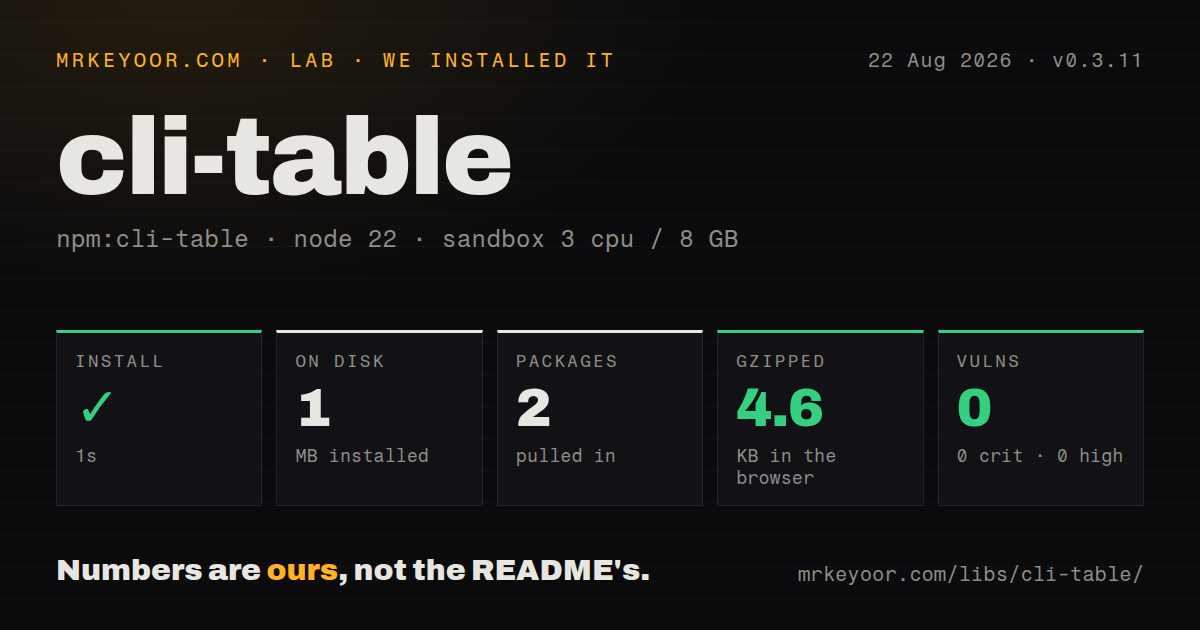
| Install | ✓ · 1s | 2 packages on disk · 1 MB |
| Import | ✓ | ESM import works · require() works · CommonJS package |
| Browser | 4.6 KB | gzipped (11 KB minified), bundled with esbuild |
| Types | — | no TypeScript types found |
| Known vulns | 0 | 0 critical · 0 high · 0 moderate · 0 low (npm audit) |
Answers from our run
Does cli-table install cleanly?
Yes. In a fresh container with an empty cache, npm install cli-table finished in 1 seconds, leaving 2 packages and 1 MB on disk. npm audit reported no known vulnerabilities.
How much does cli-table add to a browser bundle?
4.6 KB gzipped (11 KB minified) when the whole package is bundled for the browser with esbuild. Importing only part of it is usually smaller.
Does cli-table work with both ESM and CommonJS?
Yes. Both import 'cli-table' and require('cli-table') worked in Node 22 in our run. The package is published as CommonJS.
Does cli-table include TypeScript types?
No type declarations were found in our install, so TypeScript users need their own declarations.
cli-table or cli-table3: which should you use?
cli-table3: Choose it for a related table API with more recent package maintenance and bundled TypeScript declarations. cli-table 0.3.11 installed in 1 second and occupied 1 MB across 2 packages in our sandbox, but its last npm release was in 2021 and it has no bundled types.
When should you not use cli-table?
You are picking a formatter for a new CLI. cli-table3 continues the familiar API and has newer releases, while cli-table 0.3.11 dates to December 2021.
Use it if
- An existing CommonJS command already snapshots cli-table output and changing renderers would create needless churn.
- Your rows contain ordinary terminal text and you want explicit column widths, alignment, padding, and border characters.
- You need horizontal, two-column key/value, or row-and-column-header layouts from one array-like object.
- The entire result can be assembled in memory before one call to `toString()`; cli-table has no streaming API.
- You are picking a formatter for a new CLI. `cli-table3` continues the familiar API and has newer releases, while cli-table 0.3.11 dates to December 2021.
- Your cells contain emoji, combining characters, CJK text, OSC hyperlinks, or ANSI controls beyond SGR colors. Version 0.3.11 measures JavaScript string length after one narrow escape-code regex, so display columns can be wrong.
- TypeScript declarations or a documented ESM entry are required. The package bundles no types, publishes CommonJS without an exports map, and documents `require()` only.
- Rows must wrap to the current terminal width. cli-table neither reads terminal columns nor wraps words; automatic widths expand to the longest cell and fixed widths truncate.
- Untrusted objects go straight into the renderer. Cells are converted with `toString()`, `null` and `undefined` throw, and control characters are not sanitized.
Setup reality
Our fresh Node 22 install of cli-table 0.3.11 finished in 1 second. It left 2 packages and 1 MB on disk; the package itself was 36 KB unpacked. npm audit found 0 known vulnerabilities. The manifest declares 1 direct dependency, no peers, no license field, and a Node floor of >= 0.2.0. Both require() and ESM import loaded the CommonJS entry in our sandbox, but no TypeScript declarations or exports map were present.
There are no credentials, native build steps, environment variables, or config files. Create a Table, add every row, and call toString() yourself. Importing the package does not write output. The default header style uses colors/safe; a misspelled style name reaches a missing function when the table renders. Version 0.3.11 removed strip-ansi, so its only installed runtime dependency is the pinned colors 1.0.3 release.
Column sizing deserves a test with your real data. A declared width pays for left and right padding before content, and an overlong value is cut with the configured truncation marker. With no colWidths, cli-table scans the accumulated rows and grows each column to its longest value, even if the result exceeds the terminal. Its SGR regex does not calculate terminal cell width for emoji or full-width glyphs. Our browser import measured 11 KB minified and 4.6 KB gzipped, though the API is meant for terminal text.
The row shapes also have sharp edges. A vertical row uses only the first enumerable object key. A cross-table row takes an array value and prepends its row header with unshift(), so rendering changes that input array. Multiline cells increase the whole row height and pad shorter neighbors. Centered columns use the literal alignment value middle. Normalize missing values before pushing them, and do not reuse cross-table arrays after rendering.
Patterns
Print a two-column status table render-horizontal-rows
const Table = require('cli-table');

const table = new Table({ head: ['Service', 'State'] });
table.push(['api', 'ready'], ['queue', 'paused']);

process.stdout.write(table.toString() + '\n');
`toString()` returns the complete table; cli-table does not print or stream rows on its own.
Bound long descriptions set-fixed-widths
const table = new Table({
  head: ['Command', 'Meaning'],
  colWidths: [18, 36],
  truncate: '...',
});

table.push(['sync', 'Copy remote records into the local cache']);
Each fixed width includes both padding sides and the truncation marker, leaving less room for cell text than the number suggests.
Right-align counts and center states align-columns
const table = new Table({
  head: ['Job', 'Count', 'State'],
  colWidths: [18, 9, 11],
  colAligns: ['left', 'right', 'middle'],
});

table.push(['imports', 42, 'ok']);
Version 0.3.11 accepts `middle` for centered cells; `center` falls through to right alignment in the implementation.
Show runtime metadata vertically render-key-value-rows
const table = new Table();

table.push(
  { Node: process.version },
  { Platform: process.platform },
);

console.log(table.toString());
A vertical row reads only its first enumerable key, so split an object with 2 properties into 2 row objects.
Add headers on both axes render-cross-table
const passed = [28, 3];
const table = new Table({ head: ['', 'Passed', 'Failed'] });

table.push({ Tests: passed });
console.log(table.toString());
Rendering calls `unshift()` on the `passed` array, changing it to `['Tests', 28, 3]`; copy the array if other code still needs it.
Create a complete small table at once seed-constructor-rows
const table = new Table({
  head: ['Task', 'Time'],
  rows: [
    ['lint', '1.2s'],
    ['test', '8.4s'],
  ],
});

console.log(table.toString());
The constructor pushes each supplied row into the same array-like Table object, so later `push()` and `splice()` calls still apply.
Use plain ASCII borders customize-border-glyphs
const table = new Table({
  chars: {
    top: '-', 'top-mid': '+', 'top-left': '+', 'top-right': '+',
    bottom: '-', 'bottom-mid': '+', 'bottom-left': '+', 'bottom-right': '+',
    left: '|', 'left-mid': '+', mid: '-', 'mid-mid': '+',
    right: '|', 'right-mid': '+', middle: '|',
  },
});

table.push(['host', 'online']);
The character map has 13 named positions; any omitted position keeps its Unicode default.
Remove separators between body rows hide-row-rules
const table = new Table({
  chars: {
    mid: '',
    'left-mid': '',
    'mid-mid': '',
    'right-mid': '',
  },
});

table.push(['alpha', 1], ['beta', 2]);
Four empty middle-line characters remove body rules while the outer top, bottom, left, and right borders remain.
Render aligned text without a box make-borderless-columns
const table = new Table({
  chars: {
    top: '', 'top-mid': '', 'top-left': '', 'top-right': '',
    bottom: '', 'bottom-mid': '', 'bottom-left': '', 'bottom-right': '',
    left: '', 'left-mid': '', mid: '', 'mid-mid': '',
    right: '', 'right-mid': '', middle: ' ',
  },
  style: { 'padding-left': 0, 'padding-right': 0 },
});
The renderer still computes column widths; this 13-key map removes the drawn box and uses one space between columns.
Put several lines in one cell render-multiline-cells
const table = new Table({
  head: ['Service', 'Routes'],
  colWidths: [16, 30],
});

table.push(['api', 'GET /health\nPOST /jobs']);
console.log(table.toString());
A 2-line cell makes the entire row 2 lines high; cli-table fills shorter neighboring cells with blank padded lines.
Replace nullish cells before rendering normalize-empty-values
const rows = records.map((record) => [
  record.name ?? '(unnamed)',
  record.owner ?? '-',
]);

const table = new Table({ head: ['Name', 'Owner'], rows });
Version 0.3.11 calls `item.toString()` for every cell, so raw `null` or `undefined` values throw during rendering.
Choose a supported header color style-header
const table = new Table({
  head: ['Name', 'State'],
  style: {
    head: ['cyan'],
    border: ['grey'],
    'padding-left': 1,
    'padding-right': 1,
  },
});
Style names are looked up on the bundled `colors/safe` API at render time; an unknown name causes a function-call error.
Alternatives
| Package | Registry | Pick it when |
|---|---|---|
| cli-table3 | npm | Choose it for a related table API with more recent package maintenance and bundled TypeScript declarations. |
| table | npm | Choose it when word wrapping, spanning cells, and stricter table configuration matter more than an array-like builder. |
| easy-table | npm | Choose it when records are easier to build one column at a time with small formatting callbacks. |
More cli & tooling guides
commander · chalk · typescript · esbuild · yargs · click · the whole shelf →
How this guide is made: grounded in the library's documentation, release notes, changelog, and issue history, on a fixed rubric — not a hands-on install of every release. The 50 most-downloaded entries are additionally install-verified in clean containers. Corrections: contact the desk.