Short answer
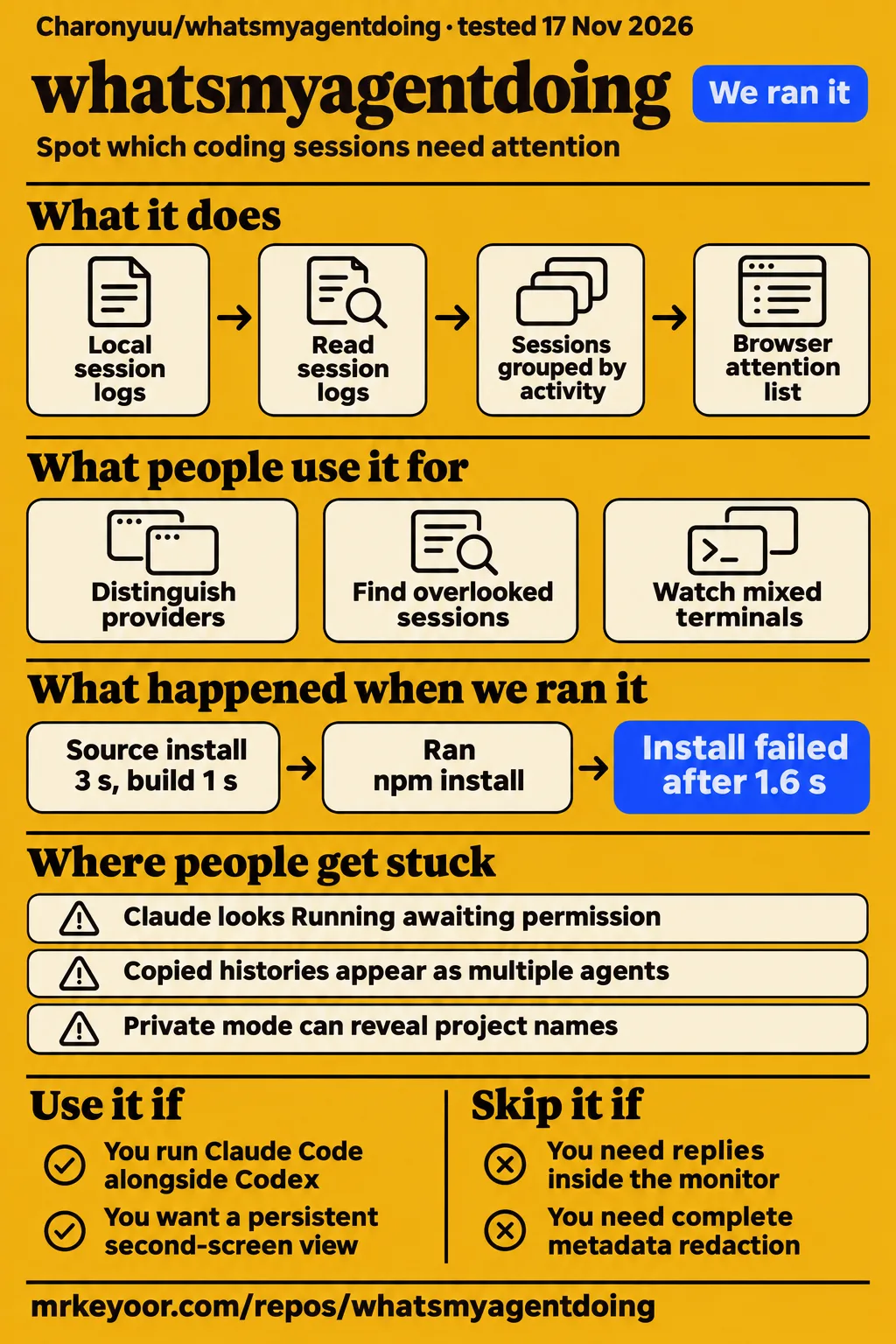
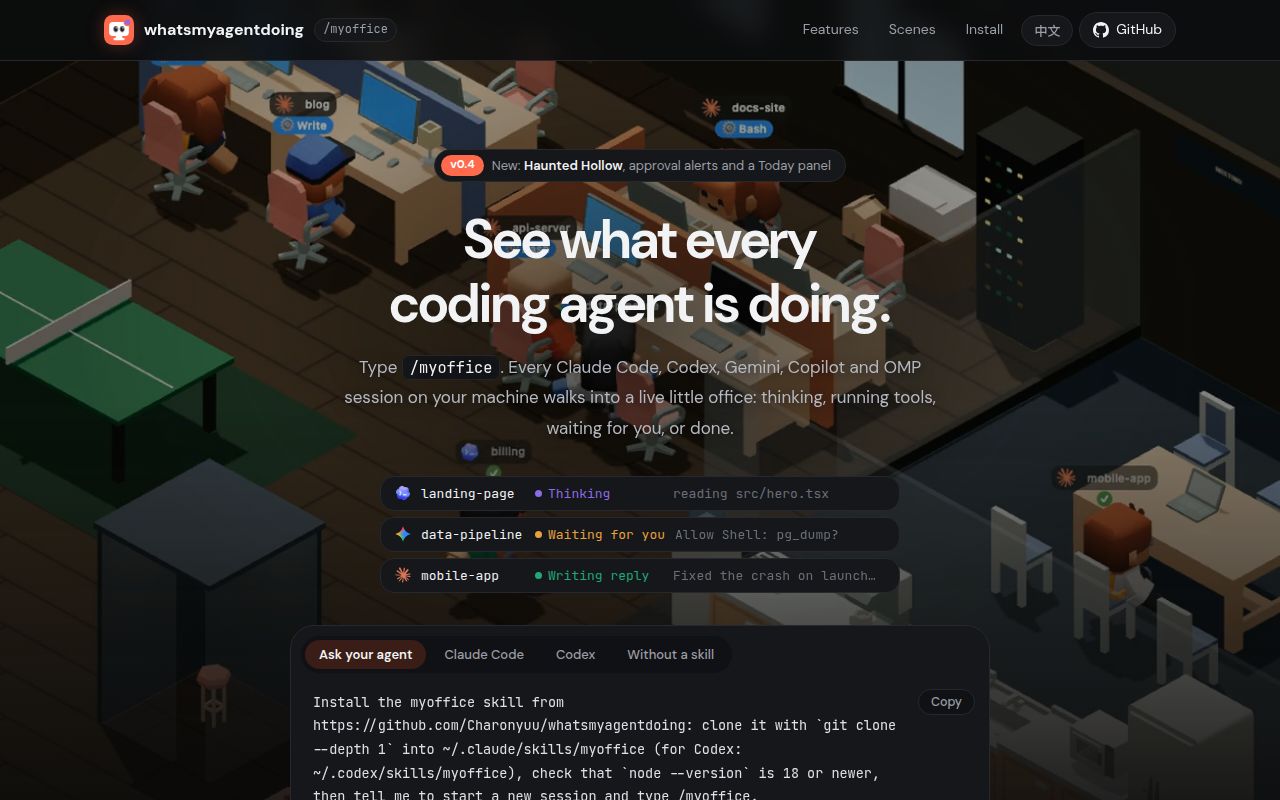
whatsmyagentdoing puts local coding sessions into one browser dashboard, with a list grouped by which sessions need you. Use it if you run Claude Code alongside Codex or another supported agent and keep losing track of questions in other terminals. Skip it if you need to reply inside the monitor, require process-liveness guarantees, or cannot expose project metadata on a shared screen. The useful part is the grouped list. The office characters give you another way to notice activity. Project README and TechWaveArena's comparison describe that division.
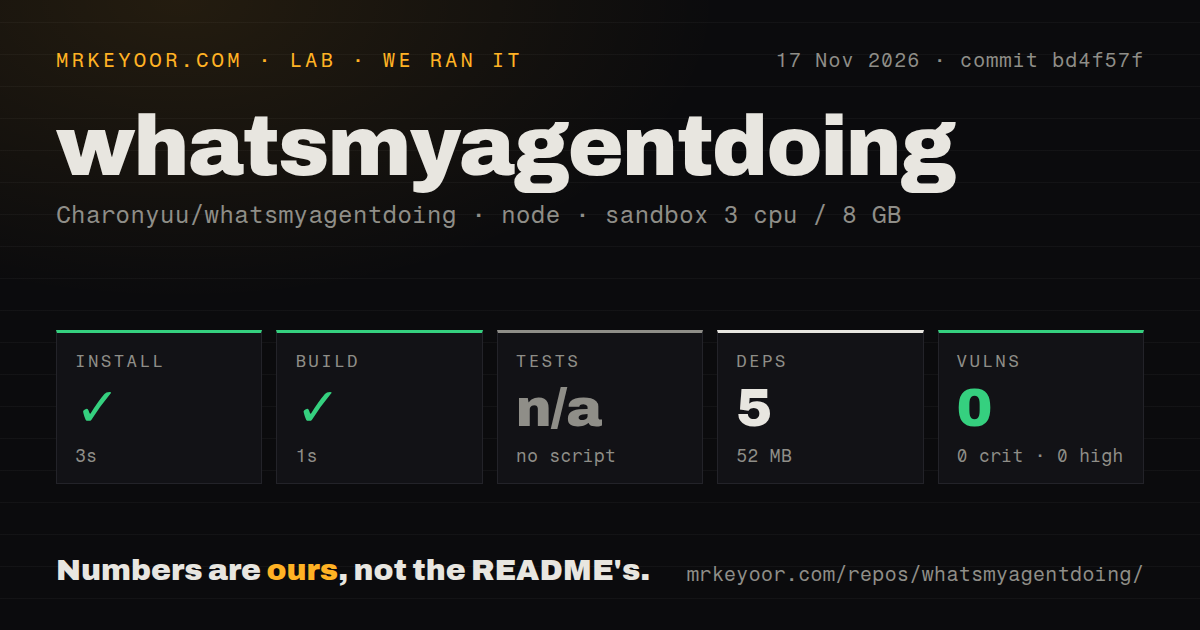
Our sandbox installed the source checkout in 3 seconds and built it in 1 second, while the test step was skipped because there was no script or target. That makes the development checkout inexpensive to try in this recorded environment. It says much less about whether the dashboard correctly recognises the state of your particular agent sessions. The most useful evidence on that question comes from specific user reports, including a missing Codex conversation and a confirmed improvement to provider icons.
What people use whatsmyagentdoing for
Users in the supplied records used the dashboard to distinguish providers, find overlooked conversations and watch a mixed set of terminals. Those are concrete uses of a local attention list. They also explain why an attractive office animation alone would be a poor reason to adopt it.
| Who used it | What they did | Reported outcome |
|---|---|---|
| GitHub user inndoll | Ran several Claude Code and Codex sessions, then updated to v0.3.0 | Said provider icons made Claude, Codex and subagents recognisable at a glance, and praised the pop-out window. Issue #4 |
| The reporter of GitHub issue #5 | Kept using a Codex App conversation that began on August 19 | Found that the active conversation was missing. The maintainer reported the discovery fix in v0.3.1. Issue #5 |
| X user Ldataengineer | Watched two Claude sessions, one Codex and one Gemini CLI after repeatedly checking terminals | Recommended the list for more than two agents, while warning about Claude approval waits. The post supplies no measured productivity gain. User's account |
| TechWaveArena's comparison author | Created synthetic Claude and Codex logs and inspected their JSON statuses | Reported tool, waiting and done states, including a Codex approval classified as waiting. These were fixtures, rather than four live agents. Fixture exercise |
Inndoll's report is especially helpful because it describes a before-and-after experience. Random character appearances had made the providers difficult to distinguish without hovering or filtering. The maintainer added bundled provider icons, released v0.3.0, and the reporter came back to confirm that the change helped. That is stronger evidence for the visual design than a directory calling the dashboard useful. It still answers a narrow question: whether one user could identify agents more easily.
In the video titled “Claude Code: watch your agents work in a 3D office”, the narration moves from cloning the project to its visual display. The creator describes opening the 3D office. Its transcript walks through working characters at desks and finished characters playing ping-pong. The supplied record omits the channel name, and the captions contain obvious transcription errors. Treat it as an attributed walkthrough of the presentation, rather than evidence of accuracy under a real workload.
What happened when we ran it
Our November 17, 2026 sandbox run at bd4f57f installed successfully in 3 seconds and built successfully in 1 second. The recorded configuration was 3 CPUs, 8 GB RAM and image label lab-node:22. That label identifies the chosen image, not the exact runtime or operating-system version.
| Recorded check | Result | What it tells you |
|---|---|---|
| npm installation | Succeeded in 3 seconds | The recorded source-checkout installation completed |
| Build | Succeeded in 1 second | The recorded build completed |
| Tests | No tests script or target; skipped | There is no passing-suite result from this run |
| Dependencies | 5 recorded; 52 MB on disk | The installed development footprint in this sandbox |
| npm audit | 0 known vulnerabilities across critical, high, moderate and low | The audit reported no known advisories in its recorded scope |
| Repository scan | 172 files, about 13,891 source lines, 11 MB checked out | The size of the measured checkout |
| Automation and packaging scan | 0 CI workflow files, no Dockerfile, a tests directory | A tests directory existed despite the skipped test step |
The research pack also contains a separate November 17 attempt at commit 47812fb6964c using the quickstart-lib recipe. It cloned the repository, then tried npm install whatsmyagentdoing@latest. The registry returned E404 and said the package was not in that registry. Its failed GET reported 404 Not Found. The run stopped at installation, and its finding points to an npm debug log. Teardown was recorded as successful. Those records document a failed registry route, alongside the successful source-checkout result above.
The README's installation route is a Git clone into a skill folder, followed by /myoffice, or direct execution of node bin/cli.js. It says the cloned dashboard can run without an npm installation. The failed registry request therefore gives you a useful instruction: follow the documented Git route. It is no evidence that the dashboard itself fails to run. Nor does a successful build resolve the missing test execution.
Where people get stuck: approvals, missing sessions and copied histories
Claude Code permission prompts need the optional Notification hook to appear as Waiting for you. The project landing page documents node bin/cli.js --install-hook; --uninstall-hook removes it. Without the hook, a shell command waiting for permission can look like work in progress. This matters when the reason you opened the dashboard was to stop leaving an agent unattended.
| Symptom | Evidence and status | Useful response |
|---|---|---|
| Claude looks Running while awaiting permission | The project documents missing permission events in Claude's logs | Use the optional hook, or inspect the terminal before assuming progress |
| An old but active Codex conversation disappears | The reporter of issue #5 described an August conversation omitted by date-folder discovery; the maintainer reported a v0.3.1 fix | Update beyond the affected release and allow a rescan. Issue #5 |
| One resumed Claude conversation becomes several agents | Issue #15 reports copied histories on v0.6.0 and v0.7.0; it is closed without a confirmed shipped fix in the supplied record | Compare the duplicate sessions with the terminal before trusting the total. Issue #15 |
| The floating window loses interactivity | Issue #2 documents interactive Document Picture-in-Picture and a view-only canvas-video fallback, released in v0.3.0 | Choose the browser mode according to whether you need clickable sessions. Issue #2 |
The Codex report explains a failure that a quick demo would miss. The conversation continued writing into the folder for its original start date. The reporter said the reader only considered recent date folders, so the conversation vanished from the office despite continued use. The maintainer confirmed that diagnosis and said v0.3.1 checks recent activity instead. Reactivated old conversations should appear at the next scan, usually around five seconds according to that reply. This is the sort of bug that matters if you keep one conversation alive for weeks.
The duplicate-history report needs a different conclusion. Its author proposed grouping Claude sessions by their root message UUID and keeping the most recently active copy. The same report points out the cost: intentional forks can share that root. Closed status alone does not tell you which deduplication policy shipped. A monitor that removes every similar history could hide a branch you deliberately kept.
Status labels come from logs and elapsed time
The supplied server snapshot changes quiet typing to done after 45 seconds, thinking to idle after 15 minutes, and tool activity to idle after 45 minutes. Those are time-based rules over session events. They are not direct checks that a process is alive, working correctly or safe to leave running. Server snapshot.
That distinction should govern how you use the dashboard. Thinking describes the latest readable event; it does not prove the model is still making progress. Writing reply means a reply block has appeared, rather than a stream of individual keystrokes. The README explains that logs arrive in finished blocks and that their formats are not public APIs. If an upstream agent changes its format, the reader may need an update.
At volume, the unresolved question is how much evidence the reader sees. The project page says large logs are read from their head and tail, and the skill directory warns of incomplete usage counts for very large logs. Use those totals to orient yourself within the dashboard. A billing reconciliation needs a complete accounting source. Our records contain no measured maximum session count or dashboard performance curve.
Local access and private mode solve different problems
The comparison author's private-mode fixture exercise retained full working paths. Localhost binding controls who can connect; private mode controls selected fields sent to the page. Neither tells you whether a client name embedded in a directory is acceptable to display. Privacy exercise.
The supplied server source clears prompt, reply and title fields and shortens activity text in its privacy branch. It also includes working-directory, project and error fields in the output object. That is a narrower promise than “status only.” For a screen share, inspect the visible metadata and avoid distributing raw snapshots merely because the private flag was set. Privacy implementation.
TechWaveArena reports that its JSON mode reads real logs. The author says --json ignores --demo, so requesting both still reads the real sessions. For a synthetic preview, use the demo server rather than assuming that combining those flags produces fake JSON. That difference matters if you intend to paste a snapshot into a public issue. Flag interaction.
Network activity needs equally careful wording. The README documents periodic GitHub version checks. Optional scenes download when you select them. The current v0.8.3 release also says updates now pull the repository and restart automatically; WMAD_NO_UPDATE_CHECK=1 turns checking and updating off. These operations are separate from session-log upload. A literal promise of zero network traffic would be wrong, while those operations alone do not show that prompts are uploaded.
TechWaveArena's fake-hostname request was rejected. That is a useful bounded check of one safeguard. Keep the intended local deployment rather than treating the browser page as a ready-made shared team service. The npm audit result above answers a dependency-advisory question, not the broader question of installation safety.
English documentation exists, and releases are moving
The public README is in English, and its current interface list includes English alongside other selectable languages. It describes language selection based on prompts with a browser-language fallback and a manual override. Several useful issue reports are in Traditional Chinese, including the missing Codex conversation and provider-icon feedback. English readers can follow the documented installation route, but some of the best troubleshooting detail needs translation. README.
GitHub's public API showed 403 stars and a last push on November 17, 2026, with v0.8.3 released that day. Those dated facts show attention and recent work. Together with the maintainer replies in issues #4, #5 and #17, they support calling the project actively maintained in this sample. They do not count deployed users or establish support capacity. Repository facts and latest release.
whatsmyagentdoing vs claude agents and agenttrail
TechWaveArena's comparison favours claude agents for answering Claude sessions inside the terminal and whatsmyagentdoing for seeing mixed providers together. That is the clearest dividing line for a buyer. The dashboard's copyable resume commands send you back to the agent rather than letting you answer within the office. Comparison.
| Choice | Pick it for | Decision boundary |
|---|---|---|
| whatsmyagentdoing | A persistent grouped view of supported local sessions across providers | Resume the underlying session to respond |
| claude agents in Claude Code | Claude-only work where you want replies and approvals inside the terminal | The comparison says it does not show Codex or Gemini. Source |
| A single-session status line | Model, context and cost information for the chat in front of you | It answers a different question from which other session needs you. Source |
| agenttrail | A project map connecting agent work, plans and file changes | Its current README describes a live project map and says the experimental 3D view was retired. Current primary source |
| Individual terminal tabs | Directly reading and answering each agent | Ldataengineer's account describes repeatedly visiting four terminals before adopting the grouped list. User report |
The agenttrail distinction also corrects the supplied directory comparison, which describes a 3D task view. Agenttrail's current README says its focus is now Map. Choose between project structure and session attention according to the question you need answered. Neither project's description supplies a comparative performance result, and the office dashboard does not arbitrate two agents editing the same files.
What the other reviews get wrong
Several supplied pages overstate privacy or reuse integration details that newer records have changed. The corrections below have practical consequences: they affect what you install, which runtime you choose and what a recording can expose.
| Page or description | Correction supported by the records |
|---|---|
| EveryDev's unqualified local-only wording | The README also documents version checks and on-demand scene downloads. Neither is proof of session upload. EveryDev, README snapshot |
| AI Frontier Post's “only” version-check network claim | Scene downloads are another documented network operation. Tutorial, README |
| The skill description's status-only privacy promise | The comparison retained project names and full paths in private output. Skill, fixture result |
| GetToolRank's unqualified Node.js 18+ requirement | The current README requires 22.13+ for OpenCode and Hermes. Directory, current README |
| TechWaveArena's unqualified Claude approval limitation | The project's optional Notification hook adds Waiting for you. The limitation applies without it. Project instructions |
| HotRepo's broad Antigravity exclusion | The current README supports Antigravity CLI while still excluding the desktop application's binary conversation store. HotRepo, current README |
| OSRepos' v0.7.1 release label | That label belongs to its November 4 health snapshot. Pi support was subsequently reported in v0.8.1. Snapshot, maintainer reply |
| Cult of Claude's missing exact installation command | The README gives the clone command and destination skill directory. Directory, README |
Keep product boundaries straight as well. Issue #19 concerns AI Office Pro 0.2.0 on Windows. The reporter traced missing office MCP tools to command quoting. The supplied closed thread shows a diagnostic workaround, without confirming an application release containing a fix. That is a report about Pro's task execution. It is not evidence of an equivalent failure in the open-source monitoring dashboard.
Questions people ask
The grouped list shows which supported local sessions appear to be working, waiting or finished by interpreting their latest log events. Use the underlying terminal when a status needs confirmation. Project description.
How can I tell which coding agent is still working, waiting for me or already finished?
Open /myoffice and use the Needs you, Working and Finished groups. The list supplies a resume command for returning to the relevant session. Thinking, tool activity and a finished turn are distinct log-derived states; Claude permission detection has the optional-hook requirement described above. List and status documentation.
What does whatsmyagentdoing do?
It reads supported coding agents' local session stores and displays activity in a browser as an office or list. The dashboard helps you notice which conversation needs attention, while responses still happen through the underlying agent. README.
How do I install whatsmyagentdoing?
Clone Charonyuu/whatsmyagentdoing into ~/.claude/skills/myoffice for Claude Code or ~/.codex/skills/myoffice for Codex, then start a new session and type /myoffice. The README also offers node bin/cli.js from an ordinary clone. Use the documented clone route rather than assuming the repository name identifies an npm package. Installation instructions.
# Claude Code
git clone --depth 1 https://github.com/Charonyuu/whatsmyagentdoing ~/.claude/skills/myoffice

# Codex
git clone --depth 1 https://github.com/Charonyuu/whatsmyagentdoing ~/.codex/skills/myoffice
Which coding agents does whatsmyagentdoing support?
The current README lists Claude Code, Codex, Gemini CLI, Antigravity CLI, Copilot CLI, OMP, Pi, Kimi Code, DeepSeek Harness, Grok Build, OpenCode and Hermes. It requires Node.js 18+ for the basic dashboard and 22.13+ for OpenCode and Hermes. Antigravity desktop remains outside that list. Current agent table.
Does whatsmyagentdoing support Pi?
Yes. In issue #17, Charonyuu reports Pi support in v0.8.1 through the reader shared with OMP, including Pi session titles and resume commands. The maintainer explicitly describes checking an upstream fixture rather than a live Pi installation. Pi support report.
Can an agent that is not listed be supported?
The project asks users to open an issue with the session-log location and a short sample with the content removed. Its answer is conditional on the agent writing usable logs to disk. That is a contribution route, not a promise that every agent can be integrated. Project FAQ.
Is whatsmyagentdoing free?
The open-source dashboard is MIT licensed, and EveryDev describes it as a self-hosted skill or CLI with no API keys. Keep that dashboard separate from the AI Office Pro product named in issue #19. Monitoring sessions does not supply access to the coding agents themselves. Licence and packaging.
Does whatsmyagentdoing need an API key or account?
The basic local log-reading dashboard needs no API key or account. It reads sessions from coding tools you already run. The directory separately identifies locally supplied credentials for the optional Magpie integration, so the basic answer should not be stretched across every integration. Basic operation, integration qualification.
Is whatsmyagentdoing safe to install?
Its documented safeguards include read-only session access, loopback binding and a localhost Host check. The comparison exercised that Host check successfully. Those are specific safeguards you can assess, rather than a blanket safety guarantee for software with access to private session logs. Host-check exercise.
Does whatsmyagentdoing send my prompts anywhere?
The documented architecture reads session logs locally and sends snapshots to the local browser; the comparison reports no session-text upload. Version checks, scene downloads and the newer update mechanism are separate network operations. The private-mode discussion above explains which local snapshot fields still need attention. Architecture and network description, comparison.
Can I share my screen with the dashboard open?
Private mode hides prompts, replies and titles, but the supplied fixture exercise retained project names and working paths. Inspect those fields before recording or screen sharing. The flag alone is insufficient when a project or directory name identifies a confidential client. Private-mode result.
Does whatsmyagentdoing slow down my agents or change their behavior?
The ordinary reader opens existing logs read-only, so it does not direct the agents' work. The optional approval hook changes Claude's configuration and writes marker files. The project describes these mechanisms, but our evidence contains no measured agent slowdown result. Project FAQ and hook description.
What we have not tested yet
Our successful source install and build did not exercise a live mixed-agent workload, and the recorded test step was skipped. We have not measured dashboard CPU use, agent slowdown, memory at session volume, status accuracy, browser background throttling or productivity gains. The separate registry failure ended before a live task. Neither record supplies screenshots or known-answer task results.
The comparison's status and privacy findings come from synthetic logs. Pi's maintainer report uses an upstream fixture, not a live Pi install. The timeouts quoted here belong to the supplied server snapshot, rather than a claim that every later version keeps the same thresholds. We have not checked current duplicate-session handling, large-log usage completeness, all integrations, automatic-update behaviour or packet-level privacy. The Pro Windows workaround also lacks a confirmed shipped fix in the supplied extract.
For your first evaluation, match the office against the sessions you actually have open: one doing work, one waiting for permission and one finished. Then inspect private output with your own project names. If either the status or the remaining metadata would make you hesitate to act on the display, keep the terminal as your source of truth.