Normal mode treats typing as commands
Press i before typing into a newly opened Vim buffer: otherwise, your letters are commands. In the basic editing manual, Escape returns you to Normal mode. Once that distinction feels natural, commands become reusable actions. You can change a word with cw, type its replacement, press Escape, then move elsewhere and repeat the change with ..
That makes Vim a good candidate for someone who edits text every day and wants familiar commands across machines. Our 47-second build says little about how quickly you'll become comfortable. The payoff comes when you remember an editing action without stopping to find it in a menu. For an occasional configuration change, learning modes can cost more attention than the job warrants.
What happened when we ran it
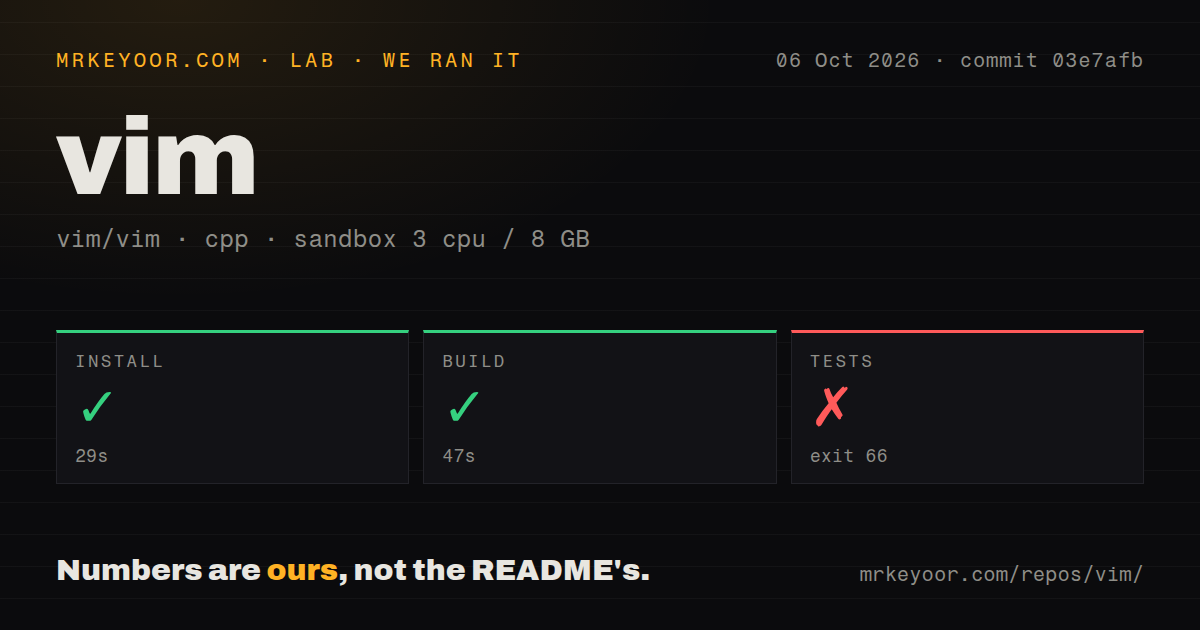
Our Vim sandbox installed commit 03e7afb in 29 seconds and built it in 47 seconds on October 6, 2026. Both steps succeeded. Our measurement setup used a fresh Debian container with 3 CPUs, 8 GB of RAM, the lab-cpp:1 image, no secrets, and no elevated privileges.
The test step failed with exit code 66 after 3 seconds. Its log tail said "no test target", followed by a summary marker that supplied no further explanation. The record contains no passing test count or named failing case. The log does not identify why the target was unavailable. This log cannot diagnose a Vim defect.
The checkout contained 8,585 files, roughly 633,595 source lines, and occupied 77 MB. Our scan found 10 CI workflow files, no Dockerfile, and no directory named tests. The directory signal does not establish that the project lacks tests, and workflow files do not turn our failed step into a passing result. The result remains: installation and build succeeded, while our test invocation did not.
A preinstalled Vim can omit features you need
The Vim README warns that the small version supplied on some Mac and Linux systems may need replacing for additional features. Clipboard support is a specific example of variation: the clipboard option reference ties availability to GUI versions or particular compiled features. The successful 47-second build does not establish what a preinstalled binary includes. Check clipboard access before copying somebody else's configuration.
Our 8 GB sandbox allocation is a description of the lab, not a minimum memory requirement for editing. Ordinary local text editing needs no API credential, hosted service, or account. Your terminal or GUI, the features in your chosen package, and your settings determine the everyday experience. Keep those choices separate from the source checkout: the 77 MB we measured describes that checkout, not an installed binary's size.
dw deletes by motion, and cw preserves the following space
Vim's chapter on small changes explains how a deletion command combines with a movement. dw deletes through a word motion, while d$ deletes through the end of a line. It also documents an old inconsistency: cw changes to the end of the word without consuming the following space. That detail matters more than a feature list when you're trying to predict what a command will do.
The 8,585-file repository also contains the runtime documentation you can reach through :help. I would start with the user manual and vimtutor, then add settings when a repeated task calls for them. A large borrowed configuration makes it harder to distinguish Vim's behavior from a mapping somebody added. Built-in help earns its place here because it explains the command at the point where you need it.
GTK4 users have an open scrollbar redraw report
Issue 21473 describes a gvim GTK4 problem on Fedora with X11: dragging the scrollbar moves the cursor and line indicator without repainting the text. The reporter says Control-L redraws it and that their GTK3 build does not show the problem. This is an open user report about a specific GUI path, rather than evidence that every Vim interface behaves this way.
Our 3-second failed test step offers no reassurance about that scrollbar behavior. A team choosing gvim with GTK4 should reproduce the report on its own platform before standardizing it. Terminal users have a different adoption decision: check that their package supplies the features they need, then learn the commands. Neither the successful build nor the failing test log establishes daily usability across all of Vim's supported platforms.
An October 10 push accompanies current bug-fix work
The repository API recorded a last push on October 10, 2026, with 41,185 stars and 1,666 open issues and PRs. Recent work includes a proposed window-command fix linked to a current report involving CursorHold, the event triggered when the cursor sits idle. That combination shows ongoing maintenance. The combined queue is too broad to treat as a count of confirmed bugs.
The latest-release endpoint returned no release record, while the README identifies Vim 9.2. That absence does not establish abandonment. The 10 workflow files in our measured checkout are another visible maintenance input, though their presence alone says nothing about whether a particular change passes. For adoption, the recent push and concrete issue work carry more weight than the absence of a GitHub release entry.
Neovim supplies client APIs, while Micro keeps familiar shortcuts
Neovim exposes APIs for external clients and interfaces, making it worth choosing when those integrations drive your editor selection. Helix includes language-server support and multiple selections, which suits someone who wants those features supplied together. Both retain modal editing and require learning their commands.
Micro uses familiar Control-key shortcuts and is the better starting point for occasional terminal edits if modes keep interrupting you. Choose Vim when its repeatable commands fit the work you already do. Before adopting a plugin collection, open a disposable file and practice changing a word, repeating that change, and undoing it. If you keep reaching for dot-repeat on the next edit, keep Vim.