mrkeyoor.com_
Tue 01 Sept 17:40 UTC
Dev Toolsevaluationupdated 25 Aug 2026

micro review

micro is a terminal text editor built for people who find nano approachable but want tabs, splits, mouse support, multiple cursors, plugins, and better defaults. It ships as a single Go binary and is meant to work both as an everyday terminal editor and as a practical tool over SSH.

+50stars / 7d
Verdict

Our build finished in 24 seconds and all 12 measured tests passed, which makes micro an easy editor to trial and a credible tool to keep on remote machines. Pick it when nano feels limiting but Vim's interaction model feels like a tax. Terminal-specific key and clipboard behavior remains the main reason to test it on your actual machines before standardizing on it.

We ran it

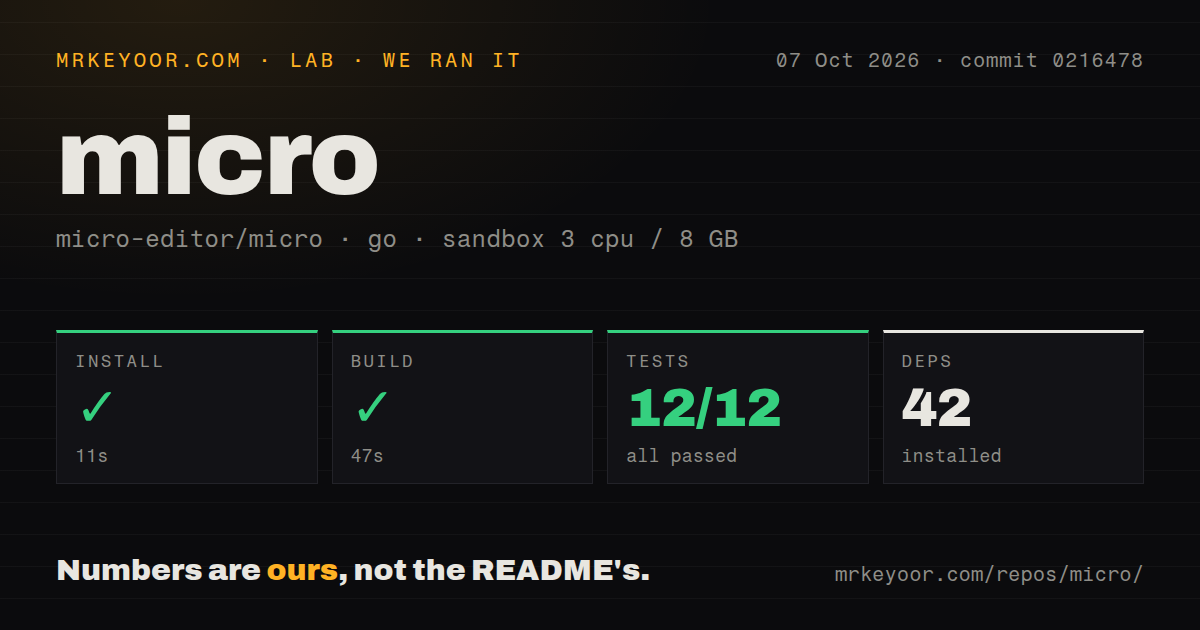
Lab card: what happened when we ran microScreenshot of micro (micro-editor.github.io)
Install✓ · 12s42 packages
Build✓ · 24s
Tests✓ · 11s12 passed · 0 failed of 12 (go test)
Repo335 files~25,628 lines of source · 1.5 MB · 3 CI workflows

Answers from our run

Does micro build from source?

Dependencies installed in 12 seconds (42 packages), and the build succeeded in 24 seconds. We cloned commit 22930a5 into a clean Debian container with 3 CPUs and no project-specific setup.

Do micro's tests pass?

Yes: 12 of 12 passed when we ran the project's own test command (go test). Some failures need services or credentials a bare container does not have.

Who should not use micro?

Vim or Neovim users whose workflow depends on modal editing, language-server clients, and a large plugin market: micro deliberately starts from conventional shortcuts and simpler built-ins.

What are the alternatives to micro?

GNU nano, Neovim, Helix. Our build finished in 24 seconds and all 12 measured tests passed, which makes micro an easy editor to trial and a credible tool to keep on remote machines.

Setup5/512-second install, 24-second build, and single-binary delivery
Docs4/5Detailed install and terminal guidance plus built-in help
Community4/529,436 stars and active 2026 issue and pull-request traffic
Maturity4/5Stable 2.0 line with broad packaging and known terminal edge cases

Discussed on

  1. hnmicro – A Modern Alternative to nano383 points
  2. hnMicro: Modern and intuitive terminal-based text editor349 points
  3. hnMicro – a modern and intuitive terminal-based text editor324 points
  4. hnMicro – A modern and intuitive terminal-based text editor12 points
  5. hnMicro: A modern and intuitive terminal-based text editor5 points

Who it’s for

Developers who want familiar Ctrl-based shortcuts in a terminal editor.
Server operators who edit over SSH and need more comfort than nano provides.
Users who want tabs, splits, mouse selection, persistent undo, and syntax highlighting without learning Vim motions.
Tinkerers who are comfortable extending an editor with Lua plugins.

Who it’s NOT for

Vim or Neovim users whose workflow depends on modal editing, language-server clients, and a large plugin market: micro deliberately starts from conventional shortcuts and simpler built-ins.
Cygwin, MinGW, Plan 9, or NaCl users: the README says those environments are unsupported or constrained by the terminal library.
macOS users who expect Command-key conventions without terminal setup: the README uses Control and Option, recommends iTerm2, and documents Option-key forwarding changes.
Anyone editing binary files with automatic save enabled: issue #4047 warns that accidental changes can corrupt a binary because micro treats it as text.
Users who need process-substitution paths to behave like regular files: issue #4092 reports that /proc/self/fd/* inputs are rejected.

Setup reality

Our run at commit 22930a5 installed 42 Go packages in 12 seconds, built micro in 24 seconds, and finished its tests in 11 seconds. All 12 measured Go tests passed, with 0 failures.

Most users can avoid the source build and download one static binary. Building needs Go 1.19 or newer; the README warns that go get omits version information needed by the plugin manager and leaves debug mode enabled.

Clipboard integration still depends on the host: X11 needs xclip or xsel, and Wayland needs wl-clipboard. macOS terminals need Option-key configuration, Windows Terminal is preferred for WSL, and Cygwin, MinGW, and Plan 9 are not officially supported.

micro 2.0.15 gives nano users a larger editing toolbox

micro 2.0.15 keeps the basic promise of a terminal editor that behaves like other desktop software. Ctrl-S saves, Ctrl-C and Ctrl-V handle copying, arrow keys move the cursor, and mouse dragging selects text. It adds tabs, splits, multiple cursors, persistent undo, a diff gutter, macros, automatic lint messages, and syntax definitions for more than 130 languages. That makes it a sensible step up from nano for someone who does not want editing itself to become a separate discipline.

The project is still small enough to understand. Our checkout had 335 files, about 25,628 source lines, and occupied 1.5 MB. Go produces the single static binary promised by the README, while runtime help, syntax definitions, themes, and built-in plugins travel with it. micro can open a named file, start an empty buffer, or read standard input. The interface exposes its shortcuts in a nano-like help bar, so occasional SSH users can return after a month and work without rebuilding muscle memory.

Our 24-second build and 12 passing tests make source setup credible

Our sandbox cloned commit 22930a5 and installed 42 Go packages in 12 seconds. The build succeeded in 24 seconds. The test step then completed in 11 seconds, with 12 tests passing and 0 failing. The repository has 3 GitHub Actions workflow files, although it does not organize tests under a top-level tests directory and provides no Dockerfile. For a portable editor, that is a reassuringly short path from checkout to a verified binary.

Most people do not need that path. Releases provide prebuilt binaries, and the README lists Homebrew, Snap, Winget, Chocolatey, Scoop, Nix, and several system package managers. It warns that third-party distribution packages may lag, while prebuilt releases, Homebrew, and Snap are guaranteed to provide the most recent stable version. Building directly with go get is discouraged because the resulting binary lacks version information required by the plugin manager and does not disable debug mode. Use make build instead.

Clipboard and keys still depend on the terminal beneath micro

A 1.5 MB checkout cannot hide the variation among terminal environments. On Linux desktops, system clipboard access needs xclip or xsel under X11 and wl-clipboard under Wayland; without those helpers, micro falls back to an internal clipboard. macOS uses Control and Option rather than the usual Command-based editor shortcuts. The README recommends iTerm2 and describes the terminal preference needed to send Option as Alt. These are one-time fixes, but they weaken the claim that every installation is configuration-free.

Windows has its own boundaries. The README recommends Windows Terminal for WSL and documents a Windows Console behavior that can change the font when external clipboard access invokes PowerShell. Cygwin and MinGW are not officially supported, though winpty may work, and Plan 9 is outside the terminal library's support. Issue #4093 also reports broken input when Ghostty advertises TERM=ghostty, with the editor's xterm setting offered as a workaround. A terminal editor should be evaluated in the exact terminal you use.

Lua plugins extend micro, but they do not turn it into Neovim

The built-in manager can install, remove, and update Lua plugins, and micro lets users rebind keys or change settings without replacing its approachable defaults. Release 2.0.15 added controls that can stop plugins from changing keybindings, plus new plugin callbacks and mouse information. Those details show that extensions are treated as a real part of the editor. The same release also changed file saving to write a backup first, a particularly welcome improvement for a tool often used on configuration files.

There are limits to that simplicity. Issue #4183 asks for an onBufferClose plugin callback because replacing a buffer does not trigger an equivalent event. Issue #4172 requests format-on-save integration with external formatters. Built-in autocompletion and lint notifications cover common needs, but developers who expect a polished language-server client, project-wide refactors, or a huge catalog of coordinated plugins will reach Neovim or Helix sooner. micro is strongest when editing is the job, not when the editor becomes an application platform.

Current pushes and a large queue point to an active, imperfect editor

The repository was pushed on August 25, 2026, and showed 1,030 open issues and pull requests. Issue updates on that same date covered selection behavior and opening process-substitution file descriptors, while new feature work continued in August. The latest stable release, 2.0.15, arrived on December 31, 2025 with changes across actions, Lua, syntax rules, file saving, and terminal compatibility. The release date alone looks older than the code activity, which is why the current push and issue traffic matter together.

Our 11-second test run ended with 12 of 12 measured tests passing, but open reports still identify cases a general Go test cannot settle. Windows paste formatting, Ghostty terminal identification, binary-file safety, and /proc/self/fd handling all depend on operating context. micro is easy to recommend for remote editing and for users graduating from nano. Install the prebuilt binary, test clipboard and key handling on each terminal family you operate, and keep a different tool for binary data or deep IDE work.

Alternatives

ProjectWhat it isPick it when
GNU nanoThe familiar minimal terminal editor installed on many Unix systems.pick this instead when ubiquity and the smallest learning curve matter more than plugins, splits, or multiple cursors.
Neovim gh↗A modal editor with built-in Lua support and a very large extension ecosystem.pick this instead when deep language tooling and programmable workflows justify learning modal editing.
Helix gh↗A modal terminal editor with tree-sitter parsing and language-server support built in.pick this instead when structural selection and integrated language tooling matter more than conventional shortcuts.

What people are saying

  1. [velocity-scout] micro-editor/micro
  2. [hackernews] How Europe is killing makers and micro-entrepreneurs
  3. [hf-trending] owensong/Inflect-Micro-v2 (trending model on Hugging Face)

Sources

  1. micro repository and current metadata
  2. micro installation and terminal notes
  3. micro 2.0.15 release
  4. micro issue tracker

More dev tools reviews

workmux · v2rayNG · SecLists · hashcat · eslint · fastfetch · the whole board →