Helix makes you select text before changing it
Select the words you want to replace, then press c to change them together. That is Helix's central bargain: you can see the text an operation will affect before committing to it. Its editing guide describes multiple selections as a normal way to work. That gives frequent file-wide edits a reason to learn another editor.
Helix also puts language server support and tree-sitter syntax handling inside the editor. You avoid choosing an integration for those features, though language servers still need separate attention. The distinction matters: our source install brought in 327 packages, so built-in functionality doesn't imply a tiny developer environment. I'd choose Helix for the editing decisions it has already made, provided those decisions agree with yours.
What happened when we ran it
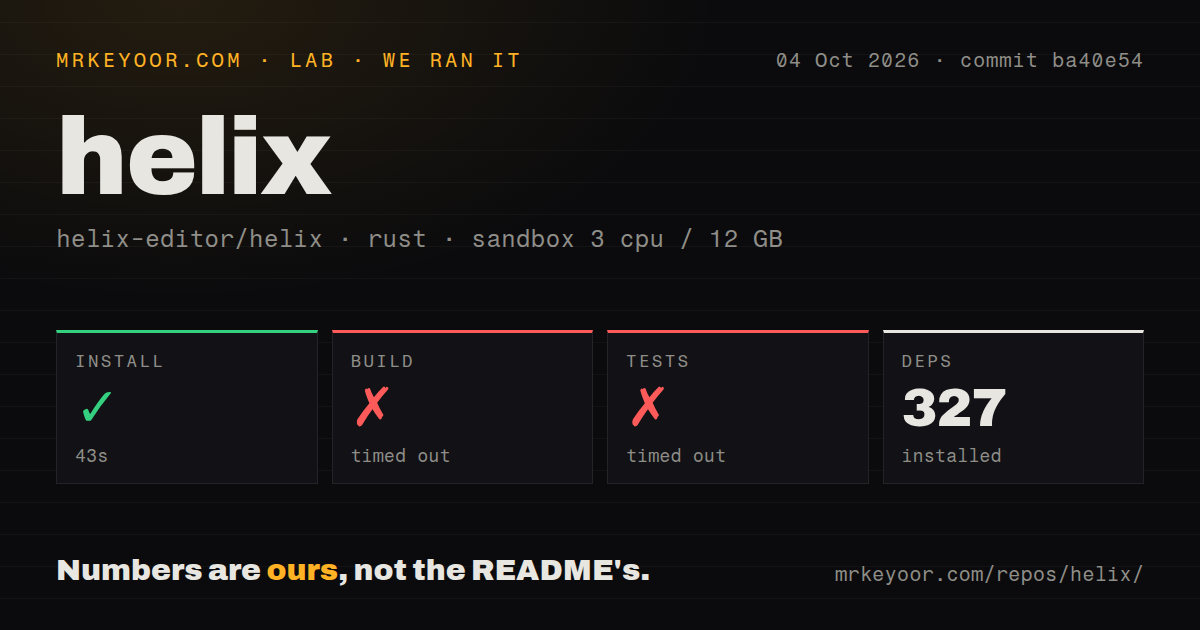
Our run installed Helix commit ba40e54 in 43 seconds, adding 327 packages, but both the build and tests timed out at 900 seconds each. We cloned it on October 4, 2026, into a fresh Debian sandbox with 3 CPUs and 12 GB of RAM. The lab-rust:1 container ran without elevated privileges or secrets. Installation succeeded; neither subsequent step completed inside its allotted window.
The test log tail shows Rust syncing the 1.90.0 toolchain and downloading 6 components. Its final compilation lines name helix-term v25.7.1 and indoc v2.0.7. There is no test-result summary in that excerpt and no explanation for the timeout. We cannot tell whether compilation would have completed with more time. Calling this a failing assertion, a missing Debian package, or an editor crash would claim something the supplied log doesn't show.
The checkout contained 2,013 files, roughly 109,179 lines of source, and occupied 9.4 MB. Our scan found 4 CI workflow files and a tests directory, with no Dockerfile. Those are repository signals, separate from the unfinished checks. This run doesn't measure everyday editing performance. For someone planning to contribute patches, the incomplete build and test results are still a practical warning.
The binary needs its runtime files and separate language servers
The 43-second install result doesn't establish that an everyday editing setup is complete. Helix's installation instructions recommend an operating system package manager and also describe release tarballs containing an hx binary plus a runtime directory. The binary belongs on your command path; the runtime files belong somewhere Helix searches. Copying only the executable misses part of the documented setup.
Use hx --health to inspect runtime locations, and set HELIX_RUNTIME if you need to override them. Install the language servers for the languages you actually use. The editor itself needs no hosted account or API credential. Personal settings live in config.toml, while languages.toml controls language configuration and can be overridden inside a project's .helix directory.
Both source checks reaching 900 seconds makes a packaged trial my preferred starting point. That recommendation follows the documentation's package-manager route; we haven't measured package installation or validated a release binary. Start with one real project and check that its language server is available before switching your daily work. The successful source install alone is too narrow a result to justify replacing a working editor.
Vim compatibility and indentation coverage are real reasons to pass
Helix's FAQ says the maintainers aren't interested in supporting a true Vi/Vim editing paradigm. Selection comes before action, which changes more than a handful of shortcuts. Someone with established Vim habits should treat that as a migration cost. The interactive hx --tutor is the right place to judge whether seeing the selection first helps enough to justify retraining.
A 9.4 MB checkout tells you little about support for your particular language. The README explicitly warns that only certain languages have indentation definitions and points to runtime/queries/<lang>/indents.scm. Syntax highlighting therefore isn't a promise of equally capable indentation everywhere. If you edit an uncommon language all day, check its indentation rules before adopting Helix.
The README also describes Helix as primarily a terminal editor. A custom renderer using wgpu is an interest expressed by the author, without a delivery promise. Developers who want a graphical application should choose on that basis today. The scope is appealing for terminal work, but a familiar desktop editing environment is a reasonable requirement.
A September push and October reports show ongoing work
The repository metadata shows a last push of September 29, 2026, and 46,563 stars with 1,732 open issues and PRs. The latest release, 25.07.1, shipped on July 18, 2025, to lower the GLIBC requirements of its published artifacts. That older tag sits alongside recent activity. It doesn't establish abandonment, and the combined queue count doesn't tell us how many confirmed defects remain.
Issue 16379, updated October 12, reports stale screen text when end-of-line diagnostics are set to hint, naming release 25.07.1 and two Linux terminals. That's a user report, separate from our sandbox's compilation of helix-term v25.7.1. If you want that diagnostic setting, check the report against your terminal. A project can be actively maintained while an everyday display problem remains open.
Choose around your editing habits before replacing your editor
Neovim is my pick for established Vim users who depend on plugins and scripting. Kakoune deserves a look if you like multiple selections and want its client-server sessions and external-program model. Code - OSS suits a graphical workflow with debugging and extensions. Microsoft's Visual Studio Code distribution adds its own customizations and product license, a distinction worth keeping when choosing open-source software.
Try Helix if selecting text before acting on it sounds useful and its built-in language support matches your work. Keep your current editor available while you learn. Our 900-second build and test timeouts leave the source workflow unverified in this sandbox. For daily adoption, the deciding exercise is a real edit in your own language: change several related selections, inspect the result, and decide whether you'd want to do it that way tomorrow.