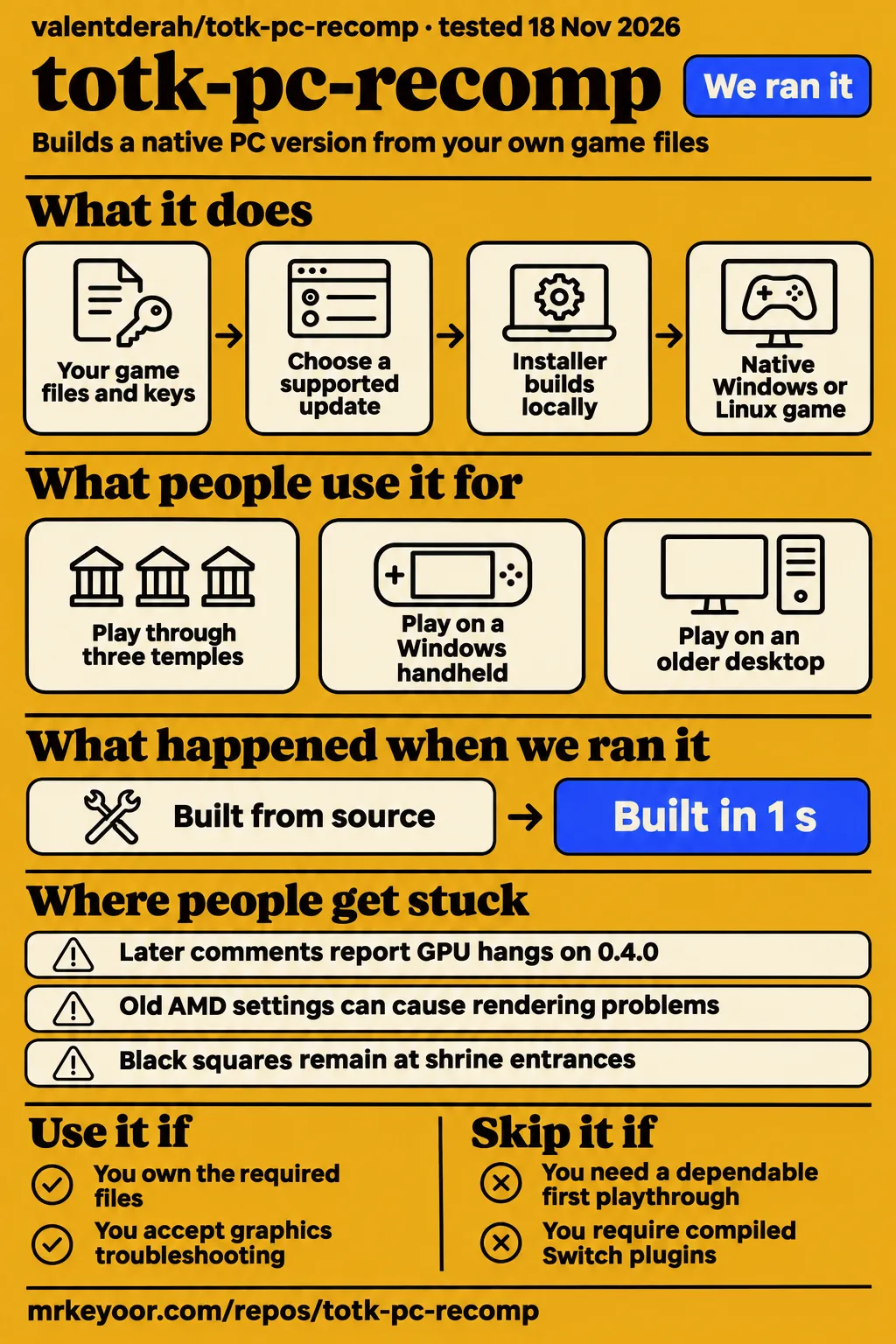
Short answer: try it if you can live with GPU troubleshooting
Use TotK Recomp if you own the required files and accept graphics troubleshooting; skip it if you need a dependable first playthrough without that work. Our totk-pc-recomp test command exited 5 after collecting no tests. The most detailed supplied player account reports three completed temples over 30 to 40 hours, with cutscene stutters, menu glitches and occasional audio desynchronization. Our tooling measurements and the player progress thread describe separate observations.
Upstream describes TotK Recomp as early development and says visual bugs and crashes are expected. Its installer builds the game locally from your own files. The project supplies its own code and tools, while the player supplies the game and console keys. The README documents an in-game settings menu, display options and remappable controls. Those features make it worth considering for experimenters who want PC controls and display settings alongside native execution. TotK Recomp README.
What people use totk-pc-recomp for
Players describe long sessions, Windows handheld play and older-desktop use, with hardware-specific results. Synthesthesia1 reports three temples, MSJ2607 reports almost halfway through the main storyline, and MondongoPerez describes playing on an i5-3470 with an RX 550. Each account below links to its supplied source. Keeping the hardware, progress and reported problems together gives readers a more useful comparison than presenting an isolated frame-rate number.
| Who used it | What they actually did | Reported outcome |
|---|---|---|
| Synthesthesia1, 9800X3D, RTX 4090, 32 GB DDR5 | Finished the wind, fire and water temples over a reported 30 to 40 hours, at 4K with DLAA | Usually 110 to 141 fps, with minor cutscene stutters, item-menu glitches and occasional audio desynchronization. Player account |
| MSJ2607, Windows ROG Ally Z1E | Reached almost halfway through the main storyline | Around 45 to 50 fps outdoors and 35 fps in Lookout Landing, with smooth progress reported. Handheld account |
| MondongoPerez, i5-3470, RX 550 4 GB, 8 GB RAM | Played on an older desktop | Reported 45 to 60 fps without crashes or significant drops, but some weapons disappeared in menus. Older-PC account |
| roshan231, RX 7800 XT | Returned for a couple of hours at 1440p after disabling the Vulkan recorder | Reported almost steady 60 fps with rare shader stutter after earlier driver crashes. AMD account |
The handheld exchange contains a substantial disagreement: cultofcobalt reports only 20 fps in Lookout Landing at 30 W Turbo with default settings, compared with MSJ2607's roughly 35 fps. Separately, dirg3music describes an imported save crashing, better behavior in handheld mode than with an external monitor, an unrecognized external controller and working Legion Go controllers. These accounts make the intended location, display and controller arrangement useful details to record when comparing results. Handheld and accessory accounts.
What happened when we ran it
Our November 18, 2026 gameplay deployment attempt stopped at the lab's Compose-file requirement. The safety step reported that none of compose.yaml, compose.yml, docker-compose.yaml or docker-compose.yml existed. Its word "unsafe" describes that deployment rule. A separate header says the repository was deployed through Compose with every port bound to 127.0.0.1, but the concrete step records a failure. The teardown record says "teardown: ok".
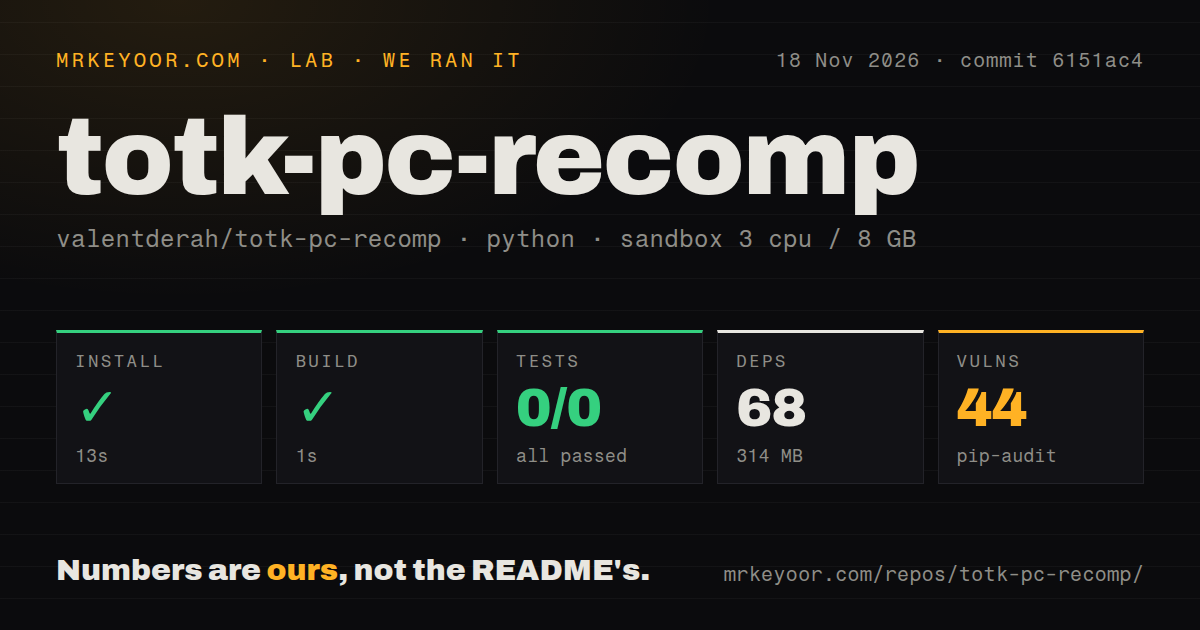
Our separate harness run selected the Python tooling under ./tools/ at commit 6151ac4. Installation succeeded in 13 seconds and the build step succeeded in 1 second. The environment recorded 68 dependencies occupying 314 MB. The test command failed with exit 5 after 2 seconds, recording 0 passed and 0 failed out of 0. Its final log said "no tests ran in 0.07s".
| Recorded check | Our result | How to use the result |
|---|---|---|
| Install | Succeeded in 13 seconds | Describes the selected Python tooling environment |
| Build | Succeeded in 1 second | Records the harness build step |
| Tests | Failed, exit 5, in 2 seconds | Pytest recorded 0 passed and 0 failed out of 0 |
| Test log | no tests ran in 0.07s | The command collected no tests |
| pip-audit | 44 known vulnerabilities | Records dependency-audit findings |
| Repository scan | 402 files, about 177,066 source lines, 10.7 MB checked out | Describes the checkout |
| Automation signals | One CI workflow, a tests directory, no Dockerfile | Records file presence |
The tests directory and the empty collection are both part of our result: the directory existed, yet this invocation collected nothing. The configured sandbox had 3 CPUs, 8 GB RAM and the image label ghcr.io/astral-sh/uv:python3.12-bookworm. Keep those configuration details attached to the tooling result, alongside the commit and selected directory, so the 13-second install and 1-second build retain their actual context.
Where people get stuck: separate fixed faults from continuing hangs
Issue #1032 distinguishes GPU page faults fixed in 0.3.13 from continuing GPU hangs, including reports on 0.4.0. That distinction prevents a broad "GPU crashes were fixed" summary from obscuring different failures. The supplied issue synthesis also records AMD startup crashes, obsolete workaround settings and shrine rendering problems. The table keeps each symptom beside its reported resolution or next step, rather than presenting every historical workaround as current advice.
| Symptom and source | Evidence of resolution | Practical next step |
|---|---|---|
| GPU device lost, issue #1032 | Maintainer reports texture-lifetime page faults fixed in 0.3.13; later comments report hangs on 0.4.0 | Supply the complete log, settings, GPU and driver details. Issue #1032 |
| Old AMD workaround settings, issue #52 | Maintainer closed the early crash report after 0.2.1 and advised removing old workaround lines; later replies describe other crashes | Follow the maintainer's instruction to remove obsolete astc, gpl, vk_subgroup_pin and memory overrides. The maintainer says astc = cpu now causes green textures. Issue #52 |
| Black squares at shrine entrances, issue #1134 | Reporter describes persistence after restarting and restoring defaults; another participant reports it on 0.4.1; contributor testing on an RTX 4080 SUPER did not reproduce it | Include the exact shrine, save and log in a report. Issue #1134 |
| Greyed-out Steam Deck cheats, issue #560 | Zakeau reports success after rerunning AppImage setup; undeadsavage94 also matched the game update and cheat file | Read the later v0.4.1 release instructions before repeating the older workaround. Issue #560 |
The November 15 v0.4.1 release notes report a fix for Linux's in-game cheat rebuild button. The notes say the button previously restarted the game with its old code, leaving code cheats greyed out. The revised behavior starts the setup AppImage itself. Upstream instructs users to run that release's setup once on the existing installation folder and keep the AppImage in place. Official v0.4.1 release notes.
Other supplied tracker findings matter when reading older troubleshooting advice. Issue #795 describes a 0.3.11 link failure involving a leftover mouse_direct.o from 0.3.10; participants reported progress after deleting the setup cache's obj/runtime directory, and the release guide attributes content-based rebuild checks to 0.3.13. Issue #67 records black worlds, broken textures, green flashes and residual squares on AMD Polaris, with a maintainer statement that 0.3.1 should fix the remaining squares. Recorded issue synthesis, Polaris issue synthesis, release guide.
Issue #332 records an update-label error: a reference labelled 1.1.1 was actually 1.1.0, followed by a participant reporting upgrade failure on 0.3.4. Issue #612 records DLSS flicker and a black scope fixed in 0.3.7, then image shake with DLSS enabled and a workaround of disabling it. Issue #63 records rejected statue photographs blocking Camera Work in the Depths, with a maintainer-reported fix in 0.2.8 for game versions 1.2.1 and 1.4.3. Update-label issue synthesis, DLSS issue synthesis, camera issue synthesis.
Setup needs your files, keys and working space
The documented installer requires your base game, a supported update and prod.keys, with about 36 GiB free during setup and 20 GiB afterward. The README lists game updates 1.1.0, 1.2.1 and 1.4.3. Source building has a separate storage requirement of about 60 GB for its work folder. Those player and source-build folders are separate from the 314 MB Python tooling environment recorded by our harness. Installer inputs, README requirements, source-build guide.
Windows requires Windows 10 or later, an x86-64 CPU with SSE4.2, and a Vulkan 1.3 GPU supporting VK_EXT_external_memory_host. Upstream says AVX2/FMA machines get a faster build. Linux adds kernel 6.7 or later and glibc 2.34 or later. The documented Steam Deck installation starts the AppImage in Desktop Mode. These requirements give a first-time reader concrete checks before choosing an installer or preparing the game files. Platform requirements and installation steps.
The Get Droid Tips walkthrough shows the installer workflow of selecting the player's game files and supported update. Shader preparation also belongs in setup planning: the source-build guide says skipping it causes compilation during play and stutter while caches fill. The supplied shader documentation describes totk.exe --warm-shaders for rebuilding an evicted pipeline cache. Keep the setup resources for code mods, because the mod documentation says rebuilding needs the original setup folder. Setup walkthrough, shader preparation, shader-cache guidance, code-mod rebuild resources.
Mods support code patches, with specific exceptions
Upstream documents RomFS mods, IPS and PCHTXT code patches, and Atmosphère cheats. Compiled Switch plugins and replacement main executables fall outside that support; the mod guide names UltraCam as an example carrying compiled Switch code the port cannot load. A useful first step is to inspect the archive's contents and game-version target, then use the Mods tab's explanation of any excluded component. Supported mod formats and exclusions.
The built-in Mods tab gives the higher entry priority when two mods replace the same file. Whole-file replacements do not combine, so the documentation recommends merging conflicting edits with TKMM and importing the merged result. It also says a renamed folder becomes a new entry in the saved ordering and resets its cheat switches. The setup folder matters separately: moving or deleting it requires running setup again against the same game folder for a code-patch rebuild. Mod ordering and rebuilding.
The separate TOTK Recomp Mod Manager documents RomFS-only support and gives the lower entry priority. Its archive import interface therefore has a different documented scope and ordering rule from the built-in menu. The supplied synthesis also records upstream testing of the HDPacks.com 4K Texture Pack v1.0 on game versions 1.4.3 and 1.2.1, with about 3.3 GB more texture memory and unchanged frame rate after loading a save. Manager documentation, port mod documentation.
Security: keep dependency findings and binary reports separate
Our pip-audit run reported 44 known vulnerabilities in the selected tooling environment. In the player thread, JoeyCard02 separately reports Bitdefender flagging TotK.exe obtained from the official GitHub. The mod-manager author describes a Defender detection of that manager as a PyInstaller false positive. These are three distinct records concerning dependency advisories, the main executable and the manager executable. player detection report, manager author's statement.
Upstream says most code and documentation is written by AI coding agents under the maintainer's direction, and that the maintainer plays every build and decides what is merged. Its license statement says the project's own code is MIT-licensed, third-party code retains its own licenses, and the license grants nothing for Nintendo's game. Those disclosures explain the project's stated development process and licensing boundaries without assigning a security rating to its binaries. Project process and license disclosures.
TotK Recomp vs UltraTears, SkyboundTOTK and emulation
TotK Recomp accepts game packages and keys, while UltraTears requires extracted 1.4.3 exefs and romfs folders. That input difference is a concrete starting point for choosing between them. MacNativeGames targets Apple chips through native ARM64 execution and Metal graphics. The supplied comparison guide positions SkyboundTOTK for the 1.0.0 base game and source building. The table compares these documented workflows rather than assigning a performance winner.
| Option | What the evidence supports | When to consider it |
|---|---|---|
| TotK Recomp | Installer for game packages and keys, plus an in-game settings menu | You want that setup workflow on Windows or Linux. Installer documentation |
| UltraTears | Native port using extracted 1.4.3 exefs and romfs folders | You already have those folders and prefer its input workflow. UltraTears README |
| SkyboundTOTK | The supplied comparison guide describes source building for the 1.0.0 base game | That version and recorded build workflow match your starting point. Comparison guide |
| MacNativeGames | The game's ARM64 code runs on Apple chips and its graphics are rebuilt for Metal | You use Apple Silicon. MacNativeGames README |
| Switch emulation, including Eden | Players compare existing emulator setups with the recomp | Compare an existing setup in the same locations with the mods you use. Player comparisons |
Several supplied players prefer the recomp to their previous emulator setups. roshan231 describes steadier performance and fewer shader stutters after changing the AMD recorder setting; MSJ2607 describes poor handheld emulation performance compared with the recomp. MondongoPerez also reports higher performance than an emulator on an older desktop. Keep those comparisons attached to their authors and machines when deciding which workflow deserves a local comparison. AMD comparison, handheld and desktop comparisons.
Outdated claims, corrected
RepoPicks' facts panel says "Accounts or keys" are "None", while the installer requires prod.keys. Its disk-space field describes installer download sizes instead of working storage; the documented installer requires about 36 GiB at peak and 20 GiB afterward. RepoPicks also mentions the larger storage requirement elsewhere, leaving its facts panel inconsistent with its own prose. The remaining corrections concern documentation, a fork snapshot, a listing and a sampled X post. RepoPicks facts panel, installer inputs, README storage requirements.
| Source | What needs correcting |
|---|---|
| Installer documentation | Its "none is published yet" statement about Windows releases is stale. The supplied release guide lists a Windows installer for v0.4.1. Installer statement, release guide |
| tryjumping1993 fork snapshot | AVX2 is required and Linux, mods and ultrawide are planned in that snapshot. Current upstream documents SSE4.2, Linux, mods and multiple display shapes. Fork snapshot, upstream README |
| Third-party mod-manager README | Its explanation that IPS cannot work because original code must remain untouched conflicts with upstream's documented code-patch rebuild workflow. The manager separately documents RomFS-only support. Manager documentation, port mod documentation |
| SourceForge metadata | The "Mac" operating-system label conflicts with the listed Windows/Linux x86-64 description. Upstream documents Windows and Linux. SourceForge listing, upstream README |
| Sampled X post | The sampled X post describes native Linux support as planned; the current README provides Linux installation instructions. Sampled X post, current Linux instructions |
Questions people ask
Synthesthesia1 reports three temples over 30 to 40 hours in response to the question about playing from start to finish. The supplied questions also cover performance, release downloads, installation, Linux, handheld settings and updates. Answers below retain the relevant hardware or documented workflow. Questions whose answers need additional evidence are addressed in the final section, so an unanswered settings question does not become a made-up recommendation. Player questions and replies.
Is totk-pc-recomp playable from start to finish?
The most detailed supplied long-play account reaches the wind, fire and water temples over a reported 30 to 40 hours. Synthesthesia1 reports usually 110 to 141 fps at 4K with DLAA on a 9800X3D and RTX 4090, alongside minor cutscene stutters, item-menu glitches and occasional audio desynchronization. That describes the actual progress and problems behind the favorable account. Long-play report.
What bugs, crashes or missing features could disrupt a long playthrough?
The sampled tracker records continuing GPU hangs and shrine-entrance black squares, including a shrine report on 0.4.1. Older records also describe camera-recognition failures and DLSS problems, with the version-specific outcomes listed above. Compiled Switch plugins are outside documented mod support. Keep the issue's version and the mod's actual contents attached to any troubleshooting decision. GPU issue, shrine issue, mod exclusions.
Does totk-pc-recomp run better than emulation?
MSJ2607 and roshan231 report better performance than their previous emulator setups, on a Windows ROG Ally Z1E and an RX 7800 XT respectively. MSJ2607 reports roughly 35 fps in Lookout Landing, while another handheld participant reports 20 fps and asks about settings. The hardware and location details make these accounts more useful than a single claim that the recomp is faster. Handheld reports, AMD comparison.
Should I use UltraTears or totk-pc-recomp?
UltraTears requires extracted 1.4.3 exefs and romfs folders; TotK Recomp's installer takes game packages and console keys. Choose the input workflow that matches your own files. Both supplied READMEs describe native execution and mod support, while the comparison table above keeps architecture and setup differences visible. A player with Apple Silicon has a separate documented option in MacNativeGames. UltraTears requirements, TotK Recomp installer inputs, MacNativeGames architecture.
Where can I download the TotK PC port?
The official GitHub Releases page supplies TotK Recomp's installers, and the release examined here is v0.4.1, dated November 15, 2026. The supplied release guide lists a Windows installer zip, a standard Linux AppImage and an experimental Linux PGO AppImage. The README says no game files are included and requires the player's own base game and supported update. Official v0.4.1 release, release archive guide, game-file requirements.
How do I install totk-pc-recomp and choose the correct release archive?
Windows users take the installer zip and unpack it before starting TotK-Setup.exe. Linux users take the standard AppImage, make it executable and start it; Steam Deck users begin in Desktop Mode. The installer then asks for the player's files, language and destination. The release guide distinguishes these installers from GitHub's source archives and identifies the PGO AppImage as experimental. Installation instructions, archive selection guide.
Does TotK Recomp work on Linux and Steam Deck?
Upstream provides an AppImage installation route for Linux and Steam Deck, with kernel 6.7 or later and glibc 2.34 or later among its requirements. Issue #560 supplies community experience with Steam Deck cheats, and v0.4.1 reports a fix for the Linux rebuild button. That release tells users to run setup once on the existing folder and retain the AppImage. Linux instructions, Steam Deck cheat discussion, v0.4.1 rebuild instructions.
Does totk-pc-recomp support ultrawide displays?
The current README documents 21:9 and 32:9 resolutions with the camera and interface adapted to those shapes. It also lists 16:10 for handheld-style displays and 3:2 layouts, alongside custom resolutions, supersampling and AMD FSR 1 upscaling. These are upstream's stated display features. They also explain why the older fork's roadmap, which still lists custom aspect ratios as planned, should be read as a snapshot. Current display features, older fork roadmap.
What we have not tested yet
Our lab covered Python tooling and a blocked deployment attempt, not installation or gameplay of the playable port. We have not prepared the game, measured frame times, completed a playthrough or reproduced the reported fixes. The 1-second build supplies no gameplay assurance, and the empty pytest result supplies no passing tests. The image label does not establish actual runtime versions; the log does not explain empty test collection. The Compose safety failure supplies neither a malware finding nor a game crash.
The supplied player reports establish substantial progress rather than completed-game reliability. They supply no matched benchmark against emulation or other ports, no confirmed settings recipe for the conflicting Lookout Landing results, and no confirmed fix for the 4 GB RTX 3050 laptop reporting 15 fps. The accessory account supplies no causal test linking its external monitor to save crashes. The v0.4.1 maintainer says the Linux build was not personally tested; current SkyboundTOTK availability is also unresolved by the supplied guide.
The sampled Flatpak tutorial listing supplies a title rather than compilation steps, and the launcher-notification question has no confirming answer. The documented update route is to run newer setup on the existing folder. The extracts also leave the final update-label resolution, released status of the proposed DLSS-shake fix, user confirmation of the Polaris fix and a shrine-glitch remedy unresolved. The recorder workaround helped some AMD users and failed for others; texture-pack evidence covers the named pack and versions rather than general compatibility.
The dependency-audit total needs package-level analysis before conclusions about exposure. Neither the player's antivirus report nor the separate manager author's false-positive explanation supplies independent binary-security evidence for TotK.exe. The supplied materials also lack a hardware-matched end-to-end player installation measurement. A useful next run would record a supported installation, versions and settings, then compare the same save and location after changing one setting at a time. Keep a copy of saves and an existing working setup during that comparison.