
A creative canvas still needs a working deployment
Toonflow brings scripts, character and scene references, images and video clips together on an infinite canvas. Its main README is in Simplified Chinese, and English documentation is available. For a technically comfortable creator, it offers a place to organize story inputs and generated assets. Our source build failed before we could evaluate that workflow.
The README describes text nodes for scripts and storyboards, reference images and individual video generations, followed by previewing and downloading assets for further production work. Creators still need to review the writing, choose models and refine the results. Whether the canvas makes a project easier to finish remains unverified by our run.
What happened when we ran it
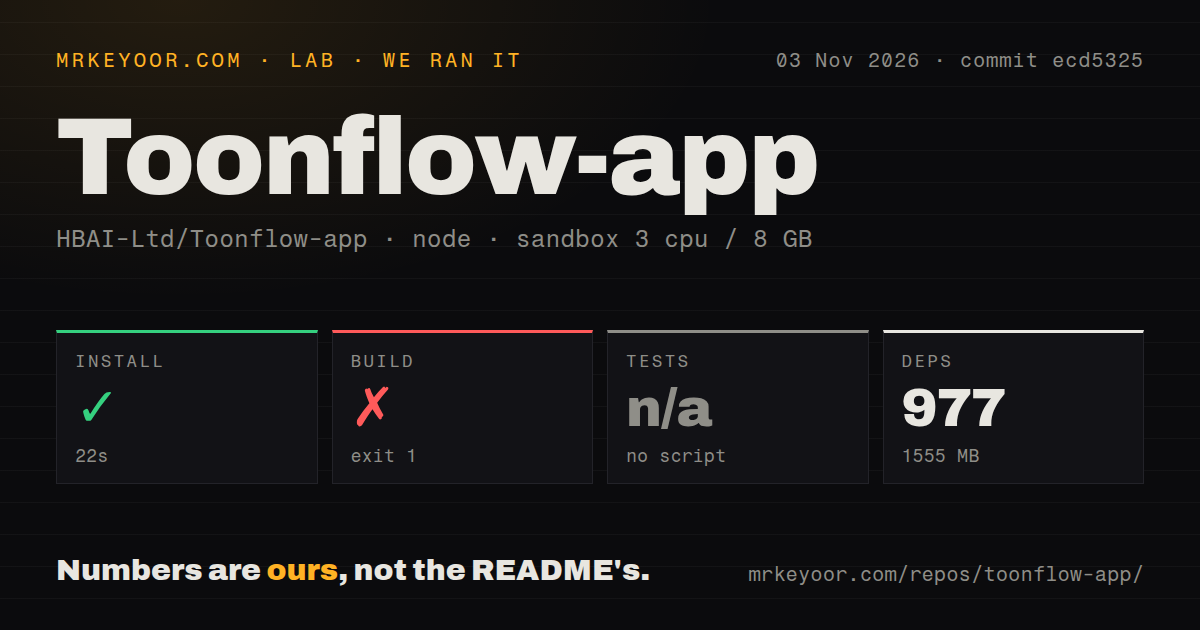
Our sandbox's Bun installation step succeeded in 22 seconds, recording 977 dependencies and 1,555 MB on disk. The build failed with exit 1 after 4 seconds. This was commit ecd5325 on November 3, 2026. Tests were skipped because the harness found no test script or target.
Our Toonflow build failed at build:tools with FileNotFound. The build command chained build:tools, build:ext and the web and server builds. The visible failure was error: FileNotFound, followed by script "build:tools" exited with code 1 and the top-level build's failure. The log doesn't name the missing file or establish a cause, so it doesn't support a diagnosis or a fix.
The checkout measured 1,018 files, approximately 98,005 source lines and 26.5 MB. The scan recorded two CI workflows, a Dockerfile, Compose configuration and monorepo workspaces, without a tests directory. The sandbox configuration specified 3 CPUs, 8 GB RAM and image lab-node:22. That image label doesn't establish the actual runtime version. No vulnerability audit or media-generation result was recorded.
Model choices determine cost and media capabilities
The English README says third-party model APIs may charge usage fees. Local models and ComfyUI require your own runtime environment and computing resources. Self-hosting Toonflow therefore doesn't settle where generation runs or what it costs. Choose the services before budgeting a production, especially if you expect repeated generation attempts.
Supported reference inputs, video duration, resolution and audio capabilities depend on the selected model and provider. Toonflow documents custom provider adapters for existing ComfyUI workflows, plus MCP connections to external tools and services. The README says integration depends on the service API, model and workflow. These connections were not evaluated in our run.
The project documents local storage for projects and assets. Before sending private scripts or references to a remote model service, check that service's input-handling and retention terms. Our run provides no network-traffic or provider-behavior evidence, so local project storage should not be read as proof that generation stays on your computer.
Server deployment requires external access control
The English README states that the web interface and API do not have separate login authentication. It instructs operators to restrict the service's port and use a reverse proxy with authentication for public access. For personal remote use, it describes an SSH tunnel. Teams expecting a public service with built-in account protection should resolve this requirement before deployment.
The instructions describe direct server storage in the repository's data/ directory and Docker storage in a named volume. Settings, plugins and workspaces belong in the backup. The README warns that docker compose down -v deletes the data volume. Preserve the entire data directory or volume when migrating or backing up.
Upstream documents desktop downloads, Docker and direct server routes. Our failed source build doesn't establish that packaged clients fail; those routes were not tried. The supplied server instructions use build:server, whereas our recorded top-level build started with build:tools. The documentation does not establish that the dedicated command fixes the recorded failure.
ComfyUI and Shotcut cover different production tasks
ComfyUI documents a visual node graph for reusable image, video, audio and other media workflows. Consider it when controlling the generation graph is your main task. Toonflow also documents connecting existing ComfyUI workflows through adapters, so the tools can be complementary. The supplied evidence contains no comparative generation-speed or output-quality measurements.
Shotcut is a free, open-source video editor. Consider it when you already have footage and need to edit it. Toonflow's documented workflow includes organizing and downloading assets for further production work, making an editor relevant to that next stage.
Repository activity doesn't resolve the recorded failure
GitHub reports a November 5, 2026 push and lists release v2.0.10 that day. This is separate from our November 3 run at ecd5325; the run does not establish the build or runtime behavior of v2.0.10.
The issue feed contains reports filed November 7 concerning local-model requests and generated-image display; both were marked closed on November 8. Closure alone doesn't establish the cause, a shipped repair or the status of our earlier build failure.
Documentation scores 4/5 on our coverage rubric: 1 means no usable starting point, 2 a basic overview, 3 a documented setup route, 4 deployment choices plus explicit access, storage and model-service limits, and 5 independently verified coverage of those routes. This rates documentation coverage, not deployment success. Setup ease, support quality and runtime maturity remain unassessed.
Before moving a production into Toonflow, get your chosen package or server route running. Then verify a generated shot through download and confirm that you can back up its project data. These are proposed acceptance checks, not results from our run.