YouTube with the controls Samsung leaves out
TizenTube changes the YouTube interface running on a Samsung television. Its headline jobs are blocking video ads and asking SponsorBlock which creator segments to skip. The project also adds DeArrow support for less click-driven titles, playback speed controls, and picture-in-picture. These are everyday viewing changes, so the appeal is easy to understand from the sofa.
The source goes further than the short README. Its settings cover preferred video quality and codec, chapters, previews, Shorts, a clock, screen dimming, end-screen cards, thumbnail quality, and which items appear in the sidebar. SponsorBlock categories can be controlled separately. Translation files cover a wide range of languages, though the project documentation itself is in English.
TizenTube has two delivery shapes. The documented route is a module inside TizenBrew, a loader for modified web apps on Tizen televisions. The module is included by default; if it is missing, the README tells users to add @foxreis/tizentube through the module manager. GitHub releases also provide a standalone TizenTube.wgt package.
The useful part is also the fragile part
YouTube's TV interface is a moving target. TizenTube injects code that changes player and interface behavior, so a YouTube update can break assumptions without a TizenTube release changing. The issue tracker shows this maintenance loop in concrete form. Reports around the standalone 2.0 release covered playback stopping after about a minute, black screens, and failures to play videos. Version 2.0.1 changed how the standalone app restarts and injects its user script, specifically to address playback reports.
That release also added casting to the standalone app. The project did not simply close after shipping it: fixes, translations, and interface changes continued through August. This responsiveness matters more than a perfect issue count for software tied to an outside service. A television client needs maintainers who can react when YouTube or Samsung changes behavior.
There are still current pain points. Issue 579 says playback works after the latest update, but reopening the app can leave it frozen on the splash screen until the television is restarted. Issue 582 describes a Samsung Frame that reaches a blank screen even after reinstalling. Those reports concern launch reliability, which every person in the room notices immediately.
What happened when we ran it
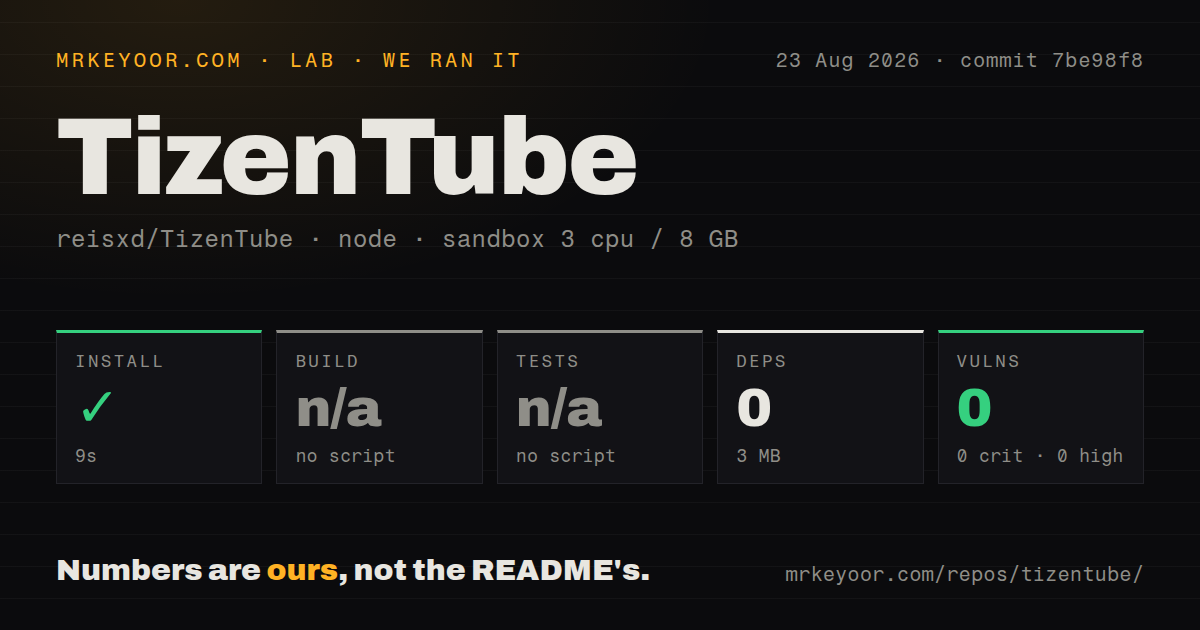
We cloned commit 7be98f8 on August 23, 2026 into a fresh unprivileged Debian container with three CPUs, 8 GB of RAM, Node 22, and no secrets. The checkout contained 91 files, about 8,461 lines of source, and occupied 1.6 MB.
The npm install step succeeded in 9 seconds. It installed zero packages, and the resulting footprint was 3 MB. This is accurate but easy to misread: the root package has no dependencies, so a successful npm command does not prove that the app is installed or usable on a Samsung TV.
Our harness found no root build script or target and skipped the build. It also found no test script or target, so tests were skipped. npm audit reported zero known vulnerabilities across all severity levels. The repository had one CI workflow, no Dockerfile, and no tests directory. There was no failed log to diagnose because neither build nor tests started.
Television setup is the real installation
The TizenBrew guide supports Samsung televisions with Tizen 3.0 or newer, described as 2017 models onward. Its preferred route asks you to open the TV's Apps panel, enter 12345, enable developer mode, set the host PC address, and reboot. You then run the TizenBrew desktop installer on a computer. Tizen 7 and newer may also prompt for a Samsung account so the installer can create a certificate.
That is manageable for a hobbyist and awkward for someone who expects an app-store install. The fallback command-line route adds Tizen Studio, Samsung's device bridge, a TV network connection, and WGT installation commands. TizenTube's own README sends readers to TizenBrew for these details. It does not provide comparable instructions for the standalone package attached to release v2.0.1.
Once installed, settings live on the TV and the updater is enabled by default in source. Keep a recovery route. A firmware change, application restart, or YouTube interface update can leave a working setup in need of another release or a television reboot.
Health and who should install it
The last push was August 22, 2026. Issues, fixes, and translation pull requests were updated that same day, while the latest release arrived on July 28. GitHub's combined open count was 98; a separate search split that into 84 issues and 14 pull requests. That is a large support queue, though the recent closures and merges show active work rather than neglect.
Documentation is enough for an existing TizenBrew user, but newcomers must follow links across projects. The main README names the core features and module identifier, then leaves device compatibility and developer-mode setup to TizenBrew. The standalone release deserves its own maintained installation and recovery page.
Install TizenTube when ad skipping and better playback controls justify an afternoon of TV tinkering. It offers far more control than Samsung's stock client. Reliability still depends on a patched web interface, a particular television environment, and quick maintenance after upstream changes, so keep a fallback client within reach.