Can you accept the system-webview tradeoff?
Tauri combines an HTML, JavaScript and CSS frontend with a Rust backend and renders through the operating system's webview. Its README maps Apple platforms to WKWebView, Windows to WebView2, Linux to WebKitGTK and Android to Android System WebView. Choose it when that architecture suits your application and your team can test the interface on its intended platforms.
This review does not establish smaller application packages, faster startup or lower memory use than Electron. We did not benchmark those outcomes. The useful distinction here is the documented rendering architecture and what our repository commands actually completed.
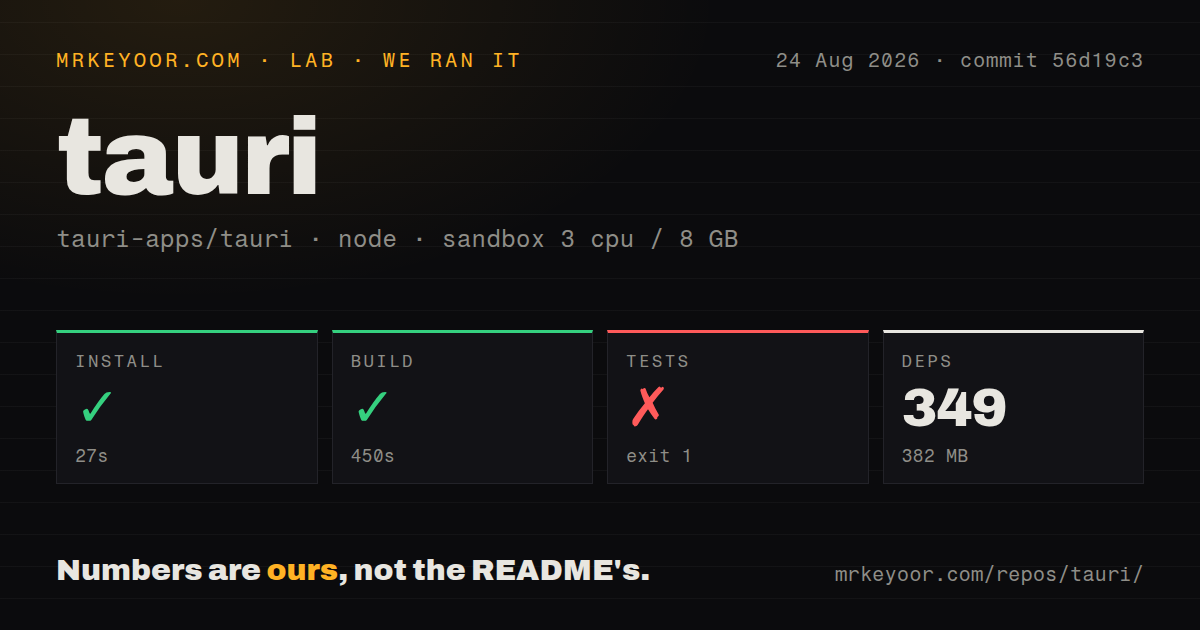
Our build passed; the template app build hit a missing prerequisite
In our run, the repository build succeeded in 450 seconds and the test command failed in 32 seconds. The run was recorded on August 24, 2026, at commit 56d19c3, whose full SHA is 56d19c39e457b528433dc546106cd0bff4066bc2.
The raw test tail shows gdk-sys failing its custom build command because pkg-config could not find gdk-3.0. It also says PKG_CONFIG_PATH was unset. The CLI test named init a project and builds it then reported that it failed to build the app. The log establishes a missing or undiscoverable system prerequisite in our sandbox; it does not establish whether installing that prerequisite would resolve every subsequent step.
The visible Vitest footer reports one failed test in packages/cli/__tests__/template.spec.ts. That is a suite-specific observation, not an exhaustive count of this repository's tests. The attached aggregate test-count field is null. Stored parser summaries alone do not establish unique, exhaustive coverage, and we have not reconciled complete logs.
Our harness records each command's success flag, exit code, elapsed wall-clock time and timeout status, alongside retained output tails. That explains how a successful repository build and an unsuccessful template app build can coexist in this record. Exit code 0 for the repository build does not show that a GUI launched or that an installer worked.
The MrKeyoor testing methodology explains this reporting approach and its limits. It is linked for provenance; its current procedure does not establish which methodology version governed this older run.
What remains to test before adopting it
The README directs readers to install system prerequisites before using npm create tauri-app@latest. Start there, then build and launch a representative application on each intended platform. Exercise the native features your application actually needs before committing to the framework.
Our record does not validate successful GUI operation, installer execution, signing, store submission, updates or mobile deployment. It contains no runtime performance benchmark and no audit result. Dependency scan coverage is unknown; the absence of an audit result is not a security finding or a clean bill of health.
The documented bundler supports formats including .app, .dmg, .deb, .rpm, .AppImage and Windows NSIS and WiX installers. The README also lists tray icons, native notifications and a desktop-only self-updater. These are documented capabilities, not features we exercised successfully in this run.
For platform requirements, distinguish the sources by date. The supplied current README lists Windows 10 and above, while the README at our recorded commit lists Windows 7 and above. Neither list is a compatibility test performed by us. Check current requirements for the application version and platform you intend to ship.
When Electron or Wails is the better starting point
Electron is a desktop framework based on Node.js and Chromium. Prefer evaluating it when those runtimes fit your application and team better than Tauri's Rust backend and system-webview approach. Its README establishes that architectural choice; it does not supply a size or speed comparison with our Tauri run.
Wails wraps Go code and a web frontend into a single binary. Evaluate it when you already have Go application logic or want Go for the native backend. Its README describes native rendering engines without an embedded browser, so choosing Wails does not establish a single Chromium rendering target.
Electron and Wails are alternative application frameworks in this decision, rather than prerequisites or complements that Tauri requires. Neither was run in this sandbox comparison.
How to read the editorial scores
These retained scores describe different dimensions, not a measured overall product ranking. Setup uses 1 for an installation block, 2 for an incomplete build, 3 for a completed build with a later validation block, 4 for completed recorded commands with substantial prerequisites and 5 for completed commands with little setup friction. Tauri's 3 reflects the successful build and blocked template test.
Documentation uses 1 for no usable entry point, 2 for fragmented instructions, 3 for a basic start, 4 for a start plus platform and contribution guidance, and 5 for independently validated instructions covering the reviewed workflow. The supplied README supports 4; we did not validate the complete documentation path.
Community uses 1 for no documented participation route, 2 for one route, 3 for issue and contribution guidance, 4 for those plus a discussion channel, and 5 when the guidance also explains how to coordinate work before contributing. The README supports 5 under this narrow rubric. This does not rate adoption, response times or support quality, which remain unknown.
Maturity uses 1 for an undeveloped proposal, 2 for an early implementation, 3 for documented application tooling, 4 for published releases and documented platform and packaging support, and 5 for that evidence plus successful validation of the intended shipping workflow. The supplied tauri-v2.11.5 release and README support 4. Our run does not justify 5.