Wagtail needs developers to own the website
Choose Wagtail if your publication wants a purpose-built website and has developers to maintain it. The CMS sits on Django, gives authors an editing interface, and leaves the public design under your team's control. That division is the reason to adopt it. If the editor must also build arbitrary layouts and application workflows without a programmer, Wagtail's own design guide points toward a mismatch.
The README names StreamField for flexible structured content, image handling, search, and a content API for a separate frontend. Those capabilities make it worth evaluating for a publication with repeatable content types. They don't settle whether your editors can perform their daily work comfortably. Our lab covered repository JavaScript commands, so the recommendation rests on the documented design plus the limited run described below, rather than experience operating a Wagtail newsroom.
What happened when we ran it
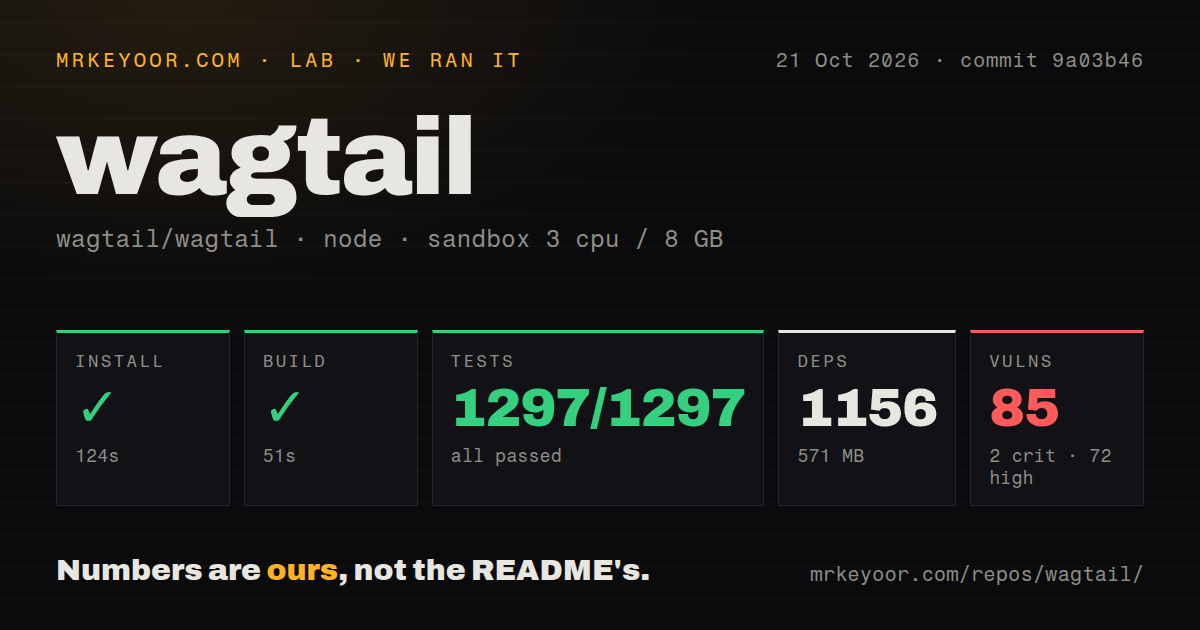
Our sandbox installed Wagtail commit 9a03b46 through npm in 124 seconds, built it in 51 seconds, and passed all 1,297 Jest tests in 48 seconds. There were 0 failed tests. The October 21, 2026 run recorded 1,156 dependencies and 571 MB on disk. These are successful results for the workflow we ran, not a measured deployment of the Python/Django CMS.
Npm audit reported 85 known vulnerabilities: 2 critical, 72 high, 9 moderate, and 2 low. The supplied block contains no advisory identifiers or dependency paths. We therefore cannot say which packages account for them, whether they reach a deployed website, or whether a particular upgrade fixes them. The counts warrant investigation before adopting the recorded dependency tree. Calling them confirmed exploitable CMS defects would exceed the evidence.
The sandbox had 3 CPUs and 8 GB RAM, with the image label lab-node:22. That label doesn't establish the actual Node or operating-system version. The checkout occupied 40.7 MB across 5,247 files and about 349,503 source lines. Our scan found 4 CI workflow files, no Dockerfile, and no tests directory. The latter is a discovery signal, not a claim that the project lacks checks: the same run executed its recorded Jest suite.
The Python site remains outside our passing result
Wagtail's README starts a site through Python tooling, then applies database migrations and creates an administrator. Our measurements identify an npm workflow instead. This difference matters more than the headline count of passing Jest tests: the supplied evidence does not verify Python application startup, database behavior, or publishing through an editor account. A buyer should require those checks on the intended deployment before making a production decision.
The documented database choices include PostgreSQL, MySQL, MariaDB, and SQLite with JSON1. The README also names PostgreSQL or Elasticsearch for search. Select the database and search configuration your team can operate, then check the release-specific Python and Django compatibility guidance. The README warns that its main-branch compatibility list may differ from the current release, so copying those versions into a deployment plan without checking the release would be careless.
Structured content keeps layout decisions with developers
The design guide asks developers to separate content from presentation. Its event-page example uses dedicated date and location fields, allowing calendar views or filtered listings that styled headings alone cannot supply. For a publication, the corresponding decision is whether a piece of information deserves a field that templates can reuse. Define that before asking an editor to enter a large archive.
This approach costs developer time. The same guide discourages turning complex application behavior into settings merely to make it editable. That is a useful refusal for a team with stable editorial needs, and a reason to walk away if your commissioning process promises unlimited layout freedom. StreamField can supply flexible content within a chosen structure. It doesn't remove the responsibility to decide what that structure should permit.
Inline editing and application forms suggest different choices
django CMS documents inline editing on rendered pages and a placeholder/plugin system for reusable content components. Choose it instead when those are the interactions your editors want to evaluate. This is a comparison of documented editing approaches, with no claim that one is faster or easier based on our lab. Put an actual article through both interfaces before standardizing your workflow.
Django's form framework is the documented alternative for forms whose backend logic stays in code. Wagtail's design guide specifically recommends it for complex forms such as integrations with a CRM or payment processor. If the main product is a custom application, starting with Django and deciding separately which records need a CMS is reasonable. Wagtail earns its place when structured authoring is a substantial part of that product.
October maintenance makes release selection an active task
GitHub recorded the last push on October 23, 2026, and recent issue activity included a report about concurrent workflow submissions. The API listed 1,025 open issues and PRs combined. Release v8.0.1 arrived October 20 with security fixes, including collection authorization and spreadsheet formula injection. Those fixes are upstream release claims, separate from our npm audit, and don't establish that its 85 findings are resolved.
Before choosing Wagtail, ask a developer and an editor to model one representative page and carry it through your required publishing process. Separately identify the advisories in the dependency tree you intend to use. Those tasks address the two gaps a passing Jest suite leaves here: whether the editorial model fits, and whether the actual deployment is ready to operate.