Floating UI gives component authors control over positioning
Floating UI helps keep a tooltip or menu next to its trigger when scrolling containers and viewport edges make that awkward. It also provides React hooks for interaction behavior. The useful buying decision is whether your team wants to assemble its own floating components. A team seeking that control has a reason to adopt it. Someone who just needs a finished dropdown has more component work ahead than the positioning demo suggests.
The README distinguishes anchor positioning across platforms from React interaction tools. Vanilla DOM, Vue and React Native have their own documented packages. This is useful scope guidance: select the integration you actually need rather than assuming every package includes the React behavior layer.
What happened when we ran it
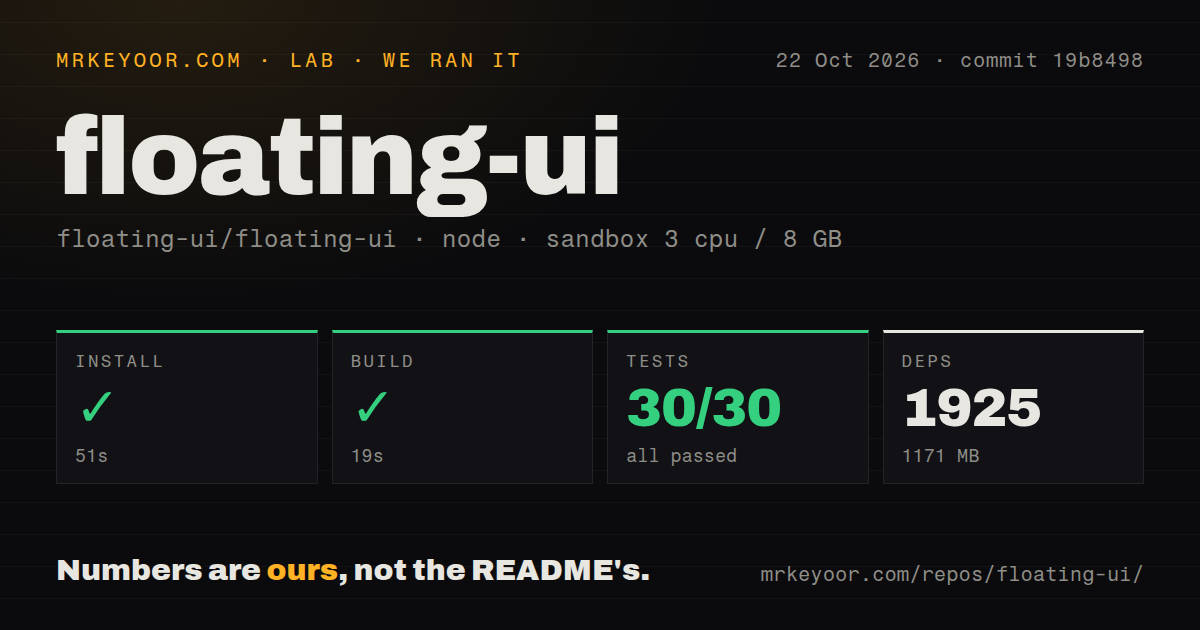
Our sandbox installed Floating UI commit 19b8498 in 51 seconds, built it in 19 seconds and completed Vitest in 30 seconds: 30 passed, 0 failed of 30. The October 22, 2026 run recorded 1,925 dependencies and 1,171 MB on disk for the contributor workspace. It establishes successful recorded repository steps, without establishing interaction coverage in a consuming application.
The sandbox configuration specified 3 CPUs, 8 GB RAM and image label lab-node:22. Actual Node and operating-system versions require raw toolchain logs. The checkout contained 1,695 files, approximately 50,263 source lines and 17 MB. Our scan found four CI workflows and monorepo workspaces, with no Dockerfile or tests directory detected.
The absence of a directory named tests plainly did not prevent Vitest from running. Equally, its recorded passing count should not become a claim that every package, visual scenario or accessibility behavior was exercised. No full workspace reconciliation or browser interaction report accompanies the supplied result. We have no measured positioning latency or application bundle cost.
The contributor footprint is separate from an application dependency
The repository is a TypeScript monorepo using pnpm workspaces, and it includes the documentation website. Our 1,171 MB result belongs to that development checkout. It is unsuitable as a download-size or runtime-memory claim about a tooltip in your product.
For React, the docs distinguish @floating-ui/react, which includes positioning and interactions, from @floating-ui/react-dom, which handles positioning alone. The latter is documented as the smaller option, but our run provides no package-size comparison. A product integrator can choose a package without adopting the contributor workflow we measured. Those are separate setup paths and should be evaluated separately.
These browser packages do not require a model-provider account or a hosted control service in the documented examples. Integration effort instead sits in your component: connecting references, applying positioning styles and deciding what opens or dismisses the element. The React guide explicitly says it supplies tools rather than pre-built components and acknowledges the extra work to get started.
React interaction hooks need to be composed into a component
The React guide shows controlled open state and combines hover and focus hooks through interaction prop getters. That detail matters for a tooltip that must respond to a keyboard user as well as a pointer. Positioning the element correctly supplies only part of the behavior you need to accept.
Treat a floating component as application code you own. Before shipping a popover, check keyboard entry, dismissal and where focus goes when it closes. Those are proposed acceptance checks, not behaviors measured by our sandbox. If the team lacks time to define and check them, starting with a component library is a better fit than assembling interaction primitives under deadline.
Automatic position updates need a cleanup path
The autoUpdate documentation requires cleanup when the floating element is removed. It warns that leaving updates active can cause severe performance degradation, especially with many elements. That is a documented integration risk, without a measured slowdown from our run.
React users also need to distinguish conditional rendering from hiding an element with CSS. The guide reserves the whileElementsMounted pattern for conditional rendering and directs CSS-hidden cases to an effect with cleanup. Review that lifecycle choice early if your design system keeps menus mounted for transitions. An overlay that appears correct on first open can still have an incorrectly managed update lifetime.
Current typeahead reports deserve a targeted acceptance check
GitHub records the last push on October 27, 2026, with issue and PR activity continuing afterward. Issue #3538, opened October 28, reports that duplicate labels prevent typeahead from reaching the second matching item in @floating-ui/react. It concerns the interaction hook, not the DOM positioning package.
That report gives menu authors a useful case to check in their chosen version. It does not establish that every current release is affected, and our earlier sandbox run did not reproduce it. Recent activity supports evaluating an actively maintained project, while leaving response times and your application's behavior unassessed.
Radix Primitives and Headless UI start at the component layer
Radix Primitives is a component library focused on accessibility and customization. Consider it when adopting a base layer for a design system fits better than composing positioning and interaction hooks yourself. Its stated focus is a reason to evaluate it, without guaranteeing your finished application's accessibility.
Headless UI provides unstyled components and documents React and Vue packages. Choose it when component-level APIs fit your application. For Floating UI, take the hardest overlay in your design, put it inside its actual scrolling container, and check its open, focus and cleanup behavior before spreading the pattern across the product.