
Meteor's repository dependencies installed successfully, but the recorded run did not establish whether a Meteor application could start or work. For JavaScript teams considering adoption, the next useful check is a small application using the intended release and frontend.
Meteor applications use a dedicated command-line tool
The installation guide explains how Meteor's command-line tool creates, runs and manages projects. Project creation prompts for a name and frontend framework. Evaluate that project workflow alongside the frontend you want to use.
The guide explicitly warns against putting the npm Meteor Tool in an application's package.json because that package is an installer. Teams that require tooling to behave like ordinary application dependencies should check whether this arrangement fits their requirements.
What happened when we ran it
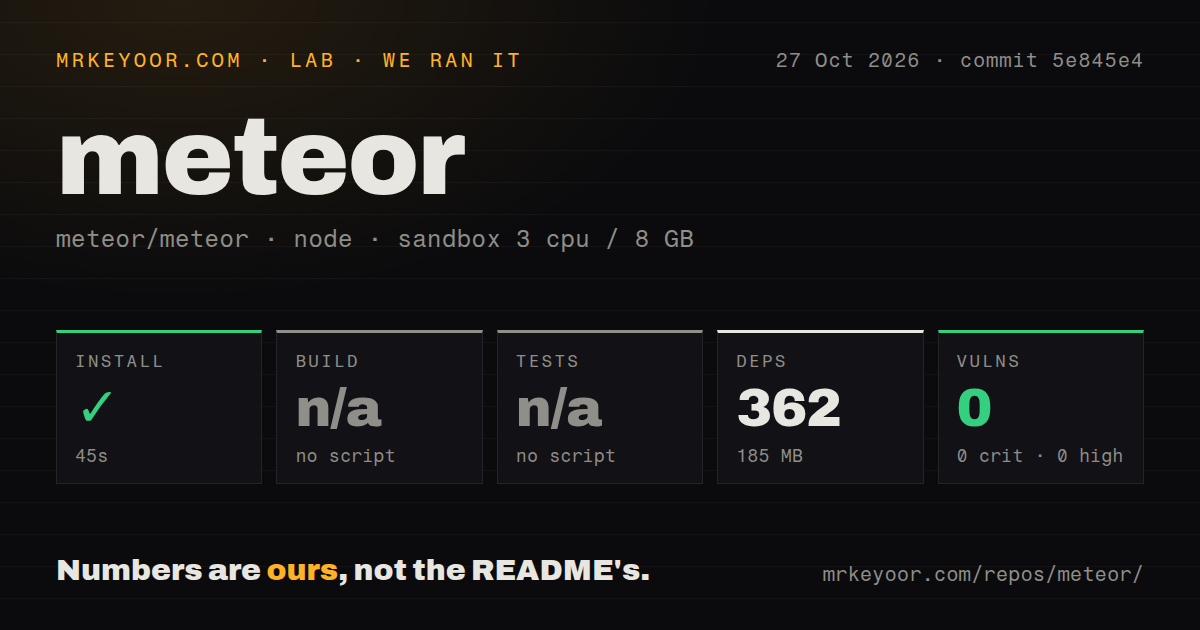
Our Meteor npm install succeeded in 45 seconds at commit 5e845e4 on October 27, 2026. The run recorded 362 dependencies and 185 MB on disk. Build and test steps were skipped because no script or target was found, leaving application readiness unverified.
The record contains no application launch, browser check, passing build or passing test result. It also contains no application startup or request timings. These omissions limit the review; they do not establish a framework defect.
Npm audit reported 0 known vulnerabilities, with 0 critical, high, moderate and low findings. That result applies to the recorded npm environment. It does not establish the security of a later application or verify its authorization rules.
The sandbox configuration was 3 CPUs, 8 GB RAM and image lab-node:22. The image label does not establish actual Node.js or operating-system versions. The checkout contained 5,569 files, approximately 383,685 source lines and 55.7 MB. The scan found 24 CI workflow files, no Dockerfile and no tests directory. Those scan results do not establish passing CI or the absence of testing machinery.
Check the release and its Node requirements
The installation guide lists Meteor 3.5 with bundled Node.js 24 and says to have Node.js v24 or higher installed for its documented npm installer. These are upstream instructions, not runtime versions measured in the sandbox.
The guide also warns that changing Node versions under a version manager with separate global package directories requires reinstalling the meteor npm package for the newly selected version. Otherwise, the meteor command will no longer be found.
Only 64-bit operating systems are supported, and iOS development requires Xcode. Check these requirements on the machines that will develop the application. This repository run did not validate mobile packaging.
The supplied release sources disagree about the current version
The latest-release endpoint returned release/METEOR@3.5.3, published October 16, 2026. Other supplied upstream evidence identifies 3.5.4: the repository README displays it, and merged PR #14882 says the npm meteor installer already publishes 3.5.4 as latest. Merged PR #14881 calls 3.5.4 the recommended release and includes it among the security releases whose changelog entries it restores. Both PRs appear in the supplied activity feed.
The endpoint's 3.5.3 response therefore conflicts with explicit newer-version signals. It should not be used to select the current release on its own. The supplied 3.5.3 notes also cannot establish sufficient migration guidance for 3.5.4: the changes and migration requirements of 3.5.4 were not independently inspected for this review.
For 3.5.3 specifically, the notes describe OAuth validation fixes and changes to dynamic-import requests. The 3.5.3 notes tell users to deploy the updated dynamic-import client and server together. They also describe changed Google native sign-in configuration. These are upstream instructions, not fixes reproduced in our sandbox. Read the notes for the release you intend to deploy and verify the affected application flows.
Express and Feathers offer different starting points
Express describes itself as a minimalist web framework for Node.js. Its README demonstrates a route and a listening server and says Express does not force a specific ORM or template engine. Evaluate it when HTTP routing is the framework capability you want to start with while choosing those other components separately.
Feathers is a framework for web APIs and real-time applications with TypeScript or JavaScript. Its README describes support for multiple databases and different frontends. Evaluate it when that API-centered model fits the project.
Neither alternative was run alongside Meteor in this review. These comparisons describe documented architecture, without a measured difference in performance or implementation effort.
What to verify before choosing Meteor
Documentation receives 3/5 under this documentation-only rubric: 1 means no usable entry point, 3 means a documented basic path, and 5 means independently checked coverage of relevant paths. The installation guide supplies a basic project lifecycle and explicit platform and Node requirements. Its instructions were not executed in this run, and the release-source conflict requires an additional version check.
Setup ease, community support and production maturity remain unassessed. Create a small application with the intended release and frontend, check that release's migration guidance, and verify a real user flow before committing the larger project.