A written contract for agent-built features
Spec Kit gives an AI coding agent a sequence of artifacts to work through before and during implementation. A project constitution records standing principles. A feature specification describes the desired behavior, the plan records technical choices, and the task list turns that plan into executable work. The implementation command works through those tasks, while convergence checks the code against all three documents and appends remaining work.
This structure targets a common failure in agent-assisted development: a prompt starts clear, then assumptions drift as the model plans and edits. Spec Kit keeps the original intent in files that a developer can inspect, commit, discuss, and revise. It supports more than 30 coding-agent integrations, including skill-based layouts as well as slash-command files, so a team can retain the artifact model even when its preferred agent changes.
The process has a price. A constitution, spec, plan, and task list are excessive for a typo or a one-line dependency update. They become useful when requirements have competing interpretations, several components will change, or another reviewer needs to understand why the agent chose an approach. Spec Kit works best when the team decides which changes deserve the ceremony.
The core flow is easy to understand
Installation uses uv tool or pipx and requires Python 3.11 or newer plus Git. The specify init command writes the integration files for your chosen agent. From there, named commands establish principles, specify behavior, plan the implementation, create tasks, implement them, and check convergence. A clarify command can resolve missing decisions before planning, while analysis and checklist commands inspect the artifact set.
The separation between product intent and technical plan is sensible. The specification prompt asks for what and why without locking in a stack. The planning step then supplies architecture and technology choices. This makes it easier for a product reviewer to challenge behavior without parsing a proposed database library, and for an engineer to change an implementation detail without rewriting the goal.
Bug fixes and idea assessment are optional extensions rather than mandatory phases. The bug flow separates assessment, repair, and verification. The idea flow collects evidence and ends in a go, clarification, or stop decision before handing accepted work to the specification command. Teams can add those paths where they earn their keep.
What happened when we ran it
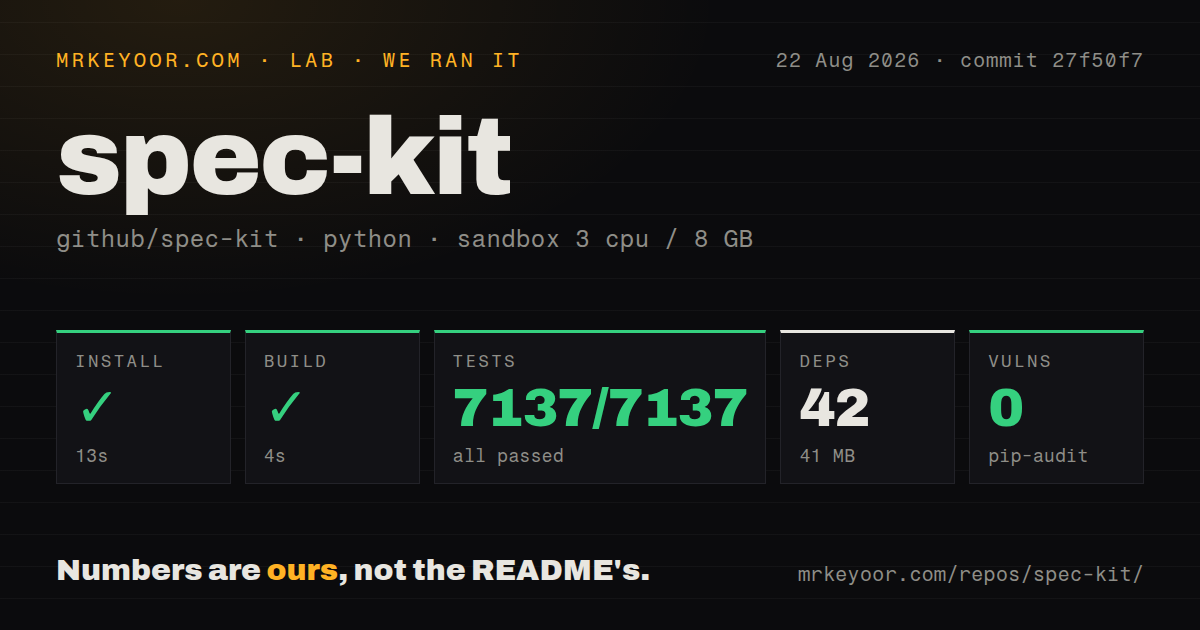
We cloned commit 27f50f7 into a fresh unprivileged Debian container with three CPUs, 8 GB of RAM, Python 3.12, and no secrets. The checkout contained 545 files, about 168,777 lines of source, and occupied 11.7 MB. Installation completed in 13 seconds, adding 42 packages and consuming 41 MB on disk.
The build succeeded in 4 seconds. Pytest completed in 404 seconds with 7,137 passing tests, zero failures, and 181 skips. The lab record lists the total as 7,137, so we preserve that figure rather than recalculating it from passed and skipped cases. pip-audit reported zero known vulnerabilities.
The repository has a tests directory and 17 CI workflow files. It does not include a Dockerfile, and ordinary use does not need one because the CLI writes templates and commands into the user's existing project. Seven minutes for the full tests is still material for contributors, though the clean result is a strong signal for the commit we ran.
Customization is powerful and easy to overdo
Project-local overrides can replace a template for one repository. Presets change how core or extension artifacts are written, such as adding compliance fields or changing terminology. Extensions add commands and workflow phases. Bundles combine versioned components for a role or team setup. The resolution order is documented, including what happens when several layers provide the same item.
That system allows a company to encode its own review gates instead of forking the whole project. It also creates configuration that must be understood. A preset can change the document an agent sees, an extension can run scripts, and a community bundle can bring several pieces at once. The README advises reviewing community source before installation. Treat those additions like dependencies, pin versions where appropriate, and test their effects in a disposable project.
Current issues show why. Issue #4282 reports that v1.0.1 cannot install catalog workflows through a bundle because a command called as Python receives a truthy Typer option object. Installing the workflow directly works. Issue #4283 reports that an extension installed through a bundle does not scaffold its declared configuration, although direct extension installation does. Both defects make bundle composition differ from its individual parts.
Version 1.0 does not mean frozen behavior
Spec Kit reached 1.0.0 after its first year, and 1.0.1 followed on August 21, 2026. The release fixed workflow switch handling and manifest validation, updated extension content, and added documentation for existing-project adoption and project history. The repository was pushed that same day. GitHub's count of 351 combines issues and pull requests, with detailed bundle reports arriving after the release.
The anniversary note explicitly values adaptability over treating 1.0 as a frozen interface. That is honest for agent tooling, where invocation formats and host products change quickly. It also means organizations should test upgrades against a sample repository and review generated-file diffs. The CLI includes read-only update checks, dry-run upgrades, and tag pinning, which are useful controls.
Spec Kit is a process aid, not proof that a specification is true. A model can write a polished requirement that misunderstands the user, and it can generate tasks that omit a risky migration. Human reviewers still need to challenge the artifacts before implementation and compare the delivered behavior afterward. Used that way, the toolkit makes agent work easier to audit. Used as a long prompt sequence that nobody reads, it merely produces more files.