Ponytail is most useful to evaluate when you can show an agent change that added more machinery than the task required. Its prompt asks the agent to understand the existing flow and reuse what is already available. Whether that produces a better patch still needs review.
What the instructions change
The README at our measured commit describes seven ordered choices: question whether the feature is needed, look for existing repository code, consider the standard library, use native platform features, check installed dependencies, consider a one-line solution, then write the minimum implementation that works. Its date-picker example favors the browser's native input over a new component package.
The current README retains the reuse principle but describes broader review and audit behavior. Review reads code touched by a change and checks bugs, security, expected load, missing tests, slow paths and opportunities to cut code. Audit applies those checks across the repository. These are documented instructions, not findings from our sandbox.
The current README identifies skills/ponytail/SKILL.md as the main prompt and AGENTS.md as its compact rules-file form. That distinction helps when choosing an integration: loading instructions and activating plugin commands are separate setup outcomes.
What our recorded run establishes
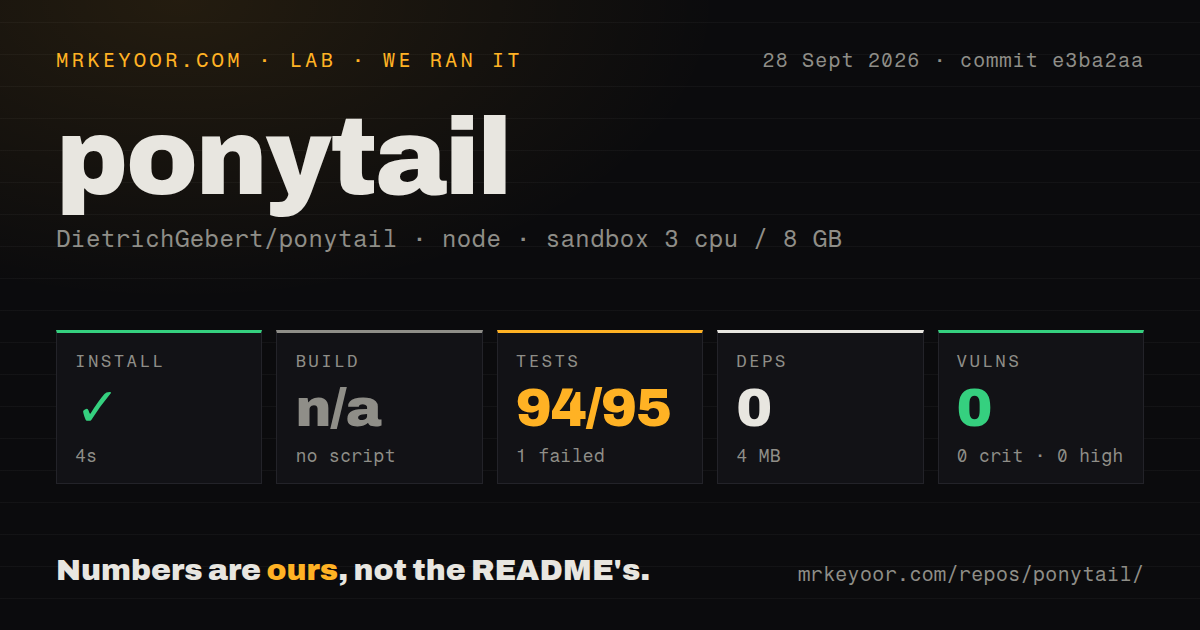
Our run took place on September 28, 2026, at commit e3ba2aa6f1e6f0bc4d69eb09c9f0d0a93af56156, whose recorded commit date is September 14, 2026. The configuration recorded 3 CPUs, 8 GB of memory and image lab-node:22. The image label alone does not establish the actual runtime version.
The dependency-setup step took about 4 seconds. Although the harness marked it successful, the raw output includes an npm ci lockfile error before the later completion message. The record reports 0 added dependencies and a 4 MB installation footprint. We cannot turn that into a successful coding-agent installation claim: no installed-binary check or live host activation is recorded.
No build script was detected, so the harness skipped the build. The test step took about 8 seconds and exited 1. Its summary reports 94 passes and 1 failure out of 95, but the available tail omits the failed assertion. The counts have not been reconciled against a complete log to establish exhaustive unique-test coverage. Neither the failure's cause nor its effect on a particular host can be determined from this excerpt.
Npm audit recorded 0 advisories, with package coverage unknown. That result does not assess whether agent-generated changes preserve safeguards. Repository measurements were 166 files, about 7,157 source lines and 1.8 MB, with two CI workflows and a tests directory. No new execution was performed for this correction.
Historical integration failures now have reported fixes
Issue 941 documents @dietrichgebert/ponytail@4.10.0 failing OpenCode v2.0.18's plugin export validation. On October 2, 2026, the maintainer reported merging the port in #943 and testing plugin loading, commands, skills and mode switching on OpenCode 2.0.22 and OpenCode 1 versions 1.15 through 1.18.34. The issue is closed. This supports a reported fix for those tested versions, not universal compatibility or confirmation of a particular published package containing it.
Issue 925 documents Hermes rejecting the root plugin manifest. On October 2, the maintainer reported fixing its schema in #744 and, together with the scanner fix in #826, successfully testing the documented installation command on current Hermes main. That issue is also closed. Our sandbox did not reproduce either the original failure or the fix.
The v4.10.0 release remains a historical source for the September integration changes. It should not be described as the latest release on the strength of that release page: the supplied current README discusses Ponytail 5 and features introduced in 5.3.
Benchmarks and host features need their own checks
The older measured-commit README describes a 12-feature-task benchmark using Haiku 4.5 with four runs. The current README describes a different benchmark using Opus 5.5, 39 tasks and five runs each. Both are project-reported experiments. Our repository test run did not reproduce either workload, measure generated diffs or establish savings, speed or safety outcomes.
Host features also have specific limits. For example, the current README says the Claude Code band requires Claude Code 2.1.290 or later and does not appear in the VS Code chat panel, cloud sessions or claude -p. A feature documented for one host should not be assumed to work through a copied rules file elsewhere.
How to decide whether to keep it
Start with one repository and one host. Confirm that the intended instructions or commands are active, then use a representative task with clear acceptance criteria. Review the patch for correctness, necessary validation and unnecessary additions. Record anything the agent skipped. This gives you evidence about your workflow without treating a smaller diff as success by itself.
Caveman's standalone skill is relevant when the problem is verbose answers; its current full toolkit has a broader scope. Superpowers is relevant when you want design, planning, testing and review organized into a development workflow. Neither comparison establishes which produces better code on your tasks.
Rating rubric
These are editorial evidence ratings, not benchmark results. A score of 1 means the supplied evidence is insufficient to assess that dimension; 2 means substantial uncertainty remains; 3 means a documented basis exists with important verification limits; 4 requires direct verification of the relevant behavior; 5 requires broad, repeatable verification across the claimed scope. Unknown adoption and untested compatibility do not earn high scores.